Excellent
Next day delivery! Depending on Availability*
Here to help! Monday to Friday, 8:30AM-5:30PM*

Logitech Rally Bar vs Logitech Meetup

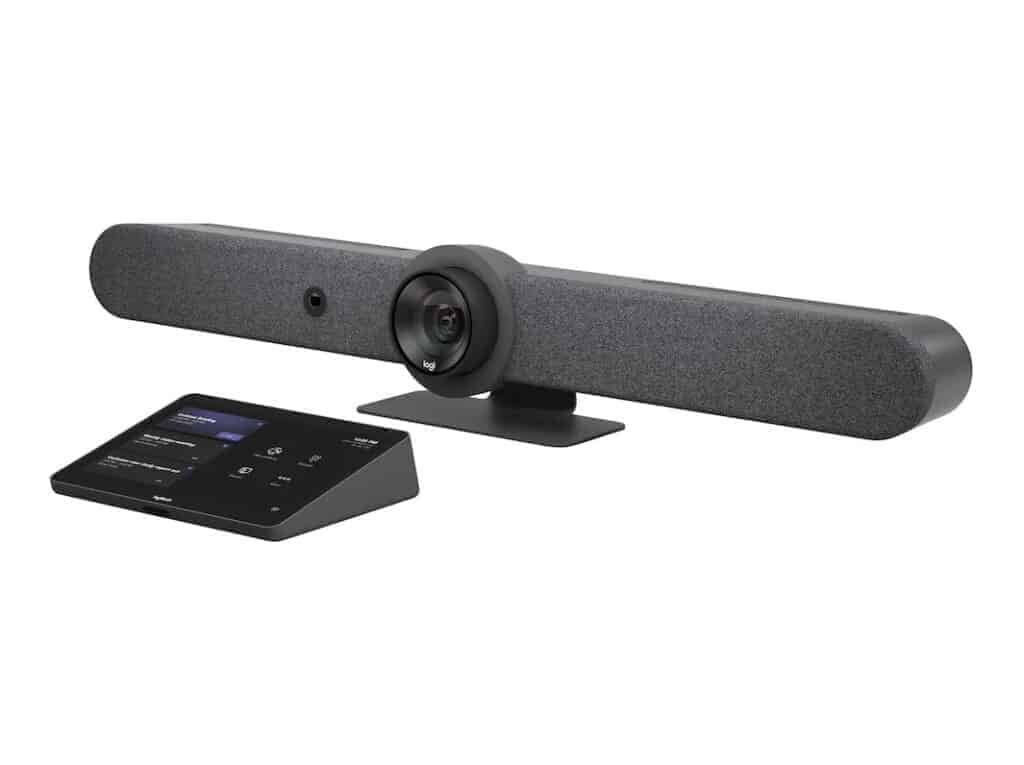
Rally Bar Logitech Tap Teams Appliance Mode Bundle - TAPRBGMSTAPP

All-in-one video solutions are becoming an aide for organisations looking for the best device with all the collaboration platforms they use and delivering high-quality audio and video conferencing. These plug-and-play units are compatible with multiple platforms and perfect for small to medium-sized huddle and conference rooms. 

The Logitech Rally Bar and the Logitech Meetup are both premier all-in-one video solutions. The Rally bar allows you to ditch the computer and use one-touch video conferencing. On the other hand, Meetup is the most compact video bar offering the most intelligent features. However, the Rally bar is intended for large meeting rooms, whereas Meetup is used for small to medium-sized meeting rooms. 

The sleek, all-in-one room system reduces setup stress with a flexible and streamlined installation. It provides an affordable and effective meeting solution and can be just as natural and productive as face-to-face collaboration. Let’s take a closer look at the difference between these two devices to help you make the better choice.


Logitech Rally Bar

About Logitech Rally Bar

The Logitech Rally Bar is an all-in-one video bar with an integrated AI camera for medium to large rooms. Its brilliant optics, automated PTZ, and high-performance audio set a new standard for video meetings. Logitech Rally Bar lets you do video meetings that can be just as natural as face-to-face collaboration. It is remarkably simple to manage, use, and deploy at scale, delivering professional-quality audio and video in a sleek. The Logitech Rally Bar is a system that includes cameras, microphones, and standalone speakers and is meant for larger meeting rooms.

Pros of Logitech Rally Bar

  • Compatible with most web-based video conferencing services.
  • Camera with super-high-resolution pan-tilt-zoom.
  • Beamforming microphone array.
  • Wide field of view.
  • Easy to set up.

Cons of Logitech Rally Bar

  • Two connection hubs seem duplicative.
  • Needs a separate computer.

Feature of Logitech Rally Bar

The Rally Bar brings all of the features of larger meeting room kits into a compact, streamlined design. This amazing product is easy to set up in seconds, with USB plug-and-play support. The incredibly rich features of the Rally Bar include: 

  • Appliance mode for PC-free access
  • USB plug-and-play design
  • All-in-one audio and video
  • RightSight for better framing
  • One-touch join for meetings
  • Logitech Sync for easy control
  • RightLight for improved lighting settings
  • RightSound for enhanced audio clarity
  • Integrations with leading meeting rooms
  • Remote control lens cap
  • Remote update management
  • 4K resolution at up to 30 FPS
  • Pan, tilt, and 4x digital zoom
  • Partner dashboard support
  • Add-on microphone options
  • AI noise suppression filter
  • Adaptive field of view up to 110 degrees
  • Room-filling speaker performance
  • Beamforming microphones

Product Description 

  • Camera:

-Resolution: 4K, 1440p, 1080p, 900p, 720p, and SD at 30fps

-Pan: Motorized ±25° 

-Tilt: Motorized ±15° Zoom: 15X HD zoom (5X optical, 3X digital available with upcoming software update) 

-Diagonal Field of View: 90° 

-Horizontal Field of View: 82.1° 

-Vertical Field of View: 52.2° 

-Total Room Coverage: 132.1° Horizontal x 82.2° Vertical

  • Built-in Components:

-6 beamforming microphones

-2 speakers, 

-PTZ camera

– AI Viewfinder

-retention system and cable management

-Logitech CollabOS platform

-table stand.

  • Power & Cables:

-Power Supply: Auto-sensing 

-Operating Voltage/Power: 100-240V, 19V, 4.74A 

-Power Supply Dimensions: 127mm x 51mm x 30mm 

-DC Cable: 1.5m / 4.9 ft 

-AC Cable: 1m / 3.28 ft 

-HDMI 1.4 Cable: 2m / 6.5 ft 

-USB A to USB C 3.0 Cable: 2.2m / 7.2 ft

  • Dimensions:

-Height: 164 mm / 6.46 in 

-Width: 910 mm / 2.99 ft 

-Depth: 130.5 mm / 5.14 in 

-Lens Depth: 28.8 mm / 1.13 in 

-Weight: 7.08 kg / 15.6 lbs

  • Interfaces:

-HDMI Out: 2 (up to 1080p) 

-HDMI In: 1 

-USB 3.0: 3x Type A, 1x Type C 

-Network: 10/100/1G Ethernet 

-WiFi: 802.11a/b/g/n/ac (MIMO) External Mic Input: Yes (proprietary input supports optional -Rally Mic Pod, Rally Mic Pod Hub, and Rally Mic Pod Extension Cable) 

-Remote Control: Bluetooth® Low Energy

  • Speakers:

-Drivers: 2x 70mm / 2.7 in 

-Output: 90dB SPL @1W, 99dB SPL @8.0W, both +/-2dB at ½ meter 

-Sensitivity: 90+/-3dB SPL at 1W, ½ meter 

-THD: 1kHz < 2% 

-Speaker Sampling Rate: 48 kHz

  • Microphones:

-Frequency Response: 90Hz – 16kHz 

-Sensitivity: >-36dBFS +/-1dB @ 1Pa 

-Microphone Data Rate Output: 48 kHz 

-Pickup Range: 4.5m / 15 ft 

-Beamforming Elements: Six omnidirectional digital MEMS microphones forming five adaptive acoustic broadside beams 

-Audio Processing: AEC (Acoustic Echo Cancellation), VAD (Voice Activity Detector) 

-Noise Suppression: AI filter 

-Add-on Mics: Supports up to 3 additional Rally Mic Pods for larger conference rooms

Compatibility with other platforms

The Logitech Rally Bar is compatible with Microsoft Teams Rooms on Windows(for medium-sized rooms), Microsoft Teams Rooms on Android (for medium-sized rooms), Zoom Rooms and Google Meet Rooms.

Logitech Meetup

About Logitech Meetup

Logitech Meetup, an all-in-one product with plug-and-play simplicity, is designed for small meetings and huddle rooms. Equipped to work with the latest applications for video conferencing. It is one of the front-runners in the all-in-one video conferencing appliance space. It comes with remote control and a Bluetooth option to function as a speakerphone for voice calls. Moreover, the Meetup is the only device in the pack with a pan/tilt camera, which zooms to an incredible view of 170 degrees. 

Pros of Logitech Meetup

  • The adjustable camera points straight to the talker.
  • Effective mic array to pick up voices well.
  • It is a convenient and compact package solution, including a mic, camera, and speaker. 

Cons of Logitech Meetup

  • Finding the proper software for additional features on the Logitech website. 
  • Video quality is not favourable for participants sitting a little far away.

Features of Logitech Meetup

The Logitech Meetup is an excellent solution for smaller meeting spaces and intimate meeting rooms. It also comes with access to some of Logitech’s most intelligent features. It is easy to install, has a 5X zoom range, and has a wide angle of view. Here is a detailed feature list for your complete understanding:

  • Three camera pre-set modes
  • Multiple mounting options
  • Excellent five times Zoom
  • 4K ultra-HD streaming and video control
  • All-in-one video and audio
  • Wireless Bluetooth technology
  • Certified for leading UCaaS tools
  • RightLight for improved lighting settings
  • RightSound for enhanced audio clarity
  • RightSight for better framing
  • 3-year warranty
  • Compatibility with other leading Logitech tools
  • Three microphones beam-forming array
  • Dial in the meeting option
  • Logitech Sync for better controls

Product Description

  • Camera:

-Custom Logitech lens with 5x HD zoom and motorised pan (+/- 25°) and tilt (+/- 15°)

-Field of View: Diagonal: 120°, Horizontal: 113°, Vertical: 80.7°

-Total Room Coverage (field of view + pan and tilt): 163° wide x 110° tall

-3 camera position presets

-RightSight auto-framing: Requires Windows 10 64-bit or macOS 10.14 or higher

  • Dimensions:

-15.8 x 4.1 x 3.4″ / 400.0 x 104.0 x 85.0 mm

-3.3 x 3.3 x 0.4″ / 83.0 x 83.0 x 10.0 mm (Remote)

  • Ports:

-USB 3.0 Type C

-USB 2.0 micro-B 5-Pin

-Power in

-USB 2.0 port (USB 3.0 Port and cable required for 4K video)

  •  Built-in Components:

-Built-in microphone

-Built-in speaker(s)

  • Microphones:

-Integrated microphone with three beamforming elements

-Pickup Range

*MeetUp: 4 m

*With optional Expansion Mic: 5 m

-Sensitivity: -27 dB

-Microphone frequency response: 90Hz-16KHz (without noise)

-AEC (Acoustic Echo Cancellation)

-VAD (Voice Activity Detector)

-Microphone date rate: 32KHz sampling rate

  • Speaker:

-Volume adjustable to 95 dB SPL at 1/2 meter peak

-Distortion: 200-300Hz < 3%, 3000 Hz -10KHz < 1%

-Speaker sensitivity 86.5+/-3dB SPL at 1/2 meter

  • Integration:

-Bluetooth wireless technology

-Integrated table/wall mount

-optional TV mount 

-RF remote control

-Kensington security slot

  • System Requirements:

-macOS 10.10 or higher

-Windows® 7, Windows 8.1, or Windows 10

Compatibility with other platforms

Logitech Meetup worked seamlessly with Microsoft Teams and was certified for Skype for Business, Zoom, and Google Hangouts Meet Hardware. Besides, it is compatible with other recordings,  video conferencing, and broadcasting applications that support TAA-compliant USB cameras. 


Logitech Rally Bar vs Logitech Meetup

The following table compares the specifications of the Logitech Rally Bar and Logitech Meetup. However, multiple configurations are available for both video bars, based on your needs and requirements. 

Items Logitech Rally Bar Logitech Meetup
Price £3,015.88  £664.94
Part Number 960-001312 960-001102
General
Power Source AC Adapter No
Host Connection USB Type-A USB 3.1 / USB 3.2 Gen 1 USB 2.0
Additional I/O 1 x USB Type-C USB 3.1 / USB 3.2 Gen 1 No
Low-Light Correction Yes No
Camera
Field of View Diagonal: 90°, Horizontal: 82.1°, Vertical: 52.2°  Diagonal: 120°, Horizontal: 113°, Vertical: 80.7°
Resolution and Frame Rate 4K, 1440p, 1080p, 900p, 720p, and SD at 30fps UHD 4K at up to 30 fps
Zoom 5x (Optical)

3x (Digital)

5x 
Tilt +/- 15° +/- 15°
Speaker Tracking Yes Yes
Pan +/- 25° +/- 25°
Speaker
Maximum Sound Pressure Level (SPL)    90dB SPL @1W, 99dB SPL @8.0W 95 dB
Built-In Speakers 2 1
Sensitivity 90+/-3dB SPL at 1W, ½ meter 86 dB
Microphone
Range 15ft 13.1 ft
Extension Microphone Yes(Optional) Yes(Optional)
Sensitivity >-36dBFS +/-1dB @ 1Pa -27 dB
Noise Cancellation  AI filter  Echo
Ports
Audio Input HDMI No
Audio Output HDMI No
Bluetooth Bluetooth® Low Energy Yes
Other Features
Wireless Screen Sharing No No
Touch Control Panel No (Optional)
Mount Options Wall, Table, Display Wall, Table, Display
Color Options Graphite, White Black
Supported Platforms
Zoom Yes Yes
Google Meet Yes Certified
Microsoft Teams Certified (USB Attached) Yes


Picture of Meeting Store

Meeting Store

Table of Contents

Conference room technology trends
Future Trends

5 Conference Room Technology Trends Shaping the Future

Discover the top 5 conference room technology trends shaping the future. Learn how the latest audio visual and video conferencing tools, collaborative platforms, and meeting technology are revolutionizing the workplace. Stay ahead of the game and stay competitive in today’s fast-paced digital world.

Read More »
remote collaboration for developers
Remote Collaboration

Remote Collaboration for Developers: Maximize Your Productivity with These Top Tools and Techniques

In recent years, the software development industry has witnessed a remarkable shift towards remote work. This growing trend of remote work has revolutionized the way developers collaborate and has brought about significant changes in the industry. Efficient remote collaboration has become increasingly essential for developers to ensure productivity and success in their projects. This article explores the significance of remote collaboration for developers in the software development industry, highlighting the various aspects and tools involved.Efficient remote collaboration plays a crucial role in boosting developer productivity. By leveraging remote collaboration tools and techniques, developers can seamlessly collaborate on coding tasks, share knowledge, and address challenges in real-time. Virtual collaboration platforms offer developers the flexibility to work from anywhere, allowing them to maintain focus, reduce distractions, and optimize their coding capabilities.Remote collaboration empowers developers to engage in coding collaboration effortlessly. Developers can leverage online collaboration tools to work together on projects, regardless of their physical locations. These tools facilitate real-time code sharing, collaborative editing, and version control, enabling smooth and effective teamwork. Remote coding collaboration fosters knowledge exchange and improves code quality through collective code review, pair programming, and agile development practices.The concept of a remote team has become increasingly prevalent in the software development industry. Remote teams bring together developers from diverse geographical locations, enabling companies to tap into a global talent pool. Effective remote collaboration ensures seamless communication, task coordination, and knowledge sharing among team members. By leveraging remote teamwork solutions, such as video conferencing, instant messaging, and project management tools, remote teams can overcome the challenges of distance and time zones.The Best Online Collaboration Tool? | Miro  Understanding the Importance of Remote Collaboration for DevelopersIn today’s digital age, remote collaboration has become a crucial aspect of software development. It offers numerous benefits to developers, such as increased flexibility, access to a global talent pool, and better work-life balance. However, it also poses challenges that can impact productivity. This section will delve into the significance of remote collaboration for developers, explore its benefits, discuss challenges faced in a remote work environment, and examine its impact on productivity.Benefits of Remote Collaboration for Developers Increased Flexibility: Remote collaboration empowers developers to work from anywhere, breaking the barriers of physical location. With the aid of remote collaboration tools and techniques, developers can seamlessly contribute to projects while enjoying the freedom to choose their ideal work environment. This flexibility enhances productivity and enables developers to achieve a better work-life balance. Access to a Global Talent Pool: Remote collaboration eliminates geographical limitations, allowing developers to tap into a diverse talent pool across the globe. Developers can collaborate with experts from different regions, bringing unique perspectives and insights to projects. This global collaboration fosters innovation and facilitates knowledge exchange, ultimately resulting in high-quality software development. Better Work-Life Balance: Remote collaboration enables developers to customize their work schedules, promoting a healthier work-life balance. Developers can eliminate time-consuming commutes and allocate more time to personal pursuits, leading to reduced stress and increased job satisfaction. Moreover, the ability to work remotely accommodates personal obligations, making it easier for developers to manage their professional and personal lives effectively. Challenges of Remote Collaboration for Developers Communication and Collaboration: Effective remote collaboration heavily relies on robust communication and collaboration practices. Developers need to overcome challenges related to remote developer communication, as they might encounter difficulties in conveying complex technical concepts or addressing issues promptly. Remote collaboration tools play a pivotal role in mitigating these challenges by providing platforms for real-time communication, virtual team collaboration, and collaborative coding tools. Maintaining Productivity: While remote work offers flexibility, it also demands self-discipline and self-motivation to maintain productivity. Developers may face distractions at home or struggle to establish a dedicated workspace. Additionally, the lack of direct supervision can lead to decreased accountability and potential productivity setbacks. Adopting remote developer productivity strategies, such as setting clear goals, using time management techniques, and leveraging collaboration tools for programmers, can help developers overcome these challenges and maintain their productivity levels. Overcoming Technical Hurdles: Remote collaboration relies heavily on technology, and developers may encounter technical challenges while working remotely. Issues such as unstable internet connections, software compatibility problems, or insufficient hardware resources can hinder progress and impact collaborative efforts. Employing effective remote collaboration techniques, utilizing reliable remote collaboration tools for developers, and ensuring technical support are essential to overcoming these hurdles. Impact on ProductivityRemote collaboration has both positive and negative implications for developer productivity. While the flexibility and autonomy associated with remote work can enhance productivity, challenges such as communication barriers, potential distractions, and technical difficulties can hinder it. To optimize productivity in a remote work environment, developers should prioritize effective communication, establish clear workflows, leverage collaborative coding tools, and embrace agile development methodologies.  Top Remote Collaboration Tools for DevelopersIn today’s evolving work environment, remote collaboration has become essential for developers to seamlessly work together, regardless of their physical locations. Effective remote collaboration tools enable developers to overcome geographical barriers and enhance productivity. This section presents a comprehensive list of remote collaboration tools specially designed for developers. These tools offer functionalities such as code collaboration, communication, project management, and version control, enabling efficient remote work and software development.Code Collaboration ToolsCode collaboration tools are vital for developers working remotely as they facilitate collaborative coding, code review, and pair programming. Here are some popular code collaboration tools: GitHub: GitHub is a leading platform that enables developers to collaborate on code projects. It provides version control, issue tracking, and code review features, fostering effective remote collaboration and facilitating distributed development teams. Developers can create repositories, review code, and track project progress seamlessly. GitLab: GitLab is another widely used tool for remote code collaboration. It offers a complete DevOps platform with built-in version control, code review, continuous integration, and deployment features. With its collaborative environment, developers can efficiently work together, ensuring smooth remote software development processes. Communication and Collaboration ToolsEfficient communication is crucial for remote collaboration among developers. The following tools facilitate seamless communication and collaboration: Slack: Slack is a popular communication platform that allows

Read More »
AV technology integration
Training and Education

Seamless AV Technology Integration: Expert Insights

In today’s fast-paced digital landscape, the seamless integration of AV technology has become an indispensable component across various sectors. This blog will delve into the significance of AV technology integration, exploring its relevance in different industries.AV technology integration involves the harmonious convergence of AV equipment, audiovisual technology, and integration services to create multimedia solutions that empower businesses and organizations. Whether it’s for smart technology implementation, conference room setup, home automation, or digital signage, AV technology integration serves as the cornerstone for enhancing user experiences.Smart technology adoption is on the rise, transforming the way businesses operate. AV integration companies are at the forefront of implementing AV control systems and seamless AV solutions. This trend is vital for optimizing operational efficiency and staying competitive.AV technology in education facilitates interactive learning experiences. Incorporating AV integration solutions enhances classrooms, making learning more engaging and effective. We’ll explore the best practices for AV technology integration in educational settings.Seamless AV technology integration requires meticulous planning and coordination across various components, such as audiovisual equipment, control systems, and network infrastructure. Experts emphasize the importance of selecting compatible and scalable technologies, ensuring proper cabling and signal routing, and employing user-friendly control interfaces. This integration enhances communication and productivity while minimizing downtime, making it essential for modern workplaces and entertainment environments.Design, integration and full installation of AV systems in a corporate building  Benefits of Seamless AV IntegrationIn today’s digital age, seamless AV technology integration has become crucial for businesses and individuals alike. This integration involves the incorporation of AV equipment, audiovisual technology, and integration services into various environments, such as conference rooms, homes, and commercial spaces. Enhanced Productivity with AV Technology IntegrationOne of the key benefits of AV technology integration is the significant enhancement of productivity. In the corporate world, efficient communication is vital, and this is where integrated AV systems shine. Businesses can optimize their operations by seamlessly connecting employees, clients, and partners through conference room setups equipped with state-of-the-art AV equipment.Improved User ExperienceUser experience (UX) is a critical factor in any AV technology integration project. The goal is to create a user-friendly environment where individuals can interact effortlessly with audiovisual technology. Integrating smart technology and multimedia solutions ensures that users can control and customize their AV systems with ease, resulting in a more enjoyable and efficient experience.Cost-Effective Solutions for Small BusinessesFor small businesses, cost-effective AV integration solutions are a game-changer. Leveraging integrated technology allows these businesses to compete on a level playing field with larger enterprises. By implementing AV equipment and integration services strategically, small businesses can enhance their operations and communication without breaking the bank.Immersive ExperiencesSeamless AV integration goes beyond standard setups. It can create immersive experiences that captivate audiences. Whether it’s in education, healthcare, or events, AV technology integration can transform spaces into immersive environments. Audiovisual tech can be used to educate, entertain, and engage, enhancing the overall experience.  Best Practices for AV Technology IntegrationWhen it comes to AV technology integration, following best practices is essential to ensure seamless operation and optimal user experience. In this guide, we’ll explore key strategies and recommendations to help you achieve success in integrating AV equipment, audiovisual technology, and multimedia solutions into various settings, such as conference rooms, home automation, and digital signage. Let’s dive straight into the valuable insights you need. Choose the Right AV Equipment for Integration AV technology integration begins with selecting the appropriate equipment. Consider factors like the purpose of the integration, budget constraints, and future scalability. Ensure that your chosen AV equipment aligns with your specific needs, whether it’s for smart technology in a conference room or immersive experiences in a home theatre setup. This decision sets the foundation for a successful integration process. Plan Your AV Integration Carefully Effective planning is crucial for seamless AV integration. Develop a detailed AV design that takes into account the layout, user requirements, and technology trends. Consider consulting with an AV consultant or specialist for expert guidance. A well-thought-out plan ensures that AV systems work harmoniously together, providing a superior user experience. Prioritize User Experience User experience should be at the forefront of your AV technology integration efforts. Make sure that the integrated technology is user-friendly and intuitive. Training on audiovisual tech might be necessary, particularly for complex AV control systems. A user-friendly setup reduces troubleshooting and enhances overall satisfaction. Embrace Smart Technology Integration The integration of smart technology enhances the functionality of AV systems. Implement features like voice control, automation, and remote management for added convenience. This approach is especially beneficial for home automation setups and conference room AV, where efficiency is paramount. Consider Cost-Effective Solutions Cost-effectiveness is a significant concern for small businesses and organizations. Look for cost-effective AV integration solutions that offer the desired functionality without breaking the budget. Evaluate options such as open-source software and affordable AV equipment to optimize your investment. Stay Updated on AV Technology Trends AV technology is constantly evolving. Stay informed about the latest AV technology trends to ensure that your integration remains current and future-proof. Regularly update your AV equipment and systems to take advantage of the latest advancements. Troubleshoot AV Integration Issues Proactively Even with meticulous planning, occasional issues may arise. Develop troubleshooting protocols and provide training for quick issue resolution. Having a proactive approach to problem-solving minimizes downtime and frustration. Explore Future Trends in Audiovisual Integration Look ahead to future trends in audiovisual integration. As immersive experiences become more prevalent, consider how you can incorporate them into your AV systems. Keep an eye on emerging technologies like augmented reality and virtual reality for potential integration opportunities.  Choosing the Right AV EquipmentIn today’s fast-paced world, the seamless integration of AV technology into various environments, whether it be a conference room setup, a home automation system, or digital signage solutions, is paramount. Businesses and individuals alike seek to harness the power of audiovisual technology to enhance user experiences, improve communication, and stay on the cutting edge of technology trends. This guide explores the key factors to consider when selecting the appropriate AV equipment for integration projects.Compatibility and ScalabilityOne of the foremost

Read More »
remote collaboration for architects
Remote Collaboration

Elevate Architectural Collaboration: Embrace the Power of Remote Collaboration for Architects with Advanced Tools and Techniques

Remote collaboration for architects refers to the process of engaging in architectural collaboration activities and communication through virtual platforms and tools, allowing architects and their teams to work together efficiently, regardless of their physical locations. This modern approach to collaboration enables seamless interaction, data sharing, and coordination, ultimately enhancing productivity and streamlining architectural projects.Remote collaboration eliminates the limitations of geographical boundaries, enabling architects to work on projects with colleagues or clients located anywhere in the world. This allows for a more diverse and talented pool of professionals to collaborate, leading to enhanced project efficiency and outcomes.Virtual collaboration tools and platforms provide real-time communication channels such as video conferencing, instant messaging, and project management software. These tools facilitate effective communication between team members, stakeholders, and clients, fostering better understanding, quick decision-making, and smoother workflow.By eliminating the need for physical meetings and travel, remote collaboration significantly reduces expenses associated with transportation, accommodation, and other logistical aspects. Moreover, it saves valuable time by enabling architects to focus on project tasks rather than being consumed by commuting or scheduling conflicts.Remote collaboration allows architects to work at their own pace and in an environment that suits them best, resulting in improved work-life balance. This flexibility boosts creativity and productivity while accommodating diverse work preferences and individual needs.Work from Anywhere: Tools, Tips, + Methods I Use to Run a Remote Architecture Studio  Remote Collaboration Tools for ArchitectsArchitects today are embracing remote collaboration tools to enhance their workflow and streamline architectural projects. Remote collaboration tools refer to software, platforms, and techniques that enable architects to collaborate effectively with their teams and clients regardless of their physical location. These tools have gained significance in architectural projects due to the increasing prevalence of remote work and the need for seamless communication and coordination.Best Remote Collaboration Software for ArchitectsWhen it comes to remote collaboration for architects, several software options stand out for their features and advantages. These tools facilitate efficient communication, file sharing, and real-time collaboration, enhancing productivity and reducing project timelines. Here are some of the best remote collaboration software options available for architects: Autodesk BIM 360: This comprehensive platform offers collaboration features specifically designed for architectural projects. It enables architects to manage designs, documents, and project data in a centralised environment accessible to all team members. Bluebeam Revu: With its powerful markup and collaboration capabilities, Bluebeam Revu allows architects to review, annotate, and share project documents effortlessly. It promotes effective collaboration among team members, eliminating the need for physical meetings. Figma: Figma is a cloud-based design and prototyping tool that supports collaborative work on architectural designs. It enables architects to create, edit, and share design files in real time, fostering seamless collaboration with team members and clients. Software Features Advantages Autodesk BIM 360 Centralized project management Streamlined coordination and document control Bluebeam Revu Markup and review tools Efficient document collaboration Figma Real-time design collaboration Seamless integration with design workflows Evaluation of Virtual Collaboration Tools for Architectural Design and Project ManagementArchitectural design and project management require effective virtual collaboration tools that support remote teamwork and enhance efficiency. The following virtual collaboration tools are suitable for architectural design and project management: Asana: Asana is a project management platform that allows architects to create tasks, set deadlines, and track progress. It facilitates collaboration by providing a central hub for project-related discussions, file sharing, and updates. Microsoft Teams: Microsoft Teams is a comprehensive collaboration platform that integrates chat, video meetings, and file sharing. It offers architects a seamless environment for virtual communication, team collaboration, and project coordination. Trello: Trello is a visual project management tool that enables architects to organise and track tasks using customisable boards. It promotes collaboration by providing a clear overview of project progress and facilitating communication among team members.   Efficient Architectural Collaboration TechniquesIn today’s fast-paced world, remote collaboration for architects has become an essential aspect of efficient architectural practices. With advancements in technology, architects can now seamlessly collaborate with team members and clients regardless of their physical location. This section explores effective techniques for remote architectural collaboration, the role of virtual design collaboration software in streamlining communication and workflow, online architectural collaboration tools that enhance productivity and collaboration, and showcases successful architectural collaboration projects and the techniques utilised.Remote Collaboration for Architects: Enhancing Efficiency and FlexibilityArchitectural collaboration techniques have evolved significantly with the introduction of remote collaboration. This approach allows architects to work together efficiently and flexibly, regardless of their geographical constraints. Remote collaboration enables architects to overcome the limitations of traditional in-person meetings and facilitates seamless communication and coordination among team members.Virtual Design Collaboration Software: Streamlining Communication and WorkflowVirtual design collaboration software plays a pivotal role in remote architectural collaboration. This software empowers architects to collaborate in real-time, share design ideas, and make simultaneous modifications to architectural plans. By leveraging virtual collaboration platforms, architects can streamline communication, enhance workflow efficiency, and ensure that project timelines are met with precision.Online Architectural Collaboration Tools: Enhancing Productivity and CollaborationA wide array of online architectural collaboration tools is available to architects, offering diverse functionalities to enhance productivity and collaboration. These tools enable architects to share files, collaborate on design concepts, track project progress, and communicate seamlessly. Remote collaboration tools for architects foster a collaborative environment that encourages knowledge sharing, problem-solving, and efficient decision-making.The Future of Remote Architectural CollaborationAs technology continues to advance, remote collaboration for architects will only grow in significance. Architectural firms will increasingly rely on collaborative software, virtual collaboration platforms, and remote collaboration solutions to overcome geographical barriers and optimise their efficiency. Remote collaboration holds immense potential in transforming the architectural landscape, enabling architects to work as cohesive teams, regardless of their physical locations.  Remote Collaboration for Architectural TeamsArchitectural collaboration has undergone a significant transformation with the rise of remote work. As architectural teams increasingly embrace remote collaboration, it becomes crucial to understand its importance, effective strategies, and the tools and techniques that facilitate seamless teamwork. In this section, we explore the significance of remote collaboration for architects, discuss strategies for effective collaboration within architectural teams, provide tips for remote project

Read More »
AV Equipment

BenQ InstaShow: How It Differs From Other Wireless Presentation Devices

Meetings are never fun for anyone, whether you were the one hosting the meeting or being called to one. Again having to fumble through all your paper work, days and weeks of folders trying to find the couple of pages that you'll need to share. Meetings have come a long way and gone are those days of walking into a meeting with a mountain of paperwork. There had to be a simpler way for you host and join in with your meeting. Without fumbling through papers. That's where wireless sharing came centre stage, especially the BenQ InstaShow range. With BenQ InstaShow you can share everything your need to share and more in one click. You can simply walk into a meeting with your laptop, or phone, sit down and plug in the InstaShow Button to share the information you need to share. But with other wireless sharing devices out there, how does BenQ differ from the rest? What is InstaShow?   BenQ InstaShow is a way for you to brag about your ideas. Its a wireless presentation device that brings seamless sharing to any meeting room or classroom. You can walk into your meeting with your head held high, plug the InstaShow Button into your laptop and start your presentation strong. The InstaShow range is perfect for hosting meeting, letting you walk around the meeting room with your head high while showing off your great ideas on the big screen. All this is done just by plugging in and clicking the button. In just one click you can become the leader of the meeting. You can share from your laptop, Mac and even your phone and tablet devices with the USB-C Button. Made to widen the audience of who can share. InstaShow stops unnecessary actions in meetings, you wont have to be unplugging and sharing around cables anymore. The InstaShow range includes the WDC10, WDC10C, WDC20, WDC20C, USB-C Button Kit and the InstaShow HDMI Button Kit. Each kits have different features and functions but they all share the capability of wireless sharing and presenting.  InstaShow WDC10 And WDC10C    First of lets talk about the WDC10 and WDC10C. The WDC10 and WDC10C are the better fit for wireless sharing and presenting within companies and classrooms. This is because it features a standard HDMI cable. This plug-and-play device is great for students, teachers and employees to share their work with the rest of the class or colleagues. And with up 16 presenters being able to present, a big chunk of your students or employees will be set up and ready to share in an instant. With no software needed, its simple for you to share. Just plug the InstaShow Button into your laptop, pair the devices together and click the Button once the pairing has finished. With this one click your work, from you laptop, will be projected onto the big screen - letting you talk away while everyone can see your work. Making you look professional and focused on your presenting.  [vc_images_carousel images="30946,30956,30957,30963" img_size="full"] With the WDC10 and WDC10C, up to 16 people can present. Each person getting their ow time to shine. Now reading that you can probably imagine the mayhem that it might cause - especially in the classroom. With students bickering about who gets to present. Yes, the InstaShow will take up to 16 presenters, but each presenter will have their own dedicated time to present. This is as the WDC10 isn't compatible with 4 people sharing at once. This feature really shows what the InstaShow WDC10 is all about, single person presentations in small to medium sized meetings or classrooms.  InstaShow WDC20 And WDC20C If the WDC10 doesn't seem like it would be enough for want you need, then the InstaShow WDC20 and WDC20C might do the trick. The WDC20 is for much larger meetings, with the opportunity for 32 people to share and present. Giving everyone has the chance to express themselves in the meeting, by splitting the meeting room display into 4. So you can share simultaneously.  Imagine yourself in a large meeting, all of the participants sat around the boardroom table - obviously in a COVID free world. You can feel a bit lost and unheard as so many people are chiming in. With the InstaShow WDC20 or WDC20C at hand, you can easily jump into the conversation. Just grab the InstaShow Button, plug it into your laptop with the HDMI cable and click the button on the top of the device. Your laptop screen will then be shown on the meeting room display, gaining you everyone's attention. Plus, if you aren't one for pacing back and forth when presenting. You can stand at the front of the room, next to the meeting room display and still use your laptop applications. This is with the help of touchback support. The capabilities are endless. The InstaShow kit will provide full HD resolution with a router level chip. Meaning that when you are in video mode, the video being show will run smoothly, with no pixilation, lagging or any awkward silences.    The WDC20 is all you need for you to become the boss of a meeting. With no software or driver needed, the BenQ InstaShow is too easy to set up. Setting Up It only takes seconds for the InstaShow to be set up. Even the most untechnical person can set the InstaShow up and instantly upgrade a meeting room. When your new wireless presentation system arrives, you will have to a pair the Button and the Transmitter together. The Transmitter acts as the base unit for the Button, connecting the Button to your meeting room display. To pair these two you will have to hold down the pairing key on the Button and the Transmitter for 5 seconds. This will then pair the two devices together and connection between the two will be automatic. If you have your InstaShow kit already installed and just want to pair another Button, then you can still
Read More »
MeetingStore.co.uk
Logo
Compare items
  • Total (0)
Compare
0
Shopping cart