Excellent
Next day delivery! Depending on Availability*
Here to help! Monday to Friday, 8:30AM-5:30PM*

Neat Makes Your Meeting Room

Neat Blog Header

Returning to the office has been challenging for most, and not just for those working from home. Finding the right solution for a meeting room can be tough and with so many options out there it can take time in finding the products that are right for your needs and meeting rooms. With Neat, a new level of design and technology will be introduced to your meetings, whether that’s a large, small, or focus room. Neat’s slimline products span across all types of work spaces, but each of their devices are made to fit the individual needs of a person either working from home, or back working in the office. 
If Neat sounds like something you want to add to your basket, then chat to us by filling out the form or give us a call on (01189) 977 785 to learn more about Neat and how it can introduce a new way of video conferencing into your hybrid workplace.

Neat Bar And Pad

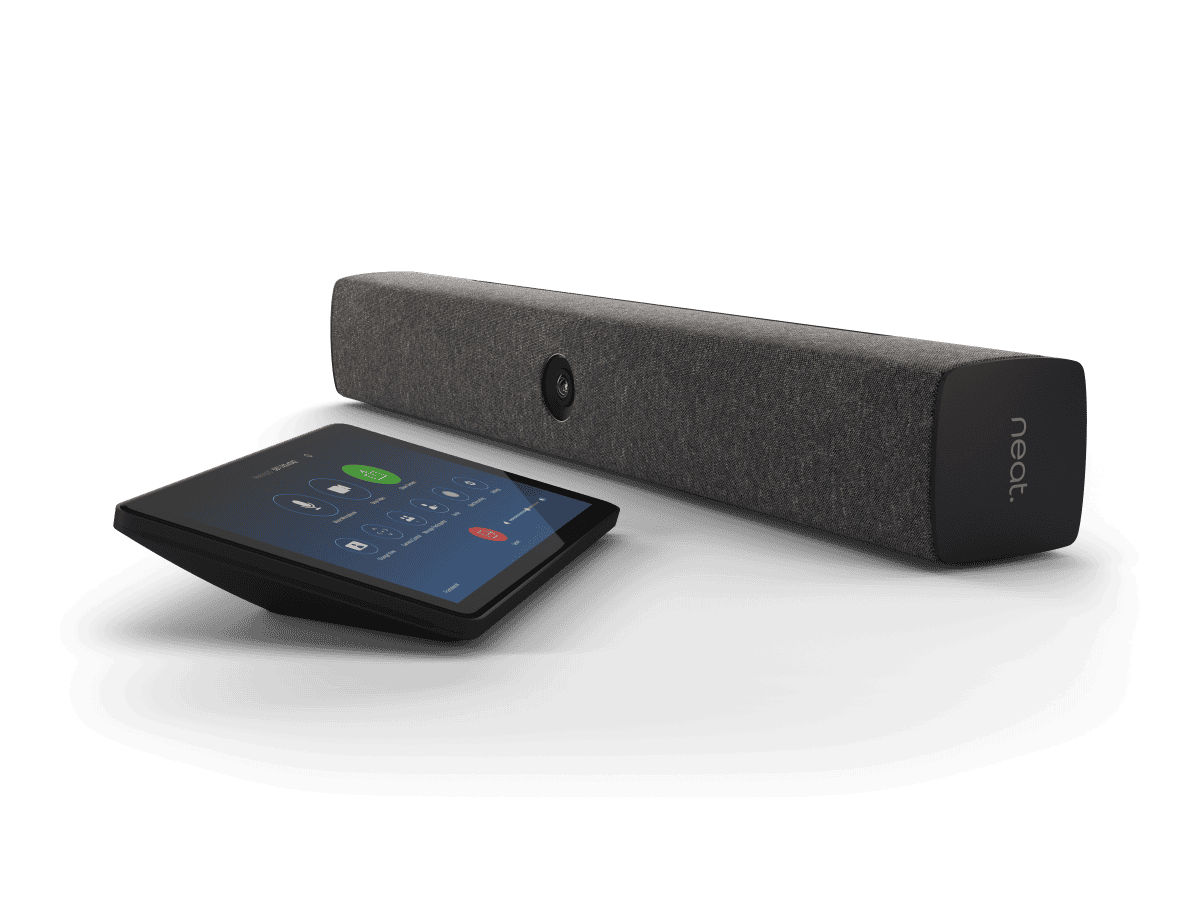
Certified for Zoom and Teams, Neat Bar And Pad easily fits into your meeting room. A sleek audio and video bar that snaps onto your meeting room display the Bar only takes minutes to get to work. The integrated 120° and 4 x digital zoom camera catches every corner of the room. The wide angled camera works perfectly for those bigger meetings.

Although the Bar can be used for bigger sized meeting rooms, it also is a great solution for smaller, brainstorming sized rooms. The automatic framing feature included will cut off the unnecessary view of the room around you. Putting you in centre frame. Not only will the Bar make sure that you are the main focus of your meeting, as you should be, Neat Bar will also re-adjust and re-frame. Making sure that any last minute attendees to the meeting will be added.

  • 120° Camera with 4x digital zoom
  • 5 Microphone array
  • Wide angle tweater
  • Double screen support
  • 4x Digital zoom
  • Dual screen support

Neat Bar And Pad Bundle

Made For Content Sharing

Neat Bar And Pad bundle is most suited for video centred meeting rooms. These types of rooms are focused on content being shared from the meeting room participants to the remote participants. So having the best video and audio is important for this type of meeting. Luckily with Neat Bars technology, the wide angled lens and multiple microphone array capture the best audio and video possible. Letting you and your colleagues express your ideas easily and communicate them all together.

Why Not A Controller? Or A Scheduler?

Working alongside the Bar, Neat Pad adds a room controller or a scheduler to your meeting room. Using Neat Pad as a room controller allows you to start, join, and control your meeting all from the 8″ touchscreen. Not only can you start a meeting from the device with a single tap, but can wirelessly share content to the main display. The Pad controller is easy to set up with a quick connection to power over ethernet and you can pair your Pad to the Bar to start controlling. 

If you are wanting to use Neat Pad as a room scheduler, the Pad will sit outside your meeting room with the availability shown on the screen. Stopping any interruptions from happening as the Pad has LED indicators showing if the room is free or not.

Neat Bar Pro And Pad

If Neat Bar sounds like a device that you want to get your hands on but know that the size and technology of the Bar wouldn’t fit into your meeting rooms. Don’t worry, Neat Bar Pro offers everything Neat Bar can offer and more to fit a larger room.

Being able to support more than two screens in a larger meeting room, Neat Bar Pro offers a larger field of view with more digital zoom. Meaning that everyone around the meeting room table, no matter the size or shape, will be seen clearly. Linking to Neat’s mission of looking after users wellbeing and making meetings more realistic and genuine. Promoting this mission even further, Neat Bar Pro has 3 full range speakers with 16 beamforming microphone array and 4 tracking microphones. Making for crystal clear audio that flows throughout the meeting room.

  • 70° to 113° Field of view camera with 16x digital zoom
  • 3 Full range speakers
  • 16 Beamforming microphone array
  • 4 Tracking microphones
  • 1080p People video resolution
  • Triple Screen Support

Neat Bar Pro For Larger Meetings

For a larger meeting room setting, Neat Bar Pro will be better suited than a Neat Bar. Neat Bar Pro gives the opportunity to let its users use multiple screens with the Pro Bar. A great chance to let teams hold their Zoom meeting on one screen, show a diagram on the other screen, and present content on the third. It makes sharing content in your meeting room much simpler and clearer to view.

Each bit of content you want seen in the meeting spread across all three screens. Making it clearer for teams to have discussions about any content shared, leaving no ones ideas behind.

Neat Frame

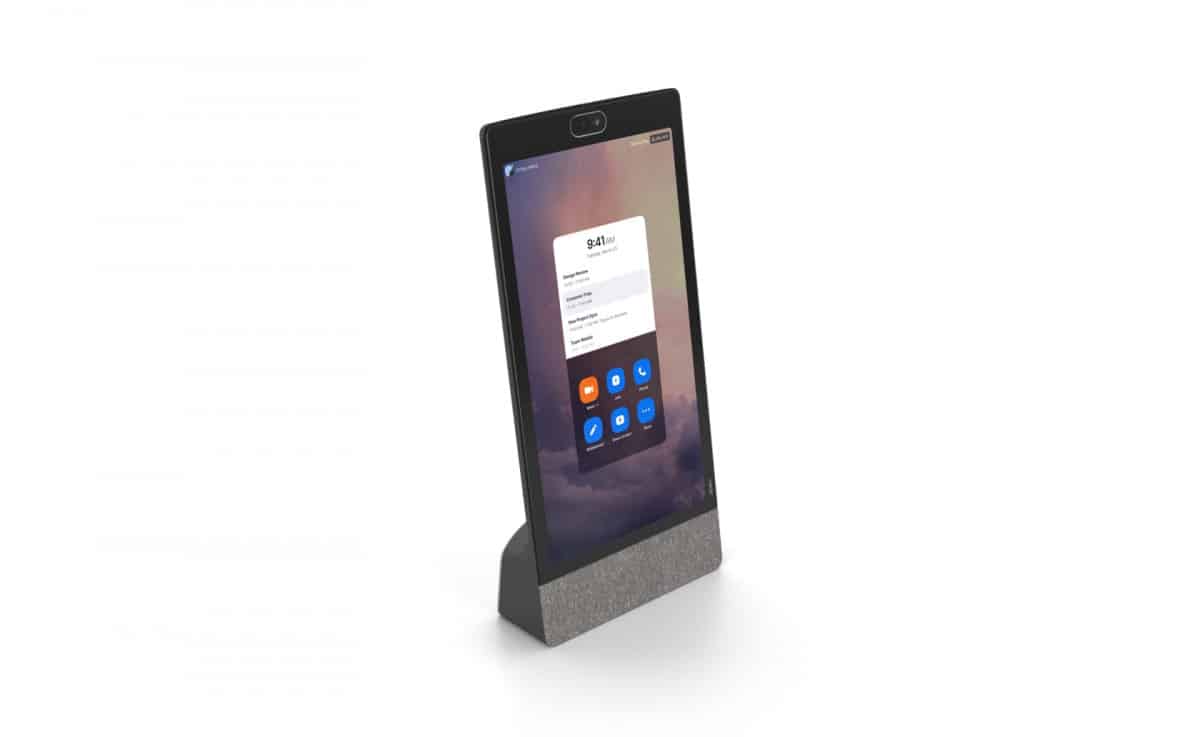
Out of all the other Neat devices, Neat Frame is the most suitable device for home offices. Working as a second screen, Neat Frame can hold all your Zoom meetings on a 15.6″ portrait touchscreen. While you use your laptop simultaneously on the side. Even though Neat Frame is the smallest out of all the Neat devices, the meeting device still offers power to those working from home or those coming into the office to quickly use the focus room for their meeting.

Neat Frame gives a 113° field of view and 8x digital zoom This pairs well with the auto framing feature as you have the freedom to stand up and move around the room with Neat Frame’s camera having a wide enough field of view to follow you. Making your meeting much more personal and in a sense more realistic to running a meeting in person.

  • 113° Field of view camera with 8x digital zoom
  • 15.6″ Full HD touchscreen
  • 3 Microphone array
  • 1 Tracking microphone
  • 1080×1920 Resolution
  • Bluetooth and headphone jack

Neat Frame By Neat

Frame At Home

Neat Frame can do great things for your home office, shaping the way you video conference from the comfort of your home. No matter the size, shape, or layout of your office at home, the quick connection video conferencing device can easily slot into your work from home set up. Just a quick connection to power, then to the internet, and you’re ready to start your Zoom meeting within a few minutes.

With Neat’s smart features like Neat Bubble and auto framing, working from home has never been easier. There won’t be any worrying over your boss or colleagues hearing your children running around or dog barking downstairs. Every noise that can distract your meeting will be blocked out. 

Along with the auto framing feature and the easy connection of the Frame, you can present from wherever in the room. So if you have a larger home office and you like to present in your meeting, you can just stand up, turn the Frame around and present. Making Neat Frame a flexible and portable device for any type of meeting.

Focus With The Frame

Even though Neat Frame is best suited for home offices, the easy to set up meeting device can easily work in and focus room in the office. With only needing one cable to set up, Neat Frame keeps your desk space clean and tidy for another person to use straight after. Making your meetings more efficient.

Just like using Neat Frame in your home office, you can use Neat Bubble and Boundary to make sure that the person you are meeting over Zoom can only hear your voice. Making you the main focus of your meeting.

Neat Board

Neat Board is one of Neat’s most portable device, with the Board being able to fit in most office work spaces. From standard meeting rooms, whether that’s a small, medium or large room, to social spaces in the office.

Taking one look at the 65″display, the clean device holds everything that you will need in a meeting room. Plus with a quick set up, the Board will obviously need connecting to power and the internet but then its just a case of connecting to your Zoom or Teams account and you can quickly start your meeting.

Neat Board has a plethora of features to make your meetings streamline and more professional. You can be confident that your audio is covered by the 5 microphone array, picking up every voice in the room but the echo cancellation and noise suppression will make sure that your voice is put across to your remote participants sharp and clearly. Alongside your audio, you have a 120-degree field of view camera and a 4x digital zoom to cover the biggest of meeting room. 

  • 120° Field of view camera with 4x digital zoom
  • 65″ 4K Multi-touch LED display
  • Wide angle tweeter
  • 5 Microphone array
  • 3 Sensor microphones
  • Air Quality Sensors
  • Anti-glare and anti-fingerprint coating 

Neat Board In Social Settings

Like we said Neat Board can be used in many situations and with the Boards flexible mounting options, it can be mounted anywhere. Neat Board lets you use the Board exactly as you want- with the flexible choice to mount the Board on the wall, the rolling floor stand, or have the Board sat on the table. The 65″ Board can be used in a standard small, medium, or large meeting room. But, place the multi-touch display into an open office and see how quickly your meeting will come alive.

Now you’re probably thinking about how it would work to hold meetings with Neat Board in an open office. Especially if more people are in the office making noise around you. That’s where Neat Bubble and Neat Bubble come into play.

Make A Bubble

Neat Bubble allows the user to create a Bubble around their team during their meeting. Its a feature that lets you block out any noise around you. So if anyone enters the Bubble while the meeting it going on, their voice will become audible. However if people are talking on the row of desks next to you, they will not be picked up. This will be because they are outside of the Bubble. Its a unique feature that lets you create the size of the Bubble and shows you what will be picked up and what wont be picked up. Making sure that your Bubble is perfect.

Similarly the Neat Boundary feature will block out any voices outside the boundary line. However, it will also stop the camera from adjusting its frame to fit in the person walking past your desks.

Standard Meeting Rooms

If you haven’t upgraded your office just yet with a more open planned style or maybe swanky new social spaces. Neat Board will still fit and work wonders in any of your meeting rooms. Behind all the standout features that can help your meeting in an open planned office, Neat Board is still an all-in-one device designed to hold you Zoom or Teams meetings. With integrated speakers, microphones and camera, the Board can still work in standard small, medium, or large meeting rooms. Being able to take your meetings up a notch. 

Hear It From The Customers

Neat is definitely one to look out for. Neat products will fit nicely into any room. In addition to their high performance technology, the modern and simplistic design of Neat products make it easy to fit into any room. Any and every company can benefit from a Neat product in their meeting room, home office, social spaces, or focus rooms.

One company that has benefited and loved their Neat device is a law firm in UK. In an interview with the firms head of IT, Neat found out about the law firms experience with Neat and how it changed the way they used Zoom.

Why Choose Neat?

Like everyone else, companies had a massive challenge ahead of them when lockdown was introduced to the world. Video conferencing sky rocketed with the amount of users. People were searching high and low for the perfect solution to their new working environment. To TWM Solicitors, Neat was a no brainer when introduced to them.

“The devices are really well designed, are really easy to use and they make a real difference to the business.”

Alan Barrett – Head of IT

After trying to find the best solution for their employees dotted at home or in the office, TWM Solicitors found out about Neat products and how they can hold great Zoom meetings. So when they were making their final decision and choosing to use Neat to complete their new hybrid working solution, it only took 4 days. Taking TWM Solicitors a matter of 4 days to change their video conferencing around with Neat. Their employees loving Neat Bar and Neat Pad they were using in the several meeting rooms and all the features that came with the Bar. Especially the Neat Symmetry.

Neat Summed Up

Summed up, Neat can and will work anywhere. And now working from home or having a hybrid working environment has increased in popularity – Neat will work for any company. Each Neat product have the perfect ability to hold your meetings to the highest quality but not only with high quality audio and video. The Neat features of Neat Bubble, Symmetry, and Boundary mean that any Neat product can be used from home, the office, or social working environments. 

Picture of Natalie Horn

Natalie Horn

Table of Contents

AV Equipment

Omicron Changed Your Back To Office Plan? Here’s How You Can Stay Productive

2022 seemed like the time to get back to the work. Tackling the morning rush to sit back in the office chair you abandoned months ago. For some there's still hope that that plan will go ahead. But for others, their back to office plan for 2022 has been hit. And maybe hit hard. With the recent news of the new COVID variant, Omicron, office workers have been faced with the work from home conversations once again. COVID-19 has bought confusion and disruption to peoples lives - and is still continuing to do so. Challenging any plans that might have been made for 2022. Not much is know about this variant, as of yet, but for a lot of home workers they know that continuing to work from home is very possibly the answer for 2022. Whether they created that answer themselves or that answer was given to them. However, working from home may have already been the plan for some in 2022 - with people getting into a routine. But we know for a lot of people their plan has been halted. So how can you make working from home just as productive as working in the office? How To Work From Home Effectively Working from home has been a tough change, with people itching to get back into the office. And with the recent news about a new variant, working from home may have reared a big black shadow hanging over you. Creating uncertainty, especially if that black shadow was just easing off. There are many simple ways for you to be okay with working from home. An easy, and probably very obvious tip is to take breaks. Just because you're working from home doesn't mean you shouldn't take the breaks you would if you were in the office. When your time for lunch is coming up, take it. Staring at your screen all day is not good, for anybody. It not only puts a strain on your eyes but can put a strain on your productivity. Another simple tip for working from home is to plan your day out. If you were always one to get into work with a pile of things to do, with no schedule for the day. Then this tip is for you. Take a few minutes in the morning, or if you're super organised the day before, and plan out your day with the tasks you need to do. If you know you have something that is super important or a task that could take a long time to finish. Schedule it in for the morning. Making sure that you get the important tasks done first and giving yourself enough time to complete it. Without having to schedule in time for you to stress over a task that isn't sorted. Work From Home Equipment As we said, this new variant has really swerved workers plans for 2022. But working from home can still be productive and effective. We know for pretty much everyone who was new to working from home, they did not have the right equipment. Or set up for that matter. Having a good working from home experience really depends on the equipment you have. At the start a laptop or desktop would've done its justice. But as time went on people have realised that you just needed more to be able to get the work done.  If you are thinking that now is a better time than ever to upgrade your working from home equipment, then these are our recommended equipment to get the best out of working from home.   Acer Chromebase 24V2 - Google Meet With a 24" touchscreen desktop, the Chromebase 24V2 is the perfect match for you working from home space. If you are one to always be on a call, nowadays a video call, this sleek designed desktop will not only look great in your home office but will hold great Google Meet meetings. Integrated with a 5.0 megapixel, wide angled camera, the Chromebase can easily upgrade your meetings. Giving you the highest quality Google Meet's as if you were in the office. On a professional office set up. The 24" touchscreen allows you to start, join meetings and open up the whiteboard - a display so easy to manage and use. However, if anything does seem to go wrong with your Chromebase, the device includes 24/7 support from Google. Making it easy for you to get your 24V2 up and running without being shut off for hours. And taking precious work time out of your day.   Working along with the camera, the Chromebase has 2 integrated microphones and speakers. Giving you and your Google Meet participants the clearest audio of your voices. No more is the worry about having to buy microphones and speakers to accommodate your home office. Its an all-in-one device that looks professional, either sat on your desk or placed on your wall. With the help of the optional VESA mounting kit. It doesn't mater if the Chromebase is placed on your desk or your wall, the device can still be tilted from -5°  and 25°. Letting your adjust the Chromebase to how you want it - exceeding your wants and needs.    DTEN Me - Zoom This 27" touchscreen display will definitely upgrade your home office. If you have been one, of the many people, working from home since COVID began. Then now is the best time to update your equipment. Especially if working from home will roll on into next year. This all-in-one display is all you need to video conference and collaborate seamlessly. And it really is all-in-one. The DTEN Me has an integrated camera, microphone and speaker. Making it so simple to unbox the DTEN Me and get to work within minutes - with the display just needing to be placed on our desk. No mount needed. However, the device does have an optional mount if you would prefer the display sat on your
Read More »
AV equipment's role in effective meetings
productivity

Break Barriers: AV Equipment’s Role in Effective Meetings

In today’s fast-paced business landscape, conducting effective meetings is essential for driving productivity, collaboration, and communication among teams. One of the key factors in ensuring successful meetings is the seamless integration of AV (Audio-Visual) equipment. This blog focuses on the essential role of AV equipment in modern meetings and highlights its impact on meeting productivity, collaboration, and communication.AV equipment plays a pivotal role in transforming traditional meetings into interactive and engaging experiences. With the rapid advancements in meeting technology, AV solutions have become indispensable tools for businesses to foster a productive work environment.The right AV setup can significantly boost meeting productivity by streamlining various processes. From setting up virtual meetings to using interactive displays and presentation tools, AV equipment ensures that participants can efficiently share ideas and insights, leading to quicker decision-making.AV technology enables teams to collaborate effectively, even in remote settings. Video conferencing equipment and online meeting platforms facilitate real-time interactions, making it easier for dispersed teams to work together seamlessly.Efficient Meetings – 7 Tips To Run an Effective Meeting  Benefits of AV Equipment in MeetingsIn today’s fast-paced business environment, meetings play a crucial role in driving collaboration, decision-making, and innovation. To ensure that meetings are productive and efficient, the role of AV equipment in effective meetings cannot be overstated. AV equipment, also known as audio-visual solutions, offers a myriad of benefits that enhance engagement, communication, and comprehension during meetings. In this section, we will explore the advantages of using AV equipment in meetings and how it fosters creativity, active participation, and meeting facilitation.Improved Engagement through AV TechnologyHolding the attention of meeting attendees is essential for effective communication and successful outcomes. AV equipment provides various visual aids and presentation tools, making meetings more engaging and dynamic. Visuals, such as interactive displays and multimedia presentations, help convey complex ideas with ease and keep participants involved throughout the meeting. According to research, visual aids in meetings increase retention and understanding of information by up to 42%.Enhanced Communication and ComprehensionClear communication is the cornerstone of any successful meeting. AV technology enables seamless video conferencing, allowing remote collaboration and virtual meetings with ease. Communication technology integrated with AV setups bridges geographical gaps and brings teams together, leading to more productive discussions and quicker decision-making.Fostering Creativity and Innovation in Brainstorming SessionsBrainstorming sessions and problem-solving discussions are essential for driving innovation within organizations. AV equipment plays a vital role in fostering creativity during such sessions. Utilizing modern AV technology, teams can visualize ideas, share concepts through collaboration tools, and collectively work on solutions. This encourages creativity, as ideas can be brainstormed and visualized effectively, resulting in innovative solutions to challenges.Positive Influence on Meeting Facilitation and ParticipationEffective meeting facilitation is crucial to maintain the flow of discussions and ensure that all participants actively contribute. AV equipment facilitates meeting facilitation by providing real-time access to data, presentations, and other resources. Additionally, interactive displays allow participants to share their inputs and interact with the content, promoting active engagement from all attendees.  Optimising AV Equipment for MeetingsTo make the most of AV equipment in meetings, it’s essential to optimize its usage and setup. Here are some best practices and tips for effective utilization: AV Equipment Setup Guide: Create a comprehensive setup guide to ensure that all necessary AV tools and technology are readily available and functioning before the meeting begins. AV Equipment Maintenance Tips: Regularly maintain and update AV equipment to avoid technical glitches and disruptions during critical meetings. AV Equipment for Small Meetings: Tailor AV equipment to suit the size of the meeting space to maximize impact and provide a seamless experience for all participants. Meeting Technology Trends and AV IntegrationStaying abreast of meeting technology trends is essential for making informed decisions about AV equipment. The integration of AV solutions into modern workplaces is becoming increasingly prevalent due to its positive impact on productivity and collaboration. “Companies that leverage the latest AV technology witness a 27% improvement in meeting productivity.” Choosing the Right AV Equipment for Your Meeting SpaceSelecting the appropriate AV equipment for your meeting space is crucial for successful outcomes. Factors such as room size, the number of attendees, and meeting requirements should be considered when investing in AV solutions. By choosing the right AV equipment, you can optimize collaboration and enhance the meeting experience for all participants.  AV Equipment for Small Meetings and Productive Team DiscussionsIn today’s fast-paced business world, effective meetings play a crucial role in driving productivity and collaboration among teams. One key factor that significantly impacts the success of such meetings is the proper utilization of AV (Audio-Visual) equipment. When tailored to suit the specific needs of small meetings, AV technology can enhance communication, streamline collaboration, and lead to better outcomes. In this section, we will explore how AV equipment can be optimized for small meetings, recommend suitable audio-visual solutions, and discuss the benefits of AV integration for productive team discussions.The Role of AV Equipment in Small MeetingsIn small meeting rooms, every participant’s engagement and understanding are vital. AV equipment serves as a powerful tool to capture and retain attendees’ attention. By leveraging visual aids and presentation tools, presenters can effectively convey information, making the meeting more engaging and fruitful.AV Solutions for Small Meeting RoomsWhen it comes to AV solutions for small meetings, simplicity and functionality are key. Here are some recommended audio-visual equipment and technologies tailored for small meeting spaces: Interactive Displays: These displays allow seamless interaction and real-time collaboration. Participants can write, draw, and share ideas, fostering a more dynamic meeting environment. Video Conferencing Equipment: For virtual meetings and remote collaboration, high-quality video conferencing equipment is essential. It enables face-to-face communication even when team members are geographically dispersed. AV Setup and Integration: Ensure that AV equipment is seamlessly integrated into the meeting room setup. This includes optimizing audio quality, display placement, and cable management for a clutter-free environment. Collaboration Tools: Invest in collaboration software that facilitates smooth file sharing, document editing, and brainstorming, promoting a cohesive and efficient meeting experience. Communication Technology: AV equipment that supports clear and uninterrupted communication is crucial.

Read More »
Augmented reality displays for meetings
Future Trends

How Are Augmented Reality Displays Revolutionizing Meeting Rooms?

Augmented reality displays are revolutionizing meeting rooms, providing a futuristic and interactive approach to collaboration. With its immersive and real-time 3D visualization, businesses can expect a more productive and efficient workspace. Explore how this technology is changing the way we meet.

Read More »
Advanced AV workshops
Training and Education

Join Advanced AV Workshops: Unlocking Innovation

In today’s ever-evolving audiovisual (AV) industry, staying ahead of the curve is not just a competitive advantage; it’s a necessity. Advanced AV workshops play a pivotal role in ensuring that AV professionals and enthusiasts are well-equipped to harness the power of audiovisual technology. This article explores the importance of these workshops in the context of the audiovisual industry’s rapid evolution.The audiovisual industry, encompassing innovative AV solutions, multimedia integration, and cutting-edge technology, is dynamic and constantly changing. To thrive in this environment, professionals need continuous learning and upskilling opportunities. This is where advanced AV workshops shine.Transformative opportunity for individuals seeking to delve into the cutting-edge world of audiovisual technology. These workshops provide a dynamic platform for participants to explore and master the latest advancements in AV technology, ranging from immersive virtual reality experiences to high-definition audio systems.The AV landscape is constantly evolving, with new hardware and software integration, high-tech equipment, and interactive presentation tools emerging regularly. Advanced AV workshops keep participants up-to-date with the latest trends in AV technology, ensuring they can adapt quickly to industry changes.Professional development is at the core of advanced AV workshops. These workshops offer hands-on training, expert-led sessions, and immersive learning experiences that allow attendees to acquire advanced AV techniques. Participants gain industry expertise and certification, making them sought-after AV professionals.Basic Event Audio Visual Training With Will Curran  Effective AV Presentation TechniquesEffective AV presentation techniques play a pivotal role in conveying messages that leave a lasting impression. In today’s fast-paced world, where attention spans are shrinking, it is essential to harness the power of audiovisual technology to engage your audience effectively. In this guide, we will delve into the significance of these techniques and provide you with specific strategies to create engaging AV presentations.The Importance of Effective AV Presentation TechniquesIn the dynamic audiovisual industry, staying ahead is crucial. Audiovisual technology has evolved rapidly, and the demand for innovative AV solutions is higher than ever. AV presentations are not just about conveying information; they are about creating an immersive and interactive experience for your audience.Visual Display and Multimedia Integration: The fusion of cutting-edge technology allows you to create visually appealing presentations that captivate your audience’s attention. Integrating multimedia elements like videos, animations, and interactive slides can make your message more compelling.Professional Development and AV Experts: To excel in the field, AV professionals need continuous learning. AV education and hands-on training are essential for mastering AV equipment and software integration. Professional development through advanced AV workshops keeps you updated with industry expertise and the latest trends in AV.Strategies for Creating Engaging AV Presentations Interactive Presentations: Encourage audience participation through polls, Q&A sessions, or live chats. This not only engages your viewers but also helps you tailor your content to their interests. Advanced AV Techniques: Explore advanced AV techniques such as 3D modelling, virtual reality, and augmented reality to make your presentations more immersive and captivating. AV Mastery through Workshops: Enroll in advanced audiovisual classes and workshops to gain hands-on experience with high-tech equipment. These workshops provide industry insights and expert-led sessions to enhance your skills. Software Integration: Master the art of integrating AV hardware and software seamlessly. This skill ensures that your presentations run smoothly without technical glitches. Visual Storytelling: Use storytelling techniques to convey your message effectively. A well-crafted narrative can make complex information easier to understand and remember. Joining Advanced AV WorkshopsThe path to becoming a proficient AV professional often begins with joining advanced AV workshops. These workshops are designed to offer immersive learning experiences and enhance your audiovisual skills. Here are some benefits: AV Certification: Many advanced AV workshops offer certifications that validate your expertise. These certifications can boost your credibility in the industry. Next-Level AV Training: Advanced tech workshops take your skills to the next level by focusing on cutting-edge AV technology and innovation seminars. Hands-On Training: Practical, hands-on training ensures you are well-prepared to troubleshoot and operate AV equipment effectively. Networking Opportunities: Workshops provide opportunities to connect with AV specialists and professionals, creating a network that can be valuable for future collaborations. Industry Expertise: Learn from experts who are well-versed in the field of audiovisual technology. Gain insights into the latest AV solutions and industry trends.   AV Troubleshooting Tips for BeginnersAV technology is an integral part of our lives, from home entertainment systems to business presentations. However, for beginners, it can sometimes be a source of frustration when things don’t work as expected.Common AV Issues for Beginners No Audio or Video Output: The most common issue beginners face is no audio or video output. Before panicking, check if all cables are securely connected. If the issue persists, it might be a problem with your AV hardware or software integration. Poor Picture Quality: If you’re experiencing a blurry or distorted picture, it could be due to a resolution mismatch. Ensure that your visual display settings match your content. This is a fundamental aspect of AV technology. Remote Control Problems: AV control systems can be intimidating. If your remote isn’t working, check the batteries first. If that’s not the issue, consult the user manual for troubleshooting guidance. Sound Distortion: If you’re hearing crackling or distorted sound, it could be a speaker issue. Check speaker connections, and if necessary, consider professional AV equipment maintenance. Practical Troubleshooting Tips Check Power Sources: Always ensure that your AV equipment is plugged in and powered on. Sometimes, the simplest solution is the most effective. Update Software: AV technology relies heavily on software integration. Make sure your software is up to date to avoid compatibility issues. Calibrate Your System: Regularly calibrate your AV system for optimal performance. This is especially crucial for home theatres. AV Workshops for Beginners: To gain confidence in troubleshooting AV issues, consider enrolling in advanced AV workshops. These workshops provide immersive learning experiences, hands-on training, and expert-led sessions. They cover advanced audiovisual classes, innovation seminars, and cutting-edge AV workshops, ensuring you’re well-prepared to handle any issues that arise.   Mastering AV Control SystemsAre you ready to dive into the intricate world of AV control systems and unlock the

Read More »
MeetingStore.co.uk
Logo
Compare items
  • Total (0)
Compare
0
Shopping cart