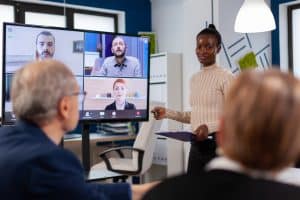
In today’s fast-paced business world, maximizing productivity in meetings is essential for overall business success. Efficient meetings save time, foster collaboration, and drive better decision-making, positively impacting an organization’s bottom line. However, achieving meeting efficiency requires more than just effective time management; it demands the integration of cutting-edge Audio-Visual (AV) technology.
AV technology in meetings revolutionises the way teams collaborate. With AV solutions, teams can seamlessly connect and share ideas, irrespective of their physical location. Virtual meetings and remote meetings have become more prevalent, and AV tools play a pivotal role in ensuring they run smoothly. Meetings can now take place effortlessly, transcending geographical boundaries and enabling businesses to tap into global talent and opportunities.
One of the key aspects of maximising productivity with AV equipment is the ease of use. Easy-to-use AV tools for meetings streamline the entire process, saving time and minimizing technical glitches that could disrupt the flow of discussions. Additionally, AV integration in meetings ensures efficient conference rooms. AV setups optimized for productive meetings enhance engagement and communication, leading to better outcomes.
Effective meeting presentations are vital for conveying information and garnering support for ideas. AV technology provides seamless presentation capabilities, making it easier for presenters to get their message across effectively. The use of AV hardware for efficient meetings allows for dynamic and interactive presentations that keep participants engaged and attentive.
Retractable Monitor and Microphones perfectly integrated in a Conference Room by ELEMENT ONE
AV Technology for Productive Meetings
Meetings are an essential part of any organization’s workflow, where collaboration, decision-making, and brainstorming take place. However, poorly managed meetings can be a drain on productivity. To address this, leveraging AV (Audio-Visual) technology can significantly enhance meeting efficiency and collaboration. In this section, we explore the top AV technologies and tools best suited for productive meetings and how they contribute to optimizing meeting outcomes.
AV Solutions for Productive Meetings
AV technology offers a wide array of solutions that can streamline meetings and boost productivity. From high-quality video conferencing systems to interactive presentation tools, AV solutions have revolutionized the way we conduct meetings.
Video Conferencing for Seamless Virtual Meetings
In the age of remote work and geographically dispersed teams, virtual meetings have become commonplace. Utilizing top-notch video conferencing software enables face-to-face interactions, fostering engagement and improving communication. Tools like Zoom, Microsoft Teams, and Google Meet provide easy-to-use AV solutions for collaboration across different time zones and locations.
AV Integration for Efficient Conference Rooms
Well-equipped conference rooms can significantly impact meeting productivity. AV integration allows seamless connectivity between various devices, enabling efficient presentation sharing and interactive discussions. With technologies like smart displays and wireless screen mirroring, teams can focus on the agenda rather than dealing with technical glitches.
Interactive AV Tools for Engaging Presentations
Presentations are at the core of many meetings, and using interactive AV tools can elevate their effectiveness. Touchscreen displays and interactive whiteboards encourage active participation, allowing attendees to contribute and collaborate in real-time. This fosters a dynamic environment that enhances creativity and problem-solving.
AV Automation for Streamlined Operations
AV automation simplifies the setup and management of AV equipment in meeting rooms. Automated control systems can adjust lighting, sound, and presentation displays with just a single touch, saving valuable time and ensuring a smooth meeting experience.
Real-Life Implementation
Small Business Boosts Collaboration with User-Friendly AV Tools
A small marketing agency implemented user-friendly AV tools like wireless presentation systems and interactive displays. This allowed team members to effortlessly share ideas during brainstorming sessions, leading to faster project development and increased collaboration.
AV Equipment Used
Benefits
Interactive Display
Enhanced brainstorming and idea sharing
Wireless Presenter
Seamless content sharing
AV Automation
Easy setup and quick start-up
Hybrid Meetings Enhanced by AV Equipment
A multinational corporation introduced hybrid meetings, combining in-person and remote attendees. AV equipment, such as multi-camera setups and high-fidelity microphones, ensured that all participants had an equal voice, maximizing engagement and productivity.
AV Technology Deployed
Benefits
Multi-Camera Setup
Improved visual engagement for remote participants
High-Fidelity Microphones
Clear audio for seamless communication
AV Automation
Effortless control of AV equipment
Maximising Virtual Meetings with AV Solutions
In today’s fast-paced business environment, virtual meetings have become an integral part of conducting business. However, they come with their own set of challenges, such as technical glitches, communication barriers, and engagement issues. To overcome these challenges and make virtual meetings more productive and efficient, the use of Audio-Visual (AV) solutions is essential. This section explores the various challenges of virtual meetings and how AV technology can be leveraged to maximize productivity, collaboration, and engagement.
Challenges of Virtual Meetings
Virtual meetings can be prone to several challenges that hinder productivity and effective communication. Some of the common challenges include:
Technical Issues: Unreliable internet connections and hardware problems can disrupt the flow of meetings and cause delays.
Lack of Engagement: Virtual meetings can lead to reduced engagement and interaction among participants compared to in-person meetings.
Communication Barriers: Miscommunication can occur due to limited non-verbal cues and delays in audio or video transmission.
Time Zone Differences: Coordinating meetings across different time zones can be challenging and affect attendance.
AV Solutions for Overcoming Challenges
AV technology offers a range of solutions to overcome the challenges faced during virtual meetings, enhancing overall productivity and efficiency. Here are some AV tools and software that enable seamless virtual meetings:
Video Conferencing Software: Platforms like Zoom, Microsoft Teams, and Google Meet facilitate high-quality video and audio communication, supporting large groups and screen sharing for effective collaboration.
Interactive Whiteboards: These digital tools allow participants to share ideas, take notes, and brainstorm collaboratively in real-time.
Noise-Canceling Microphones: Clear audio is crucial for effective communication, and noise-cancelling microphones help eliminate background noise and distractions.
HD Cameras: High-definition cameras ensure participants can see each other clearly, enhancing engagement and connection.
Productivity Tips for Effective Virtual Meetings
Maximizing productivity with AV equipment is achievable with some smart practices. Here are some productivity tips for conducting effective virtual meetings using AV technology:
Set Clear Objectives: Define meeting objectives beforehand and share the agenda with participants to keep discussions focused.
Use Breakout Rooms: Breakout rooms in video conferencing software allow smaller groups to collaborate on specific topics, enhancing engagement.
Encourage Interaction: Foster active participation by encouraging everyone to contribute ideas, ask questions, and provide feedback.
Utilize Screen Sharing: Share presentations, documents, or data on-screen to enhance understanding and facilitate discussion.
Record Meetings: Recording meetings allows participants to review discussions and ensures those who couldn’t attend stay updated.
AV Integration for Hybrid Meetings
As businesses adapt to hybrid work models, where some employees work remotely and others in physical offices, AV integration becomes crucial. Hybrid meetings require seamless collaboration between in-person and remote participants. Leveraging AV technology can bridge the gap and ensure all attendees can actively participate.
Real-time captions, easy integration with Google Apps
Businesses using G Suite
Enhancing Remote Meeting Productivity with AV
With the rise of remote work and virtual collaboration, the importance of productive and efficient remote meetings cannot be overstated. AV (Audio-Visual) technology plays a vital role in ensuring clear communication, engagement, and collaboration during these meetings. In this section, we will explore the unique requirements of remote meetings and discuss how AV technology can maximize productivity in meetings. We will also provide practical advice for optimizing remote meeting setups with AV integration.
AV Technology: Empowering Productive Meetings
AV technology has revolutionized the way we conduct remote meetings, offering a wide range of benefits that directly impact productivity. By leveraging AV solutions, meeting efficiency can be greatly enhanced, leading to better outcomes and increased team collaboration. Here are some ways AV technology contributes to maximizing productivity in meetings:
Clear Communication and Engagement: AV equipment enables high-quality audio and video transmission, ensuring seamless communication and active participation in remote meetings. Participants can see facial expressions and body language, fostering a more engaged and interactive atmosphere.
Efficient Virtual Meetings: AV tools streamline virtual meetings by offering features like screen sharing, real-time document collaboration, and instant messaging. This results in smoother discussions, quicker decision-making, and improved meeting outcomes.
Enhanced Meeting Presentations: AV technology allows for dynamic and engaging presentations, incorporating multimedia elements that keep participants attentive and focused. This ensures that important information is conveyed effectively.
Practical Tips for Optimizing Remote Meeting Setups with AV Integration
To make the most of AV technology and maximize productivity in remote meetings, consider implementing the following best practices:
Invest in Quality AV Equipment: Choose AV equipment known for its reliability and performance. High-definition cameras, crystal-clear microphones, and fast internet connections are essential for smooth remote meetings.
Utilize AV Automation: Incorporate AV automation to simplify the setup process and reduce the risk of technical glitches. Automation can streamline tasks like adjusting audio levels, managing presentations, and muting/unmuting participants.
Choose the Right AV Software: Opt for user-friendly AV software that aligns with your team’s needs. Look for features like virtual backgrounds, chat functions, and breakout rooms to enhance collaboration.
Create Dedicated AV Integration Spaces: Designate specific areas equipped with AV technology for remote meetings. These spaces should be well-lit, quiet, and free from distractions, allowing participants to focus on the discussion.
AV Technology and Meeting Productivity
Question
Percentage of Respondents Agreeing
AV technology improves meeting engagement
92%
AV integration boosts team collaboration
87%
AV solutions streamline virtual meetings
95%
AV equipment enhances meeting presentations
88%
Easy-to-Use AV Tools for Meetings
Meetings are an essential aspect of collaboration and decision-making in any organization. However, they can often become time-consuming and unproductive if not properly managed. To streamline the meeting process and boost productivity, it’s crucial to leverage user-friendly AV (Audio-Visual) tools. In this section, we will explore the importance of intuitive interfaces and seamless integration with existing systems. Additionally, we will showcase specific AV solutions accessible to all team members, regardless of their technical expertise.
Maximizing Productivity in Meetings with AV Technology
Importance of Intuitive Interfaces and Seamless Integration
To maximize productivity in meetings, AV technology needs to be easy to use and intuitive. When participants can quickly navigate the AV tools, it reduces the time wasted on technical hiccups and fosters a smoother meeting experience. Intuitive interfaces also make it easier for new team members to adapt and participate effectively in discussions.
Seamless integration with existing systems is equally crucial. When AV tools seamlessly integrate with the organization’s communication and collaboration platforms, it streamlines the meeting setup process. It allows participants to join meetings effortlessly, whether they are in-person, remote, or hybrid.
User-Friendly AV Solutions for All Team Members
Video Conferencing Software: Solutions like Zoom and Microsoft Teams have gained popularity due to their ease of use and versatility. They offer features such as screen sharing, chat options, and virtual backgrounds, enhancing meeting collaboration.
Web Conferencing Tools: Webinars have become a valuable platform for businesses to share knowledge and engage with their audience. Platforms like Webex and GoToWebinar provide user-friendly interfaces for hosting virtual meetings and webinars, making them productive and interactive.
Digital Whiteboards: Digital whiteboards, like Miro and MURAL, are excellent tools for enhancing creativity and brainstorming during meetings. They enable teams to collaborate in real time, even if they are working remotely.
AV Hardware for Conference Rooms: User-friendly AV equipment, such as interactive displays and wireless presentation systems, make it easy for team members to share content and engage in discussions during physical meetings.
AV Software for Productivity: Software solutions like Otter.ai provide real-time transcription and note-taking during meetings. This feature ensures that important points and action items are captured accurately.
Enhancing Meeting Efficiency with AV Automation
Automating certain aspects of meetings can significantly improve efficiency. For example, setting up automated reminders for upcoming meetings or automatically recording and transcribing meetings for reference later can save time and increase productivity.
Optimising Remote Meetings with AV Solutions
In the current remote work landscape, having the right AV solutions is critical for productive meetings. Features like virtual backgrounds, noise cancellation, and interactive polls enhance engagement and ensure remote participants feel included.
AV Technology for Efficient Boardroom Meetings
In boardroom settings, AV technology plays a vital role in facilitating seamless communication and decision-making. User-friendly AV tools, such as wireless presentation systems and high-quality audio devices, help maintain focus and productivity during important discussions.
Maximising Hybrid Meeting Productivity with AV Equipment
Hybrid meetings, combining in-person and virtual attendees, have become the norm in today’s business landscape. To ensure the utmost productivity and engagement in these meetings, leveraging AV technology is crucial. This section delves into the challenges and benefits of hybrid meetings, showcases AV equipment setups that facilitate seamless collaboration, and offers practical tips for maximizing productivity and engagement using AV technology.
Challenges of Hybrid Meetings
Balancing In-Person and Remote Dynamics: Hybrid meetings pose challenges in striking a balance between in-person and remote participants. Ensuring equal involvement and effective communication can be daunting.
Technical Hurdles: Technical glitches, such as poor audio or video quality, can disrupt the flow of the meeting, leading to reduced engagement and productivity.
Engagement and Participation: It can be challenging to keep all attendees engaged and actively participating, particularly when some are physically present while others join virtually.
Benefits of Hybrid Meetings
Wider Reach and Inclusivity: Hybrid meetings enable businesses to include remote team members, clients, or partners from different locations, expanding the reach and fostering inclusivity.
Cost and Time Savings: By facilitating virtual attendance, hybrid meetings save travel expenses and time for both the company and the participants.
Flexibility and Convenience: Attendees have the option to join from their preferred location, making it more convenient for them to participate.
AV Equipment for Seamless Collaboration
To overcome the challenges and harness the benefits of hybrid meetings, incorporating the right AV equipment is essential. The following setups foster seamless collaboration:
High-Quality Cameras and Microphones: Invest in top-notch cameras and microphones to ensure clear visuals and audio, creating a natural meeting experience.
Interactive Displays and Smart Boards: Interactive displays allow remote participants to annotate and contribute in real-time, enhancing collaboration and productivity.
AV Integrations and Software: AV solutions that integrate with existing collaboration tools and software streamline communication and data sharing during meetings.
Tips for Maximising Productivity and Engagement
Test AV Equipment Prior to Meetings: Conduct pre-meeting tests to verify the functionality of AV equipment, minimizing technical disruptions during crucial discussions.
Set Clear Meeting Objectives: Clearly define meeting goals and agendas to keep the discussion focused and participants engaged.
Encourage Active Participation: Employ interactive tools and techniques, such as live polls and Q&A sessions, to encourage active participation from all attendees.
Assign Meeting Roles: Designate roles like facilitator, timekeeper, and note-taker to ensure smooth proceedings and organized minutes.
AV Equipment
Features
Benefits
Interactive Displays
Real-time annotation & collaboration
Enhanced engagement and interactivity
High-Quality Cameras
Clear visuals and virtual presence
Immersive meeting experience
Integrated AV Software
Seamless data sharing & communication
Streamlined collaboration
Affordable AV Technology for Better Meetings
Meetings play a crucial role in the success of businesses, fostering collaboration, decision-making, and idea-sharing. However, there is a common misconception that AV (Audio-Visual) technology for meetings is expensive and inaccessible, limiting its adoption among small businesses and startups. In this section, we will address this misconception and present budget-friendly AV solutions that can significantly enhance meeting efficiency, productivity, and collaboration.
AV Technology Benefits for Productive Meetings
AV technology offers a multitude of benefits for productive meetings. By integrating AV tools, meetings can be transformed into engaging and interactive sessions, driving better decision-making and fostering creativity. Productive meeting tools such as interactive displays, wireless presentation systems, and video conferencing software are all part of the arsenal of affordable AV technology available to businesses.
Improving Meeting Productivity with AV Solutions
One of the key aspects of maximizing productivity in meetings is optimizing the use of AV solutions. These solutions provide seamless meeting presentations, enable real-time collaboration among team members, and enhance meeting engagement. For instance, using AV equipment for conference rooms allows participants to share content effortlessly, leading to efficient discussions and effective time management.
Boosting Collaboration in Meetings with AV Integration
AV integration in meetings plays a vital role in boosting collaboration. Integrating AV technology into meeting room setups enables teams to collaborate more effectively, regardless of whether the meetings are conducted in person or virtually. The integration of AV hardware and software enables easy-to-use and productive meeting experiences.
Affordable AV Technology for Better Meetings
Small businesses and startups can benefit significantly from cost-effective AV technology tailored to their needs. Easy-to-use AV tools for meetings, such as web conferencing software and wireless presentation systems, are readily available and can be seamlessly integrated into existing workflows without substantial investment.
Maximising Virtual Meetings with AV Solutions
With the rise of remote work and virtual meetings, AV technology has become essential for maintaining productivity and engagement. AV solutions for virtual meetings offer features like screen sharing, real-time chat, and video conferencing, creating a collaborative environment for remote teams.
Hybrid Meetings: Optimizing Productivity with AV Equipment
In today’s dynamic work environment, hybrid meetings are becoming increasingly popular, with some team members present in the office and others participating remotely. AV equipment tailored for hybrid meetings ensures that all participants can actively contribute to discussions, regardless of their location.
Data-Driven Decision-Making with AV Technology
AV technology allows businesses to make data-driven decisions more effectively. For example, using AV software for better meetings, businesses can record and analyze meeting data, gaining insights into meeting efficiency and identifying areas for improvement.
AV Technology Best Practices for Meeting Success
To make the most of AV technology in meetings, following best practices is essential. AV technology should be used strategically to enhance meeting outcomes, rather than being a distraction. Properly setting up AV systems, providing training, and promoting productive meeting strategies will yield better results.
Conclusion
In today’s fast-paced business landscape, productive meetings are the backbone of successful organizations. Leveraging AV technology in meetings can significantly enhance productivity, foster collaboration, and drive better outcomes.
AV technology has revolutionized the way meetings are conducted, enabling seamless virtual meetings, remote collaborations, and hybrid setups. It offers numerous benefits, including improved communication, enhanced engagement, and efficient time management.
To maximize productivity in meetings, consider utilizing AV solutions tailored to your specific needs. Implementing user-friendly AV tools can make a significant difference, allowing participants to focus on the meeting’s substance rather than dealing with technical challenges. Look for AV systems that offer automation, ease of use, and seamless integration.
AV integration is a crucial aspect of productive meetings. Integrating AV technology into conference rooms and meeting spaces ensures smooth communication and collaboration. By connecting various devices and software, AV integration fosters a more efficient and interactive meeting experience.
Choosing the right AV equipment is essential to maximize productivity. High-quality cameras, microphones, displays, and other AV hardware facilitate clear communication and engagement, even in remote settings. Investing in affordable AV technology tailored to your business needs can lead to better outcomes.
Virtual meetings have become increasingly popular, especially in remote work environments. To enhance productivity in virtual meetings, leverage AV technology that offers seamless connections, clear audio and video, and interactive features. This fosters better engagement and collaboration among participants, leading to more productive discussions.
AV automation streamlines repetitive tasks and ensures meetings start and end on time. By automating processes like audio setup, screen sharing, and recording, participants can focus on the meeting’s content and objectives. This saves time and enhances meeting productivity.
Maximize productivity in meetings with innovative AV strategies. Utilize AV software and tools that offer features like real-time note-taking, interactive whiteboards, and easy file sharing. These productivity hacks promote active participation and foster a collaborative meeting atmosphere.
For businesses conducting webinars and presentations, AV technology is a game-changer. High-quality audio-visual equipment ensures that the audience remains engaged throughout, leading to a more successful presentation and increased knowledge retention.
FAQs
How can AV technology maximize productivity in meetings?
AV technology can maximize productivity in meetings by enabling seamless communication, collaboration, and information sharing. High-quality audio and video conferencing systems ensure clear communication, reducing misunderstandings and enhancing engagement. Interactive displays and digital whiteboards allow participants to share ideas and annotate content in real-time, fostering collaboration. Wireless presentation systems enable quick and easy content sharing from multiple devices, saving time and promoting efficient discussions. Automated meeting room scheduling and control systems simplify setup, reducing setup time and ensuring meetings start on time. Recording and transcribing features capture important discussions for later review, enhancing retention and follow-up actions. Overall, AV technology streamlines meeting processes, facilitating productive discussions and decision-making.
What are the best AV solutions for productive meetings?
The best AV solutions for productive meetings include reliable video conferencing systems, high-quality cameras, and microphones to ensure clear communication. Interactive displays or smartboards facilitate real-time collaboration and idea-sharing. Wireless presentation systems enable seamless content sharing from multiple devices. Noise-cancelling headphones help eliminate distractions and improve focus during remote meetings. Robust network infrastructure ensures smooth video and data transmission. Additionally, integrated room control systems simplify setup and configuration, saving time and reducing technical difficulties. Ultimately, the most effective AV solutions depend on the specific needs and size of the meeting space, as well as the preferences of the participants.
How does AV technology improve meeting efficiency?
AV technology improves meeting efficiency by reducing setup time, streamlining communication, and enhancing collaboration. With AV solutions, participants can quickly join meetings remotely, eliminating the need for lengthy travel. High-quality audio and video ensure clear communication, reducing misunderstandings and wasted time. Interactive displays and collaborative tools facilitate real-time brainstorming and decision-making. AV automation streamlines the process of setting up equipment and configuring meeting spaces, saving time and minimizing technical difficulties. Recording and transcribing capabilities capture key points for later reference, ensuring that participants can focus on the discussion without the need to take exhaustive notes. Overall, AV technology optimizes the meeting experience and allows participants to be more productive and engaged.
What AV tools can enhance meeting collaboration?
AV tools that enhance meeting collaboration include interactive displays, digital whiteboards, video conferencing software, and wireless presentation systems. Interactive displays and whiteboards enable real-time annotation and content sharing, fostering brainstorming and collaboration. Video conferencing software allows remote participants to join the meeting and actively engage in discussions. Wireless presentation systems enable quick and seamless content sharing from multiple devices, encouraging participants to share ideas and materials easily. Additionally, collaborative note-taking platforms or shared documents further enhance collaboration by allowing participants to contribute to a shared workspace in real-time. These AV tools break down geographical barriers and empower teams to work together effectively regardless of their physical location.
Why is AV integration important for meetings?
AV integration is important for meetings because it ensures seamless communication, enhanced collaboration, and a user-friendly experience. Integrating AV solutions means that all equipment and technologies work together harmoniously, minimizing technical glitches and saving time during setup. It enables devices to communicate with each other, simplifying control and operation. For example, integrating video conferencing systems with room control allows users to start meetings with a single touch. AV integration also enhances user experience, as participants can easily share content, switch between devices, and access various tools within the meeting environment. Ultimately, AV integration streamlines meeting processes, reduces frustration, and maximizes the potential of the technologies involved.
How can AV technology boost creativity in meetings?
AV technology can boost creativity in meetings by providing innovative tools for idea sharing, visualization, and immersive experiences. Interactive displays and digital whiteboards enable participants to visually express their ideas and collaborate in real-time, promoting creative thinking. Virtual and augmented reality technologies immerse participants in different environments, sparking new perspectives and fostering imaginative problem-solving. Additionally, multimedia capabilities allow for dynamic presentations that engage and inspire the audience. AV technology’s ability to seamlessly integrate various media types, such as videos, images, and audio, enhances the overall meeting experience, stimulating creativity and innovation among participants.
What are the benefits of AV technology in virtual classrooms?
AV technology in virtual classrooms offers numerous benefits, including enhanced engagement, personalized learning experiences, and improved accessibility. Interactive displays and digital whiteboards enable real-time collaboration and active participation, keeping students engaged and focused. Video conferencing connects remote learners with teachers and classmates, fostering a sense of community. Personalized learning platforms and multimedia resources cater to individual learning styles, making education more effective. AV technology also breaks down geographical barriers, enabling access to quality education for students in remote or underserved areas. Additionally, recording and archiving capabilities allow students to review lectures at their own pace, facilitating better retention and understanding.
How does AV software contribute to better meetings?
AV software contributes to better meetings by providing seamless integration of audio, video, and collaborative tools. Video conferencing software connects participants from different locations, enabling face-to-face communication. Audio processing algorithms and noise cancellation enhance call quality, ensuring clear communication. Screen sharing and interactive tools foster collaboration and idea-sharing. Features like virtual backgrounds and augmented reality filters add an element of fun and engagement. Additionally, AV software often includes scheduling and automation features, making it easier to set up and manage meetings efficiently. With AV software, meetings become more interactive, efficient, and enjoyable, leading to better communication and decision-making.
What are the tips for improving meeting engagement with AV?
To improve meeting engagement with AV, consider the following tips:
Quality Equipment: Use high-quality audio and video equipment to ensure clear communication.
Interactive Displays: Employ interactive displays and whiteboards to encourage real-time collaboration and idea-sharing.
Wireless Connectivity: Enable wireless presentation and content sharing for seamless interactions.
Video Conferencing: Utilize video conferencing for face-to-face communication and better connection among participants.
Multimedia Presentations: Incorporate multimedia elements like videos and images to make presentations more engaging.
Polls and Surveys: Use interactive polls and surveys to gather feedback and involve participants.
Virtual Breakout Rooms: Implement breakout rooms for focused discussions and smaller group interactions.
Engaging Content: Prepare compelling content that captures participants’ attention and keeps them interested.
Time Management: Respect participants’ time by adhering to schedules and keeping meetings concise and on-topic.
Follow-Up Actions: Ensure action items and next steps are clearly communicated to maintain momentum after the meeting.
How can AV equipment optimize remote meetings?
AV equipment can optimize remote meetings by providing a seamless and immersive experience for participants. High-quality cameras and microphones ensure clear visuals and audio, improving communication. Interactive displays and digital whiteboards facilitate real-time collaboration and idea-sharing. Wireless presentation systems allow participants to share content effortlessly from their devices. Screen-sharing and virtual collaboration tools enhance engagement during presentations. Reliable network connectivity ensures smooth video conferencing without disruptions. Additionally, automated setup and control systems reduce the technical burden on participants, saving time and ensuring meetings start promptly. By combining these AV technologies, remote meetings become more efficient, interactive, and productive.
Which AV solutions are effective for successful project meetings?
Effective AV solutions for successful project meetings include video conferencing with screen-sharing capabilities for clear communication and content presentations. Interactive displays or digital whiteboards foster collaborative planning and brainstorming. Project management tools integrated with AV platforms help track tasks and progress during the meeting. File-sharing and storage systems simplify document exchange among team members. Virtual collaboration tools, such as virtual whiteboarding or augmented reality applications, can boost creativity and visualization. Reliable AV equipment, such as high-quality cameras and microphones, ensures that all participants can actively engage in the discussion. By combining these solutions, project meetings become more organized, collaborative, and productive.
How does AV technology enhance communication in meetings?
AV technology enhances communication in meetings by providing face-to-face interactions through video conferencing, reducing misunderstandings that may arise from text-based communication. High-quality audio equipment ensures that all participants can hear each other clearly, eliminating communication barriers. Interactive displays and digital whiteboards enable real-time visual explanations and annotations, making complex topics easier to understand. Additionally, AV technology offers features like screen sharing, file sharing, and chat functionalities, allowing seamless information exchange and enhancing the overall flow of communication during meetings. By facilitating effective communication, AV technology enables better engagement and more productive discussions among participants.
What are the advantages of AV technology in conference rooms?
The advantages of AV technology in conference rooms include:
Improved Communication: AV technology enables clear audio and video communication, reducing miscommunication and enhancing collaboration.
Efficient Meetings: Seamless content sharing and presentation tools lead to more organized and productive meetings.
Real-time Collaboration: Interactive displays and whiteboards foster real-time collaboration and idea-sharing among participants.
Engaging Presentations: Multimedia capabilities make presentations more engaging and impactful.
Enhanced Decision-making: AV tools allow participants to access relevant information and data, facilitating better decision-making.
Remote Participation: AV technology enables remote participants to join conferences, promoting inclusivity and flexibility.
Time and Cost Savings: Efficient AV setups reduce meeting setup time and eliminate the need for extensive travel, saving time and costs.
Versatility: AV technology supports various media types, making it adaptable to different presentation styles and content formats.
How can AV technology help with time management in meetings?
AV technology helps with time management in meetings by streamlining processes and reducing setup time. Automated AV systems simplify the setup process, ensuring that the equipment is ready for the meeting promptly. Wireless presentation systems enable quick content sharing, saving valuable minutes that might otherwise be spent connecting devices. Clear communication facilitated by AV equipment reduces misunderstandings and the need for repeated clarifications, saving time during discussions. Additionally, AV software often includes features like meeting timers and agenda reminders, helping participants stay on track and adhere to the meeting schedule. By optimizing meeting efficiency, AV technology contributes to effective time management during meetings.
What are the best practices for AV setups in boardroom meetings?
For boardroom meetings, consider the following best practices for AV setups:
High-quality Equipment: Invest in top-notch audio and video equipment for clear communication and presentations.
Integrated Control Systems: Use integrated AV control systems to simplify setup and operation.
Video Conferencing: Ensure reliable video conferencing capabilities for remote participants and external stakeholders.
Interactive Displays: Utilize interactive displays or smartboards for collaborative discussions and note-taking.
Wireless Connectivity: Implement wireless presentation systems for seamless content sharing from various devices.
Privacy and Security: Prioritize privacy and security measures to protect sensitive boardroom discussions.
Professional Setup: Arrange AV equipment in an organized and aesthetically pleasing manner to maintain a professional atmosphere.
Backup Solutions: Have backup equipment and contingency plans in case of technical issues.
User Training: Provide training to board members and participants on AV equipment usage for smooth operation.
Regular Maintenance: Conduct regular maintenance and updates to ensure AV equipment is in optimal condition.
By adhering to these best practices, boardroom meetings can run smoothly, foster collaboration, and make efficient use of AV technology.
In the modern world, effective presentations are a cornerstone of success across various fields. Whether you’re a business professional, educator, or public speaker, the ability to convey your ideas with clarity and impact is crucial. Presentation techniques have evolved significantly, and one of the key factors in this evolution is the integration of audio visual (AV) technology. Audio visual technology to boost presentation success has become a vital tool, revolutionizing the way information is delivered and received.Visual communication plays a pivotal role in conveying complex ideas quickly and engagingly. With the advent of multimedia technology, presenters can now utilize a variety of visual aids, multimedia tools, and presentation equipment to create impactful visuals that resonate with audiences. The synergy between visual storytelling and presentation skills is where AV integration shines. By using advanced visuals and engaging slides software, speakers can capture and maintain the audience’s attention, maximizing productivity with AV equipment. Maximizing productivity with AV equipment isn’t just about technological prowess; it’s about harnessing the power of multimedia to make presentations memorable and effective.A significant trend in recent times is the growing interest in using AV technology to improve public speaking skills and engage audiences. This interest is fueled by the realization that audio visual solutions offer an array of benefits. These range from affordable AV tech for presentations to user-friendly presentation tech, enabling speakers to craft visually stunning and impactful content. Audience engagement devices and interactive slides software allow for real-time interactions, transforming presentations from one-sided monologues to dynamic, two-way conversations. This synergy between AV solutions and presentation effectiveness has redefined what it means to captivate an audience.The journey toward effective presentations encompasses not only visual communication but also audio enhancement. Achieving audio clarity in presentations is equally critical, as clear and resonant sound ensures that your message reaches every corner of the room. By leveraging technology for speakers, such as AV solutions for speakers, presenters can ensure that their message is not only visually compelling but also audibly captivating. Modern presentation equipment has made it easier than ever to strike a balance between impactful visuals and clear audio, creating an immersive and memorable experience for the audience.As the demand for engaging presentations rises, presenters are seeking the latest multimedia tools to stay ahead. Affordable AV tech for presentations is a game-changer, allowing even smaller organizations to harness the power of multimedia solutions. Visual aids for public speaking have become more sophisticated, offering options for creating engaging slides, interactive content, and seamless transitions. With the availability of audio visual solutions, enhancing presentation impact is no longer reserved for large corporations with vast resources; it’s an opportunity accessible to all who value effective communication.Logitech-Powered Tencent Meeting Room Tour at Steelcase The Power of Visual Communication and Presentation TechniquesVisual communication is a pivotal element in modern presentations, revolutionizing the way information is conveyed and absorbed. Leveraging advanced visuals and multimedia technology can significantly enhance the effectiveness of presentations, leading to greater audience engagement and comprehension. This section delves into the critical role of visual communication and explores effective presentation techniques that seamlessly integrate audio visual (AV) technology to boost presentation success.Enhancing Audience Engagement with AV IntegrationTo maximize audience engagement, presenters can harness the power of AV solutions for speakers. Incorporating audience engagement devices, such as interactive slides software, allows presenters to create dynamic, two-way interactions, fostering a more participatory environment. User-friendly presentation tech enables speakers to seamlessly integrate multimedia elements and engage the audience through interactive features.Simplifying Complex Ideas with Effective Visual AidsVisual aids play a crucial role in simplifying complex concepts, making them accessible to a diverse audience. By using visual aids for public speaking, such as engaging slides and multimedia tools, speakers can transform intricate ideas into digestible visual representations. Impactful visuals not only capture attention but also facilitate better understanding, enabling presenters to convey their messages with precision and clarity.Boosting Presentation Effectiveness with TechnologyThe availability of affordable AV tech for presentations has democratized the use of technology for speakers of all levels. Modern presentation equipment offers solutions that cater to various budgets, ensuring access to cutting-edge tools. AV solutions for speakers encompass audio enhancement, visual communication, and presentation equipment. These technologies collectively contribute to seamless audio visual integration, enriching the presentation experience.Incorporating Multimedia Solutions for a Captivating ExperienceThe latest multimedia tools have transformed presentations into immersive experiences. Through multimedia solutions, presenters can incorporate diverse content formats, such as videos, images, and interactive elements, adding depth and engagement to their presentations. A well-executed multimedia presentation not only captures attention but also reinforces key points, leaving a lasting impact on the audience.Public Speaking Skills and Presentation EnhancementThe integration of AV technology isn’t solely about equipment; it’s about honing presentation skills as well. Presenters can use AV technology to enhance their public speaking confidence by leveraging audio clarity in presentations and employing engaging slides. By aligning technology with effective presentation techniques, speakers can elevate their delivery and captivate audiences. Visual Aid Benefits Interactive Slides Encourages audience participation and active learning Multimedia Elements Enhances engagement through diverse content formats Impactful Visuals Simplifies complex ideas, aiding audience comprehension Audio Clarity Ensures clear and crisp delivery of spoken content Affordable AV Tech for PresentationsIn the world of presentations, the misconception that audio visual (AV) technology is costly and inaccessible has persisted for too long. However, the reality is quite the opposite. Modern presentation techniques have evolved to include an array of budget-friendly AV solutions that can significantly boost presentation success. In this guide, we will explore how investing in affordable AV tech can elevate presentation quality, captivating your audience and maximizing productivity with AV equipment.AV Solutions for Effective PresentationsWhen it comes to presentation success, having the right tools at your disposal is crucial. Multimedia technology and effective visual aids play a pivotal role in engaging your audience and conveying your message effectively. Utilizing user-friendly presentation tech, such as interactive slides software, can transform your presentations into dynamic and engaging experiences. Equipment Features Price Range Interactive Software Enables interactive and engaging slides £50 – £200
In the modern landscape of professional settings, presentations have evolved from being mere tools of information delivery to becoming powerful vehicles for communication impact. The advent of audio-visual (AV) technology has transformed the way presentations are conducted and perceived. This article delves into the pivotal role that AV equipment plays in maximizing presentation success, enhancing audience engagement, and delivering effective communication through impactful visuals.Effective presentations are no longer restricted to compelling content and eloquent speakers alone. The integration of audio-visual technology, encompassing multimedia tools, enhances the overall communication impact. By leveraging AV setup and presentation equipment, speakers can elevate their talks from ordinary to extraordinary. This results in a higher level of audience engagement and a more profound connection between the speaker and the audience.Incorporating various audiovisual tools into presentations is a strategic way of improving public speaking and presentation effectiveness. Visual aids such as graphs, images, and videos provide a dynamic and interactive element that captivates the audience’s attention and aids in conveying complex information with clarity. The choice of presentation technology and AV solutions significantly impacts how well the audience retains and comprehends the delivered content.The landscape of presentation technology is constantly evolving, with new tools and techniques emerging. Presenters seeking to optimize their AV setup should be aware of the latest trends in AV equipment. From choosing the best AV equipment for presentations to utilizing innovative presentation tools and techniques, it’s crucial to stay informed about the advancements that can enhance presentation hardware and software.10 Must have equipment in Modern high tech conference rooms and Boardroom . The Power of Audio-Visual Technology in PresentationsAudio-visual technology, a comprehensive array of tools encompassing both auditory and visual elements, has revolutionized the landscape of modern presentations. By seamlessly merging sound and sight, it caters to diverse learning styles and audience preferences, ushering in a new era of impactful communication.Maximizing Productivity with AV Equipment: A Game-Changer in Presentation SuccessAV equipment’s influence on presentation success is undeniable. Maximizing productivity with AV equipment allows speakers to craft presentations that are not only visually captivating but also convey information effectively. This technology optimizes the delivery process, making it easier to engage the audience and ensuring that the key message is received with clarity.Impact on Communication: Engaging the Senses for Unparalleled Audience EngagementThe communication impact of audio-visual technology cannot be overstated. Multimedia tools transcend traditional verbal communication by incorporating visual aids, such as images, videos, and slides. By engaging multiple senses, AV setup transforms presentations into immersive experiences, fostering a deeper connection between speakers and their audience. This engagement paves the way for improved retention and understanding of the subject matter.Case Studies: Exemplifying AV Equipment’s Role in Presentation Effectiveness Tesla’s Product Launch: Tesla’s use of multimedia presentation equipment during their product launches is a prime example of AV equipment’s impact on presentation success. Elon Musk’s ability to seamlessly integrate audiovisual support into his talks captivates the audience and emphasizes the technological prowess of the products. TED Talks: The renowned TED Talks utilize AV technology to create impactful visuals that complement the speakers’ narratives. This multimedia approach enhances the audience’s understanding and emotional connection to the content, making the message more memorable. Choosing the Right AV Equipment for Success: Trends and TechniquesTo achieve impactful presentations, speakers must choose the right AV equipment for the job. Understanding the top presentation technology trends is crucial. Incorporating technology into public speaking through innovative tools and techniques ensures that the audience remains engaged and captivated throughout the presentation.Enhancing Communication: The Marriage of Visual Aids and Presentation TechnologyEffective communication tools, such as audiovisual setups, pave the way for successful public speaking. Visual aids not only reinforce the spoken word but also simplify complex concepts, making them more accessible to a broader audience. The seamless integration of AV solutions helps speakers create memorable presentations that resonate with their listeners.Boosting Engagement with Multimedia: Elevating the Presentation ExperienceBy optimizing AV setup for presentations, speakers can boost engagement levels significantly. The strategic use of AV equipment benefits both the speaker and the audience, creating an environment where the information is effectively shared, understood, and retained. This innovative approach transforms ordinary presentations into engaging experiences.Incorporating Technology for Unforgettable Talks: Crafting Impactful PresentationsSuccessful presenting hinges on the effective integration of audiovisual tools. Crafting impactful visuals and harnessing the potential of AV equipment support speakers in delivering their messages with precision and flair. This synergy of technology in presentations elevates the audience’s experience and ensures that the core message leaves a lasting impact. Choosing the Best AV Equipment for PresentationsIn the realm of effective presentations, the impact of AV equipment cannot be overstated. Maximizing productivity with AV equipment is a cornerstone of presentation success. The fusion of audio-visual technology with presentation goals significantly enhances communication impact and audience engagement. To achieve such success, careful consideration of various factors is essential.Factors to ConsiderWhen venturing into the world of multimedia presentations, several key factors warrant careful consideration. The venue size and audience size play pivotal roles in determining the appropriate AV setup. A large auditorium demands more potent AV equipment to ensure that every corner resonates with the presenter’s voice and visuals. On the contrary, smaller settings require a precise balance to avoid overwhelming the audience.Presentation format also shapes the choice of AV equipment. Different formats, such as slideshows, videos, or interactive sessions, necessitate specific tools. Effective visuals, seamlessly integrated through presentation technology, create a lasting impact on the audience. Moreover, available resources play a role in equipment selection. Whether it’s a high-budget corporate affair or a grassroots seminar, tailoring the AV setup to the available resources is crucial.Equipment for Different ScenariosEnhancing Presentations with Audiovisual ToolsFor presentations that rely heavily on impactful visuals and seamless communication, investing in a comprehensive AV setup is essential. This includes top-notch projectors, high-definition screens, and advanced sound systems. Integrating multimedia solutions enables speakers to deliver messages in a captivating manner, leaving a lasting impression on the audience.Incorporating Technology into Public SpeakingPublic speaking gear has evolved beyond just microphones and podiums. With the advent of technology,
In today’s digital age, skillful AV workshops have become paramount in the realm of audiovisual training, multimedia content creation, and advanced presentation techniques. With a focus on expert-led visual communication, these workshops offer invaluable insights and practical skills that significantly enhance multimedia production and overall value. Let’s delve into the importance of mastering AV equipment setup, effective multimedia content creation, and advanced presentation techniques within the context of expert-led AV sessions and the development of visual communication skills.In an era driven by multimedia content and interactive communication, audiovisual training is a cornerstone of success. Skillful AV workshops provide a structured platform for individuals to gain expertise in various aspects of multimedia production. Whether you are an aspiring content creator, an entrepreneur seeking to enhance your presentations, or a professional looking to expand your skill set, these workshops offer tailored solutions to meet your needs.One of the core elements of audiovisual training is mastering AV equipment setup. It is crucial for seamless multimedia production and presentations. These workshops offer hands-on training in configuring and troubleshooting audiovisual equipment. By gaining technical AV proficiency, participants can ensure that their multimedia production processes run smoothly, minimizing disruptions and maximizing the impact of their content.Creating compelling multimedia content is a cornerstone of modern communication. Skilful audiovisual training equips participants with the knowledge and tools to develop engaging multimedia content that captivates audiences. Multimedia content creation encompasses a range of skills, from video production to graphic design and storytelling. AV workshop specialists guide multimedia content strategy and best practices for AV workshops to elevate content quality.Effective presentations are an art, and expert-led training in presentation techniques can make all the difference. In AV workshops, participants learn the skilful presentation skills needed to deliver compelling narratives and engage their audience. Visual communication expertise is honed, enabling presenters to convey their ideas effectively and leave a lasting impression.NEA REPS and SCoSAA present: Audio/Visual Workshop The Key Components of Skillful AV WorkshopsSkillful AV workshops are integral in today’s multimedia industry, requiring a blend of technical expertise and creative finesse. These workshops are designed to enhance audiovisual skills, focusing on multimedia production mastery and skillful AV presentation skills. Let’s delve into the core elements that make these workshops truly effective, encompassing multimedia content creation, expert-led training, and visual communication proficiency. Multimedia Production Mastery: Skillful AV workshops emphasize mastering AV equipment setup and advanced multimedia content creation techniques. Expert instructors guide participants through the intricacies of audiovisual production, ensuring they can create compelling multimedia content that resonates with the audience. These workshops go beyond basics, delving into effective multimedia content strategies and best practices for AV workshops. Skilful AV Presentation Skills: One of the key goals of skillful AV workshops is to hone participants’ presentation techniques. Through interactive media training programs, participants learn advanced presentation skills and expert-led visual communication strategies. These workshops focus on refining the art of storytelling, incorporating audiovisual storytelling techniques and visual communication expertise for impactful presentations. Professional Multimedia Training: Professional multimedia training plays a pivotal role in honing audiovisual storytelling expertise. Participants gain in-depth knowledge of multimedia production courses, multimedia content tips, and technical AV skills development. Expert AV instructors lead these sessions, ensuring participants acquire the necessary skills and confidence to excel in the multimedia industry. Visual Communication Workshops: Visual communication workshops are essential components of skillful AV workshops. These workshops are designed to enhance visual communication skills, focusing on effective presentation skills and visual storytelling. Participants engage in expert-led media workshops, learning from visual communication specialists and multimedia experts. They explore multimedia content creation and visual communication resources, enhancing their ability to convey messages visually. Technical AV Equipment Training: Technical AV proficiency development is a core aspect of skillful AV workshops. Participants receive hands-on training in AV equipment proficiency, ensuring they can operate and troubleshoot audiovisual equipment effectively. Multimedia training programs cover audiovisual equipment tutorials and skillful AV workshop registration processes, providing participants with comprehensive knowledge of technical AV skills. Developing Audiovisual ProficiencyIn today’s fast-paced digital world, audiovisual proficiency has become a crucial skill. Whether you’re a content creator, business professional, or educator, mastering the art of effective communication through multimedia content is essential. This section will guide you through the strategies and techniques for audiovisual proficiency development and the relevance of multimedia content strategy in creating impactful AV presentations.Audiovisual Training for Skillful AV WorkshopsSkillful AV workshops are essential for honing your audiovisual skills. These expert-led sessions focus on various aspects of audiovisual production, including mastering AV equipment setup and advanced presentation techniques. If you’re looking to excel in visual storytelling, professional multimedia training, and audiovisual proficiency development, attending these workshops is a smart move. They offer a wealth of resources and knowledge, ensuring that you stay at the forefront of the multimedia industry.Multimedia Content Strategy and Its ImpactEffective multimedia content creation is a key component of audiovisual proficiency. To create impactful AV presentations, you need to develop a robust multimedia content strategy. This strategy involves understanding your audience, defining your message, and choosing the right medium. Multimedia education is a valuable resource, teaching you the technical AV proficiency required to execute your strategy successfully.Best Practices for AV WorkshopsTo get the most out of your skillful AV workshops, it’s essential to follow best practices. Expert AV instructors at these workshops will guide you through audiovisual skills, multimedia content creation, and presentation techniques. You’ll gain visual communication expertise and develop advanced workshop techniques that set you apart in the field. These workshops also cover technical AV equipment training and audiovisual storytelling techniques.Interactive Media Training ProgramsIn addition to AV workshops, interactive media training programs offer hands-on experience in audiovisual production. This approach provides practical knowledge in audiovisual proficiency, multimedia content strategy, and technical AV skills development. Interactive media training programs are designed to offer a comprehensive understanding of audiovisual education, ensuring you are well-equipped to navigate the industry’s demands.AV Workshop Specialists and Their ExpertiseAV workshop specialists play a significant role in the development of audiovisual proficiency. They not only facilitate skillful AV workshop sessions but also
In today’s fast-paced world, the art of effective presentations holds a paramount role in diverse domains ranging from business to education. The ability to captivate an audience, convey information with clarity, and leave a lasting impression is indispensable. One pivotal tool that has transformed presentation dynamics is audio-visual (AV) equipment. This article delves into the significance of AV technology in enhancing presentation impact and engaging the audience. We focus on exploring the best AV equipment options and techniques to maximize presentation productivity.Effective presentations are more than just words on a screen – they are dynamic visuals that tell a story, convey information, and inspire action. AV equipment, such as multimedia projectors, interactive displays, and advanced presentation gear, plays a pivotal role in enhancing audience engagement. Modern presenting demands more than static slides; it requires visual communication that resonates with viewers. The strategic integration of audio-visual tools transforms presentations into captivating experiences, elevating public speaking to new heights.The benefits of AV equipment extend far beyond its technical aspects. When used strategically, audio-visual technology can revolutionize the way information is delivered. By choosing the best AV equipment for presentations, speakers can boost their presentation impact and connect with their audience on a deeper level. This enhances the overall presentation experience, making it more memorable and impactful. The right AV solutions enable seamless multimedia projection, creating an immersive environment that fosters engagement and knowledge retention.Navigating the world of AV technology can be overwhelming, but with the right guidance, it becomes a streamlined process. When considering audio visual setup, it’s essential to stay informed about the latest presentation tech trends. An optimal presentation equipment guide should encompass a wide range of options, from interactive displays to advanced projection systems. With AV integration for impactful speeches, presenters can effortlessly master their message delivery and create presentations that leave a lasting mark.Logitech MTR (Tap + Meetup) Setup & Demo The Power of AV Equipment in PresentationsWith the evolution of technology, presentation methods have undergone a remarkable transformation, shifting from static slides to dynamic multimedia experiences. This transition has been driven by the rise of audio visual (AV) technology, which has revolutionized the way we communicate complex ideas and captivate audiences. Incorporating multimedia solutions has become a cornerstone of effective presentations, maximizing productivity with AV equipment.Captivating Audiences Through Audio Visual TechnologyThe power of AV equipment lies in its ability to captivate an audience’s attention and elevate presentations to new heights. Advanced presentation gear, including interactive displays and multimedia projection, enables speakers to communicate ideas with unparalleled clarity and impact. Through dynamic visuals and immersive experiences, speakers can effectively convey complex concepts, making them more relatable and memorable.Conveying Complexity with ImpactThe integration of AV technology is a game-changer for conveying intricate concepts effectively. It’s no longer limited to words and static images; multimedia solutions allow presenters to use videos, animations, and interactive elements to break down complex topics into digestible pieces. This tech-enabled approach not only enhances audience engagement but also ensures that information is understood and retained.Lasting Impressions and Enhanced EngagementSuccessful speeches are those that leave a lasting impression on the audience. This is precisely what AV equipment facilitates by creating a multisensory experience. The strategic use of audio visual tools ensures that the message resonates with attendees long after the presentation concludes. The integration of optimal presentation tools, coupled with compelling content, enhances the overall impact of the talk.Choosing the Right AV Equipment for Maximum ImpactTo maximize presentation productivity with AV equipment, it’s crucial to choose the right tools. A variety of options are available, ranging from affordable audio visual tools to more advanced setups. When selecting AV equipment, consider factors such as ease of use, compatibility, and functionality. Staying updated with presentation tech trends will also ensure that you’re harnessing the latest innovations for your talks.Elevating Public Speaking with Multimedia SolutionsElevate your public speaking game by mastering AV equipment. Whether you’re a seasoned speaker or new to the stage, the integration of multimedia solutions can significantly enhance your impact. Interactive displays, modern presenting techniques, and multimedia projection contribute to engaging and memorable presentations. This holistic approach to communication is an invaluable skill in today’s tech-driven world. Choosing the Best AV Equipment for PresentationsAudio visual technology has revolutionized the way presentations are delivered, offering a myriad of tools to enhance audience engagement and maximize productivity. In this guide, we’ll delve into the world of AV equipment and presentation tools, exploring how they can significantly elevate your public speaking prowess and streamline your presentation setup.Choosing the Best AV Equipment for PresentationsWhen it comes to delivering impactful presentations, selecting the right AV equipment is paramount. Let’s dive into the key factors you should consider when choosing the best tools for your speaking engagements: Venue Size and Acoustics To unleash presentation productivity, it’s crucial to adapt your AV setup to the venue’s size and acoustics. A large auditorium will demand powerful audio systems and dynamic visuals for optimal engagement. On the other hand, a smaller conference room might require more discreet solutions while maintaining audio clarity. Content Type and Multimedia Projection Different content types demand varied AV solutions. For text-heavy presentations, a high-resolution projector with clear text rendering is essential. For multimedia-rich content, interactive displays and multimedia solutions can create a visually immersive experience. Budget and AV Solutions Effective presentations don’t have to break the bank. Explore affordable audio visual tools that provide quality without compromising your budget. Compare prices, features, and customer reviews to make an informed decision. AV Technology Benefits and Integration AV technology offers numerous benefits, including enhancing audience engagement through dynamic visuals and optimal presentation tools. When selecting AV equipment, focus on seamless integration into your presentation workflow to create impactful, tech-enabled presentations. Presentation Tech Trends and Modern Presenting Stay up-to-date with the latest presentation tech trends to ensure your content remains fresh and engaging. Incorporate advanced presentation gear like interactive whiteboards to facilitate collaborative discussions and dynamic content sharing. Public Speaking Aids for Successful Speeches Public speaking aids, such as audience response systems and real-time
Discover the latest virtual meeting technology that is revolutionizing the way we collaborate remotely. From video conferencing to virtual event platforms, our comprehensive guide covers everything you need to know about the future of virtual meetings. Stay ahead of the curve and explore the possibilities today.
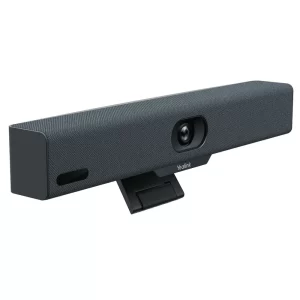
Huddle rooms are the future of the workplace, and over 75% of video meetings will occur in huddle rooms. Organisers of such meetings would often rely on USB peripherals for video conferencing, thus ignoring rapidly developing technology and solutions in the video conferencing arena. One such is Yealink A10, designed for huddle spaces. The Yealink A10 is a compact Meeting Bar for huddle rooms and home offices. It is certified for Microsoft Teams and compatible with all leading Unified Communication (UC) platforms, including Zoom. The Yealink Meeting Bar A10 is both affordable and ultra-convenient to use and set up.Yealink is a global-leading provider of Unified Communication & Collaboration Solutions specialised in video conferencing, voice communications, and collaboration, dedicated to helping every person and organisation embrace the power of “Easy Collaboration, High Productivity”. With best-in-class quality, innovative technology, and user-friendly experiences, Yealink launched the Yealink A10 for huddle spaces to provide a simple, all-in-one audio and video conferencing solution for businesses and organisations that need an easy-to-use and cost-effective way to host Huddle Space meetings. It is a versatile and reliable choice for any small business or remote team.Key Features of the Yealink A10 AI-enhanced voice: The built-in 8 MEMS microphone arrays and speaker in Meeting Bar A10 cover a huddle space nicely. As a result, you can enjoy a worry-free, full-duplex voice experience with superior performance. The device is also powered with AI noise cancellation, which blocks unnecessary background noise and makes the environment distraction-free. Thus, making everyone get heard. Speaker Tracking: Speaker Tracking frames a real-time close-up of the speaker. It brings a vivid face-to-face meeting experience. Auto Framing: The feature recognises attendees’ numbers and positions, framing everyone in the most appropriate view. Clear view: The bar packs powerful AI-enhanced video features. Important moments in the huddle space are captured with a 4k camera and 120° field of view. Smart Gallery: Smart gallery displays one panoramic view and two individual views of the current and last active speaker. This allows displaying the group more clearly to remote attendees. However, this feature is only available in Zoom-integrated devices only. What Makes the Yealink A10 a Good Choice for Huddle Spaces Simple to make room right The Yealink Meeting Bar A10 caters to all your huddle space meeting and home office needs. It is compact enough to fit anywhere. It is specially designed for focus rooms, huddle rooms, and phone rooms. You can set up within minutes and kick o your huddle space meeting in seconds. Meeting Bar A10 optimises your huddle space design and minimises visible cabling with diverse mounting options. These include desks, walls, or monitors/TV.Furthermore, compared with USB peripheral solutions, Meeting Bar A10 offers more: powerful video and audio, native meeting control and remote device management. A clean desk Meeting Bar A10 creates a wireless meeting experience with the WPP30 presentation pod. Not only content sharing but also can be wireless. Simply plug the WPP30 pod into the laptop’s USB-C port, and rich video and audio from A10 are shared immediately without installing software or drivers. Having a tidy workplace is always rewarding. Thus, reducing clutter and stress. Mini size, hardcore Though compact, the bar packs powerful AI-enhanced video and audio features. The AI-powered camera features real-time and precise Auto Framing and Speaker Tracking. Yealink’s deep learning intelligent audio analysis technology erases background noises. Thanks to its powerful video and audio technology, everyone gets an equal seat in the meeting. Unified Communication The Yealink Meeting Bar A10 is fully certified and compatible with leading video platforms such as Microsoft Teams and Zoom. It also adds flexibility as a standalone USB peripheral. No matter what platform a company starts with, later, when migrating to a native experience like Microsoft Teams or Zoom, it can complete the transition seamlessly. Management over the air The Yealink Meeting Bar A10 can be monitored, controlled and upgraded remotely with a free YMCS (Yealink Management Cloud Service) account. It can all be done, whether it’s firmware updates, configuration updates, or troubleshooting.Product Specifications Items Yealink A10 Product Code A10-010 Price £1,196.91 Inc VAT Camera 8MP Camera Resolution: 4k, 1080p and 720p 30fps 120° field of view 4x e-PTZ camera Electric privacy sheer Intelligent Features – Auto Framing – Speaker Tracking – Smart Gallery (Zoom Only) Audio Built-in 8 MEMS microphone array Built-in 5W high fidelity speaker Yealink Noise Proof Technology Full-duplex Echo cancellation Network Built-in dual-band Wi-Fi (2.4GHz/5GHz) Built-in Bluetooth Operating System Android 11 Connections 1 x HDMI output (CEC supported) 1 x USB 2.0 1 x USB-C 1 x 10/100M/1000M Ethernet port 1 x Yealink VCH port (RJ-45) 1 x Power port 1 x Security lock slot 1 x Reset slot
This website uses cookies so that we can provide you with the best user experience possible. Cookie information is stored in your browser and performs functions such as recognising you when you return to our website and helping our team to understand which sections of the website you find most interesting and useful.
Strictly Necessary Cookies
Strictly Necessary Cookie should be enabled at all times so that we can save your preferences for cookie settings.
If you disable this cookie, we will not be able to save your preferences. This means that every time you visit this website you will need to enable or disable cookies again.
3rd Party Cookies
This website uses Google Analytics to collect anonymous information such as the number of visitors to the site, and the most popular pages.
Keeping this cookie enabled helps us to improve our website.
Please enable Strictly Necessary Cookies first so that we can save your preferences!