Excellent
Next day delivery! Depending on Availability*
Here to help! Monday to Friday, 8:30AM-5:30PM*

The Rise of Digital Assistants in Meeting Rooms

Digital assistants in meeting rooms

Digital assistants in meeting rooms are quickly becoming an important topic to explore in the workplace. With the rise of artificial intelligence and voice recognition technology, digital assistants, also known as virtual assistants or smart speakers, are transforming how we interact with office automation and conference rooms. Voice commands are now a common feature in workplace technology, and the convenience and efficiency of digital assistants in meeting rooms cannot be overstated.

These intelligent assistants can help to streamline meeting productivity and improve collaboration by enabling voice-activated communication and managing tasks. They can also help eliminate manual note-taking, freeing time for more important tasks. In addition, digital assistants can be affordable solutions for meetings, offering cost-effective conference room technology options that can help to enhance the overall workplace experience.

Choosing the right digital assistant for your meeting room can greatly improve efficiency. Many options are available, from the latest digital assistant trends for meeting rooms to digital assistant features for improved productivity. Some popular features include speech recognition and natural language processing, which can make it easier to communicate with your assistant and improve accuracy.

Workplace technology is rapidly changing, and integrating digital assistants in conference rooms can significantly impact meeting productivity and collaboration. Thus, digital assistants in meeting rooms are an important and timely topic to explore. 


What are digital assistants?

Digital assistants in meeting rooms are AI-powered virtual assistants that use voice recognition technology to carry out commands given by the user. The most popular examples of digital assistants are Alexa, Siri, and Google Assistant, available on smart speakers, smartphones, and other devices.

Integrating digital assistants in meeting rooms transforms workplace technology, providing efficient office automation and smarter conference rooms.

According to a survey by Spiceworks, 36% of businesses plan to adopt digital assistants in meeting rooms by 2023. Additionally, a report by Technavio estimates that the global smart office market, which includes digital assistants, will grow at a CAGR of over 17% from 2019-2023.”

Types of Digital Assistants

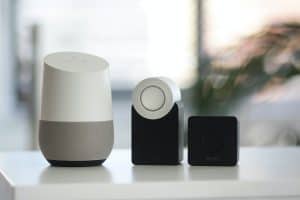
  • One of the most popular digital assistants for meeting rooms is the smart speaker, which uses natural language processing (NLP) and speech recognition technology to understand and respond to voice commands. These devices can be easily integrated into any conference room setup, providing an affordable and flexible option for businesses of all sizes.
  • Other popular types of digital assistants for meeting rooms include virtual assistants and AI assistants, which offer more advanced features such as machine learning and predictive analytics. These devices can analyse meeting data to suggest improvements for future meetings or even automatically generate meeting minutes and action items.

How Do Digital Assistants Work? 

These AI-powered virtual assistants utilise voice recognition technology and artificial intelligence to understand and respond to voice commands, making office automation and conference room technology more accessible and efficient. The most common use case for digital assistants in meeting rooms is for controlling various aspects of the room. For example, a voice-activated assistant can adjust lighting, temperature, and audio levels with a simple voice command, allowing meeting participants to focus on the content of the meeting instead of fiddling with technical equipment.

In addition to these basic functions, digital assistants can also schedule meetings, set reminders, and send notifications to attendees, streamlining the entire meeting process from start to finish. Some digital assistants even offer real-time language translation capabilities, making it easier for businesses to conduct global meetings without needing professional interpreters.


How are digital assistants used in meeting rooms?

Digital assistants in meeting rooms have revolutionised how businesses conduct meetings, conferences, and other collaborative sessions. These smart assistants provide a more efficient, streamlined, and productive experience in the workplace.

Benefits of Digital Assistants in Meeting Rooms

  • Using digital assistants in meeting rooms offers faster and more accurate note-taking is possible with voice-activated assistants that use speech recognition technology. These smart assistants can quickly transcribe meeting notes and action items, allowing attendees to focus on the discussion rather than taking notes. According to a study by Vodafone, using voice-activated assistants can save employees up to one hour per week in note-taking time.
  • Digital assistants can also streamline scheduling and task management in meeting rooms. By using voice commands, attendees can easily schedule follow-up meetings, set reminders, and assign tasks. This saves time and improves productivity, as attendees no longer need to manually schedule meetings or assign tasks after the meeting has ended. 
  • Digital assistants facilitate more efficient communication in meeting rooms. For instance, attendees can use voice commands to access documents, presentations, and other files without needing physical devices such as laptops, tablets, or smartphones. Additionally, digital assistants can connect with other smart devices in the meeting room, such as smart projectors or video conferencing equipment, making it easier for attendees to collaborate and share information.

“A study by Salesforce found that businesses that use AI assistants experience a 44% increase in customer satisfaction, a 31% decrease in costs, and a 33% increase in revenue. These benefits can also translate to meeting productivity, as AI assistants such as digital assistants can help attendees save time and improve collaboration during meetings.”

Challenges and limitations of using digital assistants in meetings

Digital assistants are becoming more common in meeting rooms as they can help with office automation, conferencing, and improving workplace technology. However, some challenges and limitations need to be addressed when using digital assistants in meeting rooms.

  • Privacy Concerns

One of the major concerns with using digital assistants in meeting rooms is privacy. Smart speakers or voice-activated devices like Amazon’s Alexa or Google Home use voice recognition technology to recognise and respond to voice commands. The devices store voice data, which could be sensitive and confidential, leading to concerns about data privacy and security. To mitigate this challenge, ensuring that the digital assistant is set up correctly, with security and privacy features enabled is essential. This includes disabling the listening mode when not in use, restricting access to the assistant, and ensuring that the data stored is secure and encrypted.

  • Technical Difficulties

Another limitation of using digital assistants in meeting rooms is technical difficulties. Voice recognition technology is imperfect; sometimes, it may not correctly recognise the speaker’s voice or commands. This could result in frustration and wasted time. Furthermore, connectivity issues may hinder the assistant from connecting to the internet or other devices. To address this challenge, it is essential to ensure that the digital assistant is compatible with the meeting room’s other devices and software and to have a backup plan in case of connectivity issues.

  • Integration with Meeting Technology

Another challenge of using digital assistants in meeting rooms is integrating with existing meeting technology. Various digital assistants are available, each with its own set of features and limitations. Finding the right assistant that works with the existing hardware and software in the meeting room can be challenging. To overcome this challenge, it is important to research and compare different digital assistants and find the most compatible with the existing meeting technology.

Potential Solutions

Despite these challenges, there are potential solutions to overcome these limitations. One solution is to use AI assistants that use natural language processing (NLP) and can understand and respond to voice commands more accurately and precisely. Another solution is using voice-controlled digital assistants that integrate with the meeting room’s devices and software, allowing seamless connectivity and communication. Additionally, it is essential to ensure that digital assistants are regularly updated with the latest software and security features to keep them secure and operating efficiently.

However, these challenges can be overcome by following security and privacy protocols, ensuring compatibility with existing technology, and using the right digital assistant for the meeting room, leading to a more efficient and productive workplace.

Best practices for using digital assistants in meetings

With the help of artificial intelligence and voice recognition technology, digital assistants can simplify office automation and streamline communication, making meetings more efficient and productive.

Speaking Clearly and Concisely

The first step in using digital assistants in meetings is to speak clearly and concisely. The better the speech recognition of the digital assistant, the more accurately it can respond to your commands. Avoid using filler words, and be sure to enunciate clearly. If you have a strong accent or speak quickly, consider training your digital assistant with your voice profile to improve recognition accuracy.

Using the Right Commands

Using the right commands is essential to getting the most out of your digital assistant. For example, saying “Set a reminder for 2 pm” instead of “Can you remind me later?” provides more specific instructions and reduces the risk of misunderstanding. Use voice commands that are simple and easy to understand, and avoid overly complicated phrases or jargon.

Avoiding Distractions

Digital assistants can help keep meetings on track, but they can also be a source of distraction. To avoid this, turn off any unnecessary notifications or alerts during meetings. Also, avoid using your phone or other devices while the digital assistant is in use, as this can create confusion and reduce efficiency.

Optimising for Different Meeting Types

Different types of meetings require different approaches to using digital assistants. For brainstorming sessions, consider using a voice-activated whiteboard to capture ideas in real time. For team updates, use a virtual assistant to provide automated updates and reports. Consider using a smart speaker to provide background music or sound effects for client presentations.

Transforming Meeting Spaces with Digital Assistants

Digital assistants transform meeting spaces by enabling more efficient and productive collaboration. With the help of voice recognition and artificial intelligence, they can automate tasks and provide real-time updates, leaving more time for discussion and brainstorming.

Therefore, by following best practices, such as speaking clearly, using the right commands, and optimising for different types of meetings, you can make the most of this technology and transform how you work. Remember to choose the right digital assistant for your specific needs and budget and to keep up with the latest trends and features to stay ahead of the curve.


Future trends in digital assistants and meeting rooms

In recent years, digital assistants in meeting rooms have become increasingly popular, and the advancements in artificial intelligence (AI) have further improved their capabilities.

  • One of the key trends we will likely see is the increased use of AI in digital assistants. As these technologies become more sophisticated, we can expect them to be able to understand and respond to more complex commands and questions, leading to more natural and efficient interactions.
  • Voice recognition technology is another area that is set to see significant advancements. While current systems can understand basic commands and speech, we can expect more advanced systems that can understand natural language and context to become available. This would make digital assistants even more user-friendly and intuitive.
  • Smart speakers and virtual assistants are already being used in some workplaces, and we can expect their popularity to grow. These devices can help with office automation, making it easier to manage tasks and schedules and providing a more streamlined working environment. As technology advances, we can expect more integration between virtual assistants and other workplace technologies, such as video conferencing and project management tools.
  • Conference rooms are another area where digital assistants are likely to see significant developments. Voice command and speech recognition technology can help make meetings more efficient and productive by enabling participants to quickly access information and data, schedule appointments, and even manage presentations. This could lead to significant time savings and improvements in meeting outcomes.

Conclusion

In conclusion, digital assistants in meeting rooms are set to see significant advancements in the coming years. As AI and voice recognition technology evolves, we can expect to see more sophisticated and intuitive systems that can understand natural language and context. This, in turn, will lead to more efficient and productive meetings, enhanced collaboration, and streamlined office automation. The future of workplace technology looks bright, and digital assistants will undoubtedly play a significant role in shaping it.


FAQs

Q. What are digital assistants in meeting rooms?

Digital assistants in meeting rooms are AI-powered devices that can help manage various aspects of a meeting. These devices are designed to make meetings more efficient, productive and engaging. Digital assistants can be used to set up and manage meetings, control the audio and video equipment in the room, and even take notes and share them with attendees.

Q. How do digital assistants work in conference rooms?

Digital assistants work in conference rooms by integrating with the audio and video equipment, as well as other software and services such as calendars and messaging apps. They use voice recognition technology to interpret user commands and can respond with natural language processing. Digital assistants can also be controlled via a touchscreen interface or mobile app.

Q. What are the benefits of using digital assistants in meetings?

Using digital assistants in meetings includes increased productivity and efficiency, improved collaboration, and a more engaging meeting experience. Digital assistants can help automate routine tasks, such as scheduling, note-taking, and audio/video setup, freeing more time for meaningful discussions and decision-making.

Q. Which are the best digital assistants for meeting rooms?

The best digital assistants for meeting rooms include Microsoft Cortana, Google Assistant, Amazon Alexa for Business, and Zoom Assistant. These digital assistants have been designed for use in meeting rooms and offer features such as audio and video control, meeting scheduling and management, and note-taking.

Q. How can digital assistants improve meeting productivity?

Digital assistants can improve meeting productivity by automating routine tasks, reducing distractions, and providing real-time assistance to attendees. By allowing participants to focus on the discussion, digital assistants can help ensure that meetings stay on track and are more productive overall.

Q. What features should I look for in a digital assistant for meetings?

When choosing a digital assistant for meetings, it’s important to look for features such as audio and video control, scheduling and management capabilities, note-taking, and integration with other software and services. Natural language processing, voice recognition, and real-time translation can help enhance the overall meeting experience.

Q. Can digital assistants help with collaboration in meetings?

Yes, digital assistants can help with meeting collaboration by facilitating communication and providing real-time assistance to attendees. Features such as note-taking, file sharing, and real-time translation can help improve collaboration between participants, even when they are located in different parts of the world.

Q. What is the cost of using digital assistants in meeting rooms?

The cost of using digital assistants in meeting rooms can vary depending on the device or service used. Some digital assistants, such as Amazon Alexa for Business, require a subscription fee, while others, such as Zoom Assistant, may be included in a video conferencing subscription cost.

Q. How secure are digital assistants in meetings?

Digital assistant meetings can be secure if proper precautions are taken. This includes using strong passwords, keeping software up to date, and limiting access to the device. Some digital assistants, such as Microsoft Cortana, offer enterprise-level security features like multi-factor authentication and data encryption.

Q. How do I set up a digital assistant in a conference room?

Setting up a digital assistant in a conference room typically involves connecting the device to the audio and video equipment and any necessary software and services. Depending on the device, this may involve using a mobile app or a touchscreen interface to configure the device and connect it to the network. Once set up, the digital assistant can be controlled using voice commands or a mobile app.

Picture of Meeting Store

Meeting Store

Table of Contents

making livestreaming more professional
AV Equipment

How to Make Your Live Streaming More Professional

When a video is streamed directly on the internet in real-time without it being recorded and edited first, that is known as Live Streaming. Now things such as social media videos, video game streams, TV broadcasts, etc. are often live-streamed.In regular streaming, the content is created, recorded, and edited first before uploading it on the internet, whereas in live streaming, the content is presented to the audience at the same moment it is being created.Videoconferencing technologies such as Skype, FaceTime, and Google Hangouts work on live communication (RTC) protocols rather than protocols that use one or more live stream broadcasts.Improving Your Live StreamsA lot of businesses are getting into live streaming nowadays, and it is generating a lot of revenue. Live streaming is the best way to promote your brand at the moment, it has the highest rate of engagement among all other content types. Live streaming is important for brands and individuals because of the level of interaction it offers. You would struggle to get this kind of interaction with other marketing strategies.Live streaming needs to be polished and professional to keep your audience engaged and impress them. No one wants their live streaming quality below expectations. Here are some tips on how to make your live streaming more professional.Select A Professional Video Hosting ServiceProfessionalism has many meanings. The most important is branding. Most big brands do not use social media platforms for their live streaming, and if they do, it is only a small strategy of collecting an audience.Instead, you should use proper video streaming platforms. Using such a platform allows you to host video content on your websites. Your content has no labels, including YouTube or any other corporation. These are sometimes called white label services. You can add your corporate branding‌ and achieve overall local integration for maximum professionalism.It has some other effects. When it comes to social media platforms, it is possible to embed them on your website. Although, when someone clicks on a live streaming video or link, they are sent to a social media website. This increases their page visits, views and they get the revenue out of it.When you embed with a white label service, it will be rotated. Clicks can lead to your website. You can add your money-making options. There are several other benefits to streaming live video, including professional platforms: Strong and safe security 24/7 customer service Money making features No one can steal your broadcasted content, you can maintain exclusive rights to your content. Create Excellent ContentMake sure to create good and engaging content to remain professional. You could be broadcasting any sport, meetings, product launches, training videos, video games, or any other form of video, but your content needs to be excellent and engaging, so it does not bore or disinterest the audience.Any business that wants to stream live videos needs to create good quality content. If your content is not engaging and of good quality, the audience won’t watch it, it will be of no use then. Invest in your content creation to make it excellent and worth watching. Remember, if your content is excellent and the audience loves it, the rest of the things get much easier.Improve Your Set DesignAlways use an improved set to make your streaming look professional. Consider investing in a personal studio to do your live streams there, but if you don’t have enough resources for setting up a personal studio, here is what you can do: Make sure you have a great background. Check your background and frame for your shoot, remove any distracting, noisy things and make your space visible and clean. You can add a few interesting but simple items, so it doesn’t look too bland. Add some space between you and the background and between you and the camera, not a lot of space but enough to look clean and professional. Create a good lighting source. Good lighting will improve the whole stream, it will add depth and dimension to your video. Try the standard three-point lighting for the best results, this includes the Key light, backlight, and fill light. Invest in natural daylight tone for your lights to avoid bluish skin tone. Also, refrain from relying on natural light as it cannot be controlled and might create a bad impression. Use Professional EquipmentIncrease the quality of your stream by using high-quality equipment. These include cameras, audio recorders, microphones, and encoders.Even though low-quality cameras can produce decent-looking videos in good light, but they produce blurry and poor colour quality videos in low light. If you are on a restricted budget then to look professional and to maximize your video quality, consider using High Definition (HD) web cam like the Logitech Brio.Your audio needs to be the best quality as this is the most important thing in your live stream, even more important than the videos. Invest properly in audio equipment, it can be a bit expensive, but it is worth investing in these. The built-in microphones of your computers and laptops are of bad quality, and using them will only create miscommunication between you and your audience. Use a good quality microphone like the ones used by professionals. Keep your microphone close to your mouth, so the audio is loud and clear.Internet connection is also a very important element for live streaming, it is the first thing you need to look at. You need to have a great internet connection, make sure you have a fast internet broadband service, so your video quality remains good. Find the spot with the strongest signals and create your live stream setup there. The faster the speed of your broadband is, the better quality stream you will produce.Setup Your Encoder AccuratelyUse the correct encoder settings. An encoder converts your video into a live stream format. Proper instructions are required to make this claim: First, you need to connect to your live video host servers. Next, you need to select the resolution, frame rate, and bit-rate for your stream. These dimensions

Read More »
remote team planning tools
Remote Collaboration

Plan and Execute Projects Efficiently with these Remote Team Planning Tools

In today’s rapidly evolving work landscape, remote teams have become increasingly prevalent. The rise of technology and the need for flexibility have paved the way for remote collaboration, enabling organizations to tap into talent from across the globe. However, managing projects and coordinating teams in a remote setup comes with its own set of challenges. In this article, we will explore the challenges faced by remote teams in project planning and execution and emphasize the importance of using effective remote team planning tools to streamline collaboration, enhance productivity, and achieve project goals.Coordination and Communication: Remote teams often struggle with effective coordination and communication due to geographical barriers. Lack of face-to-face interaction can lead to misunderstandings, delays, and misalignment. It is crucial to implement remote team coordination tools and team communication tools to bridge this gap and foster seamless collaboration.Task Management and Tracking: Without proper visibility and accountability, tracking tasks and ensuring project progress becomes challenging. Remote team task management software and project tracking tools play a vital role in facilitating efficient task allocation, tracking, and reporting. These tools provide real-time updates and enable teams to stay on top of their responsibilities.Project Planning and Scheduling: Remote team project planning requires careful consideration of time zones, availability, and dependencies. Project planning software and project scheduling tools designed for remote teams help optimize workflows, allocate resources effectively, and create realistic project timelines. These tools enable efficient project execution and ensure that deadlines are met.Collaboration and Document Sharing: Seamless collaboration is essential for remote teams to work together efficiently. Remote team collaboration tools with real-time collaboration features facilitate smooth document sharing, feedback exchange, and version control. Such tools promote effective teamwork and eliminate the challenges of working on shared documents across different time zones.Virtual Team Management: Managing a virtual team requires strong organizational skills. Remote team organization techniques and virtual team management tools help establish clear roles and responsibilities, maintain team cohesion, and ensure everyone is on the same page. These tools provide a centralized platform for storing information, sharing updates, and fostering a sense of unity among team members.7 Best Task Management Tools in 2023  Remote Team Planning Tools for Small BusinessesSmall businesses operating with remote teams face unique needs and constraints that require effective remote team planning tools. With team members spread across different locations, it becomes essential to have streamlined processes and tools in place to ensure efficient project execution, seamless communication, and optimal productivity.One of the key challenges faced by small businesses is the need for affordable tools that meet their specific requirements. Limited budgets often restrict the choice of tools, making it crucial to find cost-effective solutions without compromising functionality.Scalability is another consideration for small businesses. As the team grows and more projects are undertaken, the planning tools must be able to accommodate increasing demands and provide scalability options for smooth operations.Ease of use is paramount for small businesses, as they may not have dedicated IT staff or extensive training resources. Intuitive and user-friendly planning tools enable quick adoption and minimize learning curves, allowing teams to focus on their work.Selection of Remote Team Planning Tools Specifically Tailored for Small Businesses Project Planning Software: Effective project planning is essential for small businesses operating with remote teams. Tools like Trello and Asana offer intuitive interfaces and allow for easy creation and management of tasks, deadlines, and dependencies. These platforms promote collaboration and keep everyone on the same page throughout the project lifecycle. Project Management Tools: Remote team project management tools such as Monday.com and Basecamp provide comprehensive solutions for small businesses. They facilitate team coordination, task assignment, progress tracking, and document sharing, enabling seamless collaboration among team members regardless of their physical location. Task Management Software: To ensure efficient task execution and timely delivery, small businesses can utilize task management software like Todoist or Wrike. These tools offer features such as task assignment, prioritization, and progress tracking, helping remote teams stay organized and focused on their objectives. Team Communication Tools: Smooth communication is vital for remote teams, and tools like Slack and Microsoft Teams facilitate real-time messaging, file sharing, and video conferencing. These platforms enhance collaboration, foster quick decision-making, and promote a sense of virtual togetherness among team members. Project Tracking Tools: Small businesses can benefit from project tracking tools such as Jira or ClickUp. These tools allow for detailed project tracking, issue management, and reporting, enabling teams to identify bottlenecks, make data-driven decisions, and ensure project success. Addressing Challenges of Affordability, Scalability, and Ease of UseThe selected remote team planning tools specifically tailored for small businesses address the challenges of affordability, scalability, and ease of use in the following ways: Affordability: Trello, Asana, Todoist, and Monday.com offer free or low-cost plans with sufficient functionality for small teams, ensuring affordability without compromising essential features. This allows small businesses to access powerful planning tools within their budgetary constraints. Scalability: Basecamp, Wrike, and ClickUp provide scalable solutions, accommodating the growth and evolving needs of small businesses. These tools offer flexible pricing plans and additional features to support expanding teams and projects, ensuring smooth scalability as the business expands. Ease of Use: Slack, Microsoft Teams, and intuitive tools like Trello prioritize ease of use with user-friendly interfaces and simple onboarding processes. This allows small businesses to quickly adopt and integrate the tools into their workflow, minimizing training requirements and maximizing productivity. Tool Key Features Trello Intuitive task and project management Asana Collaborative project planning and tracking Todoist Efficient task management and prioritization Monday.com Comprehensive project management and team coordination Slack Real-time communication and collaboration Microsoft Teams Messaging, video conferencing, and file sharing Jira Detailed project tracking and issue management ClickUp Scalable project tracking and reporting Basecamp Streamlined team coordination and document sharing Wrike Task management and scalable project planning   Top Remote Team Collaboration ToolsIn today’s digital age, remote teams have become increasingly common, requiring effective collaboration tools to ensure seamless communication and efficient project execution. In this section, we will discuss a curated list of top remote team collaboration tools that enable remote collaboration

Read More »
AV gear's role in enhancing productivity
productivity

Rule the World: AV Gear’s Role in Enhancing Productivity

In today’s fast-paced world, the relentless pursuit of productivity enhancement has become paramount. As the demands of work continue to intensify, businesses and individuals are seeking innovative ways to optimize their workflow and improve overall efficiency. One remarkable transformation that has redefined work effectiveness is the integration of AV gear – audio-visual equipment that has evolved from being a mere tool to an indispensable asset for boosting productivity.In the quest for optimal workplace efficiency, the role of AV gear cannot be underestimated. From boardrooms to home offices, audio-visual solutions have become an essential part of daily operations. Leveraging AV technology, companies are embracing new avenues to communicate, collaborate, and deliver exceptional work output.The benefits of integrating AV equipment extend beyond traditional meetings and presentations. Modern workplaces recognize the power of visual communication in conveying complex ideas succinctly. The use of audio-visual aids for enhanced productivity is evident in training sessions, brainstorming meetings, and even client interactions. This seamless integration allows for efficient knowledge sharing and innovation.One of the key ways AV gear improves productivity is by enabling remote work. As businesses embrace flexible work arrangements, AV technology bridges the gap between team members located across various geographic locations. Collaborative tools like video conferencing and screen sharing facilitate real-time discussions, reducing the need for time-consuming travel.Ava interactive meeting room solutions  Significance of AV Gear in Productivity EnhancementAV gear, short for audio-visual gear, plays a pivotal role in transforming work environments and elevating productivity levels. In a rapidly evolving technological landscape, businesses are increasingly recognizing the profound impact of AV equipment on productivity enhancement. This section delves into the relationship between AV gear, audio-visual solutions, and productivity enhancement while shedding light on the benefits of integrating AV equipment into various work scenarios.AV Gear and Its Relation to Audio-Visual SolutionsAV gear encompasses a range of technologies, including display screens, projectors, audio systems, video conferencing tools, and interactive whiteboards. These elements collectively constitute audio-visual solutions that facilitate effective communication, collaboration, and presentation within organizations. By leveraging AV equipment, businesses can foster a dynamic environment that fosters creativity and knowledge sharing.Concept of Productivity Enhancement and Workplace EfficiencyProductivity enhancement revolves around optimizing work processes to achieve higher levels of output with the same or fewer resources. Workplace efficiency, on the other hand, pertains to streamlining operations to minimize wastage of time and effort. The integration of AV gear aligns with both these concepts, as it empowers employees to communicate and collaborate seamlessly, thereby minimizing bottlenecks and maximizing work effectiveness.Benefits of Integrating AV Equipment into Work Scenarios Optimizing Workflow: AV technology streamlines information dissemination, enabling teams to convey complex ideas more effectively. Meetings, presentations, and training sessions become more engaging, accelerating decision-making processes. Remote Work Tools: In the era of remote work, AV solutions enable virtual collaboration through high-quality video conferencing and screen sharing. This facilitates seamless communication regardless of geographic boundaries. Efficiency Boost: AV gear reduces communication barriers by enabling visual and auditory cues, fostering a deeper understanding of concepts. This leads to improved efficiency in project execution and problem-solving. Maximizing Productivity with AV EquipmentThe seamless integration of AV equipment enhances work environments by providing tools that boost collaboration, creativity, and efficiency. Organizations can harness the power of AV gear to optimize workflow, facilitate remote work, and amplify work output. The combination of AV technology with effective communication strategies can truly revolutionize workplace productivity, aligning with the ever-changing demands of the modern business landscape.AV Gear’s Impact on Work Effectiveness and EfficiencyEmploying AV tools cultivates an environment where employees can exchange ideas effortlessly, transcending physical barriers. As technology evolves, so do the methods of interaction, making remote collaboration more engaging and efficient. This is especially relevant in today’s dynamic work scenarios, where the ability to connect and communicate across distances is crucial for maintaining productivity.Incorporating AV Solutions for Better EfficiencyAV gear has become synonymous with enhancing work efficiency, allowing teams to collaborate in real time, regardless of their physical locations. The rapid evolution of AV technology has paved the way for seamless integration into various work settings, offering a plethora of tools that cater to different communication needs. As businesses continue to adapt to new ways of working, AV solutions emerge as key facilitators of productivity enhancement.AV Gear’s Influence on Workplace ProductivityThe role of AV equipment in the modern workplace cannot be overstated. Its ability to transcend barriers and enable effective communication contributes directly to the overall efficiency of an organization. The integration of AV technology aligns with the goal of achieving higher work output without sacrificing quality, making it an essential component of any productivity-focused strategy.  Optimising Workflow: How AV Tools Can Make a DifferenceIn today’s fast-paced business landscape, optimizing workflow and enhancing productivity have become paramount for organizations aiming to stay competitive. Leveraging audio-visual (AV) technology has emerged as a powerful strategy to achieve these goals. AV gear’s impact on workplace productivity cannot be understated, as it revolutionizes communication, collaboration, and overall work effectiveness.Audio-Visual Equipment Benefits for Work EfficiencyAV technology integration brings a multitude of benefits that contribute to productivity enhancement and workplace efficiency. By seamlessly blending audio and visual components, AV tools facilitate engaging communication that captures attention and promotes information retention. This dynamic approach enables faster comprehension and decision-making, ultimately leading to improved work output.Maximizing Productivity with AV EquipmentMaximizing productivity with AV gear is a cornerstone of modern business practices. Integrating AV solutions into daily operations offers tangible efficiency boosts. Whether it’s conducting remote meetings or sharing complex ideas through interactive presentations, AV equipment streamlines tasks, reduces misunderstandings, and fosters more productive interactions.Optimizing Workflow with AV Tools: Practical Examples Video Conferencing Systems: AV technology enables geographically dispersed teams to collaborate effortlessly. Video conferencing systems like Zoom and Microsoft Teams transcend physical boundaries, allowing teams to discuss projects, make decisions, and maintain a cohesive workflow, even when working remotely. Interactive Displays: Interactive displays, such as digital whiteboards, revolutionize brainstorming and idea sharing. Teams can collectively contribute and visualize concepts in real-time, expediting problem-solving and ideation processes. AV Equipment for Remote Work: Enhancing Work OutputIn the

Read More »
Meeting room scheduling software
Future Trends

The Benefits of Meeting Room Scheduling Software

Discover the numerous benefits of meeting room scheduling software. Automate your scheduling, streamline your operations and optimize your resources with our easy-to-use software. Get more done in less time with our powerful scheduling tools.

Read More »
remote meeting whiteboard
Remote Collaboration

Upgrade Your Remote Meetings with the Perfect Whiteboard Solution

Upgrade Your Remote Meetings with the Perfect Whiteboard Solution. Improve collaboration and productivity with a powerful remote meeting whiteboard. Discover the best tools and techniques to enhance your virtual meetings. Unlock the full potential of remote work with our comprehensive guide.

Read More »
Specialized AV knowledge
Training and Education

Attain Specialized AV Knowledge Through Expert Training

In today’s fast-paced and technology-driven world, the importance of specialized AV knowledge cannot be overstated. With rapid advancements in audiovisual technology, staying ahead of the curve is crucial. This article delves into the relevance of acquiring specialized AV skills, shedding light on the myriad benefits and opportunities available in this dynamic field.The world of audiovisual technology has witnessed a remarkable evolution in recent years. From cutting-edge displays to immersive sound systems, the possibilities are endless. To navigate this landscape effectively, individuals must equip themselves with specialized AV knowledge. This knowledge serves as the foundation for professionals to harness the power of advanced techniques and emerging trends.One of the key avenues for acquiring specialized AV knowledge is through AV certification. These certifications are designed to provide in-depth AV knowledge, ensuring that individuals can confidently handle the complexities of modern AV systems. Expert training programs cover a wide range of topics, from the fundamentals of audiovisual expertise to the intricacies of advanced audiovisual skills.Specialized programs are tailored to meet the specific needs of aspiring AV specialists. They offer a structured approach to AV education, ensuring that individuals gain specialized AV knowledge in a systematic manner. These programs often include a specialized curriculum that covers topics such as AV proficiency, advanced AV techniques, and specialized AV courses.Smart Online Classroom Solution – How it Works ? Solution Offered by PeopleLink – Part 2  Becoming an AV ExpertBecoming an AV expert, or an Audiovisual expert, is an exciting and promising career choice in today’s digital age. AV experts are professionals who excel in handling audio and visual equipment, creating seamless multimedia experiences, and troubleshooting technical issues related to audiovisual systems. Prerequisites for Pursuing a Career in AVBefore embarking on the journey to become an AV specialist, it’s essential to lay the groundwork with the right prerequisites. Specialized AV knowledge forms the foundation upon which your expertise will grow. This knowledge can be acquired through AV certification, expert training, and advanced audiovisual skills development.Qualities and Skills Required to Excel in this Field Technical Aptitude: An AV expert must have a strong technical aptitude to work with complex audio and visual equipment effectively. Advanced AV techniques are learned through specialized audiovisual training. Problem-Solving Skills: Troubleshooting is a significant part of an AV specialist’s job. You’ll need in-depth AV knowledge to diagnose and resolve technical issues swiftly. Attention to Detail: AV professionals must be meticulous in their work, ensuring that every component of an AV setup functions flawlessly. Specialized AV education emphasizes attention to detail. Communication Skills: Effective communication is key when working with clients or team members on AV projects. AV specialist skills include clear and concise communication. Adaptability: Technology evolves rapidly in the audiovisual industry. AV experts need to stay updated with the latest advancements, which can be achieved through specialized AV workshops and online courses. Specialized AV Knowledge and Professional DevelopmentSpecialized AV knowledge is the cornerstone of success in this field. AV certification benefits include validating your expertise and opening doors to exciting career paths. Expert training and specialized programs equip you with advanced audiovisual skills, making you an invaluable AV specialist.To build your AV proficiency, consider specialized AV courses, which provide in-depth AV knowledge tailored to industry demands. These courses cover advanced AV techniques and offer specialized curriculum options. Online courses are particularly convenient for professionals looking to enhance their AV expertise at their own pace.Moreover, specialized AV certification adds credibility to your profile and increases your career prospects. Certification benefits include improved job opportunities and higher earning potential.AV Career Development and Building ExpertiseAs you progress in your AV career, you’ll discover numerous paths for specialization. AV specialists can focus on areas such as live event production, home theatre installation, or corporate AV solutions. Your advanced AV skills and specialized AV education will guide your career development.Professional AV knowledge is not static; it continues to evolve. To stay at the forefront of the industry, consider attending specialized AV workshops near you. These workshops provide hands-on experience and networking opportunities with fellow AV professionals.  Specialised AV Training Programs in 2023If you’re looking to excel in the realm of audio-visual (AV) expertise, enrolling in specialized AV training programs in 2023 is your key to success. In this section, we will explore the top AV certification programs and discuss their key features and the numerous benefits they offer for your professional development. AV Certification Excellence Specialized AV knowledge is the cornerstone of a successful career in audiovisual expertise. AV certification programs, such as those offered by industry leaders, provide expert training that equips you with advanced audiovisual skills. These programs feature specialized curricula designed to help you achieve AV mastery. They cover a wide range of topics, from in-depth AV knowledge to advanced AV techniques. Online AV Proficiency In today’s digital age, online courses are a game-changer for those seeking specialized AV education. These courses offer flexibility and convenience, making it easier than ever to acquire specialized AV knowledge. You can learn at your own pace while maintaining your professional commitments. Specialized AV Workshops For hands-on experience and networking opportunities, consider specialized AV workshops near you. These workshops delve deep into AV specialist skills, offering advanced AV techniques and the chance to collaborate with industry experts. They are ideal for AV career development. Choosing the Right AV Courses The task of mastering AV techniques starts with choosing the right AV courses. Look for programs that offer specialized AV certification benefits and emphasize advanced audiovisual training. These courses should align with your career goals and provide specialized AV knowledge tailored to your needs. Building Expertise in AV Becoming an AV expert requires dedication and continuous learning. Specialized AV programs can help you build expertise in AV through comprehensive training, practical exercises, and expert guidance. Whether you’re a beginner or an experienced professional, these programs cater to all levels. Professional AV Development Enrolling in specialized AV education options demonstrates your commitment to professional development. Employers value individuals with specialized AV skills, and these programs can open up lucrative AV specialist career

Read More »
MeetingStore.co.uk
Logo
Compare items
  • Total (0)
Compare
0
Shopping cart