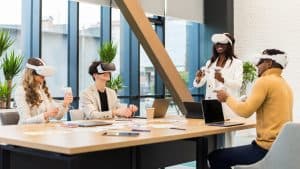
In today’s competitive world, presentation productivity plays a pivotal role in leaving a lasting impact on your audience. To achieve success in public speaking and effectively convey your message, leveraging audio-visual (AV) equipment has become indispensable. This blog will focus on the significance of AV tools in enhancing presentations and provide valuable insights into boosting productivity during speeches.
Incorporating presentation equipment, such as AV devices and interactive displays, enriches your content and keeps your audience engaged. Utilizing advanced multimedia aids not only helps deliver your message effectively but also makes your presentations more captivating and memorable.
AV tools enable you to fine-tune your public speaking skills by providing real-time feedback and offering opportunities for improvement. With the right AV integration, you can analyze your performance and make necessary adjustments to deliver impactful presentations.
Presentation software, combined with the latest AV technology, empowers you to create compelling and dynamic slideshows. Streamlined and visually appealing presentations aid in better comprehension and information retention, thereby maximizing productivity.
The Ideal Meeting Room Setup
The Power of AV Equipment for Engaging Presentations
In the fast-paced world of presentations, captivating your audience and keeping them engaged is essential for successful communication. The power of AV (Audio-Visual) equipment in achieving this goal cannot be underestimated. AV tools not only enhance visual communication but also improve public speaking, making presentations more interactive and impactful.
Maximising Productivity with AV Equipment
When it comes to maximizing productivity with AV equipment, professionals can leverage the latest advancements in presentation technology to deliver efficient and impactful presentations. By incorporating AV devices strategically, speakers can elevate their speaking skills and leave a lasting impression on their audience.
The Role of AV Equipment in Captivating Audiences
AV equipment plays a pivotal role in captivating audiences during presentations. It adds a dynamic element to otherwise static talks, making them visually engaging and interactive. With advanced multimedia aids, speakers can seamlessly integrate visuals, audio, and interactive displays to keep the audience hooked throughout the presentation.
Various Types of AV Tools and Their Impact on Visual Communication
Projectors: Projectors have revolutionized the way presentations are delivered. From traditional conference room setups to modern portable projectors, they allow speakers to project their content on large screens, making it easily visible to all attendees. The projection systems are invaluable tools for data-driven presentations, allowing the speaker to present complex information with clarity.
Displays: Interactive displays take presentations to a whole new level. These tech-enhanced screens enable speakers to navigate through their content with ease, making the presentation more fluid and interactive. Visual communication is enhanced, leaving a lasting impact on the audience.
Audio Aids: Clear and crisp audio is crucial for effective presentations. AV equipment that includes high-quality audio aids ensures that the message is heard loud and clear, eliminating any distractions and maximizing the speaker’s impact.
Successful Presentations Leveraging AV Equipment
TED Talks: TED Talks are renowned for their impactful use of AV equipment. Speakers utilize interactive displays, advanced presentation tools, and multimedia aids to deliver thought-provoking and engaging talks.
Corporate Presentations: In the business world, AV integration in conference rooms has become the norm. Executives use efficient presentation software, top-of-the-line projection systems, and AV accessories to elevate their presentations, resulting in productive meetings and better decision-making.
AV Equipment
Impact on Presentations
Interactive Displays
Enhances engagement levels
Projectors
Facilitates data-driven talks
Audio Aids
Ensures clear communication
Ways to Improve Presentation Productivity with AV Equipment
Incorporate interactive displays to foster engagement.
Use efficient presentation software for seamless content delivery.
Invest in high-quality audio aids for clear communication.
Stay up-to-date with the latest AV technology to keep presentations modern and impactful.
Choosing the Best AV Setup for Presentations
In today’s fast-paced world, delivering impactful presentations is crucial for professionals and public speakers. The right AV (audio-visual) equipment can make all the difference in capturing and retaining your audience’s attention. This comprehensive guide will help you choose the best AV setup for presentations, considering the latest trends in AV technology and focusing on productivity boosters to enhance your overall presentation experience.
AV Equipment for Engaging Presentations
To create engaging presentations, you need reliable and efficient AV tools. These tools encompass a wide range of multimedia aids, including projection systems, interactive displays, audio aids, and presentation software. By utilizing these resources effectively, you can elevate your speaking skills and improve public speaking.
Boost Productivity with AV Tools
Productivity is key when it comes to delivering successful presentations. AV devices play a crucial role in increasing productivity by streamlining your presentation process. With advanced presentation tools and AV integration, you can efficiently create impactful slideshows and seamless audio-visual experiences that leave a lasting impression on your audience.
Choosing the Best AV Setup for Presentations
When selecting your AV setup, consider your specific presentation needs. Evaluate the available AV equipment, focusing on their functionalities and how they align with your presentation style. Below, we compare various AV devices in the market and their suitability for different presentation scenarios.
AV Solutions for Conference Rooms
AV Device
Features
Suitability
Interactive Displays
Touchscreen capabilities, real-time annotations
Ideal for collaborative presentations in conference rooms.
Projection Systems
Large screen display, high image resolution
Perfect for large audiences in conference settings.
Audio Aids
High-quality microphones, sound systems
Enhances speaker’s voice and ensures clear communication.
Advanced Multimedia Aids for Speeches
AV Device
Features
Suitability
Presentation Software
User-friendly interface, customizable templates
Ideal for professionals creating data-driven presentations.
Presentation Remote
Wireless control, slide navigation
Convenient for dynamic speakers who move around while presenting.
AV Integration
Seamless device connectivity, easy setup
Suitable for multi-device presentations with smooth transitions.
Improving Visual Communication in Presentations
Visual communication is a powerful aspect of any presentation. Incorporate AV equipment to enhance visual elements and captivate your audience.
Utilize Interactive Displays: Engage your audience by allowing them to interact with the presentation content directly.
Integrate Audio Aids: Crystal-clear sound quality ensures your message reaches every corner of the room.
Embrace Projection Systems: Showcase your ideas on a large scale for better visibility.
Tech-Enhanced Presentations in 2023
As we move into 2023, AV technology continues to advance rapidly. Embrace the latest trends to elevate your presentations.
3D Projection Systems: Create immersive experiences with 3D projection technology.
AI-Driven Presentation Software: Leverage artificial intelligence to enhance content creation and delivery.
Augmented Reality (AR) Displays: Engage your audience with interactive AR elements.
Wireless Presentation Solutions: Effortlessly connect and present from any device.
Integrating AV in Conference Rooms for Seamless Presentations
In today’s fast-paced business environment, effective presentations play a crucial role in conveying ideas, engaging audiences, and driving success. Integrating Audio-Visual (AV) equipment in conference rooms is a key strategy to ensure seamless presentations that captivate, inform, and inspire. This section explores the importance of AV integration in conference rooms, provides tips on setting up conference rooms with the right AV equipment to maximize productivity, and highlights the benefits of dedicated AV systems for presentations.
Importance of AV Integration in Conference Rooms
AV Tools and Productivity Boosters for Engaging Presentations
Integrating AV technology in conference rooms significantly enhances presentation productivity by offering a range of multimedia aids and advanced presentation tools. With audio-visual tools and interactive displays, presenters can create tech-enhanced speeches that leave a lasting impact on the audience. Utilizing modern presentation gear and effective slideshows further elevates the quality of presentations, keeping participants engaged and attentive.
Effective Visual Communication and Impactful Presentations
Visual communication is a key aspect of modern presentations. AV integration allows presenters to leverage projection systems and audio aids to improve public speaking and make complex information easily understandable. The use of AV equipment for engaging presentations ensures that the message is delivered with clarity and impact, fostering better audience retention and understanding.
Tips for Setting up Conference Rooms with the Right AV Equipment
Choosing the Best AV Setup for Presentations
To create a conducive environment for efficient presentations, it is essential to carefully select the right AV devices and tools. Consider investing in high-quality AV solutions designed for conference rooms to ensure seamless integration and operation. This may include interactive displays, presentation software, and reliable projection systems that cater to the specific needs of the space.
Enhancing Speaking Skills with Audio-Visual Aids
AV equipment can be a powerful tool to improve public speaking skills. Incorporating audio aids, such as microphones and amplification systems, ensures that the presenter’s voice reaches all participants clearly. Additionally, utilizing AV tools like presentation remotes allows speakers to move freely while maintaining control over the content, promoting a dynamic and engaging presentation style.
Benefits of Dedicated AV Systems for Presentations
Efficiency and Productivity with AV Integration
Dedicated AV systems in conference rooms streamline the setup process, saving valuable time and effort for presenters. With an optimized AV equipment setup guide, presenters can focus on delivering their message without technical distractions. This boost in efficiency contributes to maximizing productivity with AV equipment, allowing for more content delivery and interaction within the allocated time.
Engagement and Audience Connection
Engaging presentations are key to capturing the attention and interest of the audience. AV integration provides presenters with access to a variety of multimedia aids, enabling them to create visually appealing and interactive presentations. By incorporating the latest projection systems for talks and modern AV accessories, presenters can establish a strong connection with the audience and leave a lasting impression.
Enhancing Public Speaking with Audio-Visual Aids
Public speaking is an art that requires confidence, clarity, and impactful communication. In today’s fast-paced world, incorporating audio-visual (AV) aids into presentations has become essential for maximizing productivity with AV equipment and captivating audiences. This section explores how AV equipment can elevate public speaking skills and instil confidence in speakers. We will delve into effective techniques for incorporating AV tools during speeches and discuss the psychological impact they have on both the audience and the speaker.
Leveraging AV Tools for Powerful Presentations
AV tools, such as presentation software, interactive displays, and projection systems, offer a wide range of multimedia aids that enhance public speaking. By combining verbal communication with visual elements, speakers can create efficient presentations that resonate with their audience. Tech-enhanced speeches stand out in the crowd, and the advanced presentation tools available in 2023 facilitate impactful presentations.
Techniques for Incorporating AV Tools Effectively
Effective Slideshows with AV Integration
Using AV devices for creating effective slideshows is crucial for maintaining audience engagement. Incorporate relevant keywords like ‘presentation equipment’ and ‘AV integration in conference rooms’ to optimize the content for search engines. Table 1 demonstrates the impact of AV-enhanced slideshows on audience engagement:
AV Slideshow Technique
Audience Engagement
Interactive Displays
High
Audio Aids
Moderate
Visual Communication
Significant
Audio Aids and Projection Systems
Audio-visual equipment, like presentation remotes and audio aids, helps speakers effectively convey their message. ‘Top presentation devices 2023’ and ‘latest projection systems for talks’ are essential search terms to incorporate.
AV Equipment
Impact on Speaker Confidence
Presentation Remote
High
Audio Aids
Significant
Projection Systems
Moderate
The Psychological Impact on the Audience and the Speaker
AV technology enhances the audience’s focus and understanding, resulting in a memorable experience. Simultaneously, speakers feel more at ease, leading to confident delivery.
Psychological Impact of AV Equipment
Audience Response
Speaker Confidence
Engaging Presentations with AV
Positive
High
Impactful Use of AV in Modern Talks
Significant
Moderate
Advanced Multimedia Aids for Impressive Slideshows
In today’s fast-paced world, delivering impactful presentations is crucial for professionals in various fields. To elevate the quality of slideshows and captivate the audience, utilizing advanced multimedia aids and presentation software is essential. In this section, we will explore the latest AV technology available for enhancing presentations and providing practical tips to improve productivity and public speaking skills.
AV Equipment for Engaging Presentations
When it comes to creating compelling presentations, having the right AV equipment plays a significant role. Modern presentation gear, such as interactive displays and projection systems, allows presenters to engage their audience effectively. These AV devices enable the seamless integration of multimedia aids, offering a dynamic and immersive experience during presentations.
Boost Productivity with AV Tools
Presentation productivity with AV equipment can be greatly enhanced by using feature-rich presentation software and audio-visual tools. These advanced presentation tools streamline the process of creating efficient presentations, making it easier for professionals to convey their ideas effectively. With AV integration in conference rooms, presenters can access a wide range of multimedia resources, increasing productivity and eliminating technical glitches.
Effective Use of AV in Slideshows
To make the most impact, it’s crucial to utilize AV technology effectively in slideshows. Incorporating audio aids and visual communication techniques can elevate the overall presentation quality. Additionally, using presentation software with intuitive interfaces and smooth navigation ensures that the presenter’s focus remains on delivering a powerful message.
Tips for Enhancing Public Speaking with AV
Public speaking can be daunting, but AV aids can serve as powerful tools to boost confidence and delivery. Utilizing tech-enhanced speeches with AV equipment allows presenters to maintain audience engagement and deliver a memorable performance. By leveraging AV solutions and interactive displays, professionals can connect with their audience on a deeper level, leaving a lasting impression.
AV Accessories to Elevate Presentations
In 2023, AV technology has evolved, and presentation accessories have become indispensable for professionals. A presentation remote equipped with the latest features enables seamless control over slideshows, allowing presenters to navigate effortlessly. With the right AV setup, speakers can focus on their content while maximizing audience interaction.
Choosing the Right Presentation Software
Selecting the best presentation software for 2023 is crucial for creating impactful presentations. Professionals should consider software that aligns with their specific needs, providing a wide range of multimedia aids and customizable features. Efficient presentation software empowers presenters to craft visually appealing slideshows without compromising on ease of use.
AV Integration in Conference Rooms
In today’s digital age, conference rooms are equipped with state-of-the-art AV integration. This technology allows professionals to deliver persuasive presentations in collaborative environments. With the latest conference room technology, seamless connectivity and multimedia sharing enhance the overall experience for both presenters and attendees.
The Future of AV in Presentations: Top Devices and Projection Systems for 2023
In 2023, the world of presentations will witness remarkable advancements and innovations in audio-visual (AV) equipment. This section explores the top projection systems and AV devices that are expected to dominate the market and discusses how integrating these cutting-edge technologies can lead to even greater presentation productivity. By leveraging modern presentation gear and AV technology, speakers can enhance their public speaking skills, deliver impactful presentations, and efficiently engage their audience.
AV Equipment for Engaging Presentations
To create engaging presentations, speakers need to leverage the power of AV equipment. Incorporating interactive displays, advanced presentation tools, and multimedia aids can significantly improve the overall experience for the audience. Interactive displays allow speakers to actively involve the audience, while advanced presentation tools provide seamless control over content delivery. The strategic use of multimedia aids enhances information retention and captivates the audience’s attention.
Boost Productivity with AV Tools
In 2023, the emphasis on productivity in presentations will be higher than ever. AV tools play a crucial role in achieving this goal. By using efficient presentation software, professionals can create well-structured and visually appealing slideshows. AV integration in conference rooms will streamline setup and ensure a smooth presentation experience. Additionally, utilizing presentation remotes will grant speakers the freedom to move and engage with their audience effectively.
Best AV Setup for Presentations
A well-designed AV setup is fundamental to the success of any presentation. For impactful presentations, speakers should focus on AV solutions that cater to their specific needs. This may include audio aids to improve sound quality and projection systems with high-resolution capabilities for crystal-clear visuals. Choosing the right AV accessories, such as microphones and laser pointers, will further elevate the quality of the presentation.
Improving Public Speaking with AV
Public speaking can be nerve-wracking, but AV devices can be invaluable in boosting confidence and delivery. With tech-enhanced speeches, speakers can have real-time visual aids and prompts to keep them on track. This technology not only empowers speakers but also facilitates better communication with the audience, leading to a more engaging experience.
Projection Systems for Modern Talks
Projection systems are at the heart of any AV setup. In 2023, we can expect projection systems with enhanced features, including higher brightness levels, improved colour accuracy, and 3D projection capabilities. These advancements will contribute to more immersive presentations, leaving a lasting impact on the audience.
Effective Use of AV in Slideshows
Slideshows are a staple in presentations, and their effectiveness can be amplified with AV integration. Presenters can employ the latest presentation software to craft dynamic slides that support their narratives. By combining visual aids and audio elements, speakers can convey information in a more comprehensive and engaging manner.
Projection System
Key Features
StellarX 9000
4K Resolution, 10,000 Lumens, 3D Capability
VisionTech ProV 2023
8K Resolution, 12,000 Lumens, HDR Support
Lumina Ultra X7
6K Resolution, 9,000 Lumens, Interactive
Enhance Speaking Skills with Audio-Visual Aids
AV equipment offers a range of audio-visual aids that can help speakers improve their delivery. By using audio aids, such as high-quality microphones and sound systems, speakers can ensure their voice reaches every corner of the room, increasing audience engagement and comprehension.
Impactful AV Integration in Conference Rooms
Conference rooms are essential settings for presentations, and integrating AV technology can make a significant difference. With seamless AV integration, speakers can avoid technical glitches and focus on delivering their message effectively. This integration also allows for live streaming and remote participation, expanding the reach of the presentation.
Conclusion
In today’s fast-paced world, effective presentations play a crucial role in communication and knowledge sharing. Leveraging audio-visual (AV) equipment can significantly enhance presentation productivity, making talks more engaging and impactful.
AV equipment, including presentation software, projection systems, interactive displays, and audio aids, serves as powerful multimedia aids in presentations. It enables speakers to convey complex information visually, keeping the audience engaged and improving their understanding.
AV devices offer a wide range of benefits to improve public speaking. Presenters can use advanced presentation tools, such as interactive displays and presentation remotes, to navigate through content seamlessly, allowing for smooth and professional delivery.
Visual communication is a key aspect of impactful presentations. AV integration in conference rooms ensures that visual aids are seamlessly incorporated into the presentation, making it easier for speakers to convey their message effectively.
AV technology enables the creation of effective slideshows, incorporating multimedia elements to make the presentation visually appealing and engaging. Utilizing the latest projection systems and AV solutions enhances the overall presentation experience.
FAQs
What AV equipment enhances presentation productivity?
AV equipment that enhances presentation productivity includes high-quality projectors with sufficient brightness, interactive displays or smart boards, wireless presentation systems for seamless connectivity, audio systems with clear sound, video conferencing tools, and user-friendly control interfaces. These tools enable presenters to engage the audience effectively, share content wirelessly, collaborate in real-time, and ensure smooth presentations without technical hiccups.
How to use AV tools for better presentations?
To use AV tools for better presentations, start by familiarizing yourself with the equipment before the event. Optimize the display settings and test audio quality. Organize your content into clear sections and use multimedia wisely to support your points. During the presentation, speak clearly and use the AV tools to enhance your message rather than distract from it. Practice beforehand to ensure smooth transitions and seamless integration of AV elements.
Which presentation software is most efficient?
As of my last update in September 2021, Microsoft PowerPoint remains one of the most efficient and widely used presentation software options. Its user-friendly interface, extensive features, and compatibility with various devices make it a popular choice for creating impactful presentations. However, other alternatives like Google Slides and Apple Keynote also offer powerful features and seamless collaboration options, making them efficient choices depending on individual preferences and needs.
How do multimedia aids improve speeches?
Multimedia aids, such as images, videos, infographics, and slides, can significantly improve speeches by enhancing audience engagement and understanding. Visual elements complement spoken words, making complex concepts more accessible. Multimedia aids can create emotional connections, support data-driven arguments, and help the audience retain information. However, it’s essential to use multimedia judiciously, ensuring it aligns with the speech’s main message and doesn’t overshadow the speaker.
What are the top projection systems for 2023?
As of my last update in September 2021, I don’t have information on specific projection systems for 2023. AV technology rapidly evolves, and newer models with advanced features are continuously introduced. To find the top projection systems for 2023, I recommend consulting recent reviews, professional AV publications, and reputable technology websites for up-to-date information on the latest models and their performance.
How does AV integration in conference rooms help?
AV integration in conference rooms streamlines communication and collaboration, resulting in more productive meetings. Integrated AV systems allow seamless connectivity between devices, making it easy to share presentations, documents, and multimedia during meetings. This fosters better engagement and understanding among participants. Moreover, with integrated audio and video conferencing capabilities, remote attendees can join meetings effortlessly, promoting inclusivity and global collaboration.
Which audio-visual tools are best for public speaking?
For public speaking, the best audio-visual tools include wireless microphones for clear and hands-free communication, high-quality speakers to ensure your voice reaches the audience effectively, a reliable projector or display to support visual aids, and a timer to help you stay on track with your speech’s timing. Additionally, interactive tools like audience response systems can boost engagement and encourage participation.
Are interactive displays effective for presentations?
Yes, interactive displays are highly effective for presentations. They allow presenters to engage the audience actively by incorporating touch-based interactions, annotations, and real-time collaboration. Interactive displays enable dynamic content delivery, making complex topics more accessible and memorable. They also encourage audience participation, leading to more engaging and memorable presentations.
What are the latest advancements in presentation technology?
As of my last update in September 2021, the latest advancements in presentation technology may include AI-powered tools for automated content generation, virtual and augmented reality integration for immersive presentations, enhanced interactivity with gesture control, and real-time translation for multilingual audiences. However, since technology evolves rapidly, I recommend checking the latest industry news and updates to stay informed about the most recent advancements in presentation technology.
How to choose the right AV accessories?
To choose the right AV accessories, consider your specific presentation needs. Evaluate factors like compatibility with your existing equipment, ease of use, quality and durability of the accessories, and budget constraints. Whether it’s a wireless presentation remote, audio adapter, cables, or additional microphones, prioritize accessories that enhance your presentation’s efficiency and overall impact without unnecessary complexities.
Which presentation remote is recommended?
There are many great presentation remotes available, and the best one for you depends on your preferences and requirements. Popular options include Logitech Spotlight, Logitech R500, and the Kensington Expert Wireless Presenter. Look for features like intuitive controls, wireless range, built-in timers, and compatibility with your presentation software. Choose a remote that feels comfortable in your hand and suits your presenting style to confidently navigate through your slides during presentations.
How can AV solutions boost productivity?
AV solutions can boost productivity by simplifying communication and collaboration. They enable smoother presentations, seamless content sharing, and interactive engagement, reducing time wasted on technical issues. AV technology also allows remote participation, fostering collaboration among teams worldwide. Video conferencing and webinars facilitate efficient remote meetings, saving travel time and expenses. By streamlining communication and content delivery, AV solutions empower individuals and businesses to accomplish tasks more effectively and achieve their goals.
How to improve visual communication in talks?
To improve visual communication in talks, consider the following tips:
Use high-quality visuals: Ensure images and graphics are clear and relevant to your message.
Limit text: Avoid overcrowding slides with text; use concise bullet points.
Utilize visuals as aids: Visuals should support your speech, not replace it.
Maintain consistency: Use a consistent theme and color scheme throughout your presentation.
Use charts and graphs: Present data visually to make complex information more accessible.
Incorporate multimedia: Videos and audio can enhance engagement and understanding.
Practice timing: Ensure your visuals align with the pace of your speech.
Seek feedback: Get input from others to fine-tune your visual communication.
What are the key elements of impactful presentations?
Key elements of impactful presentations include a clear and compelling message, a well-structured outline, engaging storytelling, audience relevance, effective use of visuals, confident delivery, and interactivity. Captivate your audience from the start and maintain their interest throughout the presentation. Tailor your content to address their needs and concerns. Use visuals to complement your message and create a memorable experience. Practice your delivery to exude confidence and authenticity. Encourage audience participation and address questions to foster engagement and retention of information.
How can modern AV technology elevate presentations?
Modern AV technology can elevate presentations by providing dynamic and interactive experiences. Features like augmented reality, virtual reality, and gesture control enable immersive storytelling and engagement. Advanced audio systems ensure crystal-clear sound, enhancing the audience’s experience. Wireless connectivity allows seamless content sharing and collaboration. AI-powered tools assist in creating more impactful and personalized content. By harnessing the power of modern AV technology, presenters can captivate their audience, convey messages effectively, and leave a lasting impression.
Returning to the office has been challenging for most, and not just for those working from home. Finding the right solution for a meeting room can be tough and with so many options out there it can take time in finding the products that are right for your needs and meeting rooms. With Neat, a new level of design and technology will be introduced to your meetings, whether that's a large, small, or focus room. Neat's slimline products span across all types of work spaces, but each of their devices are made to fit the individual needs of a person either working from home, or back working in the office. If Neat sounds like something you want to add to your basket, then chat to us by filling out the form or give us a call on (01189) 977 785 to learn more about Neat and how it can introduce a new way of video conferencing into your hybrid workplace. Neat Bar And Pad Certified for Zoom and Teams, Neat Bar And Pad easily fits into your meeting room. A sleek audio and video bar that snaps onto your meeting room display the Bar only takes minutes to get to work. The integrated 120° and 4 x digital zoom camera catches every corner of the room. The wide angled camera works perfectly for those bigger meetings. Although the Bar can be used for bigger sized meeting rooms, it also is a great solution for smaller, brainstorming sized rooms. The automatic framing feature included will cut off the unnecessary view of the room around you. Putting you in centre frame. Not only will the Bar make sure that you are the main focus of your meeting, as you should be, Neat Bar will also re-adjust and re-frame. Making sure that any last minute attendees to the meeting will be added. 120° Camera with 4x digital zoom 5 Microphone array Wide angle tweater Double screen support 4x Digital zoom Dual screen support Made For Content Sharing Neat Bar And Pad bundle is most suited for video centred meeting rooms. These types of rooms are focused on content being shared from the meeting room participants to the remote participants. So having the best video and audio is important for this type of meeting. Luckily with Neat Bars technology, the wide angled lens and multiple microphone array capture the best audio and video possible. Letting you and your colleagues express your ideas easily and communicate them all together. Why Not A Controller? Or A Scheduler? Working alongside the Bar, Neat Pad adds a room controller or a scheduler to your meeting room. Using Neat Pad as a room controller allows you to start, join, and control your meeting all from the 8" touchscreen. Not only can you start a meeting from the device with a single tap, but can wirelessly share content to the main display. The Pad controller is easy to set up with a quick connection to power over ethernet and you can pair your Pad to the Bar to start controlling. If you are wanting to use Neat Pad as a room scheduler, the Pad will sit outside your meeting room with the availability shown on the screen. Stopping any interruptions from happening as the Pad has LED indicators showing if the room is free or not. Neat Bar Pro And Pad If Neat Bar sounds like a device that you want to get your hands on but know that the size and technology of the Bar wouldn't fit into your meeting rooms. Don't worry, Neat Bar Pro offers everything Neat Bar can offer and more to fit a larger room. Being able to support more than two screens in a larger meeting room, Neat Bar Pro offers a larger field of view with more digital zoom. Meaning that everyone around the meeting room table, no matter the size or shape, will be seen clearly. Linking to Neat's mission of looking after users wellbeing and making meetings more realistic and genuine. Promoting this mission even further, Neat Bar Pro has 3 full range speakers with 16 beamforming microphone array and 4 tracking microphones. Making for crystal clear audio that flows throughout the meeting room. 70° to 113° Field of view camera with 16x digital zoom 3 Full range speakers 16 Beamforming microphone array 4 Tracking microphones 1080p People video resolution Triple Screen Support Neat Bar Pro For Larger Meetings For a larger meeting room setting, Neat Bar Pro will be better suited than a Neat Bar. Neat Bar Pro gives the opportunity to let its users use multiple screens with the Pro Bar. A great chance to let teams hold their Zoom meeting on one screen, show a diagram on the other screen, and present content on the third. It makes sharing content in your meeting room much simpler and clearer to view. Each bit of content you want seen in the meeting spread across all three screens. Making it clearer for teams to have discussions about any content shared, leaving no ones ideas behind. Neat Frame Out of all the other Neat devices, Neat Frame is the most suitable device for home offices. Working as a second screen, Neat Frame can hold all your Zoom meetings on a 15.6" portrait touchscreen. While you use your laptop simultaneously on the side. Even though Neat Frame is the smallest out of all the Neat devices, the meeting device still offers power to those working from home or those coming into the office to quickly use the focus room for their meeting. Neat Frame gives a 113° field of view and 8x digital zoom This pairs well with the auto framing feature as you have the freedom to stand up and move around the room with Neat Frame's camera having a wide enough field of view to follow you. Making your meeting much more personal and in a sense more realistic to running a meeting in person. 113° Field of view camera
Revolutionize Your Distributed Team with Top Collaboration Tools. Our collaboration software solutions are designed for remote work and distributed teams. Boost team productivity with cloud-based team collaboration, project management, and communication tools. Improve workflow and streamline tasks with team collaboration software.
In today’s fast-paced digital landscape, the seamless integration of AV technology has become an indispensable component across various sectors. This blog will delve into the significance of AV technology integration, exploring its relevance in different industries.AV technology integration involves the harmonious convergence of AV equipment, audiovisual technology, and integration services to create multimedia solutions that empower businesses and organizations. Whether it’s for smart technology implementation, conference room setup, home automation, or digital signage, AV technology integration serves as the cornerstone for enhancing user experiences.Smart technology adoption is on the rise, transforming the way businesses operate. AV integration companies are at the forefront of implementing AV control systems and seamless AV solutions. This trend is vital for optimizing operational efficiency and staying competitive.AV technology in education facilitates interactive learning experiences. Incorporating AV integration solutions enhances classrooms, making learning more engaging and effective. We’ll explore the best practices for AV technology integration in educational settings.Seamless AV technology integration requires meticulous planning and coordination across various components, such as audiovisual equipment, control systems, and network infrastructure. Experts emphasize the importance of selecting compatible and scalable technologies, ensuring proper cabling and signal routing, and employing user-friendly control interfaces. This integration enhances communication and productivity while minimizing downtime, making it essential for modern workplaces and entertainment environments.Design, integration and full installation of AV systems in a corporate building Benefits of Seamless AV IntegrationIn today’s digital age, seamless AV technology integration has become crucial for businesses and individuals alike. This integration involves the incorporation of AV equipment, audiovisual technology, and integration services into various environments, such as conference rooms, homes, and commercial spaces. Enhanced Productivity with AV Technology IntegrationOne of the key benefits of AV technology integration is the significant enhancement of productivity. In the corporate world, efficient communication is vital, and this is where integrated AV systems shine. Businesses can optimize their operations by seamlessly connecting employees, clients, and partners through conference room setups equipped with state-of-the-art AV equipment.Improved User ExperienceUser experience (UX) is a critical factor in any AV technology integration project. The goal is to create a user-friendly environment where individuals can interact effortlessly with audiovisual technology. Integrating smart technology and multimedia solutions ensures that users can control and customize their AV systems with ease, resulting in a more enjoyable and efficient experience.Cost-Effective Solutions for Small BusinessesFor small businesses, cost-effective AV integration solutions are a game-changer. Leveraging integrated technology allows these businesses to compete on a level playing field with larger enterprises. By implementing AV equipment and integration services strategically, small businesses can enhance their operations and communication without breaking the bank.Immersive ExperiencesSeamless AV integration goes beyond standard setups. It can create immersive experiences that captivate audiences. Whether it’s in education, healthcare, or events, AV technology integration can transform spaces into immersive environments. Audiovisual tech can be used to educate, entertain, and engage, enhancing the overall experience. Best Practices for AV Technology IntegrationWhen it comes to AV technology integration, following best practices is essential to ensure seamless operation and optimal user experience. In this guide, we’ll explore key strategies and recommendations to help you achieve success in integrating AV equipment, audiovisual technology, and multimedia solutions into various settings, such as conference rooms, home automation, and digital signage. Let’s dive straight into the valuable insights you need. Choose the Right AV Equipment for Integration AV technology integration begins with selecting the appropriate equipment. Consider factors like the purpose of the integration, budget constraints, and future scalability. Ensure that your chosen AV equipment aligns with your specific needs, whether it’s for smart technology in a conference room or immersive experiences in a home theatre setup. This decision sets the foundation for a successful integration process. Plan Your AV Integration Carefully Effective planning is crucial for seamless AV integration. Develop a detailed AV design that takes into account the layout, user requirements, and technology trends. Consider consulting with an AV consultant or specialist for expert guidance. A well-thought-out plan ensures that AV systems work harmoniously together, providing a superior user experience. Prioritize User Experience User experience should be at the forefront of your AV technology integration efforts. Make sure that the integrated technology is user-friendly and intuitive. Training on audiovisual tech might be necessary, particularly for complex AV control systems. A user-friendly setup reduces troubleshooting and enhances overall satisfaction. Embrace Smart Technology Integration The integration of smart technology enhances the functionality of AV systems. Implement features like voice control, automation, and remote management for added convenience. This approach is especially beneficial for home automation setups and conference room AV, where efficiency is paramount. Consider Cost-Effective Solutions Cost-effectiveness is a significant concern for small businesses and organizations. Look for cost-effective AV integration solutions that offer the desired functionality without breaking the budget. Evaluate options such as open-source software and affordable AV equipment to optimize your investment. Stay Updated on AV Technology Trends AV technology is constantly evolving. Stay informed about the latest AV technology trends to ensure that your integration remains current and future-proof. Regularly update your AV equipment and systems to take advantage of the latest advancements. Troubleshoot AV Integration Issues Proactively Even with meticulous planning, occasional issues may arise. Develop troubleshooting protocols and provide training for quick issue resolution. Having a proactive approach to problem-solving minimizes downtime and frustration. Explore Future Trends in Audiovisual Integration Look ahead to future trends in audiovisual integration. As immersive experiences become more prevalent, consider how you can incorporate them into your AV systems. Keep an eye on emerging technologies like augmented reality and virtual reality for potential integration opportunities. Choosing the Right AV EquipmentIn today’s fast-paced world, the seamless integration of AV technology into various environments, whether it be a conference room setup, a home automation system, or digital signage solutions, is paramount. Businesses and individuals alike seek to harness the power of audiovisual technology to enhance user experiences, improve communication, and stay on the cutting edge of technology trends. This guide explores the key factors to consider when selecting the appropriate AV equipment for integration projects.Compatibility and ScalabilityOne of the foremost
In the fast-paced landscape of modern business, productivity reigns supreme. As workplaces evolve to keep pace with technological advancements, the role of AV equipment in transforming workplace efficiency has become increasingly evident.AV equipment, once considered a convenience, has evolved into an indispensable tool for maximizing productivity. The Impact of AV equipment on productivity is undeniable, as it revolutionizes the way organizations operate. Through seamless integration of audiovisual solutions, workplaces experience a paradigm shift towards technology-driven efficiency, communication enhancement, and teamwork amplification.AV technology isn’t just about presentations; it’s a suite of productivity enhancement tools. Its influence extends beyond enhancing workplace efficiency, delving into transforming traditional modes of communication and presentation. This amalgamation of communication technology benefits and audiovisual technology advantages empowers organizations to achieve a productivity boost that goes beyond expectations.At the heart of AV equipment’s impact lies its ability to unlock workplace efficiency improvement. The integration of multimedia tools, collaborative solutions, and audiovisual systems serves as the catalyst for a workplace transformation that’s centered around optimized productivity. AV tools impact various aspects, from remote work efficiency to efficient presentations, seamlessly blending into the modern workplace’s fabric.Logitech MTR (Tap + Meetup) Setup & Demo Enhancing Productivity with AV TechnologyIn today’s rapidly evolving work landscape, the integration of AV technology has become a pivotal catalyst for boosting productivity and transforming workplaces. AV equipment, encompassing a spectrum of audiovisual solutions, is reshaping traditional methods of communication and collaboration. As we delve into the impact of AV equipment on productivity, it becomes evident that this technology-driven efficiency transcends conventional boundaries, propelling the modern workplace into new dimensions of effectiveness.AV Equipment: Beyond Conventional ToolsGone are the days when presentations were limited to static slides and monotonous speeches. The utilization of AV equipment introduces a dynamic element that captures attention and stimulates engagement. Multimedia tools, backed by AV technology benefits, enable the seamless fusion of visuals, audio, and interactive content. This innovative approach surpasses the capabilities of traditional communication tools, resonating deeply with audiences and facilitating information retention.Engaging the Senses, Amplifying ProductivityAt the core of AV technology’s impact lies its ability to engage multiple senses simultaneously. Visual communication impact is heightened when combined with auditory cues, resulting in a holistic understanding of conveyed messages. Research shows that the brain processes and retains information more effectively when presented through diverse sensory channels. This unique attribute of AV equipment plays a pivotal role in enhancing productivity through enriched learning experiences.AV Solutions: Transforming Presentations and CommunicationConsider the transformation of presentations in a modern workplace. AV integration advantages enable speakers to deliver compelling narratives by incorporating videos, animations, and immersive graphics. This technology-enabled work not only captures attention but also conveys complex ideas succinctly. Furthermore, collaborative tools’ efficiency is amplified through AV systems, fostering teamwork enhancement by enabling real-time sharing and interaction.Maximizing Productivity with AV EquipmentOne notable instance of maximizing productivity with AV equipment is its role in remote work efficiency. The COVID-19 pandemic accelerated the adoption of technology-driven productivity tools, including AV solutions. Businesses shifted to virtual operations, relying heavily on AV technology for seamless communication and collaboration. The impact of AV equipment on remote work efficiency is undeniable, as it bridges geographical gaps and facilitates a cohesive work environment.Unlocking the Modern Workplace’s PotentialThe synergy between AV equipment and workplace transformation is undeniable. Audiovisual system benefits go beyond superficial aesthetics, fundamentally altering the way teams interact and exchange ideas. Technology-enabled collaboration enhances the modern workplace’s effectiveness, breaking down communication barriers and fostering innovation. AV Solution Impact on Productivity Multimedia Equipment Amplifies engagement and information retention through visuals Collaborative Tools Facilitates real-time interaction and teamwork enhancement Remote Work Solutions Bridges geographical gaps, enabling efficient remote operations Presentation Systems Transforms presentations into compelling, informative experiences Impact of AV Equipment on Remote Work EfficiencyThe modern workplace is undergoing a profound transformation, driven by the rise of remote work. This shift has brought about a myriad of challenges, from maintaining effective communication among geographically dispersed teams to ensuring seamless collaboration. As businesses adapt to this new reality, the role of AV equipment in enhancing productivity and bridging communication gaps has become increasingly vital.AV Solutions: Bridging Communication Gaps in Remote TeamsIn today’s technology-enabled work environment, audiovisual solutions have emerged as essential tools for boosting teamwork, communication enhancement, and productivity improvement. These solutions leverage multimedia tools to facilitate efficient presentations and foster seamless collaboration, even in virtual settings. By integrating AV technology, businesses can create a modern workplace that thrives on technology-driven efficiency.Maximizing Productivity with AV EquipmentThe impact of AV equipment on productivity cannot be understated. AV technology benefits remote teams by providing them with audiovisual system advantages that enable dynamic presentations, engaging webinars, and interactive collaborative sessions. The integration of AV solutions empowers teams to optimize productivity through enhanced communication, efficient presentations, and seamless collaboration, ultimately resulting in a productivity boost that drives better work outcomes. AV Solutions for Better Workplace ProductivityIn today’s technology-driven world, businesses are constantly seeking innovative ways to maximize workplace efficiency and collaboration. One of the key contributors to achieving these goals is the strategic integration of Audiovisual (AV) solutions. The impact of AV equipment on productivity has been well-documented, as it plays a pivotal role in transforming traditional workspaces into modern, dynamic hubs of creativity and efficiency.AV Technology Benefits and Productivity EnhancementThe role of AV equipment in enhancing workplace productivity cannot be understated. With the advent of advanced communication tools and multimedia equipment, businesses are witnessing a notable shift in their ability to streamline operations and facilitate effective teamwork. AV solutions impact goes beyond traditional presentations – they foster collaboration, enable seamless information sharing, and create an environment conducive to innovation.AV Integration Advantages and Technology-Enabled CollaborationThe modern workplace effectiveness heavily relies on the integration of AV technology. Integrating AV systems for better work outcomes leads to a profound transformation in the way teams operate. Through technology-enabled collaboration, employees can engage with colleagues remotely, leveraging the benefits of AV tools for enhanced communication and productivity. This has become particularly relevant in the context of remote work, with AV solutions significantly impacting
In today’s fast-paced technological landscape, the significance of audiovisual (AV) solutions has transcended mere convenience, evolving into an indispensable component across various settings. From corporate boardrooms to classrooms, the demand for seamless multimedia integration, efficient video conferencing, and dynamic digital signage has skyrocketed. This blog focuses on the journey toward achieving mastery in AV solutions, exploring the relevance of AV technology in diverse scenarios.AV technology is no longer confined to professional installations; it has become a driving force behind immersive experiences and multimedia trends. As businesses increasingly adopt video conferencing solutions and interactive presentation tools, the need for AV solutions mastery has never been more apparent. Professionals seeking to optimize conference room technology and live streaming solutions can benefit from advanced AV solutions and industry best practices.In the realm of AV solutions mastery, understanding multimedia integration is paramount. This involves not only choosing the right AV equipment but also delving into cutting-edge multimedia solutions. Professionals can enhance their skills through online courses, gaining insights into AV system optimization and AV integration techniques. As the industry evolves, staying abreast of audiovisual technology trends is crucial for continued success.For businesses, video conferencing solutions are no longer a luxury but a necessity. This blog emphasizes the importance of mastering AV solutions for small businesses and optimizing AV setups to meet the demands of today’s dynamic work environment. Additionally, it explores affordable digital signage solutions, providing a comprehensive review of advanced options available in the market.Audio-Visual Solutions on a Budget AV Solutions for Small BusinessesIn today’s fast-paced technological landscape, the significance of audiovisual (AV) solutions has transcended mere convenience, evolving into an indispensable component across various settings. From corporate boardrooms to classrooms, the demand for seamless multimedia integration, efficient video conferencing, and dynamic digital signage has skyrocketed. The Growing Importance of AV Solutions MasteryAV technology is no longer confined to professional installations; it has become a driving force behind immersive experiences and multimedia trends. As businesses increasingly adopt video conferencing solutions and interactive presentation tools, the need for AV solutions mastery has never been more apparent. Professionals seeking to optimize conference room technology and live streaming solutions can benefit from advanced AV solutions and industry best practices.Navigating the Multimedia Integration LandscapeIn the realm of AV solutions mastery, understanding multimedia integration is paramount. This involves not only choosing the right AV equipment but also delving into cutting-edge multimedia solutions. Professionals can enhance their skills through online courses, gaining insights into AV system optimization and AV integration techniques. As the industry evolves, staying abreast of audiovisual technology trends is crucial for continued success.Unlocking the Potential of Video Conferencing and Digital SignageFor businesses, video conferencing solutions are no longer a luxury but a necessity. This blog emphasizes the importance of mastering AV solutions for small businesses and optimizing AV setups to meet the demands of today’s dynamic work environment. Additionally, it explores affordable digital signage solutions, providing a comprehensive review of advanced options available in the market. Optimising AV Setups: A Comprehensive GuideWhen it comes to achieving AV solutions mastery, a well-optimized audiovisual (AV) setup is paramount. Whether you are delving into AV technology for professional installations or looking to enhance your multimedia integration, this guide breaks down the essential elements for an optimal AV experience.Essential Elements of an AV SetupAV Technology MasteryBegin by understanding the core components of professional AV systems. This includes selecting the right audiovisual equipment, mastering AV troubleshooting skills, and staying abreast of the latest multimedia trends. Investing time in audio-visual training and online courses ensures you are well-equipped with the knowledge to tackle any challenges that may arise.Audio and Video ConfigurationsTo achieve AV solutions mastery, pay meticulous attention to audio and video configurations. Explore advanced AV technology for immersive audiovisual experiences. Consider affordable video conferencing tools for effective communication and digital signage solutions for impactful presentations. This optimization process is crucial for conference room technology and for creating cutting-edge multimedia solutions.Tips and Tricks for OptimizationRoom Acoustics and LightingUnderstanding the role of room acoustics and lighting is key to creating immersive AV experiences. Apply AV design principles to optimize conference room AV setups. Choose the right AV equipment for events, and explore affordable digital signage solutions to enhance the visual appeal. This meticulous approach ensures that your setup aligns with industry best practices.Live Streaming SolutionsFor mastering live streaming techniques, focus on optimizing the quality of your live streams. This involves troubleshooting AV issues and choosing the right equipment. Explore live streaming solutions that align with AV technology trends and ensure a seamless streaming experience for your audience. Affordable Video Conferencing ToolsIn the realm of AV technology, mastering audiovisual solutions is crucial for businesses seeking budget-friendly and effective video conferencing tools. This section explores various affordable options, comparing and contrasting their features and costs while emphasizing the importance of seamless virtual communication.AV Solutions Mastery: Key ConsiderationsAffordable Video Conferencing ToolsWhen delving into AV solutions mastery, businesses often seek affordable video conferencing tools. Popular choices include Zoom, Microsoft Teams, and Google Meet. Each platform offers unique features catering to different business needs, from small businesses to large enterprises. Video Conferencing Tools Features Cost (Starting From) Zoom HD Video, Screen Sharing, Collaboration Tools £14.99/month Microsoft Teams Integrated with Office 365, Chat, File Sharing £5/user/month Google Meet Seamless Integration with Google Workspace £6/user/month Seamless Virtual Communication for BusinessesMastering AV solutions extends beyond the choice of video conferencing tools. Businesses must consider multimedia integration, conference room technology, and digital signage to create immersive experiences. Multimedia Trends: Staying updated on multimedia trends ensures businesses leverage cutting-edge solutions for effective communication. Immersive Experiences: Incorporating advanced AV technology enhances the overall quality of virtual interactions. AV Certification and Professional InstallationsTo achieve AV solutions mastery, businesses should invest in AV certification programs and professional installations. This ensures expertise in AV troubleshooting, system optimization, and adherence to industry best practices. AV Certification Programs: Online courses offering AV certification provide valuable learning resources for mastering AV solutions. Professional Installations: Industry experts ensure proper AV equipment mastery and efficient AV integration techniques. Advanced AV Solutions: Navigating the LandscapeInteractive Presentations
In recent years, the software development industry has witnessed a remarkable shift towards remote work. This growing trend of remote work has revolutionized the way developers collaborate and has brought about significant changes in the industry. Efficient remote collaboration has become increasingly essential for developers to ensure productivity and success in their projects. This article explores the significance of remote collaboration for developers in the software development industry, highlighting the various aspects and tools involved.Efficient remote collaboration plays a crucial role in boosting developer productivity. By leveraging remote collaboration tools and techniques, developers can seamlessly collaborate on coding tasks, share knowledge, and address challenges in real-time. Virtual collaboration platforms offer developers the flexibility to work from anywhere, allowing them to maintain focus, reduce distractions, and optimize their coding capabilities.Remote collaboration empowers developers to engage in coding collaboration effortlessly. Developers can leverage online collaboration tools to work together on projects, regardless of their physical locations. These tools facilitate real-time code sharing, collaborative editing, and version control, enabling smooth and effective teamwork. Remote coding collaboration fosters knowledge exchange and improves code quality through collective code review, pair programming, and agile development practices.The concept of a remote team has become increasingly prevalent in the software development industry. Remote teams bring together developers from diverse geographical locations, enabling companies to tap into a global talent pool. Effective remote collaboration ensures seamless communication, task coordination, and knowledge sharing among team members. By leveraging remote teamwork solutions, such as video conferencing, instant messaging, and project management tools, remote teams can overcome the challenges of distance and time zones.The Best Online Collaboration Tool? | Miro Understanding the Importance of Remote Collaboration for DevelopersIn today’s digital age, remote collaboration has become a crucial aspect of software development. It offers numerous benefits to developers, such as increased flexibility, access to a global talent pool, and better work-life balance. However, it also poses challenges that can impact productivity. This section will delve into the significance of remote collaboration for developers, explore its benefits, discuss challenges faced in a remote work environment, and examine its impact on productivity.Benefits of Remote Collaboration for Developers Increased Flexibility: Remote collaboration empowers developers to work from anywhere, breaking the barriers of physical location. With the aid of remote collaboration tools and techniques, developers can seamlessly contribute to projects while enjoying the freedom to choose their ideal work environment. This flexibility enhances productivity and enables developers to achieve a better work-life balance. Access to a Global Talent Pool: Remote collaboration eliminates geographical limitations, allowing developers to tap into a diverse talent pool across the globe. Developers can collaborate with experts from different regions, bringing unique perspectives and insights to projects. This global collaboration fosters innovation and facilitates knowledge exchange, ultimately resulting in high-quality software development. Better Work-Life Balance: Remote collaboration enables developers to customize their work schedules, promoting a healthier work-life balance. Developers can eliminate time-consuming commutes and allocate more time to personal pursuits, leading to reduced stress and increased job satisfaction. Moreover, the ability to work remotely accommodates personal obligations, making it easier for developers to manage their professional and personal lives effectively. Challenges of Remote Collaboration for Developers Communication and Collaboration: Effective remote collaboration heavily relies on robust communication and collaboration practices. Developers need to overcome challenges related to remote developer communication, as they might encounter difficulties in conveying complex technical concepts or addressing issues promptly. Remote collaboration tools play a pivotal role in mitigating these challenges by providing platforms for real-time communication, virtual team collaboration, and collaborative coding tools. Maintaining Productivity: While remote work offers flexibility, it also demands self-discipline and self-motivation to maintain productivity. Developers may face distractions at home or struggle to establish a dedicated workspace. Additionally, the lack of direct supervision can lead to decreased accountability and potential productivity setbacks. Adopting remote developer productivity strategies, such as setting clear goals, using time management techniques, and leveraging collaboration tools for programmers, can help developers overcome these challenges and maintain their productivity levels. Overcoming Technical Hurdles: Remote collaboration relies heavily on technology, and developers may encounter technical challenges while working remotely. Issues such as unstable internet connections, software compatibility problems, or insufficient hardware resources can hinder progress and impact collaborative efforts. Employing effective remote collaboration techniques, utilizing reliable remote collaboration tools for developers, and ensuring technical support are essential to overcoming these hurdles. Impact on ProductivityRemote collaboration has both positive and negative implications for developer productivity. While the flexibility and autonomy associated with remote work can enhance productivity, challenges such as communication barriers, potential distractions, and technical difficulties can hinder it. To optimize productivity in a remote work environment, developers should prioritize effective communication, establish clear workflows, leverage collaborative coding tools, and embrace agile development methodologies. Top Remote Collaboration Tools for DevelopersIn today’s evolving work environment, remote collaboration has become essential for developers to seamlessly work together, regardless of their physical locations. Effective remote collaboration tools enable developers to overcome geographical barriers and enhance productivity. This section presents a comprehensive list of remote collaboration tools specially designed for developers. These tools offer functionalities such as code collaboration, communication, project management, and version control, enabling efficient remote work and software development.Code Collaboration ToolsCode collaboration tools are vital for developers working remotely as they facilitate collaborative coding, code review, and pair programming. Here are some popular code collaboration tools: GitHub: GitHub is a leading platform that enables developers to collaborate on code projects. It provides version control, issue tracking, and code review features, fostering effective remote collaboration and facilitating distributed development teams. Developers can create repositories, review code, and track project progress seamlessly. GitLab: GitLab is another widely used tool for remote code collaboration. It offers a complete DevOps platform with built-in version control, code review, continuous integration, and deployment features. With its collaborative environment, developers can efficiently work together, ensuring smooth remote software development processes. Communication and Collaboration ToolsEfficient communication is crucial for remote collaboration among developers. The following tools facilitate seamless communication and collaboration: Slack: Slack is a popular communication platform that allows
This website uses cookies so that we can provide you with the best user experience possible. Cookie information is stored in your browser and performs functions such as recognising you when you return to our website and helping our team to understand which sections of the website you find most interesting and useful.
Strictly Necessary Cookies
Strictly Necessary Cookie should be enabled at all times so that we can save your preferences for cookie settings.
If you disable this cookie, we will not be able to save your preferences. This means that every time you visit this website you will need to enable or disable cookies again.
3rd Party Cookies
This website uses Google Analytics to collect anonymous information such as the number of visitors to the site, and the most popular pages.
Keeping this cookie enabled helps us to improve our website.
Please enable Strictly Necessary Cookies first so that we can save your preferences!