Excellent
Next day delivery! Depending on Availability*
Here to help! Monday to Friday, 8:30AM-5:30PM*

8 Collaborative Meeting Technologies for Better Teamwork

Collaborative meeting technology

Effective collaboration and teamwork are essential in achieving a company’s goals and objectives. A vital component is collaborative meeting technology, which allows teams to communicate and collaborate regardless of location. Collaborative meeting technology refers to tools and software that enable teams to hold virtual meetings and work together in real time.

Collaborative meeting technologies such as video conferencing, virtual whiteboard tools, cloud-based sharing tools, AR, project management tools, etc., can enhance teamwork and productivity by enabling real-time communication and seamless collaboration. 

In addition to improving collaboration, collaborative meeting technology can also improve productivity. With the right tools and software, teams can quickly and easily share ideas and work on projects together, even when they are not in the same location. Group collaboration software, virtual collaboration tools, and technology can help teams stay on track and meet deadlines. Effective meetings are also crucial for successful teamwork. Collaborative technology can make meetings more efficient by allowing team members to participate from anywhere. 

Video conferencing

Video conferencing technology is an amazing tool transforming how businesses communicate and collaborate. Collaborative meeting technology allows teams to meet remotely with colleagues, clients, and partners from anywhere. Video conferencing tools enable real-time communication through video and audio, allowing users to see and hear each other as if they were in the same room. 

Pros:

It has become increasingly popular due to its many advantages for remote collaboration

  • One of the main benefits of video conferencing is that it enables remote teams to communicate more effectively. Team members can easily collaborate on projects, share ideas, and discuss strategies in real time without the need for expensive travel or long commute times.
  • Collaborative meeting platforms also offer the convenience of virtual meeting solutions, which allow users to connect from any location with an internet connection. This flexibility means that team members can participate in meetings from home while travelling or working remotely.
  • Web conferencing software provides additional benefits such as screen sharing, which allows users to share their computer screens with others in the meeting. This feature is particularly useful for remote teams working on projects collaboratively.
  • Collaborative workspaces are another popular feature of video conferencing software. These platforms allow teams to collaborate on documents and projects in real time, with multiple users able to work on the same document simultaneously.

There are many collaborative meeting software tools available in the market. The most popular ones include Zoom, Google Meet, and Microsoft Teams. These tools offer a range of features, such as video conferencing, screen sharing, virtual backgrounds, and recording options. They provide a platform for remote workers to connect, collaborate and communicate seamlessly.

  • Zoom is one of the most popular video conferencing tools. It offers a range of features, such as screen sharing, virtual backgrounds, and recording options, among others. Remote teams widely use it for virtual meetings, webinars, and training sessions.
  • Google Meet is another popular video conferencing tool. It enables individuals to connect and collaborate seamlessly, offering a range of features such as screen sharing, real-time captions, and recording options. Remote teams widely use it for virtual meetings, webinars, and training sessions.

Project management tools

Project management tools are software applications designed to help project managers and their teams plan, organise, and execute projects efficiently. They offer a range of features to help with task management, scheduling, budgeting, and collaboration. Collaborative meeting technology, such as web conferencing software, video conferencing tools, and online collaboration tools, are increasingly used as project management tools to facilitate remote and distributed team collaboration.

One of the main advantages of project management tools is that they provide a central location for all project-related information. This makes it easier for team members to access project information, communicate with one another, and collaborate on tasks. Collaborative meeting software, team collaboration tools, and virtual meeting solutions allow team members to communicate in real time, regardless of location. This means remote teams can work together seamlessly and efficiently without face-to-face meetings.

With digital collaboration software, team communication tools, and group collaboration software, project managers can easily monitor team performance and identify potential issues before they become problems. 

Some popular collaborative meeting software includes team collaboration tools such as Asana, Trello, and Monday.com. These tools allow teams to organise projects, assign tasks, and track progress in real-time. However, Microsoft Teams and Slack are great team communication tools that offer online collaboration tools, collaborative workspaces, and collaboration apps to help streamline communication between team members. These cloud collaboration tools also offer real-time collaboration software, making it easy to work together even when team members are geographically dispersed.

One of the best though is ProofHub which is an all-in-one project management and team collaboration tool that simplifies daily tasks and projects for teams working remotely or in the same office. It’s trusted by over 85,000 teams and businesses, including NASA, Netflix, and TripAdvisor.

Real-time collaboration tools

Real-time collaboration tools are changing the way businesses work together. Collaborative meeting technology allows teams to connect and communicate regardless of their location, increasing productivity and efficiency. With virtual meeting solutions, team collaboration tools, and online collaboration tools, businesses can bring together remote workers and clients for seamless communication. One significant advantage of collaboration apps and online meeting software is that they allow for real-time collaboration. Collaborative tools like digital collaboration software, group collaboration software, and virtual collaboration tools can help teams work together more effectively, no matter where they are. Collaboration technology like conference call services and business collaboration software can help businesses save time and money while improving communication.

Virtual collaboration tools like Google Docs, Slack, and Teams make it easy for teams to collaborate and communicate from anywhere in the world.

  • Google Docs is a popular online collaboration tool that allows teams to create, edit, and share documents in real time. With features like commenting, version history, and shared folders, Google Docs is an excellent option for team collaboration software. 
  • Slack is a team communication tool that provides a centralised platform for messaging, file sharing, and project management. Its channels and direct messages help teams stay organised and connected.
  • Other notable collaborative meeting platforms include Microsoft Teams, a team collaboration software that integrates with Microsoft’s suite of products, including Word, Excel, and PowerPoint. These allow teams to create tasks, assign responsibilities, and track progress.

Virtual whiteboarding tools

Virtual whiteboarding tools are collaborative meeting technologies that allow teams to brainstorm, ideate and collaborate in real time, regardless of their physical location. These tools are particularly beneficial for remote teams or those working from different locations, as they enable individuals to contribute ideas and communicate effectively, regardless of location.

Pros

The advantages of virtual whiteboarding tools for brainstorming and ideation are numerous.

  • First and foremost, they allow teams to work collaboratively and in real time. This means that team members can contribute ideas and feedback, which can be viewed and edited by other team members in real-time. This real-time collaboration can help generate new and innovative ideas and identify potential challenges or roadblocks that must be addressed.
  • Virtual whiteboarding tools enable teams to work more efficiently. These tools can streamline the ideation process, making it easier for team members to generate and organise ideas quickly and effectively. This can help to save time and improve productivity, which can be particularly beneficial for small teams or those with tight deadlines.

Some of the most popular virtual whiteboarding tools include Miro, Lucidchart, and many more.

  • Miro is a collaborative meeting platform that enables teams to visualise and organise their ideas in real-time. The tool comes with various templates, from brainstorming to project management, making it easy for teams to start.
  • Lucidchart, on the other hand, is a digital collaboration software that allows teams to create diagrams, flowcharts, and other visual aids to communicate their ideas better.
  • Other popular virtual whiteboarding tools include RealtimeBoard, Conceptboard, and Stormboard, each with unique features and benefits.

Using these collaborative meeting software tools, teams can work together efficiently, even if they are located in different parts of the world. Thus, teams can connect and collaborate as if they were in the same room.

Polling and survey tools

Polling and survey tools are essential for gathering feedback from a target audience and making data-driven decisions. Collaborative meeting technology has made it easier than ever to conduct polls and surveys, which can provide valuable insights into consumer preferences, product features, and service quality. These software programs allow users to create, distribute, and analyse surveys and polls. These tools can be used for various purposes, such as market research, customer feedback, employee satisfaction, and event planning. Polls and surveys can be distributed through various channels, including email, social media, and website pop-ups.

Pros:

Polling and survey tools have numerous advantages for gathering feedback and making decisions. 

  • These tools allow organisations to collect large amounts of data quickly and easily. 
  • They provide a cost-effective way to gather feedback from a target audience without the need for expensive focus groups or market research studies. Third, they allow organisations to get real-time feedback on their products, services, or events.

Many popular polling and survey tools are available, including:

  • SurveyMonkey is a web-based platform that allows businesses to create surveys and gather feedback from their audience. It offers various survey templates and question types, making creating custom surveys that meet specific needs easy. 
  • Poll Everywhere is a real-time audience response system that allows businesses to create polls and gather live feedback from participants. It offers a range of question types and response formats, including multiple-choice, open-ended, and word clouds.

Cloud-based file-sharing services

Cloud-based file-sharing services have become increasingly popular due to their ease of use, flexibility, and cost-effectiveness. These services enable users to store and share files over the internet, which allows them to work collaboratively with others from anywhere in the world. Some key features of cloud-based file-sharing services include the ability to collaborate on documents in real-time, track changes and revisions, and share files with others. Many services also offer advanced features such as video conferencing, screen sharing, and project management tools, which can be particularly useful for remote teams. They typically offer a variety of features, such as file syncing, version control, and file sharing, making it easy for users to collaborate with each other. 

Pros:

  • Cloud-based file-sharing services allow users to access their files anywhere, anytime, using any device. This is particularly useful for remote teams working together on a project, as it enables them to share files and collaborate in real time, regardless of their location. 
  • Cloud-based file-sharing services are generally more secure than traditional file-sharing methods. They typically use encryption to protect data in transit and at rest, and many services offer additional security features such as two-factor authentication and password protection.

Some examples of cloud-based file-sharing services that offer collaborative meeting technology:

  • One popular option is Google Drive, a cloud-based file-sharing service offering collaborative workspaces and team collaboration tools. It integrates with Google Meet, a web conferencing solution, for virtual meeting solutions. 
  • Dropbox is another option that offers real-time collaboration software and cloud collaboration tools, allowing team members to work together on files and projects from anywhere.

Instant messaging and chat tools

Instant messaging and chat tools have transformed how teams collaborate in the modern workplace. These tools facilitate real-time communication, allowing team members to collaborate efficiently and effectively, no matter where they are. They enable team members to communicate with one another in real-time, share ideas, and work on projects together.

Pros:

  • One of the most significant benefits of instant messaging and chat tools is that they offer real-time communication, allowing users to have quick conversations without waiting for responses. 
  • These tools help reduce email traffic, which can sometimes be overwhelming. Instead of sending emails back and forth, users can quickly communicate through chat, which can be more efficient.
  • Many instant messaging and chat tools can save chat history, which can be helpful for record-keeping purposes or for referring back to previous conversations.

Augmented reality tools

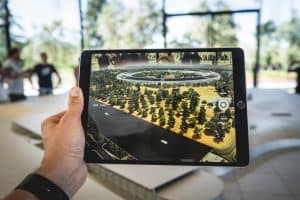
Augmented reality tools are the technology that enhances the real world with digital elements such as sounds, images, and videos. This technology has come a long way, and it’s now being used for remote collaboration and training. Collaborative meeting technology has made it possible for teams to work together seamlessly, even when they’re in different locations.

Pros:

Augmented reality tools have numerous advantages for remote collaboration and training. 

  • One of the main advantages of augmented reality tools for collaborative meeting technology is that they provide real-time collaboration software, enabling team members to work together in real time on a shared project. These tools also offer digital collaboration software that allows team members to annotate and interact with 3D models and other visual aids, making it easier to communicate complex ideas. 
  • Another advantage of augmented reality tools for remote collaboration and training is that they provide virtual collaboration tools that allow team members to work together in a collaborative workspace. These workspaces provide a shared space for team members to work together, making it easier to collaborate on projects and provide real-time feedback.
  • In addition, augmented reality tools for collaborative meeting technology provide top virtual collaboration tools for project management, making it easier to manage complex projects and collaborate on tasks. These can also be affordable video conferencing tools for remote teams, providing a cost-effective solution for businesses needing collaboration with teams in different locations.

Two of the most popular examples of such tools are:

  • HoloLens, developed by Microsoft, is a mixed-reality headset that enables users to interact with holograms, digital content, and the physical world simultaneously. With its cutting-edge technology, HoloLens is an ideal collaborative meeting technology for teams working on complex projects or those requiring digital design visualisation in a real-world environment.
  • Magic Leap offers an innovative approach to collaborative meeting technology with its spatial computing platform. With its unique technology, Magic Leap creates a digital representation of the physical world, allowing team members to interact with 3D objects as if they were physical objects. This enables remote teams to collaborate more effectively, as they can all interact with the same digital environment simultaneously.

Conclusion

Collaborative meeting technology is essential for remote teams to communicate and collaborate effectively. With so many options available, choosing the right technology can be overwhelming. The key is to identify the needs of your team and select a platform that meets those needs.

When selecting collaborative meeting technology, it’s important to consider factors such as ease of use, security, and cost. Look for software that offers features like video conferencing, screen sharing, and real-time collaboration tools. Some top options include Zoom, Microsoft Teams, and Google Meet.

FAQs

Q. What is collaborative meeting technology?

Collaborative meeting technology refers to software and tools designed to facilitate collaborative meetings and improve communication and collaboration among team members, regardless of their location. This technology typically includes video conferencing, screen sharing, chat features, and document-sharing capabilities.

Q. What are the benefits of using collaborative meeting technology?

Collaborative meeting technology enables teams to communicate and collaborate more efficiently and effectively, regardless of location. It can reduce the need for travel, increase productivity, and foster a more inclusive work environment. This technology can also help to facilitate faster decision-making, improve project management, and enhance team collaboration.

Q. How can collaborative meeting technology improve team productivity?

Collaborative meeting technology allows team members to communicate and collaborate more efficiently, increasing productivity. With features such as screen sharing, document collaboration, and real-time communication, team members can collaborate on projects more effectively and make faster, more informed decisions.

Q. What are some examples of collaborative meeting technology?

Examples of collaborative meeting technology include video conferencing platforms such as Zoom and Microsoft Teams, collaboration tools like Google Workspace and Microsoft Office 365, project management software like Asana and Trello, and instant messaging platforms such as Slack and Microsoft Teams.

Q. What features should I look for in collaborative meeting technology?

When choosing collaborative meeting technology, consider features such as video conferencing, screen sharing, chat functionality, document collaboration, project management capabilities, and integrations with other tools. Look for software that is user-friendly, reliable, and offers robust security features.

Q. How much does collaborative meeting technology cost?

The cost of collaborative meeting technology varies depending on your chosen software and features. Some platforms offer basic functionality for free, while others require a monthly or annual subscription. Costs can range from a few dollars per user to several hundred monthly for larger teams.

Q. How do I choose the right collaborative meeting technology for my team?

When choosing collaborative meeting technology, consider your team’s communication and collaboration needs, the size of your team, your budget, and the features you require. Look for software that is user-friendly, reliable, and offers robust security features. Consider trialling several different platforms to determine which one best meets your needs.

Q. How do I use collaborative meeting technology for remote teams?

To use collaborative meeting technology for remote teams, ensure all team members have access to the necessary tools and hardware, such as a reliable internet connection, a webcam, and a microphone. Establish clear communication protocols and schedules, and ensure that team members understand how to use the software and tools effectively.

Q. Can collaborative meeting technology integrate with other business tools?

Yes, many collaborative meeting technology platforms offer integrations with other business tools, such as project management software, customer relationship management (CRM) systems, and productivity tools like calendars and email. Look for software that offers integrations with the tools your team uses.

Q. What are some best practices for using collaborative meeting technology?

Best practices for using collaborative meeting technology include establishing clear communication protocols, creating an agenda and sticking to it, setting clear expectations for participation, encouraging active participation from all team members, and following up on action items after the meeting. Additionally, ensure that all team members understand how to use the software effectively and that all security and privacy protocols are followed.


Picture of Meeting Store

Meeting Store

Table of Contents

collaboration in remote working
Remote Collaboration

Master the Art of Collaboration in Remote Working for Outstanding Results

Master the Art of Collaboration in Remote Working for Outstanding Results. Learn effective techniques and tools for remote collaboration, boost productivity, and achieve success. Discover the benefits of collaboration in remote teams and gain insights into building a collaborative culture. Unlock the secrets to seamless virtual teamwork. Read on to take your remote collaboration to new heights.

Read More »
Visual technology classes
Training and Education

Enroll in Visual Technology Classes for Exceptional Learning

In a world increasingly dominated by technology, the role of visual technology has emerged as a pivotal force across various industries. The fusion of creativity and innovation has given rise to a host of opportunities, making the acquisition of visual technology skills more important than ever before. This blog delves into the significance of visual technology, its relevance in the modern landscape, and the diverse range of topics it covers to cater to different interests.As the realms of technology education and visual learning converge, mastering multimedia skills has become a necessity. Tech workshops and digital arts training now offer the chance to harness the power of virtual reality, augmented reality, and graphic design. This symbiotic relationship between creative media and emerging technologies underscores the essence of visual technology.Enrolling in visual technology classes goes beyond theoretical learning. It’s about hands-on tech education that empowers individuals with practical skills. Advanced visual training ensures that learners are equipped to thrive in a world where visual storytelling and interactive communication are vital tools for engagement. These courses don’t just teach; they inspire tech innovation and enable proficient media production.The visual technology curriculum is a gateway to a dynamic world of possibilities. It encompasses diverse subjects, including virtual reality training, augmented reality classes, graphic design courses, and interactive media learning. Through multimedia courses and creative technology classes, learners can delve into the digital arts and explore the depths of visual communication workshops. This multifaceted approach bridges the gap between traditional learning and the demands of the visual tech industry.Using Technology in the Classroom  The Rise of Visual TechnologyVisual technology’s impact extends across multiple domains, from graphic design to virtual reality experiences. Technology education has evolved to encompass visual technology courses that empower learners to excel in the digital age. Enrolling in visual technology classes provides hands-on tech learning opportunities, enabling participants to grasp emerging technologies effectively.The world of multimedia skills and digital arts training has embraced the visual revolution. Creative technology courses and graphic design classes equip individuals with visual media skills and interactive communication techniques. This training facilitates the development of striking visual storytelling and enhances content creation for media production classes.Real-World ExamplesThe integration of virtual reality and augmented reality in various industries showcases the power of visual technology. Industries like architecture employ virtual reality training to bring architectural plans to life, allowing stakeholders to explore virtual spaces. Augmented reality classes empower marketers to merge digital elements with the real world, enhancing user engagement.The visual tech industry has flourished, creating career opportunities for both tech-savvy individuals and those previously unfamiliar with technology. Specialized visual tech training has opened doors for non-techies to harness the benefits of visual technology for business growth. Top visual technology schools offer comprehensive curricula, making visual technology accessible to learners of all levels.Visual Learning and EducationVisual learning, a cornerstone of effective education, has gained momentum through technology workshops and visual technology curricula. Technology classes emphasize the importance of visual learning, enabling students to excel in the fast-paced digital landscape. Multimedia courses and interactive media learning resources enhance learning experiences by leveraging visual communication techniques.Latest Trends and Future ProspectsKeeping pace with emerging technologies, hands-on tech learning has become a norm. Easy access to online resources, such as the best online visual technology classes, ensures that learners can acquire practical visual tech skills at their own pace. The rise of visual technology has sparked innovation and positioned individuals to grasp the latest trends in this dynamic field.  Advantages of Learning Visual TechnologyIn today’s rapidly evolving digital landscape, enrolling in visual technology classes offers a plethora of benefits that extend beyond just learning new skills. These classes provide an invaluable opportunity for personal and professional growth, enhancing employability, and fostering versatility in an increasingly visual-oriented world. Let’s delve into the advantages of embracing visual technology education and the exciting prospects it brings.Career Growth and Employability Enhancement The demand for professionals well-versed in visual technology is on the rise, spanning various industries such as media production, graphic design, virtual and augmented reality, and interactive communication. By enrolling in visual technology classes, individuals position themselves as sought-after talents in the job market. As businesses leverage emerging technologies, those with visual skills developed through technology education and hands-on tech learning gain a competitive edge in this dynamic landscape. Visual technology classes enable them to keep pace with the latest trends, making them desirable candidates for job roles that require expertise in creative technology courses and multimedia skills.Empowerment in Conveying Complex Ideas In an era where visual storytelling and interactive communication reign supreme, mastering visual technology empowers individuals to convey complex ideas with precision and impact. Through graphic design classes, augmented reality training, and multimedia courses, students acquire the ability to transform intricate concepts into easily digestible visual content. This proficiency in visual communication workshops ensures that even the most intricate information can be understood intuitively, whether it’s presenting data in tables or utilizing visual media production skills to craft compelling narratives.Versatility in a Rapidly Evolving Landscape Visual technology classes offer a diverse curriculum that covers a spectrum of disciplines, from virtual reality to creative media. This comprehensive education equips individuals with a broad skill set, enabling them to adapt to tech innovation and emerging technologies seamlessly. The hands-on tech learning approach of technology workshops fosters practical skills development, making students well-rounded professionals capable of contributing across various domains, including the visual tech industry, digital arts education, and interactive media learning.Access to Top-notch Expertise One of the best aspects of enrolling in visual technology classes is the opportunity to learn from industry experts. Best online visual technology classes provide access to specialized training, allowing students to learn visual technology from experts. Affordable visual tech courses ensure that this knowledge is accessible to a wider audience, making visual technology beginners’ guides and visual technology workshops a gateway to mastering advanced visual training.  Best Online Visual Technology ClassesAre you looking to enhance your career prospects and expand your professional horizons? Enrolling in visual technology classes offers a multitude of benefits that

Read More »
Audio visual basics
Training and Education

Grasp Audio Visual Basics: Your Foundation for Learning

In the fast-paced digital era, audiovisual (AV) technology has emerged as a transformative force, revolutionizing diverse aspects of modern life. Understanding AV basics is no longer solely the domain of tech experts; it has become crucial even for beginners who seek to harness its benefits. This blog post sheds light on the significance of AV technology, underscores its importance for novices, and delves into relevant keywords and concepts.Audio visual technology encompasses a vast spectrum of multimedia basics and visual communication techniques. AV components, ranging from projectors and displays to speakers and microphones, form the backbone of this technology. Proficiency in AV presentation skills allows effective delivery of content that marries sound and visuals seamlessly, resulting in impactful communication.AV integration is an art that combines various elements to create immersive experiences. Visual display techniques, often rooted in multimedia production, facilitate captivating presentations. Novices exploring AV terminology will encounter concepts that empower them to navigate this dynamic landscape confidently.For those starting, audio visual training acts as a cornerstone. AV technology overview and multimedia fundamentals are your entry points into a world of AV essentials. With AV tools at your disposal, even the simplest audio visual setup becomes attainable. This beginner’s multimedia guide offers quick AV learning through easy multimedia concepts.Audiovisual basics interview  Audio Visual BasicsAudio visual basics encompass the foundational principles that underpin effective communication and presentation through multimedia technology. This integration of auditory and visual elements plays a pivotal role in conveying information in a captivating and comprehensible manner. This section delves into the fundamental concepts of audio visual technology, its role in enhancing communication, and the key components that constitute it.Combining Auditory and Visual Elements for Effective ConveyanceAudio-visual technology is the fusion of sound and visuals to convey information efficiently. This powerful synergy caters to diverse learning styles, ensuring a broader audience grasps the presented material. Through visual communication, complex concepts are simplified, making them accessible even to novices.AV Components and Presentation SkillsTo master audio visual basics, a grasp of essential AV components is vital. This includes comprehending the basics of audio visual systems, terminology, and equipment. Equipped with AV essentials, beginners can confidently delve into multimedia production. Strengthening AV presentation skills ensures seamless integration of sound and visuals, captivating audiences with compelling content.AV Integration and Visual Display TechniquesAV integration techniques are crucial in creating a harmonious blend of audio and visual elements. This integration enhances the viewer’s experience by providing a cohesive presentation. Visual display techniques further elevate communication by strategically utilizing multimedia tools, resulting in impactful and memorable presentations.Multimedia Fundamentals and AV Technology OverviewA foundational understanding of multimedia basics is integral to harnessing the potential of audio visual technology. Multimedia production involves creating content that combines different media types, catering to a broader sensory experience. An overview of AV technology is essential for beginners, as it offers insights into the tools and techniques that facilitate successful AV setups.Unlocking the Benefits of Visual LearningVisual communication for novices is a gateway to effective learning. Visual learning capitalizes on our natural inclination to process information through sight, aiding comprehension and retention. As novices grasp basic multimedia equipment concepts, they can seamlessly progress to more advanced AV production techniques.Navigating AV Setup and EquipmentFor those embarking on their audio visual training journey, understanding AV setup for beginners is crucial. A simple audio visual setup paves the way for a smooth learning curve. Beginners’ multimedia guides offer step-by-step assistance, demystifying the process of AV system integration. Easy multimedia concepts provide the foundation for confident exploration of advanced AV techniques.Significance of AV in PresentationsThe importance of AV in presentations cannot be overstated.  Multimedia production basics empower presenters to create dynamic content, leaving a lasting impact on their audience.  Simple Audio Visual SetupIn today’s multimedia-driven world, understanding audio visual basics is crucial for effective communication and presentations. Whether you’re a novice or a tech-savvy individual, mastering the essentials of audio visual technology can greatly enhance your ability to convey information. Audio Visual Essentials: Components and BasicsBefore we dive into the setup process, let’s familiarize ourselves with the core components that make up an audio visual system. The synergy between sound and visuals plays a pivotal role in creating engaging content, be it presentations, educational videos, or entertainment.Display Devices: Display devices are the visual cornerstone of any AV setup. These include monitors, projectors, and screens. Understanding visual display techniques helps optimize content visibility, especially for visual learners.Audio Sources: Audio sources encompass microphones, speakers, and amplifiers. Effective AV presentation skills involve balancing sound quality and clarity to ensure your message is delivered seamlessly.Connectors and AV Integration: AV integration refers to the seamless combination of audio and visual components. AV terminology may seem daunting, but learning the basics of connectors and cable types simplifies the setup process.Step-by-Step Guide to Basic AV Setup Gather Your Essentials: Begin by assembling your audio visual equipment. This may include a monitor or projector, speakers, microphones, and necessary cables. Choose Your Display Device: Select the appropriate display device based on your content and audience size. Projectors are ideal for larger groups, while monitors are great for smaller settings. Audio Source Configuration: Connect microphones and audio sources to your chosen display device. Use AV components like amplifiers to ensure optimal sound projection. Connectors and Wiring: Use suitable connectors to link audio and visual devices. AV setup for beginners involves connecting HDMI, VGA, or audio cables, ensuring secure connections. AV Calibration: Adjust display settings for optimal visuals. Visual communication relies on clear and vibrant images, making calibration a crucial step. Sound Optimization: Balance audio levels and test sound projection. AV essentials for beginners include ensuring audio is audible and distortion-free.   Beginner’s Multimedia GuideIn today’s dynamic world, multimedia has become an integral part of our lives, seamlessly intertwining with audiovisual technology to enhance communication and engagement. This guide is your gateway to understanding the captivating realm of multimedia and its pivotal connection to audiovisual technology.Multimedia Basics and Audio Visual TechnologyMultimedia encompasses a diverse array of elements, each contributing to a holistic communication experience. These elements include text, images, audio,

Read More »
Advanced AV techniques
Training and Education

Unveiling Advanced AV Techniques: Expert-Led Training

In the digital age, audiovisual technology plays a pivotal role in various aspects of our lives, from business presentations to virtual events and beyond. To unlock the full potential of this technology, mastering advanced AV techniques is essential.Audiovisual technology is continually evolving, and staying ahead of the curve is crucial for professionals in the AV industry. By honing advanced AV techniques, you can enhance sound quality, optimize AV systems, and elevate your video production skills. This not only improves the quality of your presentations but also positions you as a top-tier AV specialist in a competitive industry.One of the first steps in mastering advanced AV techniques is through professional AV training. Expert-led training programs offer valuable insights into cutting-edge AV solutions, advanced sound and video techniques, and the latest AV technology tips. These programs cover a wide range of topics, including AV equipment mastery, video editing, and AV integration.If you’re new to the world of AV, fret not. There are advanced AV techniques tailored for beginners. These techniques provide a solid foundation in AV technology and equip you with the skills needed to excel in the industry. From AV system fine-tuning to pro-level AV skills, you’ll gain a comprehensive understanding of audiovisual technology.To stay relevant in the AV industry, it’s essential to keep up with the latest trends. In 2023, we anticipate innovations in multimedia technology that will shape the future of AV.  In-depth knowledge of the AV industry is a must for any professional. Understanding AV industry insights for 2023 will give you a competitive edge. You’ll gain valuable information on pro AV strategies, expert AV tutorials, and advanced AV mastery techniques. This knowledge enables you to provide top-tier AV practices to your clients or organization.Audio-Visual Aids in Teaching  Advanced AV Techniques for BeginnersWhen it comes to delving into the world of advanced AV (Audiovisual) techniques, beginners often find themselves navigating a labyrinth of complex jargon and sophisticated technology. Fear not! In this comprehensive guide, we will break down advanced AV techniques, offer tailored advice for beginners, and help you lay a solid foundation for mastering the art of AV.Defining Advanced AV TechniquesAdvanced AV techniques encompass a wide array of skills and knowledge related to audiovisual technology. This includes AV training, video production, sound systems, AV equipment, AV optimization, and more. These techniques go beyond the basics, allowing you to create high-quality audiovisual experiences that captivate your audience.Tailored Advice for BeginnersFor newcomers to the AV industry, it’s essential to start with a clear plan: AV Certification: Begin your journey by enrolling in expert-led AV training programs. These certifications provide a structured curriculum to build your foundational knowledge. Equipment Mastery: Familiarize yourself with AV equipment. Learn how to select and set up the right gear for your needs. High-level sound systems and professional audiovisual setups are crucial components. Video Production: Dive into advanced video production techniques. Explore cutting-edge video editing to enhance your storytelling abilities. AV Integration: Master the art of AV integration, ensuring all components work seamlessly together. Fine-tuning AV systems is key to achieving top-tier AV practices. Building a Strong Foundation for AV MasteryTo excel in advanced AV techniques, you must stay updated on AV industry trends. In 2023, innovations in multimedia technology are shaping the field. Here are some areas to focus on: Virtual Events: With the rise of virtual gatherings, understanding how to deliver AV excellence in events is essential. AV Technology Trends: Keep an eye on AV technology trends in 2023. These insights will help you stay ahead of the curve. Professional AV Optimization: Learn the art of professional AV optimization to ensure your presentations are flawless. Expert-Led Training and Certification ProgramsWhen exploring advanced AV techniques, it’s crucial to seek out expert-led training. These programs offer advanced AV skills and AV mastery techniques. Look for courses that cover topics such as advanced sound and video techniques, AV equipment optimization, and pro AV knowledge.  Advanced AV Strategies and TipsIn today’s fast-paced world of audiovisual technology, staying ahead of the curve requires a deep understanding of advanced AV techniques. Whether you’re a beginner looking to unlock the full potential of AV or a professional seeking AV mastery, our expert-led guide will provide you with cutting-edge insights and strategies to elevate your audiovisual experiences in 2023 and beyond.Advanced AV Techniques for BeginnersFor those new to the world of AV, understanding the fundamentals is crucial. Start by mastering AV equipment, a cornerstone of audiovisual technology. Expert AV training can help you grasp the essentials, from sound systems to AV integration, ensuring a solid foundation for your journey.Unlocking AV Potential with Pro AV StrategiesFor professionals, it’s essential to take your skills to the next level. Advanced audiovisual techniques are your key to success. Dive deep into advanced video production and editing techniques to create captivating content. Expert AV training is invaluable for gaining mastery in AV optimization and AV certification, which are highly regarded in the AV industry.Innovations in Multimedia TechnologyTo stay at the forefront of the AV industry, you must keep pace with the latest trends and innovations in multimedia technology. As of 2023, the AV industry insights point towards immersive experiences and virtual events as major drivers of change. Theatre AV and AV equipment optimization are critical components of delivering exceptional multimedia experiences.Enhancing AV PresentationsVisual storytelling mastery is a skill every AV professional should aim for. Utilize advanced sound and video techniques to captivate your audience. Fine-tuning AV systems and selecting top-tier AV practices will ensure your presentations are nothing short of excellence.Professional AV OptimisationAV excellence in events is achieved through professional setup and optimization. Your audience deserves nothing but the best sound systems and AV equipment mastery. With next-level AV expertise, you can guarantee flawless audiovisual experiences.Cutting-Edge AV SolutionsFor those seeking advanced sound and video solutions, look no further. Explore advanced AV certification programs that delve into advanced AV tech tricks and AV system fine-tuning. These programs are designed to provide you with the top-tier AV practices needed to excel in the industry.AV Industry Insights 2023To stay competitive,

Read More »
Powering productivity with audio visual gear
productivity

Harness the Power: Powering Productivity with Audio Visual Gear

In the dynamic landscape of modern business, the integration of technology has taken center stage, revolutionizing the way we work, communicate, and collaborate. One of the most remarkable advancements in this realm is the emergence of audiovisual (AV) gear, which has rapidly gained prominence due to its remarkable ability to enhance workplace productivity and efficiency.In a world that thrives on speed and agility, businesses are constantly seeking ways to optimize their operations and maintain a competitive edge. The concept of “Powering Productivity with Audio Visual Gear” goes beyond mere convenience; it signifies a paradigm shift in how organizations harness technology to enhance efficiency. This shift is embodied by the multifaceted advantages offered by AV technology, ranging from seamless communication to streamlined collaboration.The recent surge in remote work arrangements has redefined the traditional notion of the workplace. With an increasing number of employees working from diverse locations, the importance of AV gear becomes even more pronounced. Organizations are now utilizing advanced audiovisual solutions to bridge geographical gaps, enabling virtual teams to communicate effectively and collaborate seamlessly. Efficient teamwork forms the bedrock of any successful business. AV gear not only facilitates better communication but also fosters a sense of camaraderie among team members. The integration of multimedia tools empowers teams to exchange ideas, share information, and collectively brainstorm, thereby boosting productivity levels. Setting Up Video or Teleconferencing Equipment For Conference Rooms on Pro Acoustics Tech Talk Ep 75  Optimising Remote Work with AV GearIn today’s fast-paced business landscape, remote work has become the norm. However, with this shift comes a set of challenges. As teams are geographically dispersed, effective communication and collaboration become pivotal for workplace efficiency. This is where audio visual (AV) gear steps in as a game-changer. Maximizing productivity with AV equipment is not just a trend; it’s a necessity for modern businesses.Enhancing Virtual Interactions with AV GearBoosting Teamwork Through Audiovisual ToolsRemote work often means relying on digital communication platforms. These tools, while convenient, lack the depth of face-to-face interactions. AV gear, including high-quality webcams and microphones, bridges this gap. By integrating technology and enhancing visual communication, teams can foster a sense of connection, essential for effective collaboration.Impact of Clear Audio and Video on Remote MeetingsEfficient virtual meetings are critical for decision-making and project updates. AV technology ensures that every word is heard and every facial expression is captured. In fact, studies show that clear audio and video lead to higher engagement levels and reduced misunderstandings. The seamless audiovisual integration provided by AV equipment enables teams to focus on the discussion rather than deciphering poor-quality signals.Elevating Presentations and CollaborationEnhancing Presentations with Audiovisual GearEffective presentations are at the heart of business success. AV gear enables advanced presentations with crisp visuals and impeccable audio. Whether it’s a sales pitch or a quarterly report, multimedia devices integrated into AV solutions captivate audiences and convey messages with precision. The impact? Improved communication and better retention of information.Improving Virtual Collaboration Through AV TechnologyIn the realm of remote work, collaboration can be challenging. AV technology transforms this challenge into an opportunity. With tech-enabled productivity tools, teams can brainstorm, share ideas, and co-create as if they were in the same room. Visual technology enables a dynamic exchange of thoughts, resulting in faster decision-making and seamless project progression.Modernizing Workspaces with AV SolutionsThe modern workplace demands versatility. AV gear ensures that teams can transition effortlessly from solo tasks to collaborative endeavours. The integration of AV equipment isn’t just about upgrading technology; it’s about embracing business enhancement. It’s about investing in tools that streamline communication and maximize productivity. Benefit Description Enhanced Collaboration AV gear promotes real-time interactions, fostering teamwork and creative brainstorming. Improved Engagement High-quality audio and video keep participants engaged, reducing distractions. Seamless Communication AV solutions bridge geographical gaps, ensuring smooth and effective information exchange. Elevated Presentation Quality Multimedia integration enhances presentations, making them more impactful and engaging. Streamlined Decision-Making Clear communication leads to faster decision-making and efficient project progression.   Boosting Teamwork Through Audiovisual ToolsIn the modern business landscape, teamwork stands as a cornerstone for achieving organizational goals. The collaborative efforts of a cohesive team lead to heightened workplace efficiency and better outcomes. To harness the true potential of teamwork, organizations are turning to advanced multimedia solutions and audiovisual (AV) technology. These tools not only enhance collaboration but also power productivity, ushering in a new era of work optimization.Enhancing Collaboration with AV ToolsMaximizing productivity with AV equipment has become a focal point for forward-thinking companies. The integration of audiovisual gear into the workplace environment fosters effective collaboration and efficient communication. Through seamless visual communication, teams can share ideas, insights, and strategies with clarity, leading to quicker decision-making and improved problem-solving.Modernizing Workspaces with Multimedia IntegrationThe evolution of work practices has given rise to remote work scenarios. To optimize remote work and maintain effective collaboration, AV gear proves indispensable. Teams can use video conferencing platforms to bridge geographical gaps, enhance presentations with audiovisual gear, and streamline communication using AV solutions. This tech-enabled productivity ensures that remote teams remain seamlessly connected and aligned with organizational objectives.Strategies for Enhanced Team DynamicsTo boost teamwork, it’s imperative to implement audiovisual advancements effectively. The integration of collaborative whiteboards into brainstorming sessions promotes active participation, while AV-equipped conference rooms enable dynamic and efficient presentations. By utilizing AV technology, businesses can enhance collaboration, break down communication barriers, and foster a cohesive work environment.Choosing the Right AV Equipment for Your NeedsSelecting appropriate audiovisual gear requires a keen understanding of your organization’s needs and goals. Consider factors such as the size of your team, the nature of collaboration, and the frequency of virtual meetings. This strategic approach ensures that the chosen AV equipment aligns perfectly with your vision for enhancing workplace efficiency.  Increasing Productivity with Multimedia IntegrationIn the modern business landscape, where workplace efficiency and effective communication are paramount, integrating technology has become a cornerstone of success. Maximizing productivity with AV equipment has emerged as a key strategy for businesses seeking to optimize their operations and enhance collaboration. In this section, we’ll explore how audio visual gear, in the form of projectors, interactive

Read More »
AV innovation immersion
Training and Education

AV Innovation Immersion: Transformative Learning Journeys

In today’s fast-paced world, educational innovation is paramount to preparing students for the challenges and opportunities of the future. One such innovation that has been making waves in the field of education is AV innovation immersion. This article will delve into the definition of AV innovation immersion, its significance in education, and how it has the potential to transform the learning experience.AV innovation immersion, often referred to as Audiovisual technology immersion, represents the integration of cutting-edge AV technology into the educational landscape. It involves creating immersive learning experiences by utilizing multimedia teaching tools, augmented reality tools, and interactive content to engage students in ways previously unimaginable.Through this immersive approach, participants not only acquire technical proficiency but also develop creative problem-solving abilities and a forward-thinking mindset. AV Innovation Immersion experiences empower individuals to harness the power of AV technology, driving innovation in industries such as entertainment, education, healthcare, and beyond.At its core, AV innovation immersion leverages AV technology to provide sensory learning experiences, blurring the lines between the physical and digital realms. This approach enables students to learn through experiential education, fostering a deeper understanding of the subject matter.Immersive AV at Innovation Zero  The Role of AV Innovation in EducationAudiovisual technology has evolved rapidly, and its integration into education has transformed the way students learn. In today’s digital age, AV innovation immersion has become a critical component of educational innovation. This section explores the evolving role of AV innovation in modern education, highlighting the benefits of effective AV integration, and introducing interactive AV solutions for schools.Benefits of AV IntegrationEffective AV integration in educational settings offers a plethora of benefits. It enhances educational innovation, providing students with immersive, experiential education opportunities. By incorporating multimedia teaching methods, AV technology facilitates sensory learning, making lessons more engaging and memorable.Immersive learning experiences have become the cornerstone of modern education, thanks to AV advancements. Augmented reality tools and virtual reality have revolutionized the way students interact with educational content. These immersive experiences enable transformative learning, allowing students to explore concepts in depth and from various perspectives.Interactive AV SolutionsInteractive AV solutions are at the forefront of educational engagement. In the immersive classroom, students are not passive recipients of information but active participants in their learning journey. These solutions leverage cutting-edge technology to create engaging lessons that captivate students’ attention.AV innovation immersion extends beyond traditional teaching methods. It fosters innovative learning by providing students with experiential education that goes beyond textbooks. Through AV technology, students can immerse themselves in historical events, explore distant galaxies, or dissect virtual organisms, all from the comfort of their classrooms.AV Integration Best PracticesTo maximize the benefits of AV technology, educators must follow best practices. Effective AV integration for education involves creating immersive learning environments where AV experiences seamlessly blend with the curriculum. Teachers should harness the power of AV technology to enhance their teaching techniques.Future of AV in EducationThe future of education lies in the hands of AV innovation. As AV technology continues to advance, students can expect even more immersive educational tools and interactive learning experiences. The AV learning environments of tomorrow will be dynamic, adaptable, and tailored to individual learning needs.  Transformative AV Technology in ClassroomsIn today’s rapidly evolving educational landscape, the integration of Audiovisual (AV) technology has proven to be a game-changer, ushering in immersive learning experiences that cater to the diverse needs of modern students. This transformative AV innovation immersion is reshaping traditional teaching methods and facilitating experiential education. Let’s delve into how AV technology is revolutionizing the future of education by enhancing classrooms with immersive learning environments.Immersive Learning Environments with AV IntegrationAudiovisual technology has paved the way for immersive learning experiences, aligning with the evolving expectations of digital-native students. These immersive classrooms harness the power of multimedia teaching, utilizing cutting-edge AV advancements to engage learners. Through the strategic integration of AV technology, educators can create immersive educational tools that stimulate sensory learning.Imagine a history class where students don VR headsets to explore ancient civilizations in augmented or virtual reality. This innovative use of AV technology transports students to different time periods, making history come alive. Such immersive experiences not only capture students’ attention but also foster a deeper understanding of the subject matter.Enhancing Education through AV ImmersionEducational innovation is at the forefront of AV integration, with various tools and techniques enhancing traditional teaching methods. For instance, interactive content is becoming increasingly popular. Teachers can employ touch-screen displays and interactive whiteboards to make lessons more engaging and dynamic. This approach enables students to actively participate in the learning process, improving comprehension and retention.Furthermore, AV technology facilitates experiential learning, allowing students to explore complex concepts through hands-on experiences. Augmented reality tools, such as 3D modelling applications, enable students to dissect virtual organisms or explore geological formations, promoting a deeper understanding of biology and geology.Immersive Teaching TechniquesImmersive teaching techniques made possible through AV integration extend beyond traditional subjects. For instance, language learning becomes more engaging with immersive solutions. AV technology can simulate real-world scenarios, enabling students to practice conversational skills with virtual native speakers.Additionally, the future of education is intertwined with AV technology’s ability to create personalized learning experiences. Students can progress at their own pace, using AV advancements to access tailored content that suits their learning style.  The Future of AV in EducationAudiovisual technology is rapidly transforming the landscape of education, ushering in an era of immersive learning experiences. Educational innovation powered by AV integration is revolutionizing classrooms and online learning environments alike. In this section, we’ll delve into the role of AV technology in the growing field of e-learning and explore best practices for successful AV integration in educational institutions.AV Innovation Immersion in EducationAV innovation immersion, often referred to as transformative learning, is reshaping the way students engage with educational content. With the advent of virtual reality (VR), augmented reality (AR), and cutting-edge AV technology, educational institutions are leveraging immersive experiences to captivate learners and foster experiential education.The Role of AV TechnologyAV technology has become the cornerstone of modern education, offering multimedia teaching tools that engage students in sensory learning. Augmented

Read More »
MeetingStore.co.uk
Logo
Compare items
  • Total (0)
Compare
0
Shopping cart