Excellent
Next day delivery! Depending on Availability*
Here to help! Monday to Friday, 8:30AM-5:30PM*

Is The Meta-World Our New Reality? In Depth Look At Each Metaverse

metaverse blog header

The term Metaverse has been around for years, but its only now that the term has become as well known as it is. Facebook has been the giant of social media, with the app running miles ahead of the other platforms with 2.80 billion active users – as of January 2021. It Is no question that Facebook rules. But with Facebook now changing over to Meta, the Metaverse was introduced soon after. A mixed reality world for you to roam around, hold business meetings, meet friends, and play games. The possibilities are endless.
However, with the term ‘Metaverse’ becoming the staple way to describe this mixed reality world. Other companies soon jumped on the bandwagon and created their own augmented reality. From Microsoft Mesh, to Bluejeans: Spaces, mixed reality is slowly becoming our new reality. But is this really the right way to go?

Facebook Metaverse  

Facebook introduced Metaverse to the world only last year in October, but it has already taken techy people by storm. A whole new world through just a headset. Mark Zuckerberg has created a whole new world, a world for friends to hang out, businesses to hold meetings and for family to play games. This open world lets you create your character and join others in roaming the world. With no limit.

This augmented reality uses the Oculus Quest 2, and other headsets, to transform you into the new world. A world with no limits, on what you can do or where you can go. This open world lets you meet as many of your friends as possible, in any shape you want. From the first teaser of the Metaverse, wee see Zuckerberg meet his friends up in space. Friends consisting of normal avatars and robots. As weird as this may seem, it shows the creativity and the lengths the Metaverse will let you go. The lengths, of which we said before, that you can travel the Meta-world without limit and meet other Metaverse users in the world. 

What Can You Do? 

There are so many things to do with the Metaverse. When using the Meta-world for corporate, it changes the way hybrid and home workers join their colleagues. Simply pop on the headset, grab the controllers, and sit down at the meeting table next to your work colleagues – in the Metaverse. Move your head left to right, up and down, and you will see a virtual reality that feels like you are actually there. To enhance this effect even more, the controllers allow you to move you arms and hands around during a conversation. Just as you would normally, if you were in the real world. 

But what is the Metaverse really there for? Well from what we have been shown, is a virtual way for friends to hang out. If you have friends all over the globe then the Metaverse can bring you together in an instant – in whatever form you want. The Metaverse is integrated with many features, so if you are sat around chatting with your mates and you get a Facebook message. You can still be present in the Metaverse and check your message. The same thing goes with a phone and video call. Pick it up right there in the Metaverse with the video call being shown in front of you. 

Essentially the Metaverse is an open world for people to showcase their creativity and to meet their friends, alongside others in the Meta-world.

Horizon Workrooms

If you just read that paragraph about the Metaverse and still didn’t really see the point in the Meta-world, then Horizon Workrooms may seem more your idea of a beneficial augmented world. Horizon Workrooms is apart of Facebook’s (Meta) Metaverse, a more secure way for teams to collaborate and hold meetings. Workrooms lets you hold meetings to the most realistic way possible. Bring your keyboard and desktop into the Horizon meetings, scroll and type on your desktop as you would normally in the meeting without any lagging or disruptions.  

Imagine this you have a big meeting coming up with a company across the world. Which you just cant travel to. So you have planned and set out a presentation for your meeting, using Horizon Workrooms. With Horizon you have the chance to be with the across-the-world company, a chance to stand in front of a virtual display and present your PowerPoint. Share your files and your  screen to the Metaverse and let your animated self lead the way. Plus, like we said before you can bring your desktop and keyboard into the Workroom. Simply scan your desk area that you want the Metaverse to pick up and your actions will be copied by your avatar. This gives you a set area of where you want the Oculus to pick up. So if you are typing on your laptop, the Metaverse you will also show your typing.

How It Feels Real

Just by looking at images and videos of Horizon Workrooms, it shows that meetings with remote members of a team can be made as easy as a meeting with everyone in the office. Plus more beneficial, making you feel as though you are there together. Okay, most people probably look at it and just think of it as a little game. With creating your avatar and workroom to your liking. But with video calls becoming a bit stagnant, a change up is what people need to revive remote meetings. Including spatial audio, expressive avatars and hand tracking, all this bringing a real life feel to your meetings.

If you sitting around the table and someone to your left speaks up, their voice will come from that area. The volume adjusting to their location. With inclusive features, every avatar will look different and true to them. Not only this but give non-verbal ques to other members in the team with nodding and turning to include other employees in a conversation. Alongside head nodding, you can point, raise a hand or give a thumbs up to your colleagues with smart hand tracking technology. Promoting collaboration, employee communication and relationships.

All this technology bringing Horizon Workrooms to life and functioning just like a real meeting.  

Microsoft Mesh

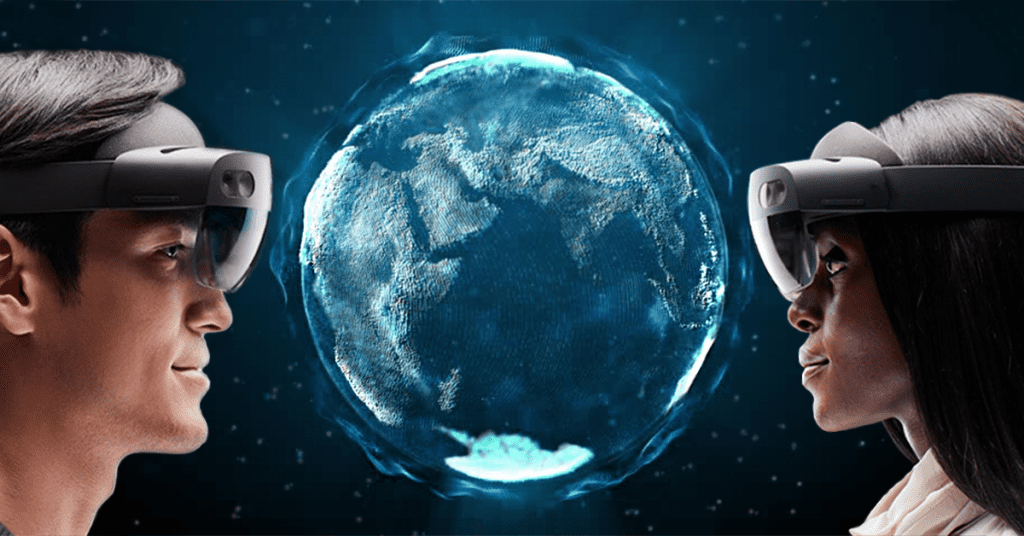
Avatars and holographic content is what makes up Microsoft Mesh. Whether you want to fully immersive yourself of mix real life with holograms, Mesh can bring a whole new reality to your world. Its up to you. Using the Microsoft Hololens you can project your work colleagues, a zoom call or a model right in front of your eyes – as a hologram. Yep, a hologram. There was a time that holograms were something of a reality in the far future. But now it is a reality. On the other hand, if the thought of using a hologram doesn’t suit you. Then, just like Horizon Workrooms, you can wear the fully immersive headset and bring your avatar self to life and sit across from your work buddie. 

Holographics

Lets dive into the holographic content just a bit. With the Hololens glasses you can project a zoom call or a model in front of your eyes. Lets say you were at a construction site on a job. You come across a problem that needs to be dealt with that day but a phone call to your boss won’t really do any good. With the Hololens glasses you can stay on site, Zoom call your boss and while seeing their face in front of you (as a hologram) they can see the problem at hand and guide you through it. Its as simple as that. The Hololens is designed for this type of work and his type of problem. A separate Hololens Glasses with ruggedized features to withstand an dropping on construction sites.

Immerse Yourself

Holoportation sounds good right? But Mesh doesn’t stop there. With a whole new headset, Microsoft Mesh brings a new world to life. You can fully immerse yourself into a 3D world, full of your colleagues – as avatars. Just like Horizon Workrooms, you can hold meetings, brainstorming sessions and one-to-one meetings in the Mesh world. Build your avatar, pop on your VR headset and join or host a meeting.  

BlueJeans: Spaces

Not much has been spoken about Spaces recently. But joining in the Metaverse world, Spaces is a place to huddle, share files, brainstorm, organise, and socialise. Roam the virtual Spaces office and see who is available to talk. Or if you want to set up a meeting with a certain colleague, you can do so by booking out a meeting room for your meeting. Just like Horizon Workrooms, you can customise you huddle space to your needs.

With the vice president of product management at BlueJeans saying that hybrid work is here to stay, BlueJeans has worked hard to bring a place for remote workers to walk around and feel as though they are back in the office. With the ability to hold 1,000 person meetings, Spaces is the way forward for hybrid or remote workers. 

Spaces isn’t just a video calling application though. Unlike the Metaverse or Mesh, Bluejeans offers a more office feel. Not just a space for meeting rooms. You can walk around a virtual office and join in with others conversations, bringing back casual talks with other colleagues. Sparking new relationships, leading to new and fresh ideas. Using the collaboration board, users can draw and share ideas to your team. You can access drawing tools to bring your plan to life, add sticky notes and images to the collaboration board to fill out you idea. Plus if you want to stay present in your meeting, giving the presenter or presenters your full attention, you can take screen shots of the collaboration board for later use and note taking. Alongside this, you can hold Q&A’s, polls and chats during a meeting.

How Does It Look?

Spaces has an easy look, quickly join meetings and see who’s available for a chat. Without having to hunt for codes or for the colleague you need to talk to. All the names of the meetings happening in Bluejeans are shown on the side of the screen, simply click the meeting on the side and join straight away. When you join one of these meetings you will be placed around the meeting room table. Now Spaces may have a lesser reality feel than the others, but that doesn’t mean the experience is any lesser. You still get a real feel when using Spaces, with spatialised audio and head movements.

The difference that makes BlueJeans stand out is that it gives way more of a social feel. Letting you walk around the office and chat with people at their desks. Setting up a meeting in real time. Something that remote workers must miss. Well, not the meetings but that office feel of walking to your desk and chatting to colleagues along the way. With the 2D view, you can easily see the floor plan of the virtual office and see where everyone is. Or to get more of an immersive feel, you can switch to a 3D view and actually go into the virtual office. 

Is The Metaverse Actually Beneficial To Us?

With technology becoming more and more advanced, addiction is getting too real. With phones consuming our adult life and now tablets consuming children’s lives, is the Metaverse really a good platform to introduce to children. To children it must feel like a whole different world when using their tablets and gaming stations. So with actually introducing a new world to them, it could have damaging effects. Damaging effects that see people become addicted and only want to live within the Metaverse, preferring the augmented reality then to actual reality.

Zoom usage skyrocketed, with pretty much everyone being a regular user daily. With so much time looking at people through a screen, Zoom call fatigue was prominent as people where using the application regularly. Leaving people feeling drowsy and run down throughout the day. With evidence like this, if the Metaverse takes over, and like Zoom, skyrockets with users. A Metaverse fatigue could definitely be on the horizon.

Although this doesn’t relate that much to a ‘Metaverse fatigue’, there are already problems popping up with the Metaverse world. Unfortunately, harassment has already made its way onto the Metaverse. Now this is obviously a worry, especially to children, so digital safety is something that needs to be discussed within the Metaverse. Facebook (Meta) have already come up with the idea of personal bubbles to stop anything like this happening further.

Even though the Metaverse is having problems, Horizon Workrooms dedicated for meetings may actually become beneficial for your once in a while meetings. Meetings with team members working from home, team members who are international and meeting with companies who are international. It brings everyone together in a way that heightens your meeting to a level that you may not of thought it could. Dedicated for only meetings, Horizon can be a better way for people to use the Metaverse – leading to potentially less ‘Metaverse fatigue’. 


Is The Metaverse Important To Have? 

The big question around the Metaverse if its going to land. There have been mixed reviews with the virtual world. Although its a great opportunity to push the boundary’s on technology and open worlds. Its more an importance to companies than to just people. And even then, work from home isn’t mandatory anymore, which means fewer video calls with colleagues and less of a reason to use Horizon Workrooms. Even though it might not be that important for work from home people that much, the Metaverse can still be a fun tool to use for gaming.

Picture of Natalie Horn

Natalie Horn

Table of Contents

Audio visual basics
Training and Education

Grasp Audio Visual Basics: Your Foundation for Learning

In the fast-paced digital era, audiovisual (AV) technology has emerged as a transformative force, revolutionizing diverse aspects of modern life. Understanding AV basics is no longer solely the domain of tech experts; it has become crucial even for beginners who seek to harness its benefits. This blog post sheds light on the significance of AV technology, underscores its importance for novices, and delves into relevant keywords and concepts.Audio visual technology encompasses a vast spectrum of multimedia basics and visual communication techniques. AV components, ranging from projectors and displays to speakers and microphones, form the backbone of this technology. Proficiency in AV presentation skills allows effective delivery of content that marries sound and visuals seamlessly, resulting in impactful communication.AV integration is an art that combines various elements to create immersive experiences. Visual display techniques, often rooted in multimedia production, facilitate captivating presentations. Novices exploring AV terminology will encounter concepts that empower them to navigate this dynamic landscape confidently.For those starting, audio visual training acts as a cornerstone. AV technology overview and multimedia fundamentals are your entry points into a world of AV essentials. With AV tools at your disposal, even the simplest audio visual setup becomes attainable. This beginner’s multimedia guide offers quick AV learning through easy multimedia concepts.Audiovisual basics interview  Audio Visual BasicsAudio visual basics encompass the foundational principles that underpin effective communication and presentation through multimedia technology. This integration of auditory and visual elements plays a pivotal role in conveying information in a captivating and comprehensible manner. This section delves into the fundamental concepts of audio visual technology, its role in enhancing communication, and the key components that constitute it.Combining Auditory and Visual Elements for Effective ConveyanceAudio-visual technology is the fusion of sound and visuals to convey information efficiently. This powerful synergy caters to diverse learning styles, ensuring a broader audience grasps the presented material. Through visual communication, complex concepts are simplified, making them accessible even to novices.AV Components and Presentation SkillsTo master audio visual basics, a grasp of essential AV components is vital. This includes comprehending the basics of audio visual systems, terminology, and equipment. Equipped with AV essentials, beginners can confidently delve into multimedia production. Strengthening AV presentation skills ensures seamless integration of sound and visuals, captivating audiences with compelling content.AV Integration and Visual Display TechniquesAV integration techniques are crucial in creating a harmonious blend of audio and visual elements. This integration enhances the viewer’s experience by providing a cohesive presentation. Visual display techniques further elevate communication by strategically utilizing multimedia tools, resulting in impactful and memorable presentations.Multimedia Fundamentals and AV Technology OverviewA foundational understanding of multimedia basics is integral to harnessing the potential of audio visual technology. Multimedia production involves creating content that combines different media types, catering to a broader sensory experience. An overview of AV technology is essential for beginners, as it offers insights into the tools and techniques that facilitate successful AV setups.Unlocking the Benefits of Visual LearningVisual communication for novices is a gateway to effective learning. Visual learning capitalizes on our natural inclination to process information through sight, aiding comprehension and retention. As novices grasp basic multimedia equipment concepts, they can seamlessly progress to more advanced AV production techniques.Navigating AV Setup and EquipmentFor those embarking on their audio visual training journey, understanding AV setup for beginners is crucial. A simple audio visual setup paves the way for a smooth learning curve. Beginners’ multimedia guides offer step-by-step assistance, demystifying the process of AV system integration. Easy multimedia concepts provide the foundation for confident exploration of advanced AV techniques.Significance of AV in PresentationsThe importance of AV in presentations cannot be overstated.  Multimedia production basics empower presenters to create dynamic content, leaving a lasting impact on their audience.  Simple Audio Visual SetupIn today’s multimedia-driven world, understanding audio visual basics is crucial for effective communication and presentations. Whether you’re a novice or a tech-savvy individual, mastering the essentials of audio visual technology can greatly enhance your ability to convey information. Audio Visual Essentials: Components and BasicsBefore we dive into the setup process, let’s familiarize ourselves with the core components that make up an audio visual system. The synergy between sound and visuals plays a pivotal role in creating engaging content, be it presentations, educational videos, or entertainment.Display Devices: Display devices are the visual cornerstone of any AV setup. These include monitors, projectors, and screens. Understanding visual display techniques helps optimize content visibility, especially for visual learners.Audio Sources: Audio sources encompass microphones, speakers, and amplifiers. Effective AV presentation skills involve balancing sound quality and clarity to ensure your message is delivered seamlessly.Connectors and AV Integration: AV integration refers to the seamless combination of audio and visual components. AV terminology may seem daunting, but learning the basics of connectors and cable types simplifies the setup process.Step-by-Step Guide to Basic AV Setup Gather Your Essentials: Begin by assembling your audio visual equipment. This may include a monitor or projector, speakers, microphones, and necessary cables. Choose Your Display Device: Select the appropriate display device based on your content and audience size. Projectors are ideal for larger groups, while monitors are great for smaller settings. Audio Source Configuration: Connect microphones and audio sources to your chosen display device. Use AV components like amplifiers to ensure optimal sound projection. Connectors and Wiring: Use suitable connectors to link audio and visual devices. AV setup for beginners involves connecting HDMI, VGA, or audio cables, ensuring secure connections. AV Calibration: Adjust display settings for optimal visuals. Visual communication relies on clear and vibrant images, making calibration a crucial step. Sound Optimization: Balance audio levels and test sound projection. AV essentials for beginners include ensuring audio is audible and distortion-free.   Beginner’s Multimedia GuideIn today’s dynamic world, multimedia has become an integral part of our lives, seamlessly intertwining with audiovisual technology to enhance communication and engagement. This guide is your gateway to understanding the captivating realm of multimedia and its pivotal connection to audiovisual technology.Multimedia Basics and Audio Visual TechnologyMultimedia encompasses a diverse array of elements, each contributing to a holistic communication experience. These elements include text, images, audio,

Read More »
remote team document collaboration
Remote Collaboration

Streamline Your Team’s Workflow with these Remote Team Document Collaboration Tools

In the modern work landscape, remote team collaboration has become increasingly significant, transforming the way organisations operate. As more companies embrace remote work and virtual teams, the need for effective document collaboration tools and streamlined workflows has become paramount. This article explores the concept of remote team collaboration, highlights the challenges faced by remote teams in terms of document collaboration, and emphasises the importance of using effective tools to enhance workflow efficiency.The essential document collaboration tools are Google Workspace, Trello, Slack, Microsoft Teams, Quip, Notion, and Dropbox.  Limited Communication Channels: Remote collaboration relies heavily on digital communication channels such as email, chat platforms, or video conferencing. However, these methods may not always provide the same level of interaction and clarity as face-to-face communication. Version Control and File Management: Coordinating multiple team members working on the same document can lead to version control issues. Without proper systems in place, it becomes challenging to track changes, manage different file versions, and ensure everyone is working on the latest document. Security and Data Protection: Remote collaboration requires careful attention to document security and data protection. Sharing sensitive information over various communication channels can pose risks if not adequately secured. Cross-Functional Collaboration: Collaborating on documents often involves cross-functional teams with diverse skill sets and backgrounds. Remote teams need effective tools to facilitate seamless collaboration among team members from different departments or locations. How to Collaborate on a File with your Team in Teams  Understanding Remote Team Document CollaborationIn today’s fast-paced work environment, remote team document collaboration plays a crucial role in optimising workflow and enhancing productivity. With the rise of remote work and virtual teams, efficient document collaboration has become essential for seamless communication, streamlined processes, and effective task management. This section explores the benefits of remote team document collaboration, addresses the specific needs of remote teams, and highlights the tools and strategies that facilitate efficient collaboration.Remote Team Document Collaboration: A Key to Workflow OptimizationRemote team document collaboration refers to the process of working together on shared documents, files, and projects in a virtual environment. It involves utilizing various document collaboration tools and platforms to enable real-time editing, task management, file versioning, and document security. By leveraging cloud-based collaboration solutions, remote teams can collaborate effectively regardless of their physical locations, enabling them to optimise workflow and achieve business goals efficiently.Benefits of Efficient Document Collaboration for Remote TeamsEfficient document collaboration brings several benefits to remote teams, contributing to improved communication, streamlined processes, and increased productivity.Improved Communication and CollaborationRemote team document collaboration tools facilitate seamless communication among team members, regardless of their geographical locations. With features such as real-time editing, team members can collaborate on documents simultaneously, eliminating the need for lengthy email exchanges and reducing communication gaps. These tools also offer chat functionality, allowing team members to discuss project details, share ideas, and address queries in real-time, fostering effective collaboration and enhancing team cohesion.Streamlined Processes and Task ManagementDocument collaboration tools provide remote teams with streamlined processes and efficient task management capabilities. Team members can assign tasks, set deadlines, and track progress within a centralised platform, ensuring clarity and accountability. By having a clear overview of project timelines and responsibilities, remote teams can optimise their workflow, avoid duplication of efforts, and ensure tasks are completed on time.Increased Productivity and EfficiencyEfficient document collaboration enables remote teams to work more productively and efficiently. With cloud-based collaboration tools, team members can access documents and files from anywhere, at any time, using any device with internet access. This flexibility eliminates barriers to productivity and allows team members to collaborate seamlessly, even across different time zones. By eliminating the constraints of physical proximity, remote team document collaboration empowers individuals to work at their own pace, boosting overall productivity.Addressing the Specific Needs of Remote TeamsRemote teams have specific needs that must be addressed to ensure successful document collaboration. Let’s explore some crucial aspects.Real-Time Editing and CollaborationFor remote teams, real-time editing is paramount. Document collaboration tools enable team members to edit documents simultaneously, view changes in real-time, and track revisions. This capability ensures that all team members are working on the latest version of a document, reducing confusion and maintaining consistency. Real-time editing promotes efficient collaboration, as team members can provide instant feedback and make necessary adjustments without delays.Task Management and Collaboration PlatformsRemote teams rely on task management and collaboration platforms to keep their projects organised and on track. These platforms allow teams to create and assign tasks, set priorities, and monitor progress. With features like notifications and reminders, remote teams can stay informed about project updates and upcoming deadlines. Task management platforms enhance efficiency, transparency, and accountability within remote teams.File Versioning and Document SecurityDocument collaboration tools provide file versioning capabilities that allow remote teams to track changes and access previous versions of documents. This feature ensures that team members can revert to previous iterations if needed, reducing the risk of data loss or errors. Additionally, document security is vital for remote teams, as sensitive information may be shared during collaboration. Robust security measures, such as user permissions and encryption, safeguard documents from unauthorised access and data breaches, maintaining confidentiality and compliance.  Key Considerations for Remote Team Document Collaboration SolutionsIn today’s fast-paced and digital work environment, remote team collaboration is becoming increasingly prevalent. As virtual teams and remote work continue to thrive, selecting the right document collaboration tools is crucial for streamlined workflow optimisation. This section explores the essential factors to consider when choosing document collaboration solutions for remote teams, emphasising the importance of cloud-based collaboration, key features like real-time editing, task management, file versioning, and document security.Remote Team Document Collaboration Essential Factors to Consider When evaluating document collaboration tools for remote teams, several key considerations can help ensure efficient and productive collaboration: Cloud-Based Collaboration for Remote Work Environments: Cloud-based collaboration platforms offer a host of advantages for remote teams. They provide centralised storage, easy access to documents from anywhere with an internet connection, and real-time updates. With cloud-based solutions, remote teams can collaborate seamlessly, eliminating the need for cumbersome email exchanges or version

Read More »
mural remote collaboration
Remote Collaboration

Boost Creativity with Mural: The Ultimate Remote Collaboration Solution

Boost creativity with Mural, the ultimate remote collaboration solution. Our digital whiteboard helps teams work together online, making remote work easy and efficient. Whether you’re brainstorming, designing, or managing projects, Mural has everything you need to collaborate visually and stay productive. Read on to learn more!

Read More »
Leveraging AV gear for better presentations
productivity

Elevate Your Impact: Leveraging AV Gear for Better Presentations

In today’s digital age, effective communication is essential for success in various fields. Whether it’s in business, education, or public speaking, delivering impactful presentations is crucial for getting your message across. Leveraging audiovisual (AV) gear plays a significant role in enhancing the quality of presentations, making them more engaging, informative, and memorable.AV gear encompasses a range of audiovisual equipment that includes projectors, sound systems, microphones, video conferencing tools, and presentation software. When used effectively, this technology can transform a standard presentation into an interactive and captivating experience for the audience.In presentations, effective communication is key. AV gear allows speakers to visually and audibly reinforce their messages, helping to maintain audience interest and retention. Incorporating videos, images, and graphics can evoke emotions, making the presentation more memorable and impactful.To create impactful presentations, leveraging AV gear should be complemented with strategic planning. Understanding the target audience and their needs is vital to tailor the content accordingly. Organizing the presentation with a clear structure and flow ensures that information is conveyed logically and comprehensively.The new Logitech TAP meeting room conference controller  AV Gear and Its BenefitsIn today’s technology-driven world, delivering impactful presentations is essential for effective communication and engagement. AV gear, short for audiovisual gear, plays a crucial role in enhancing presentations and public speaking events. In this section, we will define AV gear and its role in presentations, explore the benefits of using AV equipment, and discuss how it can amplify the impact of your presentation.AV Gear and Its Role in PresentationsAV Gear Defined: AV gear refers to a set of audiovisual equipment used to enhance presentations and communication during public speaking engagements. It includes devices such as projectors, screens, microphones, speakers, and other multimedia tools designed to create a dynamic and immersive experience for the audience.Role in Presentations: AV gear plays a pivotal role in modern presentations, transforming them into engaging and interactive experiences. By incorporating technology, speakers can capture the audience’s attention, maintain interest, and effectively convey their message.Benefits of Using AV Gear Improved Engagement: Leveraging AV equipment helps in capturing and retaining the audience’s attention. Visual aids, such as slides and videos, make complex topics more accessible and memorable, leading to better engagement and understanding. Enhanced Communication: AV gear enables presenters to communicate more effectively. With clear audio systems and visual aids, the message becomes more comprehensible, reducing the chances of miscommunication and ensuring the audience grasps the key points. Increased Impact: AV equipment can amplify the impact of your presentation. Dynamic visuals, well-designed slides, and multimedia elements leave a lasting impression on the audience, making your message more persuasive and memorable. Interactive Experience: With AV gear, presentations can become interactive. Incorporating live polls, Q&A sessions, and audience participation tools encourages active involvement and creates a two-way communication channel. Efficient Time Management: Using AV gear allows presenters to deliver more information in less time. Visual representations of data or concepts help convey complex ideas quickly, maximizing productivity in a limited timeframe. Amplifying Presentation Impact with AV Equipment Leveraging AV Equipment for Effective Presentations: To deliver effective presentations, leverage AV equipment strategically. Combine verbal communication with visual aids to reinforce key points and create a multi-dimensional experience for your audience. Optimizing Presentations with AV Gear: When using AV gear, optimize your presentation by ensuring compatibility between the equipment and presentation software. Test the setup in advance to avoid technical glitches during your talk. AV Gear Strategies for Better Talks: Incorporate AV gear strategies that suit your presentation style and content. For example, use impactful visuals for storytelling or employ infographics for data-heavy presentations. Maximizing Presentation Impact with AV Tools: To maximize impact, use AV tools that complement your presentation goals. For instance, use high-quality audio systems to ensure your message is heard clearly throughout the venue.   Selecting the Right AV Gear for Your NeedsIn today’s fast-paced world, effective presentations are crucial for success in various domains, whether it’s business, education, or public speaking engagements. To ensure your presentations leave a lasting impact, leveraging AV gear (audiovisual equipment) is essential. In this comprehensive guide, we will explore different types of AV gear available in the market and provide expert tips on choosing the appropriate equipment based on your specific presentation requirements. Identifying Different Types of AV GearAV gear encompasses a wide range of audiovisual tools and technologies that enhance presentations. Some common types of AV gear include: Projectors and Screens: Projectors display visual content on a screen or surface, making it ideal for large-scale presentations. Audio Systems: High-quality audio equipment ensures crystal-clear sound and seamless communication during your presentation. Interactive Displays: Interactive whiteboards or touchscreens enable real-time engagement with your audience, fostering better communication. Presentation Software: Software solutions like PowerPoint or Keynote facilitate the creation of visually appealing slides and multimedia presentations. Choosing the Appropriate AV EquipmentSelecting the right AV gear depends on several factors, and tailoring your choices to your specific needs will maximize the impact of your presentation. Consider the following factors: Audience Size and Venue For smaller gatherings, portable AV equipment may suffice, while larger venues may require more powerful systems. Outdoor events might require weather-resistant AV gear to ensure smooth presentations. Presentation Format Different presentation formats, such as lectures, workshops, or panel discussions, may demand specific AV tools. Interactive displays work well for workshops, while podiums with integrated AV systems suit traditional lectures. Budget Constraints Evaluate your budget to strike a balance between AV gear quality and cost-effectiveness. Prioritize essential equipment, such as a reliable projector and audio system, to ensure the success of your presentation. Expert Tips for Maximizing Productivity with AV EquipmentTo make the most of your AV gear and deliver impactful presentations, consider these expert strategies and techniques: Prepare and Rehearse: Familiarize yourself with the AV equipment before the actual presentation. Practice using the technology to minimize technical glitches during your talk. Engage with Interactive Displays: Interactive whiteboards or touchscreens enable real-time audience interaction, boosting engagement and comprehension. Optimize Presentation Content: Leverage AV gear to incorporate multimedia elements like images, videos, and animations to make

Read More »
Unleash presentation productivity with AV equipment
productivity

Launch Your Success: Unleash Presentation Productivity with AV Equipment

In today’s fast-paced world, the art of effective presentations holds a paramount role in diverse domains ranging from business to education. The ability to captivate an audience, convey information with clarity, and leave a lasting impression is indispensable. One pivotal tool that has transformed presentation dynamics is audio-visual (AV) equipment. This article delves into the significance of AV technology in enhancing presentation impact and engaging the audience. We focus on exploring the best AV equipment options and techniques to maximize presentation productivity.Effective presentations are more than just words on a screen – they are dynamic visuals that tell a story, convey information, and inspire action. AV equipment, such as multimedia projectors, interactive displays, and advanced presentation gear, plays a pivotal role in enhancing audience engagement. Modern presenting demands more than static slides; it requires visual communication that resonates with viewers. The strategic integration of audio-visual tools transforms presentations into captivating experiences, elevating public speaking to new heights.The benefits of AV equipment extend far beyond its technical aspects. When used strategically, audio-visual technology can revolutionize the way information is delivered. By choosing the best AV equipment for presentations, speakers can boost their presentation impact and connect with their audience on a deeper level. This enhances the overall presentation experience, making it more memorable and impactful. The right AV solutions enable seamless multimedia projection, creating an immersive environment that fosters engagement and knowledge retention.Navigating the world of AV technology can be overwhelming, but with the right guidance, it becomes a streamlined process. When considering audio visual setup, it’s essential to stay informed about the latest presentation tech trends. An optimal presentation equipment guide should encompass a wide range of options, from interactive displays to advanced projection systems. With AV integration for impactful speeches, presenters can effortlessly master their message delivery and create presentations that leave a lasting mark.Logitech MTR (Tap + Meetup) Setup & Demo   The Power of AV Equipment in PresentationsWith the evolution of technology, presentation methods have undergone a remarkable transformation, shifting from static slides to dynamic multimedia experiences. This transition has been driven by the rise of audio visual (AV) technology, which has revolutionized the way we communicate complex ideas and captivate audiences. Incorporating multimedia solutions has become a cornerstone of effective presentations, maximizing productivity with AV equipment.Captivating Audiences Through Audio Visual TechnologyThe power of AV equipment lies in its ability to captivate an audience’s attention and elevate presentations to new heights. Advanced presentation gear, including interactive displays and multimedia projection, enables speakers to communicate ideas with unparalleled clarity and impact. Through dynamic visuals and immersive experiences, speakers can effectively convey complex concepts, making them more relatable and memorable.Conveying Complexity with ImpactThe integration of AV technology is a game-changer for conveying intricate concepts effectively. It’s no longer limited to words and static images; multimedia solutions allow presenters to use videos, animations, and interactive elements to break down complex topics into digestible pieces. This tech-enabled approach not only enhances audience engagement but also ensures that information is understood and retained.Lasting Impressions and Enhanced EngagementSuccessful speeches are those that leave a lasting impression on the audience. This is precisely what AV equipment facilitates by creating a multisensory experience. The strategic use of audio visual tools ensures that the message resonates with attendees long after the presentation concludes. The integration of optimal presentation tools, coupled with compelling content, enhances the overall impact of the talk.Choosing the Right AV Equipment for Maximum ImpactTo maximize presentation productivity with AV equipment, it’s crucial to choose the right tools. A variety of options are available, ranging from affordable audio visual tools to more advanced setups. When selecting AV equipment, consider factors such as ease of use, compatibility, and functionality. Staying updated with presentation tech trends will also ensure that you’re harnessing the latest innovations for your talks.Elevating Public Speaking with Multimedia SolutionsElevate your public speaking game by mastering AV equipment. Whether you’re a seasoned speaker or new to the stage, the integration of multimedia solutions can significantly enhance your impact. Interactive displays, modern presenting techniques, and multimedia projection contribute to engaging and memorable presentations. This holistic approach to communication is an invaluable skill in today’s tech-driven world.  Choosing the Best AV Equipment for PresentationsAudio visual technology has revolutionized the way presentations are delivered, offering a myriad of tools to enhance audience engagement and maximize productivity. In this guide, we’ll delve into the world of AV equipment and presentation tools, exploring how they can significantly elevate your public speaking prowess and streamline your presentation setup.Choosing the Best AV Equipment for PresentationsWhen it comes to delivering impactful presentations, selecting the right AV equipment is paramount. Let’s dive into the key factors you should consider when choosing the best tools for your speaking engagements: Venue Size and Acoustics  To unleash presentation productivity, it’s crucial to adapt your AV setup to the venue’s size and acoustics. A large auditorium will demand powerful audio systems and dynamic visuals for optimal engagement. On the other hand, a smaller conference room might require more discreet solutions while maintaining audio clarity. Content Type and Multimedia Projection Different content types demand varied AV solutions. For text-heavy presentations, a high-resolution projector with clear text rendering is essential. For multimedia-rich content, interactive displays and multimedia solutions can create a visually immersive experience. Budget and AV Solutions Effective presentations don’t have to break the bank. Explore affordable audio visual tools that provide quality without compromising your budget. Compare prices, features, and customer reviews to make an informed decision. AV Technology Benefits and Integration AV technology offers numerous benefits, including enhancing audience engagement through dynamic visuals and optimal presentation tools. When selecting AV equipment, focus on seamless integration into your presentation workflow to create impactful, tech-enabled presentations. Presentation Tech Trends and Modern Presenting Stay up-to-date with the latest presentation tech trends to ensure your content remains fresh and engaging. Incorporate advanced presentation gear like interactive whiteboards to facilitate collaborative discussions and dynamic content sharing. Public Speaking Aids for Successful Speeches Public speaking aids, such as audience response systems and real-time

Read More »
MeetingStore.co.uk
Logo
Compare items
  • Total (0)
Compare
0
Shopping cart