Excellent
Next day delivery! Depending on Availability*
Here to help! Monday to Friday, 8:30AM-5:30PM*

Neat Makes Your Meeting Room

Neat Blog Header

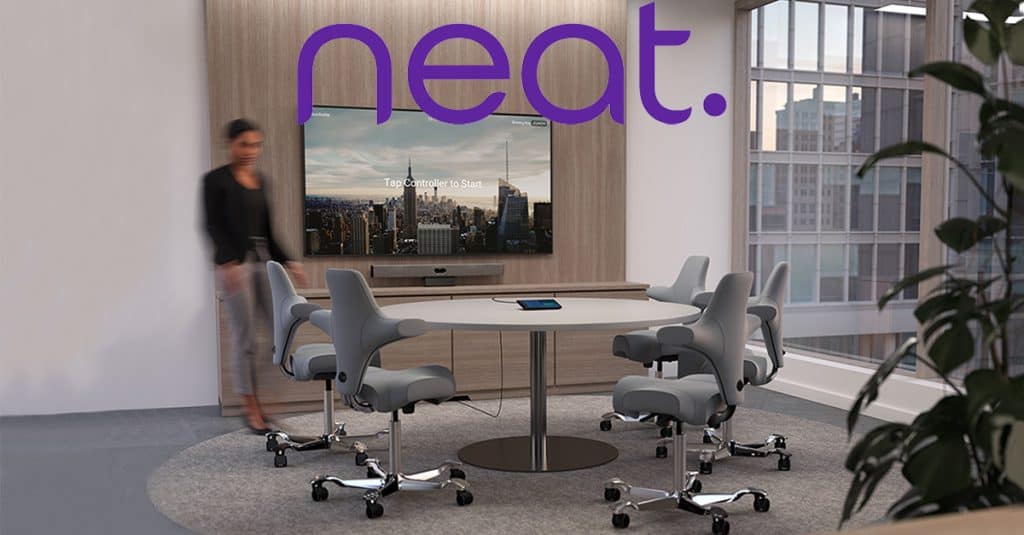
Returning to the office has been challenging for most, and not just for those working from home. Finding the right solution for a meeting room can be tough and with so many options out there it can take time in finding the products that are right for your needs and meeting rooms. With Neat, a new level of design and technology will be introduced to your meetings, whether that’s a large, small, or focus room. Neat’s slimline products span across all types of work spaces, but each of their devices are made to fit the individual needs of a person either working from home, or back working in the office. 
If Neat sounds like something you want to add to your basket, then chat to us by filling out the form or give us a call on (01189) 977 785 to learn more about Neat and how it can introduce a new way of video conferencing into your hybrid workplace.

Neat Bar And Pad

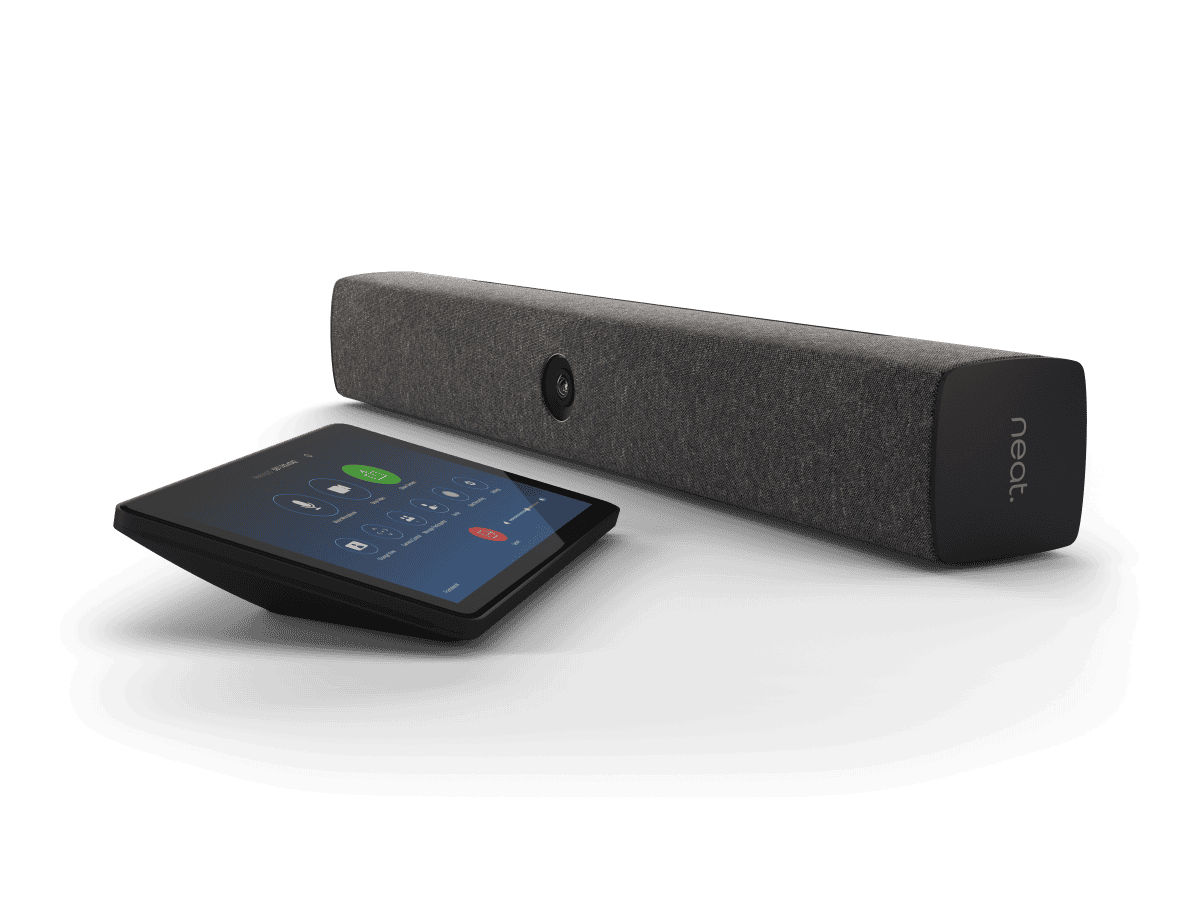
Certified for Zoom and Teams, Neat Bar And Pad easily fits into your meeting room. A sleek audio and video bar that snaps onto your meeting room display the Bar only takes minutes to get to work. The integrated 120° and 4 x digital zoom camera catches every corner of the room. The wide angled camera works perfectly for those bigger meetings.

Although the Bar can be used for bigger sized meeting rooms, it also is a great solution for smaller, brainstorming sized rooms. The automatic framing feature included will cut off the unnecessary view of the room around you. Putting you in centre frame. Not only will the Bar make sure that you are the main focus of your meeting, as you should be, Neat Bar will also re-adjust and re-frame. Making sure that any last minute attendees to the meeting will be added.

  • 120° Camera with 4x digital zoom
  • 5 Microphone array
  • Wide angle tweater
  • Double screen support
  • 4x Digital zoom
  • Dual screen support

Neat Bar And Pad Bundle

Made For Content Sharing

Neat Bar And Pad bundle is most suited for video centred meeting rooms. These types of rooms are focused on content being shared from the meeting room participants to the remote participants. So having the best video and audio is important for this type of meeting. Luckily with Neat Bars technology, the wide angled lens and multiple microphone array capture the best audio and video possible. Letting you and your colleagues express your ideas easily and communicate them all together.

Why Not A Controller? Or A Scheduler?

Working alongside the Bar, Neat Pad adds a room controller or a scheduler to your meeting room. Using Neat Pad as a room controller allows you to start, join, and control your meeting all from the 8″ touchscreen. Not only can you start a meeting from the device with a single tap, but can wirelessly share content to the main display. The Pad controller is easy to set up with a quick connection to power over ethernet and you can pair your Pad to the Bar to start controlling. 

If you are wanting to use Neat Pad as a room scheduler, the Pad will sit outside your meeting room with the availability shown on the screen. Stopping any interruptions from happening as the Pad has LED indicators showing if the room is free or not.

Neat Bar Pro And Pad

If Neat Bar sounds like a device that you want to get your hands on but know that the size and technology of the Bar wouldn’t fit into your meeting rooms. Don’t worry, Neat Bar Pro offers everything Neat Bar can offer and more to fit a larger room.

Being able to support more than two screens in a larger meeting room, Neat Bar Pro offers a larger field of view with more digital zoom. Meaning that everyone around the meeting room table, no matter the size or shape, will be seen clearly. Linking to Neat’s mission of looking after users wellbeing and making meetings more realistic and genuine. Promoting this mission even further, Neat Bar Pro has 3 full range speakers with 16 beamforming microphone array and 4 tracking microphones. Making for crystal clear audio that flows throughout the meeting room.

  • 70° to 113° Field of view camera with 16x digital zoom
  • 3 Full range speakers
  • 16 Beamforming microphone array
  • 4 Tracking microphones
  • 1080p People video resolution
  • Triple Screen Support

Neat Bar Pro For Larger Meetings

For a larger meeting room setting, Neat Bar Pro will be better suited than a Neat Bar. Neat Bar Pro gives the opportunity to let its users use multiple screens with the Pro Bar. A great chance to let teams hold their Zoom meeting on one screen, show a diagram on the other screen, and present content on the third. It makes sharing content in your meeting room much simpler and clearer to view.

Each bit of content you want seen in the meeting spread across all three screens. Making it clearer for teams to have discussions about any content shared, leaving no ones ideas behind.

Neat Frame

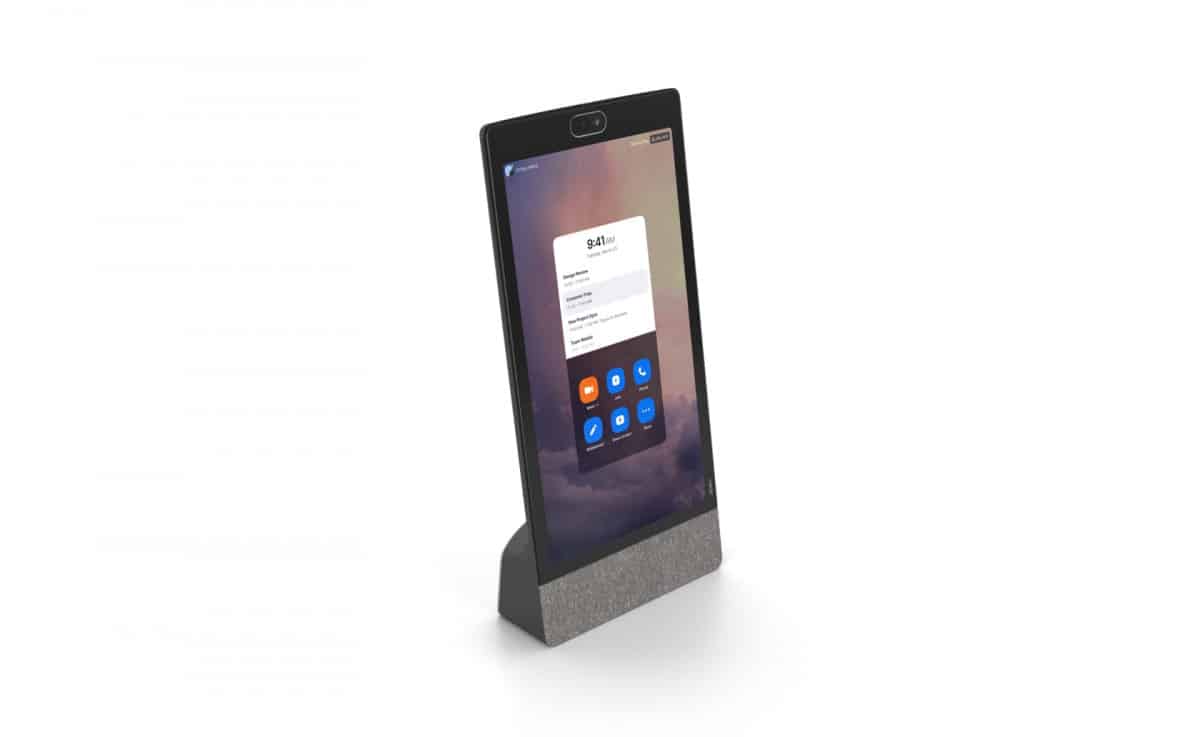
Out of all the other Neat devices, Neat Frame is the most suitable device for home offices. Working as a second screen, Neat Frame can hold all your Zoom meetings on a 15.6″ portrait touchscreen. While you use your laptop simultaneously on the side. Even though Neat Frame is the smallest out of all the Neat devices, the meeting device still offers power to those working from home or those coming into the office to quickly use the focus room for their meeting.

Neat Frame gives a 113° field of view and 8x digital zoom This pairs well with the auto framing feature as you have the freedom to stand up and move around the room with Neat Frame’s camera having a wide enough field of view to follow you. Making your meeting much more personal and in a sense more realistic to running a meeting in person.

  • 113° Field of view camera with 8x digital zoom
  • 15.6″ Full HD touchscreen
  • 3 Microphone array
  • 1 Tracking microphone
  • 1080×1920 Resolution
  • Bluetooth and headphone jack

Neat Frame By Neat

Frame At Home

Neat Frame can do great things for your home office, shaping the way you video conference from the comfort of your home. No matter the size, shape, or layout of your office at home, the quick connection video conferencing device can easily slot into your work from home set up. Just a quick connection to power, then to the internet, and you’re ready to start your Zoom meeting within a few minutes.

With Neat’s smart features like Neat Bubble and auto framing, working from home has never been easier. There won’t be any worrying over your boss or colleagues hearing your children running around or dog barking downstairs. Every noise that can distract your meeting will be blocked out. 

Along with the auto framing feature and the easy connection of the Frame, you can present from wherever in the room. So if you have a larger home office and you like to present in your meeting, you can just stand up, turn the Frame around and present. Making Neat Frame a flexible and portable device for any type of meeting.

Focus With The Frame

Even though Neat Frame is best suited for home offices, the easy to set up meeting device can easily work in and focus room in the office. With only needing one cable to set up, Neat Frame keeps your desk space clean and tidy for another person to use straight after. Making your meetings more efficient.

Just like using Neat Frame in your home office, you can use Neat Bubble and Boundary to make sure that the person you are meeting over Zoom can only hear your voice. Making you the main focus of your meeting.

Neat Board

Neat Board is one of Neat’s most portable device, with the Board being able to fit in most office work spaces. From standard meeting rooms, whether that’s a small, medium or large room, to social spaces in the office.

Taking one look at the 65″display, the clean device holds everything that you will need in a meeting room. Plus with a quick set up, the Board will obviously need connecting to power and the internet but then its just a case of connecting to your Zoom or Teams account and you can quickly start your meeting.

Neat Board has a plethora of features to make your meetings streamline and more professional. You can be confident that your audio is covered by the 5 microphone array, picking up every voice in the room but the echo cancellation and noise suppression will make sure that your voice is put across to your remote participants sharp and clearly. Alongside your audio, you have a 120-degree field of view camera and a 4x digital zoom to cover the biggest of meeting room. 

  • 120° Field of view camera with 4x digital zoom
  • 65″ 4K Multi-touch LED display
  • Wide angle tweeter
  • 5 Microphone array
  • 3 Sensor microphones
  • Air Quality Sensors
  • Anti-glare and anti-fingerprint coating 

Neat Board In Social Settings

Like we said Neat Board can be used in many situations and with the Boards flexible mounting options, it can be mounted anywhere. Neat Board lets you use the Board exactly as you want- with the flexible choice to mount the Board on the wall, the rolling floor stand, or have the Board sat on the table. The 65″ Board can be used in a standard small, medium, or large meeting room. But, place the multi-touch display into an open office and see how quickly your meeting will come alive.

Now you’re probably thinking about how it would work to hold meetings with Neat Board in an open office. Especially if more people are in the office making noise around you. That’s where Neat Bubble and Neat Bubble come into play.

Make A Bubble

Neat Bubble allows the user to create a Bubble around their team during their meeting. Its a feature that lets you block out any noise around you. So if anyone enters the Bubble while the meeting it going on, their voice will become audible. However if people are talking on the row of desks next to you, they will not be picked up. This will be because they are outside of the Bubble. Its a unique feature that lets you create the size of the Bubble and shows you what will be picked up and what wont be picked up. Making sure that your Bubble is perfect.

Similarly the Neat Boundary feature will block out any voices outside the boundary line. However, it will also stop the camera from adjusting its frame to fit in the person walking past your desks.

Standard Meeting Rooms

If you haven’t upgraded your office just yet with a more open planned style or maybe swanky new social spaces. Neat Board will still fit and work wonders in any of your meeting rooms. Behind all the standout features that can help your meeting in an open planned office, Neat Board is still an all-in-one device designed to hold you Zoom or Teams meetings. With integrated speakers, microphones and camera, the Board can still work in standard small, medium, or large meeting rooms. Being able to take your meetings up a notch. 

Hear It From The Customers

Neat is definitely one to look out for. Neat products will fit nicely into any room. In addition to their high performance technology, the modern and simplistic design of Neat products make it easy to fit into any room. Any and every company can benefit from a Neat product in their meeting room, home office, social spaces, or focus rooms.

One company that has benefited and loved their Neat device is a law firm in UK. In an interview with the firms head of IT, Neat found out about the law firms experience with Neat and how it changed the way they used Zoom.

Why Choose Neat?

Like everyone else, companies had a massive challenge ahead of them when lockdown was introduced to the world. Video conferencing sky rocketed with the amount of users. People were searching high and low for the perfect solution to their new working environment. To TWM Solicitors, Neat was a no brainer when introduced to them.

“The devices are really well designed, are really easy to use and they make a real difference to the business.”

Alan Barrett – Head of IT

After trying to find the best solution for their employees dotted at home or in the office, TWM Solicitors found out about Neat products and how they can hold great Zoom meetings. So when they were making their final decision and choosing to use Neat to complete their new hybrid working solution, it only took 4 days. Taking TWM Solicitors a matter of 4 days to change their video conferencing around with Neat. Their employees loving Neat Bar and Neat Pad they were using in the several meeting rooms and all the features that came with the Bar. Especially the Neat Symmetry.

Neat Summed Up

Summed up, Neat can and will work anywhere. And now working from home or having a hybrid working environment has increased in popularity – Neat will work for any company. Each Neat product have the perfect ability to hold your meetings to the highest quality but not only with high quality audio and video. The Neat features of Neat Bubble, Symmetry, and Boundary mean that any Neat product can be used from home, the office, or social working environments. 

Picture of Natalie Horn

Natalie Horn

Table of Contents

Conference room technology trends
Future Trends

5 Conference Room Technology Trends Shaping the Future

Discover the top 5 conference room technology trends shaping the future. Learn how the latest audio visual and video conferencing tools, collaborative platforms, and meeting technology are revolutionizing the workplace. Stay ahead of the game and stay competitive in today’s fast-paced digital world.

Read More »
remote collaboration for HR teams
Remote Collaboration

Optimise Remote Collaboration for HR Teams with these Powerful Tools

In today’s remote work environment, HR teams face unique challenges in maintaining effective collaboration and workflow management. The shift towards remote work has necessitated the adoption of powerful remote collaboration tools to streamline HR processes and enhance productivity. This blog aims to provide a comprehensive list of such tools, enabling HR teams to overcome the hurdles of remote collaboration and optimise their workflow. Communication and Collaboration: HR teams heavily rely on seamless communication and collaboration to fulfill their responsibilities. However, remote work settings often hinder face-to-face interactions and impede the spontaneous exchange of ideas, leading to communication gaps and reduced collaboration. Workflow Management: Coordinating HR activities, managing projects, and tracking progress can be challenging when team members are geographically dispersed. The absence of physical proximity requires HR teams to find efficient ways to delegate tasks, monitor workflows, and ensure timely completion of assignments. Document Management: With remote work, HR teams need efficient systems for sharing, editing, and storing documents securely. Traditional methods of document handling become impractical, emphasising the need for digital collaboration tools that enable remote access, version control, and document security. Project and Task Management: HR projects often involve multiple tasks, deadlines, and dependencies. Without proper tools, remote teams may struggle to track progress, assign responsibilities, and manage tasks effectively. HR teams require streamlined project management and task tracking solutions tailored to remote work environments. How I use Asana to manage my organization’s work and teams  Understanding Remote Collaboration for HR TeamsRemote collaboration has become increasingly important for HR teams in today’s digital era. It refers to the process of working together on projects, tasks, and initiatives while being physically located in different places. This concept has gained significant significance as organisations embrace remote work and virtual teams. In this section, we will explore the concept of remote collaboration and its vital role in enhancing efficiency, communication, and workflow management for HR teams.Improving Efficiency through Remote CollaborationRemote collaboration offers numerous benefits to HR teams, and one of the key advantages is improved efficiency. By leveraging collaboration tools and software, HR professionals can streamline their workflow and eliminate geographical limitations. They can work on projects, exchange information, and collaborate on tasks seamlessly, regardless of their physical location. This streamlined process allows HR teams to work more efficiently and complete projects in a timely manner.Enhancing Communication within HR TeamsEffective communication is vital for the success of HR teams, and remote collaboration plays a crucial role in facilitating communication across distributed teams. Collaboration tools for HR teams enable real-time communication, allowing team members to connect and interact instantly. Whether it’s discussing HR strategies, addressing employee concerns, or coordinating recruitment efforts, remote collaboration tools provide a platform for seamless communication. This enhanced communication fosters stronger collaboration and ensures that everyone is on the same page, regardless of their physical location.Enabling Seamless Workflow ManagementWorkflow management is a critical aspect of HR operations, and remote collaboration simplifies this process for distributed teams. With the help of collaboration tools, HR professionals can effectively manage documents, projects, and tasks. Cloud-based collaboration platforms offer secure and centralised document management, allowing HR teams to access and collaborate on files from anywhere. HR project management software and task management solutions also enable efficient planning, execution, and tracking of HR initiatives, even in a remote work environment. These tools automate manual processes, streamline HR workflow, and ensure that tasks are completed on time.The Role of Collaboration Tools in Remote WorkCollaboration tools are the backbone of remote work and play a pivotal role in facilitating remote collaboration for HR teams. These tools encompass a wide range of software, platforms, and applications designed to support virtual teams and enable effective collaboration. HR collaboration software offers features tailored to HR processes, such as employee onboarding, performance management, and HR analytics. Virtual collaboration tools provide virtual meeting spaces, video conferencing capabilities, and chat functions to encourage real-time collaboration and idea sharing among team members. By leveraging these tools, HR teams can overcome the challenges of remote work and continue to collaborate effectively. Collaboration Tool Description HR Collaboration Software Software designed specifically for HR processes Virtual Collaboration Tools Tools that provide virtual meeting spaces and chat HR Project Management Software Software for planning, executing, and tracking HR projects Task Management Solutions Tools for efficient management and tracking of tasks Cloud-Based Collaboration Tools Tools that enable secure and centralised document management   Key Features to Look for in Remote Collaboration Tools for HRIn today’s evolving work landscape, remote collaboration has become essential for HR teams to manage their workflow and ensure seamless communication effectively. The right collaboration tools empower HR professionals to streamline processes, enhance productivity, and foster efficient teamwork. In this section, we will explore the key features that HR teams should consider when selecting remote collaboration tools, emphasising document management, project management, task management, and secure communication. We will also highlight the significance of cloud-based solutions and automation capabilities in effectively streamlining HR workflows.Document Management: Centralize and Organize HR DocumentsEfficient document management is crucial for HR teams operating remotely. Look for remote collaboration tools that offer robust document management capabilities. These tools should enable HR teams to centralise all HR-related documents securely, allowing easy access for authorised team members. With features like version control, document sharing, and real-time collaboration, HR professionals can collaborate seamlessly on projects, policies, and procedures. A comprehensive document management system ensures that HR teams can maintain accurate records and easily retrieve information as needed.Project Management: Track and Coordinate HR ProjectsRemote collaboration tools should include project management features tailored to the specific needs of HR teams. These features enable HR professionals to define project goals, set milestones, assign tasks, and track progress. An effective project management module allows for transparency and accountability within the HR team, ensuring everyone stays on track and meets deadlines. Look for tools that offer visual timelines, task dependencies, and team collaboration functionalities to enhance project coordination and productivity.Task Management: Streamline HR WorkflowsStreamlining HR workflows is essential for remote teams. Look for collaboration tools that provide robust task

Read More »
cloud collaboration tools
Remote Collaboration

Transform Your Workflow with these Powerful Cloud Collaboration Tools

In today’s fast-paced digital workplace, effective collaboration is crucial for success. Cloud collaboration tools have revolutionized the way teams work together, providing seamless communication, enhanced productivity, and streamlined workflow management. This blog explores a variety of powerful cloud collaboration tools that cater to different needs and scenarios, empowering businesses to achieve their goals efficiently.Cloud collaboration tools play a pivotal role in fostering teamwork and boosting productivity within organizations. These tools facilitate real-time collaboration among team members, regardless of their geographical location. By enabling virtual teams to work together seamlessly, cloud collaboration tools break down barriers and promote efficient communication.Efficient workflow management is a key aspect of any successful business. Cloud collaboration tools offer a range of features that simplify task and project management. With cloud-based software, teams can track progress, assign tasks, and set deadlines, ensuring everyone is aligned and aware of their responsibilities. This streamlined workflow management helps teams stay organized, meet deadlines, and achieve optimal efficiency.Best Free Cloud Collaboration Tools  Cloud Collaboration Tools for Startups and Small BusinessesStartups and small businesses often face unique challenges when it comes to collaboration and workflow management. Limited resources, remote work setups, and the need for seamless communication among team members are just a few of the hurdles they encounter. To overcome these challenges, leveraging cloud collaboration tools can be a game-changer. These tools enable teams to collaborate effectively, streamline their workflows, and improve productivity. In this section, we will discuss specific challenges faced by startups and small businesses in terms of collaboration and workflow management, and present a curated list of cloud collaboration tools designed to address these challenges.Limited Resources and Budget ConstraintsStartups and small businesses often have limited resources and tight budgets. Investing in expensive collaboration solutions can be a challenge. However, cloud collaboration tools provide affordable options without compromising functionality. They offer flexible pricing plans and scalable features, allowing businesses to adapt as they grow.Remote Work and Virtual TeamsWith the rise of remote work, startups and small businesses frequently operate with virtual teams spread across different locations. This setup requires effective collaboration tools that facilitate seamless communication, file sharing, and real-time editing. Cloud-based software provides a centralized platform accessible from anywhere, allowing team members to collaborate efficiently regardless of their physical location.Document Management and Version ControlEfficient document management is crucial for startups and small businesses to ensure seamless collaboration. Cloud collaboration tools offer robust document management features, allowing teams to store, share, and manage files securely. Additionally, version control features ensure that everyone is working on the latest document version, eliminating confusion and saving time.Curated List of Cloud Collaboration Tools Google Workspace Google Workspace (formerly G Suite) is a comprehensive cloud-based collaboration platform that offers a suite of productivity tools, including Gmail, Google Drive, Google Docs, Google Sheets, and Google Meet. It enables real-time collaboration, document sharing, and video conferencing. Google Workspace is suitable for startups and small businesses of all sizes, offering affordable pricing plans and seamless integration with other Google services. Microsoft 365 Microsoft 365 (formerly Office 365) is another popular cloud collaboration suite. It includes tools like Microsoft Teams, SharePoint, OneDrive, and Microsoft Word, Excel, and PowerPoint. Microsoft 365 provides a robust ecosystem for teamwork, project management, and file sharing. It offers various plans tailored to the needs of startups and small businesses, ensuring affordability and scalability. Slack Slack is a cloud-based team collaboration tool designed to enhance communication and streamline workflows. It offers channels for organized discussions, direct messaging, file sharing, and integration with other apps. Slack provides startups and small businesses with an efficient platform for remote collaboration, boosting productivity and fostering teamwork. Trello Trello is a popular cloud-based project management tool that uses a visual board and card system. It allows teams to create task lists, assign responsibilities, set due dates, and track progress. Trello’s intuitive interface makes it easy to manage projects and collaborate effectively. Startups and small businesses can benefit from Trello’s simplicity and flexibility. Asana Asana is a powerful cloud-based project and task management tool. It offers features such as project planning, task assignment, deadlines, and progress tracking. Asana provides startups and small businesses with a centralized platform for managing workflows, increasing transparency, and improving team collaboration. Dropbox Dropbox is a widely used cloud-based file sharing and storage platform. It allows teams to store, sync, and share files securely. With features like file versioning and collaboration on documents, Dropbox facilitates smooth teamwork and efficient collaboration. Startups and small businesses can benefit from its user-friendly interface and robust security measures.  Boosting Productivity with Easy-to-Use Cloud Collaboration ToolsWhen it comes to optimizing productivity in today’s fast-paced work environment, seamless collaboration among team members is paramount. Cloud collaboration tools have emerged as a game-changer, enabling remote collaboration and enhancing teamwork by providing efficient project management, file sharing, real-time editing, and more. To maximize productivity, it is essential for these tools to offer user-friendly interfaces and intuitive workflows that minimize the learning curve for team members.Facilitating Seamless Collaboration and Minimizing Learning CurvesThe chosen cloud collaboration tools provide several key benefits that facilitate seamless collaboration and minimize the learning curve for team members:Streamlined Workflow ManagementBy offering intuitive workflow management features, cloud collaboration tools enable teams to organize and prioritize tasks efficiently. The ability to assign, track, and update tasks in real-time fosters transparency and accountability, leading to increased productivity and smoother project execution.Real-time Editing and CollaborationCloud collaboration tools empower team members to collaborate on shared documents in real time. Multiple users can simultaneously make edits and provide feedback, eliminating the need for time-consuming back-and-forth exchanges. This real-time editing capability enhances efficiency and accelerates decision-making, ultimately boosting overall productivity.Simplified File Sharing and Document ManagementEffortless file sharing and secure document management are crucial aspects of effective cloud collaboration. The selected tools offer secure cloud-based platforms that enable seamless sharing of files and folders among team members. Additionally, advanced document management features, such as version control and document locking, ensure data integrity and eliminate confusion caused by multiple file versions.  Secure and Efficient Cloud Collaboration ToolsIn today’s dynamic work environment,

Read More »
Progressive AV mastery
Training and Education

Progressive AV Mastery: Uncover Potential

In today’s dynamic digital landscape, mastering Progressive AV (Audiovisual) Mastery has become not just a choice, but a necessity. The world is increasingly visual, and multimedia production is at the forefront of this transformation. AV mastery, encompassing multimedia production, visual storytelling, and interactive learning, is indispensable for anyone navigating the digital sphere.Progressive AV mastery is not merely a skill; it’s an asset. In a world driven by visual content, having a stronghold on advanced audiovisual techniques is invaluable. It’s not just about producing videos anymore; it’s about creating immersive multimedia experiences that captivate audiences. Interactive audiovisual learning is the future of education, making multimedia production expertise a vital aspect of modern teaching methods.Businesses thrive on effective communication, and visual communication mastery is the key. With innovative AV solutions, companies can create compelling visual content that resonates with their audience. From cutting-edge multimedia skills to advanced visual storytelling, businesses can leverage the power of multimedia production to enhance their brand presence and engage customers.The future of AV technology is here, and it’s evolving rapidly. From AI-powered AV advancements to user-friendly multimedia editing software, staying updated with AV technology trends is crucial. Future-ready AV technology not only streamlines the production process but also ensures that the content remains relevant and impactful in the ever-changing digital landscape.For educators, embracing progressive AV tools opens doors to a world of possibilities. Creative AV solutions for education are revolutionizing classrooms, making learning interactive and engaging. Accessible multimedia technology for educators, coupled with easy-to-use visual storytelling tools, empowers teachers to deliver content in innovative ways, catering to diverse learning styles.Aspiring multimedia professionals and businesses alike can benefit from a plethora of resources available online. AV mastery online courses and multimedia production tutorials provide in-depth knowledge, guiding beginners through the nuances of multimedia production. Top AV skills development platforms offer comprehensive training, ensuring that learners are equipped with the latest skills and techniques.Mastery Learning in Mr. Vandenberg’s Class  Progressive AV Mastery Techniques for BeginnersProgressive AV mastery is the key to unlocking your potential in multimedia production and visual storytelling. If you’re a beginner looking to develop essential AV skills, this guide is tailored to help you on your journey. We’ll provide step-by-step guidance on mastering these skills, emphasizing the importance of a gradual learning approach.AV Skills DevelopmentTo embark on your journey towards AV mastery, it’s essential to start with a solid foundation. Begin by understanding the fundamentals of audiovisual technology and multimedia production. Explore the world of visual storytelling and interactive learning to grasp the core concepts. AV Mastery Foundations: Start by learning the basics of AV technology trends and multimedia solutions. This knowledge will provide you with a strong foothold in the field. Visual Communication Mastery: Effective visual communication techniques are crucial for conveying your message. Dive into the principles of visual content creation mastery. Progressive AV ToolsInnovative media applications and progressive AV tools can make your journey smoother. Consider using user-friendly multimedia editing software to enhance your skills. Some cutting-edge multimedia skills include: Advanced Multimedia Production: Delve into advanced multimedia production techniques, such as immersive multimedia experiences and interactive audiovisual learning. Next-Gen AV Mastery: Stay ahead of the curve by exploring the future-ready AV technology and AI-powered AV advancements. Step-by-Step GuidanceAchieving AV mastery takes time and practice. Follow these steps to guide your progress: Evolving Multimedia Technologies: Keep up with evolving multimedia technologies and digital media innovation. This ensures you’re always at the forefront of the field. Creative AV Applications: Apply your knowledge to create innovative media solutions. These can be beneficial for businesses, startups, and educators. Enhanced Multimedia ExperiencesCreating immersive multimedia experiences is the pinnacle of AV mastery. Consider the following: Interactive Storytelling Techniques: Learn how to captivate your audience with interactive storytelling techniques. This skill is invaluable in multimedia production. Accessible Multimedia Technology: Use user-friendly audiovisual learning platforms to make your content accessible to a wide audience. Resources for BeginnersAs a beginner, you have access to various resources to aid your AV skills development: AV Mastery Online Courses: Enroll in AV mastery online courses to receive structured guidance. Multimedia Production Tutorials: Explore multimedia production tutorials to gain practical insights. Best AV Tools for Beginners: Discover the best AV tools for beginners that streamline your creative process. Interactive Storytelling Software: Experiment with interactive storytelling software to engage your audience.   Easy AV Skills Development MethodsLearning audiovisual skills might seem daunting, but with the right methods and resources, anyone can progress swiftly in the realm of AV mastery. Whether you’re a novice or an aspiring multimedia producer, these user-friendly techniques will guide you seamlessly toward progressive AV mastery.Interactive Learning Platforms: Your Gateway to Advanced Audiovisual TechniquesEngage with interactive learning platforms tailored for AV skills development. These platforms integrate innovative AV solutions and cutting-edge multimedia technologies, providing a seamless learning experience. Explore topics such as multimedia production expertise, visual communication mastery, and immersive media solutions. With these platforms, beginners can navigate complex AV production techniques effortlessly.Creative AV Solutions for Education and BusinessesIn the ever-evolving landscape of multimedia production, creative content creation is paramount. Educators and businesses alike can benefit from affordable, user-friendly multimedia editing software and interactive storytelling tools. These tools enhance visual communication techniques and offer advanced multimedia experiences. For startups and educators, these solutions are essential, offering access to next-gen AV mastery without a steep learning curve.AV Technology Advancements: Navigating the Future of Multimedia ProductionThe future of multimedia production is now, with AI-powered AV advancements and modern multimedia production techniques. Stay ahead of the curve by exploring AV technology guides and progressive multimedia production techniques. These resources delve into the evolving multimedia technologies, ensuring you’re equipped with the knowledge to innovate and create immersive multimedia experiences.  Innovative Multimedia Production TipsIn the dynamic landscape of multimedia production, staying at the forefront of creativity and technology is essential for achieving progressive AV mastery. This journey involves honing AV skills, exploring advanced audiovisual techniques, and leveraging multimedia solutions effectively. Let’s dive straight into the world of multimedia magic!Creative Content Creation MasteryTo embark on the path of progressive AV mastery, one

Read More »
Boosting productivity using AV technology
productivity

Experience Growth: Boosting Productivity Using AV Technology

In today’s fast-paced digital workplace, maximizing productivity has become a top priority for businesses of all sizes. Leveraging Audiovisual (AV) technology has proven to be an effective strategy in achieving this goal. AV technology encompasses a wide range of audio and visual tools that enhance performance, foster collaboration, and streamline various tasks. In this blog, we will explore the increasing importance of productivity, the role of AV technology in boosting efficiency.In the ever-evolving business landscape, productivity has emerged as a critical factor in determining an organization’s success. With mounting competition and the rise of remote work, businesses are constantly seeking ways to optimize efficiency. The digital workplace, with its reliance on technology and remote collaboration, demands enhanced productivity to stay ahead.AV technology encompasses a wide range of tools and solutions that cater to diverse needs in the workplace. From video conferencing and smart displays to automation and productivity software, AV technology plays a pivotal role in fostering efficiency and collaboration.Top 14 Ways how Modern Technology Increase Productivity in the Workplace  AV Technology for Small BusinessesAV (Audiovisual) technology has become a game-changer for small businesses, offering various tools and solutions that maximize productivity and enhance workplace efficiency. In today’s fast-paced digital world, businesses need to adopt modern collaboration solutions and productivity software to stay competitive and adapt to remote work environments. This section explores the benefits of AV technology for small businesses, delves into specific AV tools suitable for such environments, and provides real-world examples of businesses that have experienced remarkable productivity improvements through AV technology.AV Technology for Small Businesses: A Productivity Game-ChangerAV Technology: Enhancing Performance and Efficiency AV technology, with its wide range of audiovisual tools, has proven to be instrumental in boosting productivity for small businesses. From video conferencing to smart displays and automation, AV solutions are transforming the way teams collaborate and work together. The integration of AV equipment allows for seamless communication, efficient meetings, and streamlined project management, ensuring that tasks are completed promptly and with precision.Enabling Productivity in Remote Work and Digital Workplace With the rise of remote work and the digital workplace, AV technology has become indispensable. Remote teams can now connect effortlessly, bridging geographical barriers, and enhancing collaboration through video conferencing and other AV tools. AV technology enables businesses to maintain high productivity levels even when team members work from different locations.Maximizing Productivity with AV EquipmentEfficient Meetings and Collaboration Solutions AV technology offers a plethora of collaboration tools that streamline meetings and discussions, ultimately boosting productivity. Businesses can conduct virtual meetings with ease, saving time and resources that would have otherwise been spent on travel. Through interactive audiovisual systems, participants can share ideas, provide feedback, and make data-driven decisions in real-time.AV Automation for Time Management and Project Efficiency Automation is another key aspect of AV technology that contributes to maximizing productivity. Repetitive tasks can be automated, freeing up valuable time for employees to focus on more strategic and innovative endeavours. By integrating AV automation into daily operations, small businesses can optimize their time management and improve project efficiency significantly.AV Technology: A Catalyst for Small Business GrowthAV technology plays a vital role in fostering business growth and success. The benefits of enhanced productivity, efficient collaboration, and seamless communication are undeniable. To make the most of AV technology, businesses can invest in suitable AV solutions tailored to their specific needs and objectives. By embracing technology-driven productivity strategies, small businesses can stay ahead of the competition and thrive in today’s dynamic marketplace.  Boosting Productivity with Video ConferencingIn today’s digital age, the integration of AV technology has revolutionized communication and collaboration, particularly with the widespread adoption of video conferencing. This technology has significantly impacted remote work and productivity, providing efficient solutions for teams to connect and cooperate regardless of their physical location. In this section, we will explore the role of video conferencing in transforming communication and collaboration, its impact on remote work, and how to maximize productivity during video conferencing sessions.The Power of AV Technology in Transforming Communication and CollaborationAV Technology for Seamless Collaboration AV technology has enabled seamless collaboration through video conferencing, breaking down geographical barriers and fostering real-time interactions. With audiovisual tools and productivity solutions, remote teams can communicate effectively, share ideas, and work together on projects, just as if they were in the same physical space. This digital workplace integration has streamlined workflows, promoting workplace efficiency and reducing the challenges of traditional communication.Enhancing Performance with AV Equipment Video conferencing has become a cornerstone of productivity software, enhancing workplace productivity and revolutionizing communication in modern businesses. The productivity benefits of AV technology are numerous, with efficient meetings, smoother project management, and faster decision-making processes. Automation and time management tools further optimize collaboration, allowing teams to focus on high-value tasks and strategic initiatives.The Impact of Video Conferencing on Remote Work and ProductivityMaximizing Productivity with AV Technology Maximizing productivity with AV equipment is a fundamental aspect of remote work. By leveraging audiovisual systems, teams can maintain regular communication, engage in face-to-face discussions, and build stronger connections with colleagues. This fosters a sense of camaraderie, resulting in higher motivation levels and improved productivity for remote employees.AV Solutions for Efficient Collaboration Remote work productivity can be significantly improved with the use of AV solutions. Video conferencing not only facilitates virtual meetings but also enables the sharing of screens, documents, and multimedia content. This level of interaction promotes brainstorming, collaboration, and efficient problem-solving, making it easier for teams to tackle complex tasks and achieve their objectives.Tips and Best Practices for Maximizing Productivity During Video Conferencing SessionsAV Technology for Better Time Management Effective time management is crucial during video conferencing sessions. Utilize AV technology to create structured agendas, set specific time frames for each agenda item, and encourage active participation from all participants. This ensures that meetings remain focused, productive, and time-efficient.AV Technology for Enhanced Engagement Engagement is key to productive video conferencing sessions. Use AV innovations, such as smart displays, to maintain visual engagement and keep participants attentive throughout the meeting. Utilizing AV advancements like virtual whiteboards and interactive elements can also facilitate active collaboration.  Enhancing Productivity in Virtual MeetingsIn today’s digital

Read More »
Mastering AV techniques
Training and Education

Mastering AV Techniques: Expert-Led Training

In today’s digital age, the importance of mastering AV (audio-visual) techniques cannot be overstated. The convergence of technology and multimedia has transformed how we communicate, educate, and entertain. To stay relevant and competitive in this dynamic landscape, individuals and professionals must acquire AV skills through expert-led training programs. In this article, we’ll delve into the significance of AV techniques and introduce the concept of expert-led training in the realm of multimedia, visual communication, and media production.Audiovisual techniques encompass a broad spectrum of skills and knowledge that are essential in today’s media-centric world. From creating compelling visual stories to enhancing multimedia presentations, mastering AV techniques is paramount for individuals seeking to excel in the media industry.Visual communication has become a cornerstone of effective information dissemination. Whether it’s through social media, online courses, or corporate presentations, the ability to convey ideas through multimedia is indispensable. AV techniques empower individuals to craft engaging and impactful messages that resonate with audiences across various platforms.The demand for professionals skilled in AV technology and multimedia editing is on the rise. The media production industry is constantly evolving, driven by technological advancements and changing consumer preferences. To stay ahead, individuals need to continuously update their skills and adapt to these trends.Expert-led workshops and training programs offer a structured and effective way to gain proficiency in AV techniques. These programs are designed and led by industry experts who possess a wealth of knowledge and practical experience in multimedia, visual storytelling, and AV technology.Through interactive learning, participants not only acquire technical expertise but also learn about media industry trends. This type of training allows individuals to stay current and relevant, ensuring they can meet the evolving demands of the digital age.AV training goes beyond the basics. It equips individuals with the skills needed to create professional multimedia content. Participants learn advanced audiovisual techniques, multimedia editing, and innovative multimedia skills that set them apart in a competitive landscape.Mastering Techniques For Better Dynamics – ITL #105  Mastering AV Technology BasicsIn the fast-paced world of media production, mastering AV techniques is essential for anyone looking to excel in the field. Whether you’re a beginner seeking to gain a foothold in the industry or a seasoned professional aiming to stay ahead of the curve, understanding the foundational aspects of AV technology is crucial. This guide will delve into key components such as cameras, microphones, and video editing software, as well as offer insights into choosing the right equipment for your needs. Let’s dive right in!AV Skills for Multimedia Training The journey to mastering AV techniques begins with acquiring the necessary AV skills. AV training programs provide expert-led workshops and interactive learning experiences that cover a wide range of topics, from basic AV technology to advanced visual storytelling. These programs are designed to equip you with the technical expertise needed to thrive in the media production industry.Understanding Key Components To excel in AV technology, you must understand its key components: Cameras: Cameras are the backbone of any audiovisual production. High-quality cameras capture crisp images and videos, making them essential for multimedia editing and visual storytelling. Microphones: Audio quality is just as important as video quality. Different microphones cater to various recording needs, ensuring clear and professional audio in your multimedia content. Video Editing Software: Mastering AV techniques also involves proficiency in video editing software. Innovative multimedia editing tools empower you to create compelling multimedia content that captivates your audience. Choosing the Right Equipment Selecting the right equipment for your needs can be a daunting task. Here are some factors to consider: AV Technology: Stay updated with the latest AV technology and media industry trends to make informed equipment choices. Professional Training: Seek professional audiovisual training to gain the expertise required to assess and select the most suitable equipment. Creative Content Creation: Your choice of equipment should align with your creative content creation goals. Consider the tools that enhance your multimedia production expertise.   Step-by-Step AV Production GuideIn the dynamic world of multimedia and visual communication, mastering AV techniques is essential for creating compelling content. Whether you’re a novice or an experienced professional, this step-by-step AV production guide will walk you through the process, from planning to execution, ensuring you have the skills needed to excel in the media production industry.Pre-production: Setting the FoundationSuccessful AV production begins with meticulous pre-production planning. Start by honing your AV skills and multimedia training to develop a strong foundation. Consider enrolling in expert-led workshops and courses to gain the technical expertise required in this rapidly evolving field. AV Training: Begin your journey by enrolling in comprehensive AV training programs that cover audiovisual skills and advanced visual techniques. These programs often offer interactive learning experiences, helping you grasp concepts effectively. Planning and Storyboarding: Visual storytelling is at the heart of AV production. Learn how to craft compelling narratives and storyboards that captivate your audience. This is where your visual communication expertise will shine. Scriptwriting: In pre-production, perfecting your scriptwriting skills is crucial. Ensure that your multimedia editing skills are on point, as the script is the backbone of your content. Selecting AV Technology: Stay up-to-date with AV technology trends to make informed choices. Familiarize yourself with innovative AV technologies and tools that enhance your media production capabilities. Shooting: Bringing Your Vision to LifeOnce your pre-production phase is complete, it’s time to move into the shooting phase. This is where you put your technical AV expertise to work. Camera Techniques: Learn advanced audiovisual techniques for capturing high-quality footage. Focus on achieving visual perfection with your shots. Lighting and Sound: Mastering AV techniques also involves understanding lighting and sound. These aspects are essential for creating professional multimedia content. Directing and Editing: During the shooting phase, employ your multimedia editing skills to create visually appealing scenes. Pay attention to details, as the devil is in the edit. Post-production: Crafting the Final ProductAfter you’ve gathered all your footage, it’s time to dive into post-production. Here, your media production skills will be put to the test. Multimedia Editing: Utilize advanced audiovisual training to edit your content seamlessly.

Read More »
MeetingStore.co.uk
Logo
Compare items
  • Total (0)
Compare
0
Shopping cart