Excellent
Next day delivery! Depending on Availability*
Here to help! Monday to Friday, 8:30AM-5:30PM*

Switch Up Your Meeting With Neat

Neat Features Blog Header

Getting back into the office has been a light at the end of the tunnel for a lot of people. Working from the confines of a home office for the past 2 years has affected people mentally and physically. But with people still unsure about the safety of going back into the office, things have to be adjusted and changed. New ways of holding meetings had to be created, with new focus rooms, hybrid desks, and new equipment to suit the new way of working.

Neat doesn’t just bring sleek and slimline devices in to your meeting room. Behind all the technology Neat products are working hard to give you the best and healthiest meeting there can be. The features included are: Neat Sense, Symmetry, and Boundary. These unique features have been included to change the way people video conference. The features can make you meeting more successful with enhancing your audio and image. Neat starting a movement to make meetings more personal and insightful – no matter where you are.
If Neat sounds like something that would benefit your meetings – send us over a filled out from with your details and we’ll get back to your enquiry. Or if you want to have a chat about Neat products and their unique features, you can give us a call on (01189) 977 785.  

Neat Sense

If you are one of those worrying about the safety of returning to the office, Neat Sense could help easy your worries. This feature monitors your meeting room and creating analytics for you to view after your meeting is over. Neat Sense will gather information about the meeting rooms temperature, humidity, and air quality. Plus it will count how many people are in the room.

Getting information about the air quality of your room can be super important. Neat devices uses TVOC (Total Volatile Organic Compounds) and CO2eq sensors to put across an estimate of CO2 concentrations in the room. Giving you the best most accurate data it can. This information will let you keep control over your meeting room and if the room is safe enough to hold a meeting.

Real Time Analytics

Neat’s Smart Sense technology will gather data in real time throughout your meeting and presenting it to you at the end. The Neat device will constantly monitor your meeting rooms air quality. Alongside Neat monitoring the air quality of the room, humidity and the temperature of the meeting room will also be monitored. These analytics will let you make sure that your meeting room is suitable and comfortable for the participants in the meeting. 

To be able to get an accurate reading, your Neat device will need to be powered on for at least 24 hours in the meeting room you want to get analytics from.

It Just Makes Sense

There are many reason to why gathering this sort of data is important. Calculating the levels of CO2 in a room helps make your meeting room less dangerous and can affect people in the meeting. If CO2 levels get too high, it is proven that is can slower your productivity. Not only dangerous for your meetings but your employees. Similarly to stop an impact on productivity and motivation, making sure that the air quality is good is important. It helps make people in the room more productive, happier, and healthier.

Furthermore, making sure that the humidity is between 30-60% it stops any viruses transmitting from person to person. A great feature to entice people back to the office and to use meeting rooms again. Giving people access to clear and precise analytics to show that they are safe.

Neat Boundary

If you are working from a focus room in a busy office, Neat Boundary allows you to shut yourself away. A feature that can keep the focus on yourself and your meeting participant. Shutting out the noisy office. With Neat Boundary you can walk into your focus room with Neat Frame already sat on the desk. Ready to hold your meeting and adjust the width and depth of the Boundary.

With your Boundary set, voices, loud noises, and other faces will be blocked from your meeting. The Boundary settings are easy to use, you can set your Boundary line to the exact width and height you want it at. You having piece of mind and Neat’s smart technology knowing that you should only be in focus.

Set Your Boundary

The Boundary feature is fully customisable to how you want it and to the size of your room. So if someone needs to join in last minute you can adjust the width of the boundary to include the extra person. Making way for collaboration and further ideas being presented. When setting the boundary it is recommended that you walk around your desired perimeter to make sure that your boundary is correct. So if someone is in the meeting room but stood outside of the boundary, the Neat camera will detect that they are there but will not show them in the meeting. 

Neat Symmetry

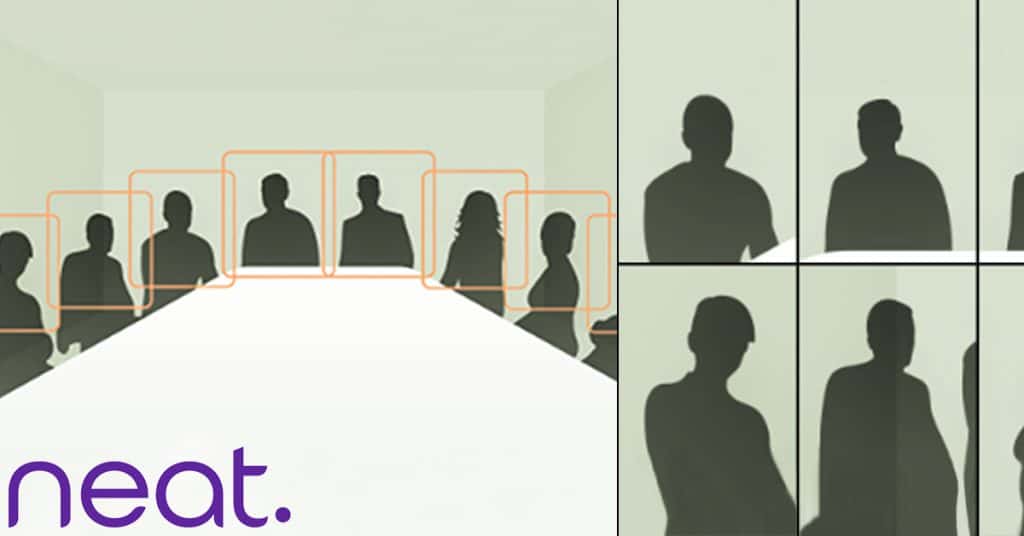
When meeting in a large meeting room, having up-close and personal interactions can be difficult. With Neat Symmetry, each and every person in the meeting will be put into frame. With the remote participants seeing the classic grid view that would normally be seen if each person was using their own device.

This not only gives a cleaner look to the meeting with cutting out the background and focusing on the person. But, it promotes a more natural meeting as you can see everyone’s facial expressions. Being able to bring back natural interactions. The interactions that you would normally have if everyone included in the video conference was in the same meeting room together. 

More Realistic Meetings

One of the biggest benefits of Neat Symmetry is that it can help improve the wellbeing of Neat’s users. It may not seem like it but Symmetry will, like said, help move your video conferencing to a more realistic meeting. So if you’re just starting to come back to work, it can be difficult to not have in-house meetings. Especially for that amount of time if you’ve been working from home. Using Neat Symmetry will help those still working from home. Helping them feel more included and involved in the meeting. 

Neat Symmetry will work in any meeting room and can be used on all, but Neat Pad, Neat devices. Neat making sure that these features can help with anyone’s wellbeing in any meeting, however Neat Symmetry will only work in a meeting with less than nine people. Using the Neat Symmetry feature on Neat Board in a large room for example. 

Neat Auto Framing

Auto framing is a regular feature in most video conference devices. However with Neat, they have proposed a feature of auto framing that can actually help improve your wellbeing. Included in Neat Frame, the auto framing feature promotes users to get up and move around while on a video call. Instead of just sitting in your chair. It can improve your mental health by being able to do some form of exercise in your day.

Not only that but it can help improve your meeting by giving you the freedom to get up and move around while you present during your call – like you would do normally during a face to face meeting. Knowing that Neat’s camera will follow you around seamlessly.  

Freedom To Move Around

Not only does Neat’s auto framing feature allow you to get up throughout the day. And get your steps in. But it allows for more natural conversation gestures and expressions. Allowing you to feel like you are in a normal conversation with your work colleague. Which can massively improve you style of conversation and what ideas you bring to the table. Letting that natural conversation and interaction come back into the office. 

Neat provide the best devices to get the most out of your meetings. Focusing on whats best for the wellbeing of your team to holding the best meeting you can. That’s why we think that Neat is one of the best and upcoming devices to use in any type of meeting room or meeting space. That’s what is so great about Neat – they have created devices to cover every type of meeting room and meeting space. If you wanted to use Neat Board in your open planned office, you can do just that and with the unique Neat features it’s possible to do so without having any interruptions. 

Picture of Natalie Horn

Natalie Horn

Table of Contents

AV transformation journey
Training and Education

Transformative AV Journey: Expert-Led Learning

In the realm of modern education, the concept of AV transformation journey stands as a pivotal force, reshaping classrooms and revolutionizing learning experiences. This transformative process, rooted in cutting-edge Audio Visual (AV) technology, is more than a mere upgrade; it’s an evolution. As educational technology intertwines seamlessly with interactive learning tools, multimedia integration, and experiential education, the role of expert-led learning becomes paramount in this journey.Educational technology has swiftly embraced AV solutions, paving the way for immersive teaching and collaborative learning. Traditional classrooms are no longer confined to static teaching methods. Instead, digital learning and interactive displays have ushered in an era of experiential learning experiences. Here, the AV transformation journey acts as a bridge, connecting educators and students to a world of innovative teaching tools and multimedia resources.Expert-led learning plays a pivotal role in guiding this AV transformation journey. Educators armed with knowledge about the future of AV technology are instrumental in implementing advanced visual solutions and interactive projection techniques. By understanding the nuances of AV integration solutions, educators can create interactive classroom experiences that resonate with the evolving needs of students. This process isn’t merely about incorporating technology; it’s about curating transformative learning experiences that enhance student engagement and optimize AV for effective teaching.For beginners, the AV journey might seem daunting. However, with the right guidance, transforming classrooms with AV becomes not only feasible but also enriching. The future-ready AV solutions available today cater to diverse educational settings, offering affordable classroom AV setups. Educators can benefit from guides that help them choose the right AV equipment and interactive displays suitable for their specific needs. From interactive projection solutions to budget-friendly classroom AV setups, the options are vast, allowing seamless integration of AV technology into education.How to use your interactive Epson projector in your classroom   AV Journey for BeginnersIn the ever-evolving landscape of education, the term “AV transformation journey” has emerged as a pivotal concept that underscores the integration of advanced audiovisual technology into the classroom. This journey encompasses a myriad of fundamental concepts and terminologies, offering innovative approaches to education while ensuring a seamless transition to the digital era.AV Transformation JourneyThe AV transformation journey signifies a paradigm shift in the education sector, characterized by the fusion of educational technology, interactive learning tools, and multimedia integration. At its core, this journey revolves around creating experiential education through AV solutions, thereby enhancing classroom technology and enabling digital learning. To navigate this path successfully, beginners must acquaint themselves with key terminologies, concepts, and cutting-edge audiovisual trends.Fundamental Concepts and Terminologies Immersive Teaching: Immersive technology refers to creating an environment that deeply engages students. It involves the use of interactive displays, interactive projection, and advanced visual solutions to create transformative learning experiences. Educational Innovation: This concept encompasses the adoption of innovative learning tools and experiential technology to enhance the learning process. Multimedia Resources: Multimedia resources include various content forms like videos, images, and interactive presentation tools that facilitate collaborative learning solutions. Technology-Enabled Education: The incorporation of AV integration solutions, adaptive AV systems, and next-gen multimedia to enable technology-driven teaching methods. Experiential Learning Experiences: Creating interactive and immersive classroom experiences that promote experiential education and improve student engagement. AV Innovation Trends: Staying updated with the latest AV technology trends is essential for maintaining an innovative learning environment.   Transforming Classrooms with AVEducational technology has come a long way in revolutionizing traditional classrooms. The integration of Audio-Visual (AV) technology has played a pivotal role in this transformation, shaping the way educators teach and students learn. In this section, we’ll explore the impact of AV technology on teaching methods, student engagement, and real-life examples of schools that have successfully embraced the AV transformation journey.AV Transformation Journey in EducationAV technology has evolved significantly, shaping the future of education. The AV transformation journey in classrooms has paved the way for immersive technology and experiential education. With cutting-edge AV solutions, traditional classrooms are no longer confined to static textbooks and chalkboards. Instead, digital transformation has ushered in an era of smart multimedia solutions, interactive displays, and immersive teaching.Impact on Teaching MethodsAV technology has redefined teaching methods, making learning more interactive and engaging. Educators can now leverage AV integration solutions to create transformative learning experiences. Interactive projection tools and multimedia resources empower teachers to deliver content in innovative ways. This shift from traditional teaching methods to experiential learning experiences has had a profound impact on students.Benefits of AV IntegrationThe benefits of AV technology in education are numerous. It enhances student engagement, making learning more enjoyable and effective. As a result, it fosters collaborative learning, allowing students to actively participate and work together. With AV innovation trends, educators can adapt their teaching methods to cater to diverse learning styles, ensuring a more inclusive and technology-enabled education.Choosing the Right AV EquipmentFor educators embarking on their AV journey for the first time, it’s crucial to choose the right AV equipment. Budget-friendly classroom AV setups are available, and AV setup guides for educators can help in this process. By optimizing AV for effective teaching, educators can ensure a smooth transition into the world of interactive multimedia learning tools.The Future of AV TechnologyAs we look to the future, the role of AV technology in education is set to expand. Emerging AV technologies will continue to shape the classroom of tomorrow. With interactive presentation software and AV solutions comparison, educators will have more choices than ever before. The future-ready AV solutions will empower educators to create immersive classroom experiences that cater to the needs of the digital generation.  Future-Ready AV SolutionsIn the fast-paced world of education, staying future-ready is crucial, and the adoption of cutting-edge AV solutions plays a pivotal role in this journey. As educational technology continues to evolve, so do the demands for immersive, interactive, and experiential education. Importance of Being Future-Ready with AV SolutionsThe AV transformation journey is a continuous process of adapting to the ever-changing educational landscape. Educational technology and interactive learning tools have revolutionized the way students engage with content, making multimedia integration a necessity for educators. AV solutions are the cornerstone of this

Read More »
working together remotely
Remote Collaboration

Strengthen Your Remote Team with these Proven Strategies for Working Together Remotely

Remote work has experienced a surge in popularity, transforming the traditional office-based work model into a more flexible and dynamic environment. Enabled by advanced technologies, remote work allows individuals to perform their tasks from any location, offering a range of benefits and opportunities. However, to maximize productivity and ensure seamless operations, effective collaboration and communication within remote teams are of utmost importance. This article explores the concept of remote work, highlights the significance of remote collaboration, and emphasizes the need for efficient communication among team members.Remote work, also known as telecommuting or working remotely, refers to the practice of completing work tasks outside of a traditional office setting. It has gained significant traction in recent years due to advancements in communication technologies, such as video conferencing, project management software, and instant messaging platforms. This shift in work dynamics has been fueled by numerous factors, including the desire for greater work-life balance, increased autonomy, and access to a global talent pool.Remote collaboration plays a pivotal role in the success of remote teams. It involves individuals working together remotely, leveraging digital tools and technologies to achieve common goals. By facilitating shared knowledge, diverse perspectives, and collective problem-solving, remote collaboration fosters innovation and enhances productivity.To ensure effective collaboration, remote teams can employ a variety of strategies and tools. Virtual teamwork platforms, such as project management software and collaborative document editors, provide a centralized space for team members to collaborate on projects, share updates, and track progress. These tools enable real-time communication and promote transparency, allowing remote teams to work seamlessly despite physical distance.Communication lies at the heart of successful remote work. Remote team members must be able to communicate clearly, promptly, and effectively to align their efforts and ensure a smooth workflow. Remote communication encompasses a wide range of channels, including emails, video conferences, instant messaging, and virtual meetings.Working Remotely Together?  Building a Remote Work CultureIn today’s evolving work landscape, remote work has gained significant popularity, transforming the way teams operate. With the rise of technology and virtual collaboration tools, working together remotely has become a viable option for many organizations. Establishing a strong remote work culture is essential for enhancing team performance, fostering a positive work environment, and reaping the benefits of this modern approach. This section explores the significance of a robust remote work culture, provides tips for fostering a positive remote work culture, and discusses the benefits for both employers and employees.Significance of a Strong Remote Work CultureA strong remote work culture plays a pivotal role in shaping team performance and overall success. It sets the foundation for effective remote team collaboration, virtual teamwork, and productive communication. Here are some key reasons why a robust remote work culture is crucial: Enhanced Team Performance: A strong remote work culture promotes a sense of belonging and unity among team members, despite physical distances. When individuals feel connected and supported, they are more motivated to excel in their work, leading to improved team performance and higher productivity levels. Increased Employee Satisfaction: A positive remote work culture creates an environment where employees feel valued, heard, and appreciated. Encouraging open communication and recognizing achievements fosters a sense of job satisfaction, which, in turn, improves employee morale, engagement, and retention. Promotes Work-Life Balance: Remote work allows individuals to achieve a better work-life balance, enabling them to allocate time to personal and family commitments. A strong remote work culture emphasizes the importance of maintaining this balance, resulting in happier, more fulfilled employees. Attracts Top Talent: With the increasing popularity of remote work, organizations that foster a strong remote work culture have a competitive advantage in attracting and retaining top talent. Remote work flexibility is highly valued by professionals seeking a better work-life integration, and a positive remote work culture can be a differentiating factor for job seekers. Tips for Fostering a Positive Remote Work CultureCreating a positive remote work culture requires deliberate effort and focus. Here are some tips to cultivate a supportive and engaging work environment for remote teams: Encourage Open Communication: Establish channels for effective remote communication, such as video conferencing tools, instant messaging platforms, and project management software. Encourage team members to express their ideas, concerns, and feedback openly. Recognize Achievements: Regularly acknowledge and celebrate individual and team achievements. Implement recognition programs or virtual events to appreciate hard work and contributions, boosting team morale and motivation. Promote Work-Life Balance: Encourage employees to maintain a healthy work-life balance by setting clear boundaries and promoting self-care practices. Encourage breaks, flexible working hours, and discourage excessive overtime. Establish Remote Team Building Activities: Organize virtual team-building activities, such as online games, virtual coffee breaks, or team challenges. These activities help foster camaraderie, strengthen relationships, and improve collaboration among remote team members. Benefits of a Remote Work CultureA robust remote work culture brings numerous benefits for both employers and employees. Let’s explore these advantages: Increased Productivity: Studies have shown that remote work can lead to higher productivity levels. Remote employees often experience fewer distractions, have more control over their work environment, and can optimize their workflow according to their preferences. Cost Savings: Implementing a remote work culture can result in significant cost savings for employers. Reduced office space requirements, utility expenses, and commuting costs contribute to overall operational savings. Broader Talent Pool: Embracing remote work allows employers to tap into a global talent pool. Organizations are no longer restricted to hiring within a specific geographic location, enabling access to highly skilled professionals from diverse backgrounds. Improved Employee Retention: Remote work options and a positive remote work culture can boost employee retention rates. When employees have the flexibility to work remotely, they are more likely to stay with an organization in the long run.   Effective Communication Strategies for Remote TeamsRemote work has become increasingly common in today’s digital age, with teams collaborating across different locations and time zones. As a result, effective communication is vital to ensure smooth workflow, foster collaboration, and maintain productivity. In this section, we will explore various communication tools and platforms designed specifically for remote teams,

Read More »
AV technology and its effect on meeting productivity
productivity

AV Technology and Its Effect on Meeting Productivity: Accelerating Progress

In the context of the modern workplace, the efficient and seamless conduct of meetings holds significant importance for businesses striving to stay productive and collaborative. With the growing emphasis on remote work and virtual interactions, the role of AV (Audio-Visual) technology has become paramount in improving meeting productivity and facilitating successful collaboration among teams. In this blog post, we will explore the significance of AV technology in maximizing meeting productivity and collaboration while addressing the relevance of virtual meetings, video conferencing, and various communication solutions in today’s business landscape.In the fast-paced corporate environment, time is of the essence. Traditional meetings often consumed substantial time and resources, causing disruptions in daily workflows. However, with the integration of AV technology, businesses have experienced a transformative change in how meetings are conducted. AV equipment plays a pivotal role in enhancing meeting productivity by enabling efficient communication and streamlined collaboration. Whether it’s web conferencing, smart presentations, or interactive displays, AV technology ensures seamless information exchange and real-time decision-making, leading to productive outcomes.Virtual meetings have emerged as a game-changer for businesses operating in dispersed locations. Leveraging AV technology for virtual meetings facilitates face-to-face interactions without geographical barriers, promoting remote work and allowing teams to connect effortlessly. Video conferencing, a core component of AV technology, enables participants to observe visual cues and expressions, creating a more engaging and productive meeting environment. As remote work continues to be prevalent, the adoption of virtual meetings and video conferencing has become essential for organizations aiming to stay competitive in the modern landscape.Collaboration tools powered by AV technology have revolutionised teamwork and idea-sharing. The integration of productivity software, teleconferencing capabilities, and cloud-based meetings empower teams to collaborate on projects in real time, irrespective of their physical locations. Additionally, communication solutions offered by AV technology enable seamless and effective information dissemination, fostering a culture of clear and transparent communication within the organization. Embracing these solutions leads to improved collaboration, increased creativity, and enhanced overall productivity.AV technology goes beyond just facilitating meetings; it also streamlines meeting management processes. With conference room solutions and technology integration, scheduling and organizing meetings become effortless tasks. AV tools for effective meetings assist in setting agendas, recording minutes, and managing follow-ups, enhancing overall meeting efficiency. Businesses can make the most out of AV equipment to optimize their meeting processes and make informed decisions promptly.Audio Visual Technology for the Modern Office | RJ Young  Understanding AV Technology and Its Benefits for MeetingsIn today’s fast-paced world, AV (Audio-Visual) technology has revolutionized the way meetings are conducted. This advanced technology encompasses various components, such as audio-visual equipment, collaboration tools, and video conferencing solutions, which have proven to maximize meeting productivity. In this section, we will explore the evolution of AV technology, its impact on meetings, and the numerous benefits it offers for enhancing communication, engagement, and time efficiency.Evolution of AV Technology and Its Impact on MeetingsAV Technology: A Journey through TimeThe inception of AV technology traces back to the early 20th century, when it primarily involved rudimentary audio systems and film projectors. Over the years, advancements in technology have led to the integration of audio and visual components, giving birth to the modern AV equipment we use today. From traditional overhead projectors to cutting-edge interactive displays, AV technology has come a long way in streamlining meetings and presentations.Revolutionising Meetings with AV TechnologyThe introduction of AV technology has transformed the way meetings are conducted, especially in corporate and remote work settings. Virtual meetings and video conferencing have become the norm, allowing teams to collaborate seamlessly regardless of geographical barriers. The integration of communication solutions and collaboration tools has enhanced team connectivity, enabling real-time interactions and instant decision-making.Benefits of Using AV Technology for MeetingsEnhanced Communication and CollaborationAV technology facilitates face-to-face interactions through virtual meetings and video conferencing. This fosters a stronger sense of connection among team members, promoting open communication and idea sharing. Additionally, collaboration tools, like screen sharing and interactive displays, enable real-time editing and feedback, promoting effective teamwork and problem-solving.Improved Engagement and ParticipationMeetings powered by AV technology tend to be more engaging, as visual aids and multimedia presentations capture participants’ attention. The use of smart presentations and conference room solutions creates an immersive meeting environment, keeping attendees focused and interested. This heightened engagement leads to increased participation, resulting in more productive discussions and outcomes.Time-Saving Features for Efficient MeetingsAV technology streamlines meeting processes, optimizing time management. With features like video communication and web conferencing, teams can connect quickly without the need for travel. Additionally, productivity software and cloud-based meetings enable efficient planning, scheduling, and documentation of meetings. By maximizing productivity with AV equipment, companies can save valuable time and allocate it to other critical tasks.Maximising Productivity with AV EquipmentAV Technology Benefits for MeetingsThe benefits of AV technology for meetings are far-reaching. It empowers businesses to overcome geographical constraints, facilitating seamless collaboration between remote teams. Furthermore, the integration of AV tools and solutions improves meeting efficiency, resulting in quicker decision-making and task execution.Improving Meeting Productivity with AV SolutionsAV solutions offer a wide array of features that directly contribute to meeting productivity. From teleconferencing and web-based meetings to smart presentations and screen sharing, these technologies simplify communication and foster more effective discussions.Boosting Meeting Efficiency through TechnologyIntegrating AV technology into meetings reduces the time spent on administrative tasks and enhances overall efficiency. By leveraging conference technology and digital communication, companies can conduct meetings with greater ease and effectiveness.  Improving Meeting Productivity with AV SolutionsIn today’s fast-paced business landscape, maximizing productivity with AV equipment has become essential for organizations. AV technology has revolutionized the way meetings are conducted, making them more efficient, collaborative, and seamless. This section explores specific AV solutions designed to improve meeting productivity, streamline various meeting processes and enhance overall efficiency.AV Technology: Empowering Seamless Virtual MeetingsAV technology plays a pivotal role in enabling virtual meetings, ensuring that remote teams can collaborate effectively regardless of their physical location. Video conferencing, one of the key AV solutions, allows teams to connect face-to-face, promoting better engagement and understanding. This technology integration makes it easier to set

Read More »
Yealink A10
Meeting Room Solutions

Yealink A10 For Huddle Spaces

Huddle rooms are the future of the workplace, and over 75% of video meetings will occur in huddle rooms. Organisers of such meetings would often rely on USB peripherals for video conferencing, thus ignoring rapidly developing technology and solutions in the video conferencing arena. One such is Yealink A10, designed for huddle spaces. The Yealink A10 is a compact Meeting Bar for huddle rooms and home offices. It is certified for Microsoft Teams and compatible with all leading Unified Communication (UC) platforms, including Zoom. The Yealink Meeting Bar A10 is both affordable and ultra-convenient to use and set up.Yealink is a global-leading provider of Unified Communication & Collaboration Solutions specialised in video conferencing, voice communications, and collaboration, dedicated to helping every person and organisation embrace the power of “Easy Collaboration, High Productivity”. With best-in-class quality, innovative technology, and user-friendly experiences, Yealink launched the Yealink A10 for huddle spaces to provide a simple, all-in-one audio and video conferencing solution for businesses and organisations that need an easy-to-use and cost-effective way to host Huddle Space meetings. It is a versatile and reliable choice for any small business or remote team.Key Features of the Yealink A10 AI-enhanced voice: The built-in 8 MEMS microphone arrays and speaker in Meeting Bar A10 cover a huddle space nicely. As a result, you can enjoy a worry-free, full-duplex voice experience with superior performance. The device is also powered with AI noise cancellation, which blocks unnecessary background noise and makes the environment distraction-free. Thus, making everyone get heard.  Speaker Tracking: Speaker Tracking frames a real-time close-up of the speaker. It brings a vivid face-to-face meeting experience. Auto Framing: The feature recognises attendees’ numbers and positions, framing everyone in the most appropriate view.  Clear view: The bar packs powerful AI-enhanced video features. Important moments in the huddle space are captured with a 4k camera and 120° field of view. Smart Gallery: Smart gallery displays one panoramic view and two individual views of the current and last active speaker. This allows displaying the group more clearly to remote attendees. However, this feature is only available in Zoom-integrated devices only. What Makes the Yealink A10 a Good Choice for Huddle Spaces Simple to make room right The Yealink Meeting Bar A10 caters to all your huddle space meeting and home office needs. It is compact enough to fit anywhere. It is specially designed for focus rooms, huddle rooms, and phone rooms. You can set up within minutes and kick o your huddle space meeting in seconds. Meeting Bar A10 optimises your huddle space design and minimises visible cabling with diverse mounting options. These include desks, walls, or monitors/TV.Furthermore, compared with USB peripheral solutions, Meeting Bar A10 offers more: powerful video and audio, native meeting control and remote device management. A clean desk Meeting Bar A10 creates a wireless meeting experience with the WPP30 presentation pod. Not only content sharing but also can be wireless. Simply plug the WPP30 pod into the laptop’s USB-C port, and rich video and audio from A10 are shared immediately without installing software or drivers. Having a tidy workplace is always rewarding. Thus, reducing clutter and stress. Mini size, hardcore Though compact, the bar packs powerful AI-enhanced video and audio features. The AI-powered camera features real-time and precise Auto Framing and Speaker Tracking. Yealink’s deep learning intelligent audio analysis technology erases background noises. Thanks to its powerful video and audio technology, everyone gets an equal seat in the meeting. Unified Communication The Yealink Meeting Bar A10 is fully certified and compatible with leading video platforms such as Microsoft Teams and Zoom. It also adds flexibility as a standalone USB peripheral. No matter what platform a company starts with, later, when migrating to a native experience like Microsoft Teams or Zoom, it can complete the transition seamlessly. Management over the air  The Yealink Meeting Bar A10 can be monitored, controlled and upgraded remotely with a free YMCS (Yealink Management Cloud Service) account. It can all be done, whether it’s firmware updates, configuration updates, or troubleshooting.Product Specifications Items Yealink A10 Product Code A10-010 Price £1,196.91 Inc VAT Camera 8MP Camera Resolution: 4k, 1080p and 720p 30fps 120° field of view 4x e-PTZ camera Electric privacy sheer Intelligent Features  – Auto Framing  – Speaker Tracking  – Smart Gallery (Zoom Only) Audio Built-in 8 MEMS microphone array Built-in 5W high fidelity speaker Yealink Noise Proof Technology Full-duplex Echo cancellation Network Built-in dual-band Wi-Fi (2.4GHz/5GHz)  Built-in Bluetooth Operating System Android 11  Connections 1 x HDMI output (CEC supported) 1 x USB 2.0 1 x USB-C 1 x 10/100M/1000M Ethernet port 1 x Yealink VCH port (RJ-45) 1 x Power port 1 x Security lock slot 1 x Reset slot   

Read More »
remote team icebreakers
Remote Collaboration

Boost Team Morale and Bonding with these Fun Remote Team Icebreakers

In today’s rapidly evolving work landscape, remote work has gained immense popularity and become a widespread practice. Remote work refers to a work arrangement where individuals perform their job responsibilities from a location outside of a traditional office setting, often from their homes or co-working spaces. This flexibility provides numerous benefits, such as increased autonomy, improved work-life balance, and access to a global talent pool.However, virtual teams face unique challenges compared to co-located teams, particularly in terms of communication, collaboration, and building relationships. These challenges can impact team morale and bonding, which are crucial for a positive and productive work environment. Let’s delve into these challenges and explore how icebreaker activities can foster team spirit, engagement, and a positive work culture in remote teams.Communication lies at the heart of any successful team, and remote teams face hurdles due to the absence of face-to-face interactions. Without non-verbal cues and spontaneous conversations, miscommunications can arise, leading to delays, misunderstandings, and reduced efficiency. Additionally, time zone differences and language barriers further complicate effective communication in distributed teams.Collaboration is another area where remote teams encounter obstacles. Physical separation makes it difficult to spontaneously brainstorm ideas or engage in informal discussions. Sharing and accessing documents, coordinating tasks, and ensuring alignment across team members become more complex in a remote work environment.Building relationships is vital for creating a cohesive team. The absence of casual office interactions and team-building activities can make it challenging for remote team members to connect on a personal level. This lack of familiarity and bonding can impact trust, teamwork, and morale within the virtual team.Remote team icebreakers activities play a pivotal role in breaking down barriers and establishing a strong foundation. These activities help team members get to know each other, build rapport, and foster a sense of belonging, even in a virtual setting. By incorporating icebreakers into remote team dynamics, organizations can enhance team spirit, engagement, and overall work culture.Top 5 virtual icebreakers for remotely connected teams  Team Bonding Activities for Remote TeamsIn remote work environments, team bonding activities play a crucial role in fostering strong relationships, enhancing team morale, and improving overall team dynamics. As virtual teams operate without face-to-face interaction, it becomes even more important to establish a sense of connection and camaraderie among team members. These activities not only promote a positive work culture but also contribute to increased employee engagement and productivity. By incorporating team bonding activities into remote work settings, organizations can create a supportive and collaborative environment that nurtures both professional and personal growth.Virtual Team Bonding Activities Virtual Icebreaker Questions: Start remote meetings or team discussions with icebreaker questions designed to encourage interaction and help team members get to know each other better. Some examples include “What’s your favorite book and why?” or “Share an interesting fact about yourself.” Online Team Building Games: Engage remote teams in fun and interactive online games that promote collaboration and teamwork. Games like virtual escape rooms, trivia quizzes, or collaborative puzzles encourage problem-solving skills and build rapport among team members. Remote Team Building Exercises: Conduct virtual team building exercises to strengthen bonds and foster effective communication. Activities such as virtual scavenger hunts, role-playing scenarios, or team-building challenges enhance trust, cooperation, and creativity within remote teams. Virtual Team Bonding Games: Organize virtual team bonding games to encourage friendly competition and create a sense of shared achievement. Games like virtual charades, Pictionary, or virtual board games provide opportunities for team members to connect and have fun together. Creative Icebreakers for Remote Teams: Incorporate creative icebreakers specifically designed for remote teams. For instance, have team members share photos of their workspaces or participate in a virtual show-and-tell session where they showcase something meaningful to them. Activity Description Virtual Scavenger Hunt Create a list of items for team members to find within their homes while connected through video conferencing. The first person to find all the items wins. Collaborative Storytelling Start a story and have each team member contribute a sentence or paragraph, building upon what others have shared. This exercise promotes creativity and teamwork. Online Trivia Quiz Host a virtual trivia quiz using platforms like Kahoot or Quizizz. Include questions related to the team’s work, interests, or industry to foster knowledge sharing and friendly competition. Virtual Escape Room Engage the team in an online escape room experience, where they work together to solve puzzles and challenges within a virtual environment. This activity encourages problem-solving and collaboration.   Fun Icebreaker Games for Virtual TeamsIn today’s remote work culture, fostering team morale, promoting team bonding, and encouraging effective communication among remote teams is crucial. Engaging and entertaining icebreaker games can play a significant role in breaking the ice, creating a relaxed atmosphere, and encouraging team members to interact. Let’s explore a range of fun icebreaker games suitable for virtual teams.Virtual Scavenger HuntsVirtual scavenger hunts are an exciting way to get remote team members actively involved while encouraging collaboration and problem-solving. Participants can search their surroundings for specific items or complete certain challenges within a given timeframe. These activities promote teamwork, creativity, and remote collaboration, allowing team members to connect and bond while having fun.Online Trivia ContestsOnline trivia contests offer an interactive and competitive experience for remote teams. Participants can test their knowledge in various categories, such as pop culture, history, or industry-related topics. Trivia games not only provide a fun and engaging experience but also promote friendly competition and encourage team members to interact, share knowledge, and learn from one another.Virtual Escape RoomsVirtual escape rooms provide an immersive and challenging experience for remote teams. Participants work together to solve puzzles, decipher clues, and escape within a given time limit. These games promote critical thinking, problem-solving skills, and effective communication among team members. Virtual escape rooms offer an exciting way for remote teams to bond, collaborate, and have a shared goal.How Icebreaker Games Break the Ice and Encourage InteractionIcebreaker games serve as a catalyst for breaking down barriers and fostering a relaxed atmosphere within virtual teams. By engaging in these activities, team members can: Connect on

Read More »
Enhancing productivity in presentations with AV tools
productivity

Power Up: Enhancing Productivity in Presentations with AV Tools

In today’s fast-paced world, presentations have become an integral part of business, education, and communication. To captivate and engage audiences, presenters need to leverage the power of AV (audio-visual) tools effectively. This blog explores various easy-to-use AV tools that can enhance productivity in presentations, along with presentation improvement hacks and techniques to optimize your slides. By harnessing AV technology’s benefits, presenters can maximize their impact and leave a lasting impression on their audiences.AV tools play a vital role in enhancing productivity during presentations. These tools encompass multimedia, audio-visual solutions, and technology that enable seamless content delivery. By incorporating AV tools into presentations, presenters can achieve greater efficiency and effectiveness, resulting in a more impactful delivery.Utilize presentation software features that support interactive elements. Engaging multimedia presentations can significantly enhance audience interest and understanding.Use AV tools to optimize your slides visually. Incorporate visual aids, such as images, infographics, and videos, to complement your content and keep the audience engaged.Advanced Meeting Room Interactive Tool  The Importance of AV Tools in PresentationsIn today’s fast-paced world, presentations play a crucial role in communicating information effectively. To create impactful presentations, incorporating Audio-Visual (AV) tools and multimedia solutions is essential. This section explores the significance of AV tools in presentations, how they revolutionize communication, and the benefits they offer to maximize productivity.Significance of Multimedia and AV Solutions in PresentationsMultimedia and AV solutions have transformed the way presentations are delivered and received. By combining visual aids, audio elements, and interactive features, AV tools enhance the overall appeal and engagement of presentations. The integration of multimedia creates a dynamic and immersive experience, capturing the audience’s attention and increasing information retention.How AV Tools Can Revolutionize the Way You Communicate Information Presentation Efficiency with AV Technology: AV tools streamline the presentation process, allowing presenters to organize, edit, and deliver content seamlessly. With user-friendly software, like presentation software comparison, presenters can optimize their workflow and focus on delivering compelling content. Enhancing Slides with AV Tools: Incorporating multimedia tools into slides can transform static information into visually captivating elements. Multimedia presentations provide a better understanding of complex ideas and leave a lasting impact on the audience. Interactive Presentations with AV Integration: AV technology enables interactivity, encouraging audience participation and engagement. Presenters can use advanced AV tools to create interactive quizzes, polls, and live demonstrations, making presentations more memorable. Benefits of Incorporating AV Technology into Your Presentations Maximizing Productivity with AV Equipment: By utilizing AV tools, presenters can efficiently manage their time and resources. AV integration in presentations enables smoother transitions, reducing the likelihood of technical glitches and disruptions. Boosting Presentation Productivity: Easy-to-use AV tools facilitate a seamless presentation experience. Presenters can save time by quickly accessing and customizing multimedia content, optimizing their delivery. Presentation Improvement Hacks: AV tools offer presentation software tutorials and tips for using AV tools in presentations. These resources enhance presentation skills, ensuring presenters deliver polished and impactful content. Common Challenge AV Solution Lack of Audience Engagement Utilize multimedia presentation ideas and interactive AV tools to keep the audience actively involved. Limited Information Retention Incorporate visual aids and multimedia software features to enhance information retention. Technical Difficulties Choose easy-to-use AV tools and conduct thorough AV equipment testing before presentations.   Easy-to-Use AV Tools for Captivating PresentationsIn today’s fast-paced world, delivering impactful presentations is essential for success in various professional settings. To maximize productivity with AV equipment and create captivating presentations, incorporating user-friendly AV tools is crucial. This section explores different AV software solutions, their features, and how to seamlessly integrate them into your presentation workflow. Comparing User-Friendly AV Tools When it comes to enhancing presentations, the right AV tools can make all the difference. Let’s compare some of the best AV tools for captivating presentations and maximizing productivity: Presentation Software Comparison Effective presentations demand top-notch software that aligns with your needs. Consider using advanced AV tools like interactive multimedia software that enable captivating presentations with visual aids. Multimedia Tools for Impactful Presentations Enhance your slides with multimedia software that offers a range of features, such as animation, video integration, and audio enhancements, allowing you to craft dynamic and engaging presentations.  Features and Functionalities To create compelling presentations, you must have access to the right AV technology. Let’s explore the features and functionalities of some popular AV tools: Seamless AV Integration Look for AV tools that seamlessly integrate with your existing presentation software. This ensures a smooth workflow and saves time on manual data transfer. Presentation Efficiency and Optimization Optimize your presentations with AV tools that allow you to easily rearrange content, add multimedia elements, and ensure smooth transitions, leading to more efficient and impactful presentations. Step-by-Step Guide to Incorporate AV Tools Now that you understand the importance of AV tools, here’s a step-by-step guide to incorporating them seamlessly into your presentation workflow:Selecting the Right AV Tools Consider your specific needs and objectives to choose AV tools that align with your presentation style and content requirements. Understanding the Software Features Familiarize yourself with the features of your chosen AV tools to make the most of their capabilities and enhance your presentation’s visual appeal. Optimizing Multimedia Elements Integrate multimedia elements, such as images, videos, and infographics, to convey complex ideas effectively and leave a lasting impact on your audience. Enhancing Slides with AV Tools Use AV tools to refine your slides by incorporating animations, transitions, and interactive elements, making your presentation more engaging and memorable.   Presentation Improvement Hacks with AV ToolsIn today’s fast-paced world, making impactful presentations is essential for effective communication. To achieve this, leveraging Audio-Visual (AV) tools and multimedia solutions can significantly enhance productivity and efficiency in presentations. In this section, we will explore various techniques and tips to improve presentation skills, optimize flow, and create visually appealing and engaging presentations using AV tools.Maximizing Productivity with AV EquipmentWhen it comes to delivering presentations, maximizing productivity with AV equipment can be a game-changer. By incorporating advanced AV tools, presenters can streamline their preparation process, saving valuable time and resources. Additionally, utilizing efficient AV technology enables seamless integration of multimedia elements, contributing to a

Read More »
MeetingStore.co.uk
Logo
Compare items
  • Total (0)
Compare
0
Shopping cart