Excellent
Next day delivery! Depending on Availability*
Here to help! Monday to Friday, 8:30AM-5:30PM*

Our Recommended Meeting Room Equipment For 2022

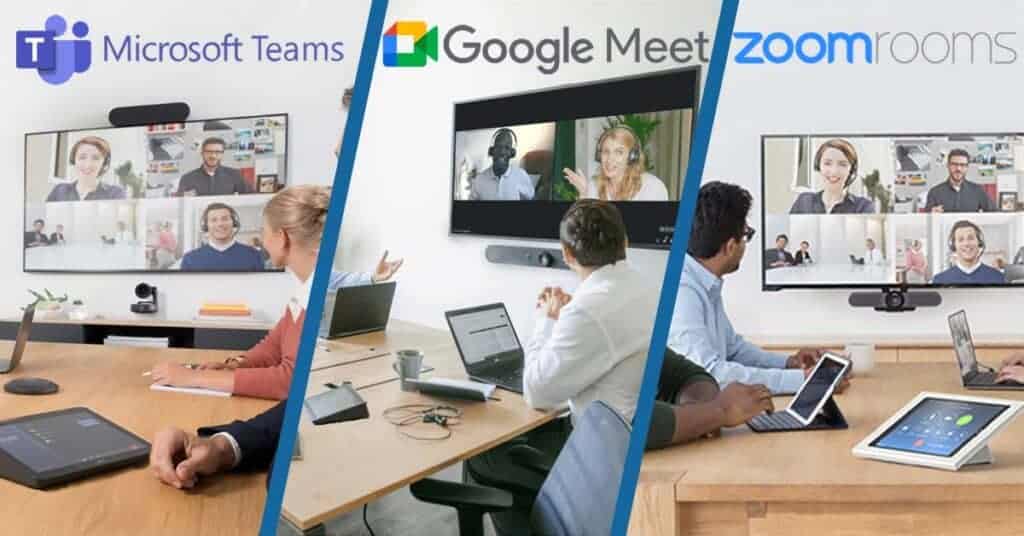
Video conferencing has taken over our lives for the past two years. And with the AV market ever growing, it can be a challenge trying to find the right equipment. That not only suits your wants and needs, but each device being high quality to deliver a high quality meeting. However, now a days its not just about buying the best camera with 4K quality or a microphone with 360° pickup. You now have to think about the platforms you’re using, Zoom, Teams or Google Meet. They all have the basic job of connecting people via video, but people definitely have their favourite. That’s where meeting room solution kits come into the game. 
With it now nearing the end of the year and there being lots of new equipment, there’s still a lot to think about when buying meeting room equipment. To make things easier for you, here are our recommended meeting room equipment for 2022.

For Zoom Rooms

With many different video conferencing platforms, finding the right one that works for you can seem a bit pointless. Considering they all do the same thing. But with Zoom Rooms, you can conference simply and seamlessly. All you have to do is install the equipment and get to conferencing. Zoom handling the rest.

If you don’t know what Zoom Rooms is, it is basically turning your small, medium or large meeting room into a Zoom based room. Making Zoom meetings just as simple tap away. And that’s all it takes to start a Zoom call with Zoom Room kits. It integrates all the necessary meeting room equipment with Zoom software. So if you’re a dedicated Zoom platform user, purchasing Zoom Room kits is a big benefit to not only upgrading your meeting room, but upgrading your meetings and making it an easier task for you and your colleagues. Zoom Room kits can totally transform your meeting room, taking once an old, forgotten meeting room to a collaborative, easy to manage space to hold all your meetings.

Its more than just room to room conferencing, it makes video conferencing external colleagues or business partners easy. Zoom Room kits don’t only accommodate huddle spaces and medium to large meeting rooms, but they also offer separate touch screen displays and scheduling displays for your meeting rooms. Zoom being able to fully kit out your meeting. They have teamed up with many big named brand to bring you the best meeting room kit possible: Logitech, Yealink, DTEN, Neat, Poly, all covering small to large rooms.

Yealink ZVC500 Zoom Room Meeting Kit 

If Zoom Rooms sounds like the best fit to your meetings, the Yealink ZVC500 is the best kit for you. With high quality devices, your meetings will be transformed with just a few connections. This video conferencing kit comes includes:

  • Yealink UVC50 PTZ Camera
  • CP960 Conference Phone
  • MCore Mini-PC

A kit that includes all of your needs, taking the difficulty out of upgrading your meeting room. The ZVC500 is packed full of qualities to help you conference better. This kit is specifically designed for medium sized rooms but with a 5x optical zoom, 4k camera, and a 360° voice pickup range. It’s easy for the ZVC500 to fit in with your small or even your huddle room. 

Yealink UVC50 Camera

The UVC50 camera makes this video conferencing equipment. It has to be in top condition to bring perfect meetings. The camera includes a pan range of 60°, a tilt range of 40° and a 91° field of view. So with these qualities alongside a powerful 4K camera to capture you and several other colleagues in a meeting. It shows that the UVC50 camera is just the camera to capture everyone in a medium sized meeting. Plus it shows that Zoom have chosen the right brand and equipment to better your meetings. Furthermore, the UVC50 includes auto framing with 60 frame rate. A perfect combination to give the best angle and the clearest picture. 

Yealink CP960

Having high quality audio is important. Participants at both ends need equipment to be able to hear every thought and idea clearly. The CP960 is the perfect addition to the ZVC500 room kit.

If you only have the choice of one meeting room for all of your meetings, no matter the size, then the CP960 will still work in your meeting room. With a 5″ capacitive touchscreen display and 360° voice pickup range, you can place the device anywhere on your meeting room table. So if you are using your one meeting room for a huddle sized meeting. You can easily place the CP960 on the table where you and your colleague or colleagues are sitting.

However, if you are using that one meeting room for your medium sized meeting and the meeting room table is full. The CP960 Conference Phone can still pick up you and your colleagues voices. Plus with Yealink Noiseproof technology, you voices will be the only thing that the CP960 will pick up. Putting across crystal clear audio to your external participants. Blocking out any unwanted and distracting noises. 

MCore Mini-PC

The MCore Mini-PC is the heart of the ZVC500. The heart that makes the UVC50 camera and the CP960 Conference Phone run smoothly. The 8th Gen Intel Quad-Core Processor and 128GB storage, lets you do just that. This is the heart as everything in the ZVC500 kit connects to the MCore Mini-PC. Now this may sound like a messy bit of the equipment, but the MCore has built in cable management. Stopping any cables from overlapping and confusing anyone who may need to unplug something. Not only that but keeping, wherever you put the Mini-PC, tidy. Alongside this, the MCore has a security slot. Meaning that it you want your MCore to stay in its designated space. The security slot feature will stop anyone from unplugging anything from the MCore and moving it anywhere. 

[vc_images_carousel images=”12288,12286″ img_size=”full” autoplay=”yes” wrap=”yes”]

For Google Meet

Just like Zoom Rooms, Google Meet has full kits for specific meeting room sizes. From stand alone displays to full kits including a camera, speaker and microphones. Google Meet room solutions integrates the Google Meet software into the meeting room equipment so you can quickly set the equipment up and start your scheduled meetings. Not only does the equipment make for quick meetings but the equipment also works alongside Google G Suite Calendar. So if you are working from home today but tomorrow you are going back to the office to have some meetings. You can easily schedule your meeting for the time you would like, from your home. The scheduled meeting will then be logged on the Google Meet Room equipment, ready for your meeting tomorrow and not letting any double booking of the room happen.

Google Meet has worked with big brands to accomplish video conferencing equipment for better meetings. From Logitech, Lenovo Series One Kits, ASUS Kits and Avocor, Google Meet can be used across a wide range of video conferencing equipment.  

Google Meet Series One Board 65

The Google Meet Board 65 from Avocor is one of the newest products to the Google Meet Series One kits. This board is perfect for small and medium sized meetings, letting you wheel the Board out to the any spot in the room and then wheel back in again when your meeting has finished. Keeping the meeting room clean and tidy. The Board is basically a modernised Jamboard, just on a 4K, 65″ screen with a viewing angle of 178°. Bringing the Jamboard experience to a whole new level. All while making sure that everybody can see what is being shown on the display.

This interactive Board is meant to be released early next year, making it our recommended device for sharing, creating, presenting and video conferencing for small and medium sized meetings.   

Video Conferencing 

Board 65 is made for video conferencing, bringing external and internal colleagues and business partners together. The Board 65 makes it simple for people to hold their meetings. So simple that you wont have to go out to buy a camera, speaker or microphone as it all comes with the board. Everything in one place, with the technology of a digital PTZ camera and microphone arrays. The Board not only bringing Google Meet software to your room but effective sound and video quality for high quality meetings.

The layout of the device is easy to use with a simple tap of a button to start your scheduled meeting, bring up the whiteboard and start a meeting all together. Video conferencing can be made collaborative with the whiteboarding feature, allowing you to bring the whiteboard up during a video conference. This will simply push the grid layout of every external participant to the side while the whiteboard takes place front and centre. Still letting you converse with each other, while creating on the whiteboard.

The Board is jam packed of features, big and small, making the board the best thing for bringing collaboration into your meeting rooms. The device is tilt optimized for a natural writing angle, making it comfortable for anybody and everybody to create and annotate. The whiteboarding feature allows multiple people to use the whiteboard at once, making bigger ideas happen on the spot, the Board comes with two stylus pens so that this collaboration can happen. This isn’t only for participants in the meeting room but for those participating over Google Meet. As they can create on the whiteboard while someone else is as well. 

For Teams Room

Have a clean and professional meeting room with equipment dedicated to Teams. You will have the peace of mind knowing that your equipment will all work seamlessly together. Teams has worked with big brands such as Logitech, Yealink, Poly and Crestron. Giving you high quality meetings using the Teams software. Upgrading your meeting room to a Teams Room allows you and your participants to use the Surface Hub. The Surface Hub is a place where everyone can share, create and collaborate on any piece of content, this content can be shared with the access to Microsoft 365 files. Making it easy for you to pull a document from the files and bring it to everyone’s attention, allowing your meeting to run smoothly without any sharing hiccups. 

Alongside creating a perfect Team meeting, the Teams equipment uses the Microsoft Calendar to book meeting rooms and schedule meetings. A great addition for businesses that only have a few meeting rooms as everyone can go into the calendar and see what room they can use for their meeting and when they can use it. Not only that but by having a controller panel with your Teams Room kit, your meeting will be shown on the controller. So you can start your meeting with a tap of a button.   

Yealink MVC840 Microsoft Teams For Large Room

This kit, we feel, is perfect for your larger meetings, holding the specs to capture a space with more than eight people. The MVC840 kit includes:

  • Yealink UVC84 Camera
  • MTouch II Touch Panel
  • 2x VCM34 Array Microphones
  • Yealink Soundbar
  • WPP20 Wireless Presentation Pod

Each device brings a new level to your meetings, constantly making your meetings better. From the audio to the video, the MVC84 is tailored to bring your Teams meetings to life.

Yealink UVC84 Camera

The UVC84 camera is a powerful 4K, auto framing camera with a 12x optical zoom. Easily making sure that everyone is included in the meeting.  These features turn the camera into a clever device as it can recognise how many people are in the meeting. Plus using its auto framing technology to adjust the camera and set it to the right frame. You may now be thinking that the camera may disrupt your meeting if anyone new enters. With it having to adjust to fit them in the meeting. But the camera has a smooth mechanical pan, tilt and zoom, meaning that the camera will adjust quietly without projecting an mechanical noises through to your external participants. By having this automatic adjusting feature, it also stops any one else in a different meeting from grabbing at the camera. The UVC84 camera always being in the place you need it.  

Yealink VCM34 Array Microphones

Capturing everyone’s voices in a meeting can be difficult. But the VCM34 array microphones have no problem with making everyone heard. With a 360°, 20ft (6 meters) audio pickup range. Even the person right at the very end of the table will be picked up clearly. The MVC84 kit including two VCM34 microphones, you can easily chain the microphones together and have a microphone at either end of the table. 

If you meeting room is located in a bit of a noisy environment, you main focus can be to buy equipment that guarantees crystal clear voice pickup. The VCM34 comes with Yealink’s Noise Proof technology, giving you that guarantee you want. This technology pushes out any noises that can disrupt your meeting, blocking out any noises that aren’t voices. Keeping you the main focus of the meeting. 

Yealink MTouch II Touch Panel

There’s a simple way to control your meeting. This 8-inch touchscreen controller lets you start your meeting from a single tap. The device has a human motion sensor, so it really is only one tap to start your meetings. From this touch panel you can see your scheduled meetings, start a new meeting and present to your room display. You can share your content through this device wirelessly or wired. Giving you the control on how you want to share. Plus, being able to share wirelessly can be a time saver. Meaning you wont have to waste time in finding the right cable and connecting your device. It also stops the table from looking messy with a handful of cables.

Furthermore, the MTouch has an angle adjustable bracket. So you can place and adjust the touch panel wherever you want it to be. The touch panel can be sat on the table for easy accessibility or it can be mounted on the wall for a more room controller feel.  

[vc_images_carousel images=”30704,12317″ img_size=”full” autoplay=”yes” wrap=”yes”]

Picture of Natalie Horn

Natalie Horn

Table of Contents

4K displays in meeting rooms
Future Trends

The Benefits of 4K Displays in Meeting Rooms

Discover the benefits of using 4K displays in your meeting rooms. Increase your business productivity with enhanced visual communication, perfect for conference rooms and video conferencing. Upgrade to 4K displays today and experience the Ultra HD resolution and color accuracy.

Read More »
remote team collaboration software
Remote Collaboration

Empower Your Team with the Best Remote Team Collaboration Software

In today’s evolving work landscape, remote teams are gaining popularity, and the effective use of collaboration software is becoming crucial. Remote collaboration has become a necessity for organizations to enhance team communication, streamline workflows, and boost productivity. This blog post aims to explore the best collaboration software options for remote teams, empowering them to work efficiently and achieve success in their projects.Effective team communication lies at the heart of remote work success. Collaboration software provides virtual team communication tools such as chat features, video conferencing, and document sharing, ensuring seamless and instant communication regardless of team members’ physical locations. By bridging the distance gap, remote teams can maintain constant connectivity, exchange ideas, and resolve issues promptly.Remote collaboration software optimizes workflow by providing features like task management, project management, and time tracking. These tools enable remote teams to set priorities, assign tasks, track progress, and manage deadlines efficiently. By streamlining workflow processes, teams can stay organized, eliminate bottlenecks, and achieve optimal productivity.Collaboration software empowers remote teams to work together seamlessly, leading to enhanced productivity. With cloud-based collaboration platforms, team members can access shared documents, collaborate in real-time, and provide instant feedback. This eliminates the need for time-consuming email chains and enables efficient collaboration on projects. By leveraging collaborative software solutions, remote teams can focus on their core tasks and deliver high-quality results.Simple Team Collaboration Software For Remote Teams  Remote Team Collaboration Software for Small BusinessesSmall businesses face unique challenges when managing remote teams. Without a physical office space, team members are dispersed geographically, making effective communication and collaboration more difficult. The lack of face-to-face interaction can hinder teamwork, coordination, and productivity. Additionally, small businesses often have limited resources and budget constraints, requiring them to find cost-effective solutions that cater specifically to their needs.Introducing Collaboration Software Options for Small BusinessesTo overcome these challenges, small businesses can leverage remote team collaboration software specifically designed to enhance virtual collaboration and project management. These software solutions offer a range of features and benefits tailored to the needs of small businesses.Affordable and Scalable SolutionsSmall businesses can benefit from collaboration software that provides cost-effectiveness and scalability. By choosing affordable remote team collaboration software, businesses can optimize their budget without compromising on functionality. These solutions offer flexible pricing plans and often provide a free tier or trial period for businesses with limited resources. Moreover, scalable software allows businesses to expand their operations seamlessly as their team grows.Streamlined Team CommunicationEffective team communication is vital for remote collaboration. Collaboration software offers features such as real-time messaging, chat channels, and discussion threads that facilitate seamless communication among team members. This enables instant updates, quick problem-solving, and efficient coordination, bridging the gap created by physical distance.Comprehensive Project ManagementRemote team collaboration software includes robust project management features that enable businesses to effectively track and manage tasks, deadlines, and milestones. These solutions often provide visual boards, Kanban-style workflows, and task assignment features that help streamline project execution and ensure accountability within the team. With intuitive interfaces and user-friendly dashboards, project management becomes more efficient and transparent.Seamless Document Sharing and CollaborationCollaboration software offers secure document sharing and collaboration features, allowing small businesses to store, access, and edit files in a centralized and cloud-based environment. This eliminates the need for email attachments and ensures that team members are working on the latest versions of documents. With features like version control, commenting, and real-time editing, businesses can foster a collaborative work environment, even when physically apart.Efficient Video Conferencing and Virtual MeetingsVirtual collaboration heavily relies on effective video conferencing capabilities. Remote team collaboration software often integrates video conferencing tools that facilitate face-to-face communication, screen sharing, and remote presentations. Small businesses can conduct virtual meetings, brainstorming sessions, and client presentations with ease, promoting effective communication and fostering team cohesion.Enhanced Workflow and EfficiencyCloud-based collaboration platforms enable small businesses to streamline workflows and enhance overall efficiency. These solutions offer features like task automation, notifications, and integrations with other productivity tools, empowering remote teams to focus on high-value tasks and reducing manual administrative work. By automating repetitive processes, businesses can boost productivity and achieve better results.  Affordable Remote Team Collaboration SoftwareIn today’s digital landscape, remote teams have become the norm for startups and businesses seeking cost-effective solutions. Affordability plays a pivotal role for these organizations, enabling them to optimize their resources while fostering effective collaboration among team members. With limited budgets, startups and small businesses need affordable remote team collaboration software that empowers their workforce without compromising on functionality or performance.Cost-Saving Advantages without Compromising QualityChoosing affordable remote team collaboration software doesn’t mean compromising on quality and performance. In fact, leveraging these tools can yield substantial cost-saving advantages while ensuring optimal team productivity and efficiency. Streamlined Workflow and Efficiency: By implementing remote collaboration software, businesses can enhance workflow and efficiency within their teams. These tools facilitate coordinated task management, seamless document sharing, and streamlined project tracking, reducing time wastage and increasing overall productivity. Eliminating Travel Expenses: With remote collaboration software featuring video conferencing capabilities, businesses can significantly reduce travel expenses. Virtual meetings and conferences enable face-to-face interactions without the need for physical travel, cutting costs while promoting effective communication and collaboration. Flexible and Scalable Solutions: Affordable collaboration software for remote teams often offers flexible pricing plans that align with business requirements. Startups and small businesses can opt for entry-level plans, which provide essential features while allowing room for growth. This scalability ensures that businesses only pay for the functionalities they require, optimizing their budget allocation. Choosing the Right Collaboration ToolsWhen selecting collaboration software for remote teams, considering key features and functionalities is crucial to meet the unique requirements of startups and businesses on a tight budget. Some essential features to look for include: Document Sharing: The software should enable seamless document collaboration and version control, ensuring efficient content creation and review processes. Task Management: Robust task management features facilitate tracking and assignment of tasks, enabling teams to work together seamlessly and meet project deadlines. Video Conferencing: Integrated video conferencing capabilities enhance virtual meetings, eliminating the need for additional software or subscriptions, and promoting effective

Read More »
Presentation productivity with AV equipment
productivity

Skyrocket Your Productivity: Presentation Productivity with AV Equipment

In today’s competitive world, presentation productivity plays a pivotal role in leaving a lasting impact on your audience. To achieve success in public speaking and effectively convey your message, leveraging audio-visual (AV) equipment has become indispensable. This blog will focus on the significance of AV tools in enhancing presentations and provide valuable insights into boosting productivity during speeches.Incorporating presentation equipment, such as AV devices and interactive displays, enriches your content and keeps your audience engaged. Utilizing advanced multimedia aids not only helps deliver your message effectively but also makes your presentations more captivating and memorable.AV tools enable you to fine-tune your public speaking skills by providing real-time feedback and offering opportunities for improvement. With the right AV integration, you can analyze your performance and make necessary adjustments to deliver impactful presentations.Presentation software, combined with the latest AV technology, empowers you to create compelling and dynamic slideshows. Streamlined and visually appealing presentations aid in better comprehension and information retention, thereby maximizing productivity.The Ideal Meeting Room Setup  The Power of AV Equipment for Engaging PresentationsIn the fast-paced world of presentations, captivating your audience and keeping them engaged is essential for successful communication. The power of AV (Audio-Visual) equipment in achieving this goal cannot be underestimated. AV tools not only enhance visual communication but also improve public speaking, making presentations more interactive and impactful.Maximising Productivity with AV EquipmentWhen it comes to maximizing productivity with AV equipment, professionals can leverage the latest advancements in presentation technology to deliver efficient and impactful presentations. By incorporating AV devices strategically, speakers can elevate their speaking skills and leave a lasting impression on their audience.The Role of AV Equipment in Captivating AudiencesAV equipment plays a pivotal role in captivating audiences during presentations. It adds a dynamic element to otherwise static talks, making them visually engaging and interactive. With advanced multimedia aids, speakers can seamlessly integrate visuals, audio, and interactive displays to keep the audience hooked throughout the presentation.Various Types of AV Tools and Their Impact on Visual Communication Projectors: Projectors have revolutionized the way presentations are delivered. From traditional conference room setups to modern portable projectors, they allow speakers to project their content on large screens, making it easily visible to all attendees. The projection systems are invaluable tools for data-driven presentations, allowing the speaker to present complex information with clarity. Displays: Interactive displays take presentations to a whole new level. These tech-enhanced screens enable speakers to navigate through their content with ease, making the presentation more fluid and interactive. Visual communication is enhanced, leaving a lasting impact on the audience. Audio Aids: Clear and crisp audio is crucial for effective presentations. AV equipment that includes high-quality audio aids ensures that the message is heard loud and clear, eliminating any distractions and maximizing the speaker’s impact. Successful Presentations Leveraging AV Equipment TED Talks: TED Talks are renowned for their impactful use of AV equipment. Speakers utilize interactive displays, advanced presentation tools, and multimedia aids to deliver thought-provoking and engaging talks. Corporate Presentations: In the business world, AV integration in conference rooms has become the norm. Executives use efficient presentation software, top-of-the-line projection systems, and AV accessories to elevate their presentations, resulting in productive meetings and better decision-making. AV Equipment Impact on Presentations Interactive Displays Enhances engagement levels Projectors Facilitates data-driven talks Audio Aids Ensures clear communication Ways to Improve Presentation Productivity with AV Equipment Incorporate interactive displays to foster engagement. Use efficient presentation software for seamless content delivery. Invest in high-quality audio aids for clear communication. Stay up-to-date with the latest AV technology to keep presentations modern and impactful.   Choosing the Best AV Setup for PresentationsIn today’s fast-paced world, delivering impactful presentations is crucial for professionals and public speakers. The right AV (audio-visual) equipment can make all the difference in capturing and retaining your audience’s attention. This comprehensive guide will help you choose the best AV setup for presentations, considering the latest trends in AV technology and focusing on productivity boosters to enhance your overall presentation experience.AV Equipment for Engaging PresentationsTo create engaging presentations, you need reliable and efficient AV tools. These tools encompass a wide range of multimedia aids, including projection systems, interactive displays, audio aids, and presentation software. By utilizing these resources effectively, you can elevate your speaking skills and improve public speaking.Boost Productivity with AV ToolsProductivity is key when it comes to delivering successful presentations. AV devices play a crucial role in increasing productivity by streamlining your presentation process. With advanced presentation tools and AV integration, you can efficiently create impactful slideshows and seamless audio-visual experiences that leave a lasting impression on your audience.Choosing the Best AV Setup for PresentationsWhen selecting your AV setup, consider your specific presentation needs. Evaluate the available AV equipment, focusing on their functionalities and how they align with your presentation style. Below, we compare various AV devices in the market and their suitability for different presentation scenarios.AV Solutions for Conference Rooms AV Device Features Suitability Interactive Displays Touchscreen capabilities, real-time annotations Ideal for collaborative presentations in conference rooms. Projection Systems Large screen display, high image resolution Perfect for large audiences in conference settings. Audio Aids High-quality microphones, sound systems Enhances speaker’s voice and ensures clear communication. Advanced Multimedia Aids for Speeches AV Device Features Suitability Presentation Software User-friendly interface, customizable templates Ideal for professionals creating data-driven presentations. Presentation Remote Wireless control, slide navigation Convenient for dynamic speakers who move around while presenting. AV Integration Seamless device connectivity, easy setup Suitable for multi-device presentations with smooth transitions. Improving Visual Communication in PresentationsVisual communication is a powerful aspect of any presentation. Incorporate AV equipment to enhance visual elements and captivate your audience. Utilize Interactive Displays: Engage your audience by allowing them to interact with the presentation content directly. Integrate Audio Aids: Crystal-clear sound quality ensures your message reaches every corner of the room. Embrace Projection Systems: Showcase your ideas on a large scale for better visibility. Tech-Enhanced Presentations in 2023As we move into 2023, AV technology continues to advance rapidly. Embrace the latest trends to elevate your presentations. 3D Projection Systems: Create

Read More »
Leveraging AV tools for better productivity
productivity

Excel Today: Leveraging AV Tools for Better Productivity

In today’s fast-paced world, productivity has become a crucial aspect for both businesses and individuals. With the constant demand to achieve more in less time, organizations and professionals are continuously seeking ways to improve efficiency and streamline their workflows. One effective solution that has proven indispensable in various aspects of work is the use of audiovisual (AV) tools. Leveraging AV tools can significantly enhance productivity, enabling seamless communication, collaboration, and task management.AV tools encompass a wide range of audiovisual technology that aids in maximizing productivity. These tools facilitate remote work by bridging communication gaps and enabling virtual meetings. With AV solutions for efficiency, teams can collaborate seamlessly, irrespective of geographical location, fostering productivity in a globalized workforce.One of the key ways AV tools contribute to productivity is by enhancing communication. Through the use of AV equipment, teams can interact in real-time, share ideas, and quickly address issues. This fluid communication fosters effective collaboration, leading to improved project management and streamlined tasks. AV collaboration tools have become essential for businesses to thrive in a remote work environment.Data analysis is a critical aspect of improving productivity. AV tools play a significant role in simplifying data visualization and analysis. Presenting data in a visually appealing manner using AV software benefits decision-making processes. Through comprehensive data analysis, businesses can identify bottlenecks in workflows, implement improvements, and optimize productivity.AV automation offers tremendous advantages in optimizing workflows. Repetitive tasks can be automated, allowing employees to focus on high-priority activities. Leveraging audiovisual tools for better productivity enables smoother operations and faster completion of tasks.The Best AI Tools I’ve Tried For Productivity In 2023  Productivity Tips Using AV ToolsIn today’s fast-paced world, maximizing productivity with AV equipment has become a crucial aspect of efficient work routines. Audiovisual technology offers a wide range of tools that can significantly boost productivity, enhance communication, streamline tasks, and facilitate collaboration within teams. Let’s explore some practical productivity tips using AV tools and how they can revolutionize your work processes.AV Tools for Remote Work EfficiencyIn the era of remote work, leveraging AV tools has become essential to maintain seamless communication and collaboration among team members. Video conferencing software allows teams to conduct virtual meetings, enabling face-to-face interactions regardless of geographical location. Screen-sharing capabilities further enhance remote collaboration, allowing participants to present ideas, share documents, and provide real-time feedback.AV Technology for Enhanced CommunicationClear and effective communication is the backbone of any successful project. AV tools play a pivotal role in enhancing communication by providing visual aids and audio clarity. Utilizing AV tools for presentations can captivate audiences, ensuring that important information is conveyed effectively. Additionally, voice recognition software streamlines communication by enabling voice commands for various tasks, allowing for quick and hands-free interactions.Streamlining Tasks with AV AutomationAV automation brings a new level of efficiency to everyday tasks. Through automated workflows and processes, repetitive and time-consuming activities can be simplified, allowing employees to focus on more strategic and creative aspects of their work. This results in increased productivity and improved job satisfaction.Boosting Team Productivity with AV SolutionsCollaborative work environments can greatly benefit from AV solutions. For example, AV tools for task management provide a centralized platform for teams to track progress, assign responsibilities, and meet deadlines. By visualizing project timelines and task dependencies, teams can stay organized and work cohesively towards project completion.Enhancing Workflow with AV SystemsEfficient workflow optimization is a key goal for any organization. AV systems offer a plethora of benefits, such as providing real-time data analysis, allowing teams to make data-driven decisions swiftly. Additionally, multitasking becomes more seamless with AV tools, as employees can efficiently manage multiple tasks without sacrificing quality.Leveraging AV Tools for Virtual MeetingsVirtual meetings have become an integral part of modern business operations. AV tools for virtual meetings not only facilitate face-to-face interactions but also provide interactive features like virtual whiteboards and real-time document editing. This enables collaborative brainstorming and problem-solving, fostering a more productive virtual meeting environment.AV Tools for Project Planning and ManagementAV tools play a vital role in project planning and management. By utilizing AV equipment for better project planning, teams can create detailed project outlines, allocate resources effectively, and set clear milestones. This ensures that projects progress smoothly and are completed on time.Importance of AV Integration in the WorkplaceSeamless integration of AV tools into the workplace environment is crucial for maximizing productivity. Training employees to use AV software efficiently and ensuring that AV equipment is easily accessible can significantly improve work processes and employee satisfaction.AV Tools for Effective Data AnalysisData analysis is at the core of informed decision-making. AV tools provide visual representations of complex data sets, making it easier for teams to identify trends, spot opportunities, and address challenges. This leads to more effective strategies and outcomes.AV Tools for Multitasking EfficiencyIn today’s dynamic work environment, multitasking has become a necessity. AV tools aid in multitasking efficiency by providing features like split-screen presentations, virtual meeting recordings, and real-time note-taking, enabling employees to manage multiple tasks seamlessly.AV Solutions for Efficient CollaborationCollaboration is essential for innovation and problem-solving. AV collaboration tools foster a cohesive and inclusive work environment by enabling all team members to participate actively. This leads to better ideas and solutions, ultimately boosting productivity.Top AV Equipment for ProductivityTo achieve maximum productivity gains, investing in top-notch AV equipment is essential. High-quality AV software and hardware ensure smooth operations and eliminate potential technical hindrances that could disrupt work processes.  Boosting Team Productivity with AV SolutionsIn today’s fast-paced business environment, team productivity plays a crucial role in achieving organizational goals. With the rise of remote work, the need for effective collaboration and seamless communication among team members has become more important than ever. Audiovisual (AV) solutions offer a powerful toolkit to enhance teamwork, streamline tasks, and optimize workflows. In this section, we will explore the significance of team productivity in achieving organizational success and how AV solutions can play a vital role in fostering efficient collaboration, especially in remote work environments.Importance of Team Productivity in Achieving Organizational GoalsEfficiency and productivity are fundamental drivers of success for any organization. When teams

Read More »
advanced-av-tutorials
Training and Education

Advanced AV Tutorials: Elevate Your Expertise

In today’s ever-evolving technological landscape, Audio-Visual (AV) technology has become the backbone of numerous industries, transforming the way information is presented, communicated, and experienced. From corporate presentations and educational institutions to entertainment venues and healthcare facilities, the integration of AV equipment has revolutionized how content is delivered. As the demand for seamless multimedia production and advanced techniques continues to surge, the need for expertise in setting up and fine-tuning AV equipment has never been more crucial.The growing reliance on visual technology has sparked a surge in demand for individuals proficient in handling AV equipment. This surge is driven by the need for flawlessly executed presentations, captivating entertainment experiences, and effective communication in various contexts. To address this demand, advanced AV tutorials have emerged as a vital resource for individuals seeking to enhance their AV skills and proficiency.Covering intricate techniques in audiovisual technology, the tutorials delve into topics such as cutting-edge equipment setup, immersive sound systems, intricate video mapping, and effective troubleshooting. This blog embarks on a comprehensive journey through the world of AV technology, catering to both newcomers and seasoned professionals. The scope of this content spans practical tips, the art of fine-tuning equipment settings, troubleshooting techniques, and a plethora of expert guidance. Whether you’re navigating intricate AV configurations or aiming to streamline multimedia production, this resource provides step-by-step instructions to elevate your AV competence effectively.Delving into the realm of AV equipment mastery, our content serves as your go-to guide for unraveling the intricacies of advanced multimedia production. From unveiling advanced visual technology to expertly navigating complex AV configurations, our content equips you with the tools needed to excel. We offer insights into pro-level AV optimization, empowering you to fine-tune settings and troubleshoot issues seamlessly.Our expert-level AV guidance is designed to enhance your AV skills progression, bridging the gap between novice and proficient. Our meticulously curated tutorials break down advanced multimedia equipment lessons into easily digestible segments, making the journey of AV skills refinement both engaging and enlightening. Our content serves as a beacon of AV expertise enhancement, guiding you towards mastery with every step.As pioneers in AV education, we’re committed to demystifying expert AV tactics and sharing professional development insights. By referencing the best practices for advanced AV and presenting cutting-edge AV tutorials, we provide a resource hub for AV enthusiasts to access advanced AV learning resources. Our aim is to empower you with the skills needed to master AV techniques and develop proficiency step-by-step.Basic Event Audio Visual Training With Will Curran  Practical Tips for Professional AVAV equipment and multimedia production have evolved to encompass advanced techniques and visual technology. To master these intricacies, expert guidance through advanced audiovisual tutorials is essential. Whether you’re fine-tuning AV equipment settings or navigating intricate AV configurations, enhancing your AV competence requires a step-by-step approach. Let’s delve into practical tips that address common challenges professionals encounter while optimizing audio and visual components.Challenges with AV Setups Complex Configurations: AV setups often involve intricate configurations. From connecting various devices to adjusting settings, mastering these setups can be daunting. Technical Glitches: Troubleshooting technical issues, such as audio glitches or video distortions, requires advanced AV troubleshooting techniques. Practical Tips for Optimization Fine-Tuning AV Equipment Settings: To unveil advanced visual technology, master the nuances of your AV equipment. Adjust resolution, frame rates, and color settings for optimal visual output. Streamlining Multimedia Production: Elevate your multimedia production by using advanced multimedia tutorials. Learn to edit videos seamlessly, integrate graphics, and sync audio effectively. Navigating Cable Management: Effective cable management is crucial. Organize and label cables to prevent confusion and ensure a tidy setup. Enhancing Ambient Lighting: The right lighting sets the mood. Experiment with ambient lighting to complement the visual experience. Engaging the Audience: Professional AV techniques go beyond visuals. Learn how to engage the audience through clear audio delivery and captivating visuals. Understanding Venue and Acoustic Characteristics: Venue Analysis: Before diving into AV setup, analyze the venue thoroughly. Consider its size, shape, and acoustic properties to tailor your setup accordingly. AV Proficiency Training: Elevate your AV skills with expert-level AV guidance. Develop an understanding of audiovisual education that emphasizes real-world applications.   Fine-Tuning AV Equipment SettingsProperly calibrated AV equipment is paramount to achieving exceptional audiovisual quality. With advanced techniques, users can elevate their AV skills and harness the full potential of visual technology. This set of expert-level AV guidance is designed to refine your AV expertise, enhance your multimedia production, and master complex AV setups.Audio Visual Training: Enhancing AV Skills Step by StepWhen it comes to mastering intricate AV configurations, the significance of fine-tuning AV equipment settings cannot be overstated. By following advanced audiovisual tutorials and expert AV guides, you can navigate through the complexities of audiovisual education with confidence.Optimizing Audio for Professional AVAchieving optimal audio levels is fundamental for multimedia production. Through advanced AV techniques, you can streamline your AV skills progression. Utilize techniques like adjusting audio levels and EQ settings to ensure crystal-clear sound reproduction. Elevate your AV competence effectively by incorporating practical tips for professional AV.Perfecting Speaker Placement and EQ SettingsExpert AV knowledge sharing unveils the critical role of speaker placement in AV quality. With advanced multimedia tutorials, you’ll gain insights into advanced visual equipment lessons. By refining speaker positioning and EQ settings, you’ll master AV equipment mastery, leading to an enhanced audiovisual experience.Calibrating Displays for Precision and ResolutionAdvanced AV skills development involves understanding how to calibrate displays for accurate color reproduction and resolution. Follow professional AV development practices to ensure that visual technology tutorials meet the highest standards. Through AV skills refinement, you’ll learn to present visuals with unprecedented clarity.Accounting for Room Acoustics in AV SettingsBest practices for advanced AV include addressing room acoustics. By following advanced AV techniques, you can unveil advanced AV tactics demystified. Room acoustics profoundly impact AV settings; therefore, expert AV advice recommends adjustments that cater to the audiovisual education environment. This practice enhances AV proficiency training.Strategies for Advanced AV TroubleshootingCutting-edge AV tutorials extend to advanced troubleshooting techniques. Elevating AV practices requires mastering pro-level AV optimization. As you navigate advanced multimedia

Read More »
MeetingStore.co.uk
Logo
Compare items
  • Total (0)
Compare
0
Shopping cart