Excellent
Next day delivery! Depending on Availability*
Here to help! Monday to Friday, 8:30AM-5:30PM*

Microsoft Mesh: Is The Metaverse Taking Over?

Technology is forever growing. And with the world being turned on its head for the last couple of years, technology has had even more chance to expand. New ideas popping up to help get us accustomed to this new lifestyle we’ve been pushed into. With an idea coming to life, a new world being created – the Metaverse.
Holograms and virtual realities were an exciting, futuristic ideas that seemed to be a reality in years like 2064. But virtual reality is much closer than you think with Metaverse being introduced last year. Now Microsoft has jumped on the bandwagon with Microsoft Mesh. A place where you can hold business meetings from the comfort of your home but actually be fully immersed in the world you have created. You can bring your projects to life with having a design being in front of you, in the form of a hologram.

With the future of technology already upon us, what is Microsoft Mesh and what can it do for you?

What is Microsoft Mesh?

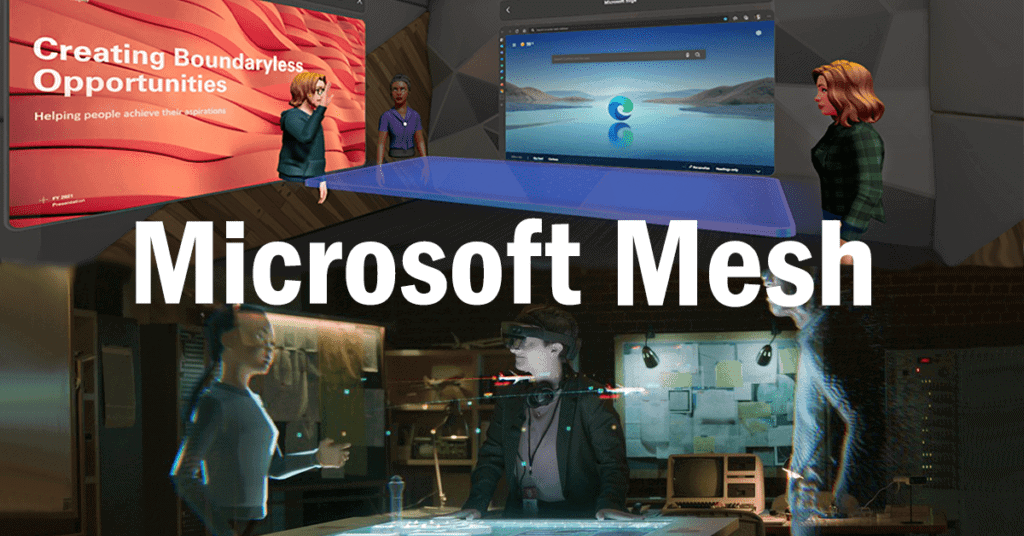
Microsoft Mesh is a new application created by Microsoft, bringing holograms and virtual reality into to your home. Mesh can connect friends, family and colleagues no matter where they are in the world. This can be through their holoportation or their virtual reality world where you can walk around as your avatar. There are so many possibilities with Mesh – a whole new world for businesses to hold meetings.

Within this virtual world you can create yourself into an avatar and join a meeting from you home office. Although you wont just be slumped over a desk using your keypads to move your avatar around. You will be fully immersed into the world, being able to move around and present your work during a meeting, using the VR headsets. You can stand at the head of the meeting table and draw up your plan on the whiteboard. The VR headset tracking you hand movements to present exactly what you are doing. 

Holoportation

The new era of working remotely is here to stay. Whether you’re 10 miles or 100 miles away from your workplace, holoportation can bring everyone in your business together. The holoportation feature is similar to the hologram feature. In that it can project a realistic, holographic image of your colleague into your home office. Letting you work on a project together or just hold a meeting. The headset will take a photo like capture of yourself and project it to the person you are meeting with – as a hologram. Letting you and your meeting participant interact as you normally would if you were both there in human form.

Yes over a normal Teams call you would still be able to interact with each other, but Mesh brings those interactions back to a normal human level, the way that we have missed so much. Brining back eye contact, hand movements and facial expressions and actually feeling like you are in the same room as your colleague. Bringing work from home situations to a whole new level.

If you don’t want to show your face, just like people don’t want to turn their camera on during a Teams call, then you don’t have to. Easily project your customised avatar to your colleague instead. Again, the headset tracking your hand movements to bring those non-verbal gestures back into the meeting. 

Immersive Spaces

If your are wanting to completely separate your work life from your home life, then Mesh’s immersive spaces can achieve this for you. Separating your work from home life used to be such a simple task for some people but with home offices becoming peoples main place of work, that separation is becoming smaller and smaller. So instead of having a sperate office space for work, you can have a whole separate world for work.

The immersive space uses 3D animation to create a meeting room for you and your colleagues. This almost having the resemblance to a high resolution game. All you have to do is join your Teams meeting and pop on the VR headset. Transporting you into the virtual world where your team is waiting for you around the virtual meeting room table.

But don’t just believe that you are limited to only sitting around the table, that’s not what Microsoft wanted. Microsoft has thought about the normal task and activities that would happen during a meeting. And transferred them as easy as possible in to the immersive space. Allowing your avatar to get up from the table and start presenting in front of your team. Creating and presenting on the whiteboard at hand. With the VR headset and accessories this is all possible, the VR equipment following your head and hand movements to create a perfect representation of you to your colleagues, in your avatar form.

How To Use Mesh?

To be able to use the futuristic capabilities of Microsoft Mesh – you will have to use a VR headset. These headsets act as glasses that instead will show you either your hologram or the virtual reality office space. Making you feel as though you are actually in the Mesh Metaverse. These headsets have trackers that follow you eye and head movements, so wherever you turn your head the headset will show the right display of the room. Mesh supports the most popular VR headsets – Oculus and Hololens. These sleek designed headsets can transport you into a virtual world and changing you into your avatar. Bring you international colleagues into your home through holoportation or create interactive holograms in your home office.

Mesh is essentially an application for you to video conference with colleagues. But Microsoft is extending the video conferencing limits to make Teams meetings more exciting and engaging. Users can use Mesh alongside the Teams application to hold their meetings in the Mesh world, with each colleague turning into their avatar. Tis brings back the meeting experience to those working from home, immersing them back into office life. Even if you are working from abroad, this is a chance for you to actually meet your colleagues and all of you be able to sit around the same able and discuss the way you would if you were really there. Not just holographically or in avatar form.

Quest VR Headset 

If the idea of a whole new world at your fingertips sounds exciting, especially if you are working from home and confided in a small box room, then the Quest VR headsets are your best bet to use Mesh to its full extent. The Quest headset will strap around your head and fully cover both of your eyes. Showing you a full view of the virtual reality office. Because the Oculus Quest will fully cover your eyes, a worry may be over tripping up or falling over any furniture. And no one wants to be moving their home office furniture about a couple of minutes before a meeting. With the Oculus this worry is eliminated out.

When using the headset you will have to draw out the area you will be using the Oculus. So if you were using the Oculus to join a meeting, you would scan the area of your desk you want the Oculus to pickup. Once you have scanned out the area you would like to use, the Oculus will register the area and guardian will be activated. This means that if you reach past the area you have drawn and cross the guardian. A pass through alert will notify you. stopping any tripping or falling over, meaning you can take those few minutes before a meeting to prepare your setup instead of moving furniture.

Specs

With the Oculus Quest 2 headset you will get 1832 x 1920 pixels per eye, offering high resolution whichever way you turn your head. Letting you all see each other in crystal clear resolution, making the experience feel even more real. And you would expect nothing less from the speed and motion. 

[vc_images_carousel images=”31067,31068″ img_size=”full”]

The Quest 2 uses fibre optic cables to give the cleanest and smoothest motion, with premium fibre-optic strands it not only increases the speed and enhances the flexibility. The cables also reduce the weight of the headset, making it a more comfortable fit. With the Quest 2 weighing 224g, its important that the headset isn’t too heavy and uncomfortable for the user. If the headset is too heavy it can make the user uncomfortable and distracted. 

HoloLens Headset

Unlike the Quest VR Headset, the Hololens is for the holoportaition and holographic side of Mesh. This headset will still strap around your head but instead of fully covering your eyes, the Hololens will have a glasses like shape to fit over your nose and a plastic shield in front of your eyes. Whoever or whatever is being projected into your room will be seen through the plastic lens of the Hololens. Not only does the Hololens let you project your work in front of you but you can also hold meetings with the device. With the Teams call be projected in front of you instead – a perfect way to call your boss for guidance and  continue with your task at hand. 

Specs

The Hololens offers 2K resolution with a 5 channel microphone array and built in speakers with spatial sound. Spatial sound will deliver sound to you from the correct places the are coming from. So, if you are sat at the meeting table and your colleague next to you starts talking, the sound of their voice will come from that direction. Making the Microsoft Mesh world feel so real.

[vc_images_carousel images=”31062,31063,31064″ img_size=”full”]

Making sure that you body movements are properly represented on your holoportation, the device has multiple sensors. Including 4 head tracking cameras and 2 IR cameras tracking you eyes. Furthermore, there is hand tracking for when you are using a whiteboard in the Mesh world. Not only that but it brings a sense of human nature to the avatar as the avatar will follow hand movements while you are talking. Along with cameras tracking your body movements, the device comes with the ability to give commands with your voice. Letting you control the Hololens with you voice.

An important factor of this type of device is the battery life, especially it is being used on the go. The full battery on the Hololens will give you 2 – 3 hours of use, which may not seem a lot. But if your main use of the Hololens is to hold a holographic meeting with a colleague, then the 2 hour battery life is fine as most meetings run for an hour. Charging is done through a USB-PD cable for fast charging. 

The lens comes in one size, with an adjustor on the head straps for you to be able to tighten or loosen the headset if needed. 

Price

VR headsets are never cheap. If the holographic, mixed reality side of Mesh has caught your eye and believe that it would be a great addition to your business, then you will need to purchase the Hololens 2. And this may be pricey for most. The Hololens 2 will cost you £3,349.00, from Microsoft’s website. This version of the Hololens would be perfect for education, offices and even healthcare providers. However if you are working on site and need something more sturdy, then the Hololens also comes in a industrial edition. This headset will be suitable for hazardous location environments.

But if the fully immersive, animated world complete with your own customisable avatar and designed meeting rooms is definitely what you want. Then the Oculus Quest 2 starts from £299. This will included the VR headset and two Quest Touch Controllers – giving you the full experience of the Metaverse world. 


Who Can Benefit From Using Mesh?

Microsoft Mesh can practically work in any setting. If you are in a situation where Teams is your main source of communication. Then Mesh can work wonders for you. It can be the solution to bringing peoples motivation and productivity back up. Whether you are using Mesh for its holoportation feature or for its immersive spaces, Mesh can work for business, universities or training centres.

Business

The Hololens can fit into any situation. If you work in an office, chances are hybrid working is still present. Although this may be a pricey solution for you, Mesh can be a great way to bring all your employees back together again. All of you being able to sit around the meeting room together and share your ideas – bringing back that normality.  

What if you work for an architecture company – creating structures and drawings is a big part of your job. Having to plan your design precisely and accurately. Now imagine being able to bring your drawing to life as a 3D holographic structure. No matter where you are, you could be working from home or on the site where your building may go. This way you can share your plan with your boss and other colleagues on the project. All of you being able to see the design come to life and interact with it. Therefore letting you identify any problems with the structure you may have missed. Or letting your boss and other colleagues suggest any ideas to add on to the structure. Bringing an easier workflow into your business, with you bosses being able to help with any problems with a first hand view of the design, just by popping the VR headsets on.

Taking the use of Mesh into a different direction. Mesh can be an amazing way for people to get in touch with medical experts. If you have the money to own an Hololens, you could meet with your doctor from you living room. With Mesh, the possibilities are endless and the future is looking more technology based.  

Training And Education

In a training situation the Hololens can massively improve students understanding on what they are training. Viewing a diagram on a projector or watching a video may not cut it with students anymore. Especially when this kind of technology is now at hand. If you are a medical student training to be doctor, you will be constantly looking at diagrams of the body. It can difficult and put a strain on your eyes having to look at the smaller details in a diagram. With the Hololens, students can simply put the headset on and see the diagram of a body organ come to life. Letting them get up close and see the little details that may not have been noticeable in a drawn diagram.  

The immersive side of Mesh can be a great addition for office workers and students. Letting the teacher have everyone in the same room and teach the way they know how to. Bringing back natural teacher and student interactions and conversations – instead of the teacher having to talking to a bunch of blank screens. Essentially, a tool like this can help bring students productivity levels back up, as online lessons have obviously not been great for them. 

Picture of Natalie Horn

Natalie Horn

Table of Contents

work from home collaboration
Remote Collaboration

Master Work from Home Collaboration with these Innovative Strategies

In recent years, remote work has gained significant popularity, with more and more individuals and organizations embracing the freedom and flexibility it offers. The concept of remote work involves performing tasks and fulfilling responsibilities from a location outside of the traditional office environment. As this trend continues to grow, the need for effective collaboration in remote work environments becomes paramount. This blog focuses on providing innovative strategies to enhance work from home collaboration, ensuring seamless communication, productivity, and success for virtual teams.Collaboration lies at the core of any successful work environment, whether physical or remote. However, in a work-from-home setup, where team members are geographically dispersed, effective collaboration becomes even more crucial. Without proper collaboration, remote teams may face challenges such as miscommunication, lack of coordination, and decreased productivity. By emphasizing efficient collaboration, virtual teams can overcome these obstacles and thrive in a remote work setting.One of the key components of successful work from home collaboration is leveraging collaboration tools and embracing virtual teams. These tools and platforms enable seamless online communication, project management, and remote collaboration. By utilizing remote work software and virtual collaboration solutions, teams can bridge the physical gap and work together efficiently, regardless of their geographical locations.Effective remote collaboration begins with establishing clear communication channels. Virtual team members should have access to reliable online communication platforms to share ideas, provide feedback, and engage in real-time discussions. Online collaboration platforms facilitate instant messaging, video conferences, and document sharing, ensuring efficient information exchange among team members.Invite Collaboration in English and Help Your Team to Work Together  Understanding Remote Work CollaborationRemote work collaboration is a vital aspect of today’s digital landscape, enabling individuals and teams to effectively work together regardless of geographical barriers. In this section, we will define remote work collaboration, explore its significance, discuss the challenges faced by remote teams, and highlight the benefits of successful work from home collaboration.What is Remote Work Collaboration?Remote work collaboration refers to the process of individuals or virtual teams working together on projects and tasks while being physically located in different places. It involves the utilization of collaboration tools, virtual teams, and online communication to foster effective coordination and project management.The Significance of Remote Work Collaboration in Today’s Digital LandscapeIn today’s digital landscape, remote work collaboration has gained immense importance due to several reasons. Firstly, it allows businesses to tap into a global talent pool, enabling them to access skilled professionals regardless of their physical location. This widens the pool of expertise and fosters diversity within teams.Secondly, remote work collaboration provides flexibility to individuals, allowing them to work from their preferred location and optimize their productivity. This flexibility also contributes to improved work-life balance and reduced commuting time, resulting in higher job satisfaction.Furthermore, the use of collaboration tools and virtual collaboration solutions enhances productivity by streamlining communication and project management processes. These tools enable real-time document sharing, video conferencing, and instant messaging, facilitating seamless collaboration among team members.Challenges Faced by Remote TeamsWhile remote work collaboration offers numerous advantages, it also presents challenges that need to be addressed. Communication is a key challenge for remote teams, as they lack face-to-face interaction. Misunderstandings and delays in information sharing can occur, leading to decreased efficiency and potential conflicts.Project management can also be challenging in remote settings. Coordinating tasks, tracking progress, and ensuring everyone is on the same page requires effective planning and the utilization of remote work software and project management tools.Coordination among team members, especially across different time zones, can pose difficulties. Scheduling meetings and finding suitable time slots for everyone can be complex, requiring virtual collaboration skills and effective time management.Benefits of Successful Work from Home CollaborationDespite the challenges, successful work from home collaboration offers numerous benefits that contribute to enhanced productivity and overall team success.Increased Productivity: Remote collaboration enables individuals to work in their preferred environment, resulting in increased focus and productivity. The flexibility of remote work allows individuals to optimize their working hours, leading to better outcomes.Flexibility: Work from home collaboration provides flexibility to employees, allowing them to balance personal and professional commitments. This flexibility enhances job satisfaction and employee retention.Efficient Project Management: Through the use of collaboration tools and remote work software, project management becomes more streamlined and efficient. Tasks can be assigned, tracked, and completed within designated timeframes, ensuring project milestones are met.Cost Savings: Remote work collaboration reduces overhead costs associated with physical office spaces. It also eliminates the need for commuting, saving both time and money for employees.  Effective Remote Collaboration Tips for BeginnersIn today’s digital age, remote work has become increasingly prevalent, offering individuals the flexibility to work from home or anywhere in the world. However, successful remote collaboration requires a unique set of skills and strategies. In this section, we will explore practical tips for individuals new to remote work collaboration. By establishing clear communication channels, setting expectations, practicing effective time management, self-discipline, and maintaining work-life balance, you can thrive in a remote work environment.Establish Clear Communication Channels and Set ExpectationsClear communication is the cornerstone of remote collaboration. When working remotely, it’s crucial to establish reliable communication channels with your team members and clients. Utilize a variety of collaboration tools such as project management software, online communication platforms, and virtual collaboration solutions. These tools enable seamless communication, real-time updates, and file sharing, fostering effective remote collaboration.To ensure smooth communication, establish guidelines and expectations from the outset. Clearly define project goals, deliverables, and deadlines. Encourage open and transparent communication, and encourage team members to ask questions or seek clarification when needed. By setting clear expectations, you can minimize misunderstandings and enhance productivity in remote work collaboration.Emphasize Time Management, Self-Discipline, and Work-Life BalanceTime management is crucial when working remotely. Without the physical boundaries of an office, it’s easy to become distracted or overwhelmed by the freedom and flexibility remote work offers. To optimize your productivity, implement effective time management techniques.Create a dedicated workspace that helps you focus and minimizes distractions. Establish a routine and stick to a schedule, allocating specific time slots for different tasks. Prioritize your work

Read More »
Amplify productivity with audio visual gear
productivity

Harness the Force: Amplify Productivity with Audio Visual Gear

In today’s fast-paced world, the growing importance of productivity has taken center stage. As work demands increase, individuals and businesses alike are seeking innovative ways to maximize output and efficiency. A key solution emerging on this front is the integration of audio visual (AV) gear to optimize workflow and enhance work performance. This blog delves into the realm of audio visual gear, shedding light on how it can be a game-changer in boosting productivity.Multimedia solutions have become integral tools for enhancing effectiveness in various domains. Visual communication tools, driven by audiovisual technology, are revolutionizing how we process and convey information. The synergy between auditory and visual elements creates a more engaging and comprehensible experience. Leveraging this, businesses and individuals can optimize performance and amplify productivity.The integration of audio visual gear can significantly optimize workflow. By seamlessly incorporating multimedia devices, individuals can streamline tasks and bridge communication gaps. Visual aids and audio gear complement each other to provide a holistic work environment, where information is disseminated swiftly and accurately. This approach not only saves time but also ensures the seamless flow of ideas and collaboration.Selecting appropriate audio gear is pivotal in ensuring effective communication. We will guide you through the process of choosing the right audiovisual solutions tailored to your needs, a crucial step toward productivity improvement. Our insights will help you make informed decisions to amplify your work efficiency.Davis Audio Visual: Video Conference Room Salt Lake City  Role of Audio Visual Gear in Productivity EnhancementAudio visual gear, encompassing both audio and visual components, forms a dynamic fusion of tools designed to elevate productivity and communication within various work settings. This amalgamation comprises multimedia devices, audio gear, and visual communication tools that collectively create an environment conducive to efficient workflows and effective collaboration. Amplifying productivity with audio visual gear is not just a trend but a strategic move towards optimizing performance.Leveraging Multimedia Solutions: A Catalyst for Enhanced Work PerformanceMultimedia solutions serve as potent catalysts in boosting work performance. By integrating audio visual gear into daily tasks, teams can break down complex ideas through visual aids, making information easier to grasp. Incorporating audiovisual technology into presentations and meetings can significantly enhance the overall engagement level and comprehension. This approach is a cornerstone of maximizing productivity with AV equipment, where the fusion of multimedia tools with work tasks drives results.Optimizing Workflow and Communication: The Power of Effective AV SolutionsEfficiency tools like audio visual gear play a pivotal role in optimizing workflow and communication. Visual presentation using multimedia equipment simplifies conveying intricate concepts, saving time and promoting understanding. Audio gear aids in clear communication, eliminating misunderstandings that can hamper progress. Choosing the right audio gear for better productivity empowers teams to communicate seamlessly, contributing to a streamlined workflow.Visual Communication: A Key Driver of Productivity EnhancementVisual communication tools integrated into audio visual solutions are instrumental in enhancing productivity. Visual aids facilitate the absorption of information, ensuring that ideas are comprehended swiftly. The incorporation of visual aids in presentations and discussions helps in retaining key points and ideas, furthering the productivity enhancement through visual aids.Selecting the Best Audio Visual Gear: A Prerequisite for Optimal PerformanceTo maximize output, it’s essential to select the best audio visual gear for productivity enhancement. Top multimedia tools for efficiency bring clarity to communication, reducing the chances of misinterpretation. The effectiveness of audio visual solutions rests on the compatibility of multimedia devices with the tasks at hand. By choosing the right audiovisual solutions, organizations can set the stage for improved efficiency and productivity.  Selecting the Right Audio Visual Gear for Better ProductivityIn today’s fast-paced work environment, audio visual (AV) gear plays a pivotal role in enhancing productivity. By choosing the right multimedia solutions, businesses can optimize workflow, boost work performance, and effectively communicate their ideas. Criteria for Choosing the Best Audio Visual GearWhen aiming to enhance productivity through audio visual gear, it’s crucial to consider the following criteria: Efficiency Tools for Specific Needs: Different tasks require different tools. Select AV equipment that caters to your specific needs, whether it’s interactive displays for collaborative brainstorming or high-quality headphones for focused audio work. Audiovisual Technology: Embrace cutting-edge audiovisual technology that offers seamless integration and compatibility. Look for devices that support wireless connectivity, high-definition displays, and advanced audio processing. Visual Communication Tools: Opt for gear that facilitates clear and effective visual communication. Visual aids like projectors, digital whiteboards, and video conferencing systems enable efficient idea sharing and remote collaboration. User-Friendly Interface: Choose gear with intuitive interfaces. Devices that are easy to set up, operate, and customize contribute to smoother workflow integration. Multimedia Solutions: Prioritize devices that offer comprehensive multimedia solutions. This could range from all-in-one presentation systems to versatile audio mixers for dynamic content creation. Top Audio Gear and Multimedia Devices in the Market Gear Category Top Products Headphones Sony WH-1000XM4, Bose QuietComfort 35 II Interactive Displays Microsoft Surface Hub 2S, Google Jamboard Projectors Epson PowerLite 2250U, BenQ HT3550 Audio Mixers Behringer X32, Yamaha MG10XU Video Conferencing Logitech MeetUp, Poly Studio X Matching Gear to Productivity Enhancement Collaborative Brainstorming: Interactive displays like Microsoft Surface Hub 2S are ideal for team brainstorming sessions. Their touch-enabled screens allow participants to contribute directly, enhancing engagement and idea sharing. Noise-Canceling Headphones: When focus is paramount, noise-canceling headphones like Sony WH-1000XM4 create an immersive environment, allowing individuals to delve into tasks without distractions. Professional Audio Mixing: Audio mixers such as the Behringer X32 are valuable for content creators. They ensure high-quality sound production, making them essential for podcasts, video production, and virtual events.   Enhancing Visual Communication for Improved EfficiencyIn today’s fast-paced world, effective communication is key to success. Visual communication stands out as a powerful tool for conveying information quickly and effectively. Integrating well-crafted visuals into your content can amplify productivity with audio visual gear. These multimedia solutions not only enhance effectiveness but also optimize workflow, leading to a significant boost in work performance.Audio Visual Gear: Facilitating Clear and Concise CommunicationAudio visual gear plays a pivotal role in modern communication settings. From boardrooms to classrooms, this technology has revolutionized the way we

Read More »
best collaboration tools for remote teams
Remote Collaboration

Maximize Your Team’s Success with the Best Collaboration Tools for Remote Teams

Remote work has witnessed a significant surge in recent years, revolutionizing the way teams collaborate and operate. This growing trend of remote work has necessitated the adoption of effective collaboration tools to ensure seamless communication, maximize productivity, and enhance project management. In this article, we will explore the importance of using the best collaboration tools for remote teams and how they contribute to the success of distributed work environments.Remote collaboration has become a game-changer for modern teams, enabling individuals to work together regardless of their physical location. With remote work, teams can tap into global talent pools, achieving diversity and expertise that traditional office settings may lack. By leveraging the power of collaboration tools, remote teams can overcome geographical barriers, foster effective communication, and streamline their workflows.To maximize productivity in remote work scenarios, utilizing the best collaboration tools for remote teams is crucial. These tools empower teams to collaborate seamlessly, enabling real-time communication, task management, and file sharing. By leveraging these tools, teams can stay organized, work efficiently, and deliver outstanding results.Effective task management is essential for remote teams to stay on track. Collaboration tools such as project management software and task management apps offer features like task assignment, progress tracking, and deadline reminders. These tools help distribute work evenly, promote accountability, and ensure timely completion of projects.TOP REMOTE TEAM TOOLS FOR COLLABORATION AND PRODUCTIVITY  Collaboration Tools for Remote Teams with Document SharingDocument sharing plays a vital role in facilitating seamless collaboration among remote teams. In a remote work environment, effective communication, efficient project management, and streamlined workflow are crucial for the success of distributed teams. Document sharing not only enhances team collaboration but also maximizes productivity and ensures the smooth progress of projects.When remote teams have access to collaboration tools with robust document sharing capabilities, they can easily share files, work on them simultaneously, and track changes in real-time. This promotes efficient collaboration and eliminates the challenges of version control and the hassle of constantly emailing or transferring files. By enabling remote team members to collaborate on documents seamlessly, organizations can foster a sense of unity and collective progress, regardless of geographical boundaries.Best Collaboration Tools for Remote Teams Google Workspace: Key Features: Google Workspace offers a suite of productivity apps, including Google Docs, Sheets, and Slides, which allow real-time document collaboration and editing. It also provides seamless integration with other Google tools such as Google Drive and Google Meet for file storage and video conferencing. Benefits: Google Workspace ensures easy document sharing, simultaneous editing, and centralized storage. It enhances remote team communication and enables efficient project management with shared calendars and task assignment features. User Experience: Users appreciate the simplicity and user-friendly interface of Google Workspace, enabling smooth collaboration and streamlined workflows for remote teams. Microsoft 365: Key Features: Microsoft 365 offers tools like Microsoft Word, Excel, and PowerPoint for document collaboration. It provides cloud storage through OneDrive and integrates with Microsoft Teams for communication and project management. Benefits: With Microsoft 365, remote teams can collaborate on documents in real-time, co-author files, and access them from anywhere. The integration with Microsoft Teams allows seamless communication, video conferencing, and task management. User Experience: Users value the familiar Microsoft Office interface and appreciate the robust collaboration features offered by Microsoft 365. The comprehensive suite of tools simplifies remote team collaboration and enhances productivity. Slack: Key Features: Slack is a messaging and collaboration platform that offers document sharing and integration with various productivity apps. It allows teams to create channels for specific projects, share files, and communicate in real-time. Benefits: Slack facilitates efficient communication and document sharing, promoting collaboration among remote teams. It integrates with popular productivity apps, such as Google Drive and Dropbox, for seamless file sharing and collaboration. User Experience: Users find Slack intuitive and appreciate its organized workspace, quick search functionality, and the ability to integrate with other tools. The platform enhances remote team collaboration by providing a centralized hub for communication and file sharing. Trello: Key Features: Trello is a visual project management tool that enables remote teams to organize tasks, create workflows, and share documents. It offers boards, lists, and cards to track project progress and assign tasks. Benefits: Trello enhances remote team collaboration by providing a visual representation of projects and tasks. It allows document sharing within cards, providing context and clarity for team members. User Experience: Users find Trello easy to use and appreciate its visual interface for managing projects and tasks. The intuitive drag-and-drop functionality and seamless collaboration features make it a popular choice for remote teams.   Easy-to-Use Collaboration Tools for Virtual TeamsIn today’s fast-paced work environment, remote teams are becoming increasingly common. To ensure the success of these distributed teams, it is crucial to equip them with the best collaboration tools for remote teams. These tools not only simplify remote collaboration but also minimize learning curves and maximize productivity. In this section, we will explore a selection of collaboration tools known for their intuitive interfaces and ease of use, providing valuable insights into how they simplify collaboration for remote teams.Project Management ToolsEfficient project management lies at the core of successful remote team collaboration. The following project management tools excel in providing seamless communication, task management, and organization: Trello: Trello offers a user-friendly interface that allows remote teams to manage projects with ease. Its intuitive Kanban-style boards enable teams to visualize workflows, assign tasks, and track progress effortlessly. Asana: Asana is a comprehensive project management solution that promotes team collaboration and accountability. Its easy-to-use interface facilitates seamless task assignment, prioritization, and tracking, ensuring efficient remote work collaboration. Communication and Messaging AppsEffective communication is vital for remote teams to stay connected and work cohesively. The following communication and messaging apps enhance remote team collaboration: Slack: Slack is a popular messaging app that enables real-time communication, file sharing, and team collaboration. Its intuitive interface and robust features foster seamless communication and keep remote teams connected. Microsoft Teams: Microsoft Teams offers a unified platform for remote team communication, file sharing, and video conferencing. Its user-friendly interface, coupled

Read More »
meeting owl - features
Owl Labs

Owl Camera: The Ultimate Guide To The Owl Video Conferencing System

Looking for the perfect video conferencing solution? The Owl camera system is here to help! Our ultimate guide has everything you need to know about the Owl video conferencing camera. From setup to troubleshooting, we’ve got you covered. Get started today and experience the ultimate video conferencing solution!

Read More »
Meeting room automation
Future Trends

The Benefits of Meeting Room Automation

Automating meeting rooms is a game-changer. By utilizing smart technology, meeting room automation makes it easy to schedule and manage meetings, improve productivity and overall efficiency. Find out how automated meeting rooms can benefit your workplace today.

Read More »
AV innovation immersion
Training and Education

AV Innovation Immersion: Transformative Learning Journeys

In today’s fast-paced world, educational innovation is paramount to preparing students for the challenges and opportunities of the future. One such innovation that has been making waves in the field of education is AV innovation immersion. This article will delve into the definition of AV innovation immersion, its significance in education, and how it has the potential to transform the learning experience.AV innovation immersion, often referred to as Audiovisual technology immersion, represents the integration of cutting-edge AV technology into the educational landscape. It involves creating immersive learning experiences by utilizing multimedia teaching tools, augmented reality tools, and interactive content to engage students in ways previously unimaginable.Through this immersive approach, participants not only acquire technical proficiency but also develop creative problem-solving abilities and a forward-thinking mindset. AV Innovation Immersion experiences empower individuals to harness the power of AV technology, driving innovation in industries such as entertainment, education, healthcare, and beyond.At its core, AV innovation immersion leverages AV technology to provide sensory learning experiences, blurring the lines between the physical and digital realms. This approach enables students to learn through experiential education, fostering a deeper understanding of the subject matter.Immersive AV at Innovation Zero  The Role of AV Innovation in EducationAudiovisual technology has evolved rapidly, and its integration into education has transformed the way students learn. In today’s digital age, AV innovation immersion has become a critical component of educational innovation. This section explores the evolving role of AV innovation in modern education, highlighting the benefits of effective AV integration, and introducing interactive AV solutions for schools.Benefits of AV IntegrationEffective AV integration in educational settings offers a plethora of benefits. It enhances educational innovation, providing students with immersive, experiential education opportunities. By incorporating multimedia teaching methods, AV technology facilitates sensory learning, making lessons more engaging and memorable.Immersive learning experiences have become the cornerstone of modern education, thanks to AV advancements. Augmented reality tools and virtual reality have revolutionized the way students interact with educational content. These immersive experiences enable transformative learning, allowing students to explore concepts in depth and from various perspectives.Interactive AV SolutionsInteractive AV solutions are at the forefront of educational engagement. In the immersive classroom, students are not passive recipients of information but active participants in their learning journey. These solutions leverage cutting-edge technology to create engaging lessons that captivate students’ attention.AV innovation immersion extends beyond traditional teaching methods. It fosters innovative learning by providing students with experiential education that goes beyond textbooks. Through AV technology, students can immerse themselves in historical events, explore distant galaxies, or dissect virtual organisms, all from the comfort of their classrooms.AV Integration Best PracticesTo maximize the benefits of AV technology, educators must follow best practices. Effective AV integration for education involves creating immersive learning environments where AV experiences seamlessly blend with the curriculum. Teachers should harness the power of AV technology to enhance their teaching techniques.Future of AV in EducationThe future of education lies in the hands of AV innovation. As AV technology continues to advance, students can expect even more immersive educational tools and interactive learning experiences. The AV learning environments of tomorrow will be dynamic, adaptable, and tailored to individual learning needs.  Transformative AV Technology in ClassroomsIn today’s rapidly evolving educational landscape, the integration of Audiovisual (AV) technology has proven to be a game-changer, ushering in immersive learning experiences that cater to the diverse needs of modern students. This transformative AV innovation immersion is reshaping traditional teaching methods and facilitating experiential education. Let’s delve into how AV technology is revolutionizing the future of education by enhancing classrooms with immersive learning environments.Immersive Learning Environments with AV IntegrationAudiovisual technology has paved the way for immersive learning experiences, aligning with the evolving expectations of digital-native students. These immersive classrooms harness the power of multimedia teaching, utilizing cutting-edge AV advancements to engage learners. Through the strategic integration of AV technology, educators can create immersive educational tools that stimulate sensory learning.Imagine a history class where students don VR headsets to explore ancient civilizations in augmented or virtual reality. This innovative use of AV technology transports students to different time periods, making history come alive. Such immersive experiences not only capture students’ attention but also foster a deeper understanding of the subject matter.Enhancing Education through AV ImmersionEducational innovation is at the forefront of AV integration, with various tools and techniques enhancing traditional teaching methods. For instance, interactive content is becoming increasingly popular. Teachers can employ touch-screen displays and interactive whiteboards to make lessons more engaging and dynamic. This approach enables students to actively participate in the learning process, improving comprehension and retention.Furthermore, AV technology facilitates experiential learning, allowing students to explore complex concepts through hands-on experiences. Augmented reality tools, such as 3D modelling applications, enable students to dissect virtual organisms or explore geological formations, promoting a deeper understanding of biology and geology.Immersive Teaching TechniquesImmersive teaching techniques made possible through AV integration extend beyond traditional subjects. For instance, language learning becomes more engaging with immersive solutions. AV technology can simulate real-world scenarios, enabling students to practice conversational skills with virtual native speakers.Additionally, the future of education is intertwined with AV technology’s ability to create personalized learning experiences. Students can progress at their own pace, using AV advancements to access tailored content that suits their learning style.  The Future of AV in EducationAudiovisual technology is rapidly transforming the landscape of education, ushering in an era of immersive learning experiences. Educational innovation powered by AV integration is revolutionizing classrooms and online learning environments alike. In this section, we’ll delve into the role of AV technology in the growing field of e-learning and explore best practices for successful AV integration in educational institutions.AV Innovation Immersion in EducationAV innovation immersion, often referred to as transformative learning, is reshaping the way students engage with educational content. With the advent of virtual reality (VR), augmented reality (AR), and cutting-edge AV technology, educational institutions are leveraging immersive experiences to captivate learners and foster experiential education.The Role of AV TechnologyAV technology has become the cornerstone of modern education, offering multimedia teaching tools that engage students in sensory learning. Augmented

Read More »
MeetingStore.co.uk
Logo
Compare items
  • Total (0)
Compare
0
Shopping cart