Excellent
Next day delivery! Depending on Availability*
Here to help! Monday to Friday, 8:30AM-5:30PM*

Is Telehealth The Way Forward After Covid? How VC Platforms Can Aid Health Services

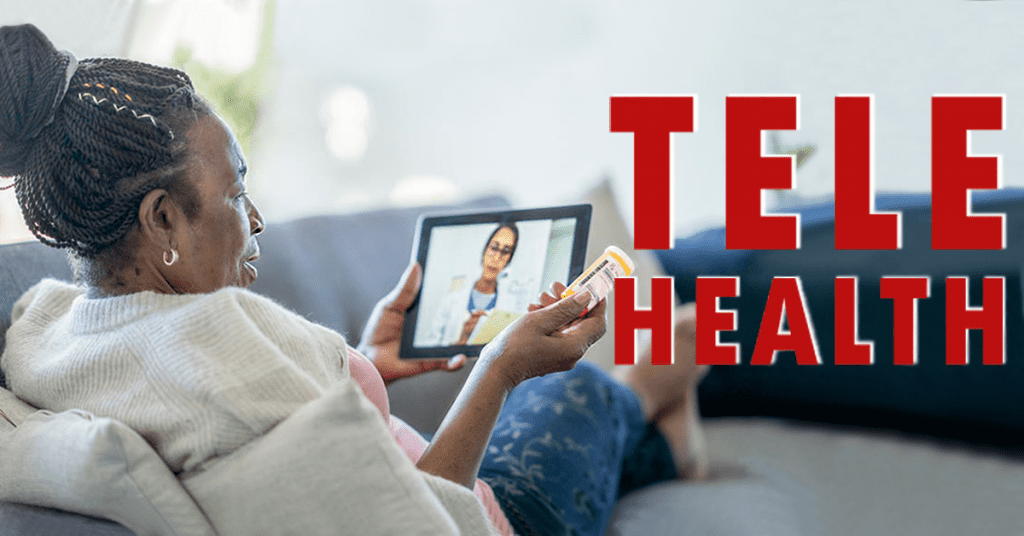
More than ever people are focusing on their health, looking after themselves any way they can. Hospitals being over run and complicated to get into. Within these times people needed a way to communicate with a doctor without having to worry about getting into the hospital. Telehealth has been around for many years, but recently it has skyrocketed in acknowledgment and in users who swear by it. Video calls were at an all time high over COVID, it made sense that Telehealth, a way of visiting the doctors without leaving your home, was a popular way to get medical help. A relaxed and more suitable way for most people to see a doctor or their GP.
 

Telehealth Rundown 

Telehealth is a way for people to visit the doctors. Virtually. Communicate to your doctor through electronic devices – phone, laptop or tablet. It can be a call, video call or message. Video calling wasn’t just used for business conferencing during 2020 as Telehealth had its peak usage. To some it may seem a hazardous solution, but for others it gives them the freedom to stay healthy both mentally and physically anytime, anywhere.

Imagine living on the outskirts of a town or a city, miles away from a hospital or a doctors office and you have a concern about your health. But know that travelling to the hospital isn’t an option. With Telehealth you can calm any medical worries through a phone or video call. A lot of Telehealth services will run through an application. Making it super simply to use and all your health data and records will be stored safely within the app. Giving you easy access to your records and your past history of using Telehealth. So if any problems do occur and you cant get to a doctor at that moment, you can go back through your records and Telehealth history via the app. With this you could find a reason to your medical worry – perfect for long term medical conditions. Not only that but to aid your Telehealth experience, vital monitoring devices can be bought to monitor your health throughout the day. These devices will then store your health data for you to view. Letting you not only view the data but you can share the data with your doctor during a video call.  

How Does Telehealth Work?

Some of you may be reading this thinking, well if I have a long term medical condition how are they going to be taking my vitals if we are miles apart? But the Telehealth world has already thought this through. Alongside phone calls, a video call is probably the best way to meeting with your doctor. Not only can you discuss your medical worry, but you can show any signs of medical concern on your body. With those devices we mentioned, such as the Remote Vital Monitoring Device, doctors can give a full examination as they normally would but this time just through a screen. This Remote Vital Device works by checking a patients vitals during a call, or throughout your day.

So if you suffer from diabetes for example and need to keep an eye on your glucose levels. You can purchase wearable devices that monitor your glucose levels throughout the day. Taking Telehealth even further, watches are becoming more and more advanced. They’re not just their to tell you the time anymore. You can connect your Remote Vital Monitoring Device to your watch to keep you updated every few minutes. Your health in the palm of your hands. 

Remote Vital Monitoring Devices

This topic needs to be dived into a little bit more. Telehealth isn’t just phone, video calls and messaging. There are many devices people can wear or have in their home to check their vitals, without a trip to the doctors. Referring back to having long term medical conditions, with Dexcom your can monitor your glucose levels at home and in real-time. With the use of Clarity, the Dexcom device tracks your glucose levels and secures them in an app. Clarity is a management software that stores your data safely. You can buy Dexcom’s G6 Starter Kit, made up of glucose transmitters and the sensors. You will have to wear the transmitter, by applying it to your arm or stomach with the sensor. Once that is applied you can track your glucose levels throughout you day. Plus, as we said before, you can connect the transmitter to your phone, smartwatch or to a monitoring device.

So going back to the situation before. You have a worry and cant make it to any professional. You can easily check you health throughout your day that could help you come to a solution to your worry. Also a great thing about the Dexcom device is that it will send you alerts when your glucose level is too high. Not only keeping your health in check but letting you live out your day without having to use finger sticks to check your levels.

BioButton

Another Telehealth device to keep track of your health throughout the day is the BioButton. If you are just generally trying to look after your health or have a long term health issue, the ‘coin-sized’ BioButton can give you peace of mind. Designed to ‘wear and forget’, this small stick on device can track your health vitals through out 30 days of wear. The device continuously tracks your temperature, respiratory rate and heart rate. And just like the Dexcom, the BioButton has a dedicated app for you to store and log your health data. Plus, making your health monitoring device even better, the BioButton has a dedicated cloud portal – the BioCloud. A place where your data from the BioButton can be used to detect any physiological changes in your health. Sending you a electronical report.

Another advantage of the BioButton is the BioMobile. If one day you are feeling a bit under the weather and have a few symptoms that may concern you. You can chat with a coversational AI with BioMobile. Type in your queries and the AI will ask questions suitable to your queries or symptoms. A quick way for you to ease your mind and figure out if your condition is serious or mild. 

Benefits

Through the recent years video conferencing platforms have massively helped us with day to day life. Telehealth is just another way video conferencing platforms are helping us. Whether you suffer from a long term condition or just need your mind to be eased, Telehealth can suit everyone. You can easily pick up your phone and book a video call appointment with your doctor. Plus, Telehealth is pretty much a on the go service. If you are out and about doing your daily tasks and start to feel unwell. You could easily talk with your doctor over a video call in your car to find a solution to your problem. Or if a doctor is busy and cant be reached. You can still arrange an appointment that suits you. 

As we said, Telehealth isn’t just talking with a doctor over the phone Telehealth can be small devices that people with long term illnesses wear to track their health. These little devices can generally save lives or prevent any situation from escalating. As the BioButton monitors your health vitals throughout the day. Alerting you if anything peaks or lows too much. This little device can also acknowledge COVID-19 symptoms in a person before you may have even thought about doing a test.


Disadvantages

With everything there are disadvantages next to the benefits. A main disadvantage with Telehealth is security. Your health records and data is private and should stay that way. With 54% of people admitting that some clinics will use Zoom, Facebook Messenger, Facetime and WhatsApp to conduct their Telehealth services. And even though, like we said, video conferencing platforms have supported us through the last few years. Having a secure and safe way to talk to professionals and keep your data private is something that needs to be a main focus with Telehealth.

Another fault in Telehealth is that if you rely on the service too much, other illnesses and issues can go unnoticed. Yes, you are technically seeing a doctor. But sometimes actually going to see your doctor can be more beneficial to you then talking to them through a screen. It allows the doctor to fully examine the patient alongside checking their vitals. Using Telehealth to talk to your doctor is great every once in a while, but using it as your ‘hospital’ almost. Isn’t the best way to look after your health. Another reason to not rely on Telehealth too much is that you could almost become a little bit obsessed with checking your health through the data tracking. Not only making you bit obsessed with checking the app but this can put a strain on your mental health. As you are always worried or paranoid.  


Will Telehealth Be The Future?

Well Telehealth is a great tool, especially during COVID, for obvious reasons. But as for Telehealth being the future, there are pro and cons. From all this information, Telehealth needs to be clear on what their goal is. Is it trying to take over seeing your general doctor in general or is it trying to be an add on feature to help healthcare professionals. Telehealth services need to focus on their security and how they store their patients data. However, even though it seems that Telehealth has still got a bit to go. The future of Telehealth could be amazing.

Just think, with the new technology being introduced in the world, Telehealth could really thrive. With things like holograms and holoportation now coming to life, Telehealth can take advantage of this technology and improve how doctors communicate with their patients. Letting patients holoportate into the doctors office for a full body examination. And with 56% of UK patients claiming that they would use Telehealth mobile applications in the future after trying them on COVID. Shows that a improvement in technology, like the Metaverse. Could help telehealth gain more attention and potential users.     

Picture of Natalie Horn

Natalie Horn

Table of Contents

AV Equipment

All You Need To Know About The Whiteboard Owl: Our Full Review

The Meeting Owl Pro has been the go to product for many meeting rooms. A unique way to really see everybody in the meeting - up close and personal. The Meeting Owl Pro boasts 360-degree views of your meeting room, putting everyone on your screen. Up close. Allowing you to see everybody at once. Without having to wait for the camera to track and move to who is speaking. By the time it processes who is speaking, its too late. The Meeting Owl Pro covered that. However now that working from home is the new normal, being able to create and present to your colleagues, or your students, has been a bit of a challenge. Even though a lot of interactive displays have integrated digital whiteboards. Being able to create in real time, on a real whiteboard big enough for you, your colleagues and your classmates. Is a must for a lot of people. That's where Owl Labs stood up and created the Whiteboard Owl. The Meeting Owl's friend that captures your whiteboard content.  But with the Whiteboard Owl seeming like just another meeting room camera, how does the Whiteboard Owl differ from other meeting room cameras? What Is The Whiteboard Owl? The Whiteboard Owl is a camera for you to capture your whiteboard content, shooting it across to your remote participants in HD quality. All of this while working with the Meeting Owl Pro. Just pair the two devices together and your meeting will have 360-degree views of the people within the meeting room or classroom. The Whiteboard Owl is fully flexible to your needs. It can be mounted on the ceiling, the wall or can be mounted on a tripod. If you chose to mount the Owl on your wall or on a tripod, it is recommended that you place it 7 - 16 feet away from your whiteboard and 6 feet off the ground. Allowing the Owl to capture a large area of your whiteboard and capture the content clearly.  The Whiteboard Owl includes: Whiteboard Tags Power Supply Mount Adhesive Strips  Cable Management Pieces Drywall Hangers  Screws A tripod for the Whiteboard Owl will have to be bought separately. But not to worry though - you wont need to think too much about buying the right tripod. The Owl comes with a tripod screw thread on the bottom of the device. Making it easy for you to set up the Owl and chose the right tripod. Just make sure that you use a tripod screw that isn't longer than 8mm - otherwise you will damage the Whiteboard Owl. If you are going to be moving the Owl from room to room. Then getting a tripod is recommended. Instead of you having to take the Owl off the wall when you want it in a different room. When you are moving your Whiteboard Owl around, just remember to take your whiteboard tags with you.  Content When creating content with the Whiteboard Owl you will never have to worry about your participants not being able to see what you have created, as the Owl comes with features to enhance your content. When you're ready to start creating on your whiteboard, you simply flip over one of the whiteboard tags. This will then switch the remote participants view from the Meeting Owl to the Whiteboard Owl. Then you can start drawing on the whiteboard. Another way the Whiteboard Owl focuses on your content is that you will almost become invisible to your remote participants when drawing on your whiteboard. So when you're drawing the Whiteboard Owl will pick out the content that it can see and enhance it, while turning you transparent. Then when your done drawing and move out of frame, the Owl will line up the rest of your drawing and enhance it further. Making the Whiteboard Owl experience even easier. Just a little tip though. Owl Labs recommend using black, blue, red or green markers when using the Whiteboard Owl. Just so your drawing can be picked up by the Owl clearly. The whiteboard capture feature stops you from having to take notes during the Whiteboard Owl session. You missing out on important parts of your meeting as you had to look at your notepad. The Whiteboard Owl will take photos of your whiteboard and store them for you to look at after your session is over.  Whiteboard Tags The whiteboard tags are a crucial part of the Whiteboard Owl - without them nothing on your whiteboard will be seen. So before you even set up the Whiteboard Owl, place the whiteboard tags on your whiteboard. One in the top left hand corner and one in the bottom right hand corner. This is just so you don't get ahead of yourself and start using the Whiteboard Owl without putting the tags on. Taking your time creating on the whiteboard and your participants via Zoom not seeing a thing. The tags look somewhat like QR codes.  They have to go, like we said in the top left hand and bottom right hand corner, but you can create your own smaller frame. This is if you don't want your whole whiteboard being captured. The tags act as a frame for your content and what the Whiteboard Owl should focus on. Make sure that they are facing upright for them to work right. The tags are also magnetic, so they are super easy to set up. However if your whiteboard isn't a magnetic whiteboard, then you will need to use magnetic adhesive strips to attach the tags to your whiteboard. Going back to the idea of moving the Owl from room to room, obviously the tags need to be moved to the new room as well. When setting up the Owl in the new room, the Whiteboard Owl and the tags need to re crop. Meaning that the Owl will have to figure out the frame you want of the new whiteboard. This process is just so that the
Read More »
remote team expense management
Remote Collaboration

Revolutionise Remote Team Expense Management with These Innovative Solutions

In the context of remote work, effective expense management is crucial for distributed teams to maintain financial control and optimize their operations. Remote team expense management refers to the process of tracking, controlling, and streamlining expenses incurred by virtual teams. By implementing innovative solutions and leveraging software tools, organizations can ensure cost optimization, efficient budget management, and streamlined expense tracking. This article highlights the importance of remote team expense management, addresses the challenges faced by distributed teams, and emphasizes the need for innovative solutions to streamline the expense management process.In today’s remote work landscape, where virtual collaboration is the norm, managing expenses efficiently is vital for organizations. Remote team expense management enables businesses to maintain financial transparency, ensure cost control, and make informed decisions about resource allocation.Remote team expense management allows businesses to track and analyze their expenditures, identifying areas for cost reduction and optimization. By gaining insights into spending patterns, organizations can make informed decisions to control expenses and improve overall financial management.With distributed teams, it becomes crucial to establish and manage budgets effectively. Remote team expense management enables organizations to set clear budgets, allocate funds, and monitor expenses against predefined financial targets. This ensures that the virtual team operates within allocated budgets, minimizing financial risks.Tracking expenses across multiple remote team members can be challenging without proper systems in place. Remote team expense management solutions provide centralized platforms that streamline expense tracking, allowing team members to submit and track expenses efficiently. This not only saves time but also reduces the chances of errors or overlooked expenses.How to Manage Remote Teams  Understanding Remote Team Expense ManagementIn today’s era of remote work, efficient management of team expenses is crucial for organizations. Remote team expense management encompasses several key components that ensure smooth financial operations. These components include expense tracking, control, and reimbursement.Expense tracking is the process of recording and monitoring all expenses incurred by remote team members. It involves keeping a detailed record of individual expenses, categorizing them, and maintaining accurate documentation. Remote expense tracking tools and software simplify this task by automating the process, reducing errors, and providing real-time visibility into expenditure.Expense control refers to the establishment of policies and procedures to regulate spending within remote teams. By implementing an expense policy, organizations can set clear guidelines on what expenses are permissible and define spending limits. This helps in preventing overspending, improving cost control, and maintaining budget discipline.Reimbursement is the final stage of remote team expense management. It involves the timely and accurate reimbursement of expenses incurred by remote team members. Clear reimbursement processes ensure that team members are promptly reimbursed for legitimate expenses, fostering trust and satisfaction within the virtual team.Significance of Maintaining a Clear Expense Policy for Remote TeamsMaintaining a clear expense policy holds immense importance in remote team expense management. An expense policy acts as a guiding framework that defines acceptable expenses, spending limits, and reimbursement procedures for remote team members.Having a well-communicated policy ensures that all team members understand what expenses are covered and how to submit reimbursement requests. It eliminates confusion, prevents disputes, and promotes consistency in expense management practices across the organization.A clear expense policy also contributes to cost control. By setting spending limits and defining authorized expenses, organizations can effectively manage their budgets and avoid unnecessary expenditures. This enables businesses to optimize their financial resources and allocate funds to priority areas.Moreover, a transparent expense policy enhances compliance with regulatory requirements and mitigates the risk of financial fraud. It sets expectations for ethical conduct, prevents misuse of funds, and ensures accountability within the remote team.Importance of Accurate Financial Tracking and Auditing in Remote Expense ManagementAccurate financial tracking and auditing play a vital role in remote expense management. These practices provide organizations with valuable insights into their expenditure patterns, identify areas for optimization, and facilitate informed decision-making.Financial tracking involves consistently monitoring and analyzing expenses incurred by remote teams. It enables organizations to identify spending trends, evaluate cost-saving opportunities, and assess the financial health of the remote workforce. By leveraging cloud-based expense management tools, businesses can streamline the tracking process, capture real-time data, and generate comprehensive reports.Regular financial audits further enhance expense management by ensuring compliance with policies, regulations, and industry standards. Audits help in identifying discrepancies, errors, or fraudulent activities, providing an additional layer of control and risk mitigation. They contribute to maintaining the integrity of financial processes and building trust among stakeholders. Key Components Description Expense tracking Recording and monitoring individual expenses incurred by remote team members Expense control Establishing policies and procedures to regulate spending within remote teams Reimbursement Timely and accurate reimbursement of legitimate expenses incurred by remote team members Clear expense policy Guiding framework defining acceptable expenses, spending limits, and reimbursement procedures Accurate financial tracking Consistently monitoring and analyzing expenses incurred by remote teams Financial auditing Regular assessment of expenses to ensure compliance, identify discrepancies, and mitigate risks   Best Practices for Remote Team Expense ControlAs the world continues to embrace remote work, effective expense control within remote teams becomes a crucial aspect of financial management. Managing expenses in a distributed work environment requires a different approach compared to traditional office settings. In this section, we will discuss the best practices for remote team expense control, providing practical tips and strategies to streamline and optimize the financial management process.Setting Clear Spending Limits and GuidelinesOne of the key aspects of remote team expense management is setting clear spending limits and guidelines for team members. Without proper boundaries, expenses can quickly spiral out of control. Here are some best practices in this regard: Define spending policies and guidelines: Establish comprehensive policies that clearly outline acceptable expenses and spending limits. Ensure these policies are easily accessible to all team members and regularly communicated. Encourage pre-approval for significant expenses: Implement a pre-approval process for large expenses to ensure they align with the company’s budget and goals. This step helps prevent unnecessary overspending and ensures financial accountability. Educate team members: Conduct training sessions to educate team members about the company’s expense policies and provide guidance on making

Read More »
remote working and collaboration in agile teams
Remote Collaboration

Master Agile Collaboration: How to Excel at Remote Working and Collaboration in Agile Teams

Master Agile Collaboration: How to Excel at Remote Working and Collaboration in Agile Teams. Discover proven strategies and techniques to optimize remote work and foster effective collaboration in agile teams. Enhance team communication, boost productivity, and overcome challenges for successful remote teamwork. Dive into our comprehensive guide now!

Read More »
Expertise through AV
Training and Education

Expertise through AV: Guided Learning

In today’s fast-paced professional landscape, audiovisual expertise stands as the cornerstone of success. With technology evolving at an unprecedented rate, mastering advanced audiovisual skills is not just an option but a necessity. This blog delves deep into the realm of audio visual training, emphasizing its pivotal role in experiential education and hands-on training. Let’s embark on a journey where expert guidance through audiovisual means isn’t just a choice, but the key to unlocking unparalleled success in the world of AV technology.In an era where visual learning methods are surpassing traditional modes of education, practical skills in AV technology are invaluable. The demand for specialized training programs, offering immersive learning experiences, is at an all-time high. With expert-led AV education becoming the norm, professionals are not just acquiring knowledge; they are mastering the art of AV technology. Guided learning solutions in AV are designed to enhance AV proficiency, providing interactive visual learning experiences that cater to the needs of the modern learner.This blog serves a vital purpose for individuals seeking practical expertise in AV technology. By exploring advanced audiovisual skills training, hands-on AV expertise courses, and specialized AV training programs, readers gain insights into the immersive expertise training online. Our focus is on expert-guided immersive learning, where experiential AV education for professionals becomes more than just a concept; it becomes a reality.Delving into the depths of audiovisual mastery, our content navigates the complexities of AV skills development. Through immersive AV education programs and expert-guided hands-on AV training, individuals not only gain practical expertise but also understand the intricacies of AV technology. Interactive visual education programs facilitate the learning process, ensuring that learners grasp the concepts effectively. Data, when applicable, is presented in easy-to-understand tables, ensuring that readers can absorb complex information effortlessly.Impression AV our expertise  The Evolution of LearningIn the ever-evolving landscape of education, the shift from conventional classroom settings to hands-on AV expertise courses and specialized training programs has been nothing short of transformative. This shift has been facilitated by technology, ushering in a new era of experiential education, guided learning, and immersive learning experiences. The Role of Technology in Shaping LearningThe integration of technology into education has been a driving force behind the evolution of learning. In the past, traditional learning methods relied heavily on textbooks and lectures, which often left learners passive and detached. Today, we have immersive learning experiences that make use of AV technology, providing a dynamic and engaging way to acquire knowledge.Immersive Learning: A New ParadigmImmersive learning is at the forefront of the educational revolution. It involves interactive AV training that places learners at the center of the learning experience. Through audiovisual expertise training, students can engage with the subject matter in a way that traditional methods could never replicate. This method caters to different learning styles, such as visual learning, making it more effective and enjoyable for a broader range of students.Guided Learning SolutionsExpert guidance plays a pivotal role in the evolution of learning. Expert-led AV education ensures that students receive the most up-to-date and relevant information. Whether it’s in the form of hands-on AV expertise courses or specialized AV training programs, expert guidance through audiovisuals ensures that learners are on the right path to mastery.Practical Skills and Specialized TrainingThe integration of AV technology has allowed for more practical skills development in fields that require specialized expertise. Whether it’s enhancing AV technology skills or offering specialized training in visual learning techniques, these programs provide learners with the tools they need to excel in their chosen field.Interactive AV TrainingInteractive AV training is a cornerstone of the modern learning experience. It provides learners with the opportunity to actively engage with the material, solidifying their understanding through hands-on expertise with AV. This approach is highly effective in enhancing experiential learning through AV.Advanced AV Skills DevelopmentWith the advent of experiential AV training, learners can advance their AV skills to levels previously unattainable through traditional methods. This practical AV knowledge enhancement is vital in a world where technology continues to play an integral role in various industries.  Immersive Learning: Beyond the BasicsImmersive learning stands at the forefront of education, transforming the way we acquire audiovisual (AV) expertise. In this digital age, where audiovisual technology shapes our daily interactions, having specialized skills in AV technology is crucial. This section explores the concept of immersive learning, its significance in acquiring AV expertise, and the impact of interactive visual learning solutions on the learning process.Expert-Guided Immersive Learning: Mastering AV TechnologyIn the realm of audiovisual expertise, guided learning solutions are paramount. Expert guidance through audiovisual immersive learning experiences not only enhances practical skills but also accelerates the mastery of AV technology. Hands-on AV expertise courses, such as expert-guided immersive learning, enable professionals to delve deep into the nuances of AV technology. Interactive visual learning solutions, rooted in expert-led AV education, provide a comprehensive understanding of advanced audiovisual skills training.Interactive Visual Learning: A Game-Changer in AV EducationThe fusion of practical AV knowledge enhancement and immersive expertise training online is revolutionizing AV education. Guided visual learning, combined with specialized AV training programs, creates an environment where professionals can hone their skills effectively. Interactive visual education programs, facilitated by experts, ensure experiential AV education for professionals. Through expert-guided hands-on AV training, individuals gain practical expertise in AV technology, setting them apart in the competitive landscape.The Impact of Immersive Learning on Practical AV SkillsImmersive expertise through AV goes beyond traditional learning methods. Expert-guided audiovisual education emphasizes hands-on training in AV skills development. Specialized visual learning courses, designed to enhance AV proficiency, utilize immersive AV training courses. This approach not only imparts advanced audiovisual skills but also focuses on practical expertise in AV technology. Experiential AV training, rooted in expert-led audiovisual mastery, shapes professionals into industry-ready experts.  Experiential AV Education for ProfessionalsThe increasing demand for specialized AV training programs tailored to the needs of professionals is driven by the rapid evolution of audiovisual technology. In today’s fast-paced world, staying ahead in the realm of AV expertise is essential for success in numerous industries and professions. This section will delve into the

Read More »
remote team chat apps
Remote Collaboration

Boost Your Communication with the Best Remote Team Chat Apps for Seamless Connectivity

Effective communication plays a vital role in the success of remote teams. With the rise of remote work and virtual collaboration, the need for seamless connectivity and efficient communication tools has become increasingly important. In this article, we will explore the significance of effective communication in remote teams and highlight how chat apps can enhance collaboration and productivity. We will also discuss various chat app features that facilitate seamless connectivity and support remote team communication.Remote collaboration relies heavily on effective communication to bridge the physical distance between team members. Clear and timely communication fosters understanding, builds trust, and ensures alignment within the team. It allows remote team members to collaborate efficiently, share ideas, resolve issues, and stay connected regardless of geographical boundaries. Effective communication in remote teams leads to enhanced productivity, improved teamwork, and better outcomes.Chat apps serve as online communication platforms, facilitating instant messaging for remote teams. With real-time messaging, team members can exchange information, seek clarifications, and share updates in a quick and efficient manner. These apps offer features such as read receipts and typing indicators, ensuring that messages are promptly received and acknowledged.Efficient file sharing is crucial for remote team productivity. Chat apps enable seamless sharing of documents, files, and media, eliminating the need for lengthy email chains. Team members can easily collaborate on projects, review documents, and provide feedback in real time. Additionally, version control features ensure that everyone has access to the latest file versions, promoting accuracy and consistency.The 10 Best Team Chat Apps for Working Remotely in 2020  Choosing the Right Remote Team Chat AppsIn today’s digital age, remote work has become increasingly prevalent, making effective communication and collaboration essential for remote teams. Selecting the appropriate chat app for remote teams is a crucial decision that can significantly impact remote collaboration, seamless connectivity, and overall team productivity.Significance of Selecting the Appropriate Chat App for Remote TeamsThe choice of a chat app for remote teams holds significant importance in enabling efficient and streamlined communication among team members. A suitable chat app facilitates real-time collaboration, quick information sharing, and the ability to connect seamlessly regardless of geographical distances. By leveraging the right chat app, remote teams can overcome communication barriers and foster a sense of virtual togetherness, which is crucial for successful remote work collaboration.Essential Features to Consider When Choosing a Chat App for Remote Teams Real-Time Communication: A chat app should offer instant messaging capabilities, enabling team members to communicate in real-time. This feature allows for quick decision-making, immediate feedback, and reduces communication gaps, fostering seamless connectivity among remote teams. File Sharing Capabilities: An essential feature to consider is the ability to share files effortlessly within the chat app. This allows team members to exchange documents, images, and other files without the need for separate file-sharing platforms. It enhances collaboration, enables version control, and ensures that everyone has access to the most up-to-date information. Video Calling Functionality: Effective communication often requires face-to-face interaction. A chat app with video calling functionality facilitates virtual meetings, conference calls, and screen sharing, promoting better understanding and team cohesion. It helps remote teams connect on a more personal level and strengthens remote work collaboration. Task Management Integration: Integration with task management tools enhances productivity and project organization. A chat app that integrates with popular task management platforms enables remote teams to create, assign, and track tasks directly within the app, streamlining workflows and ensuring efficient project management. End-to-End Encryption: Security is a paramount concern for remote teams. Choosing a chat app with end-to-end encryption ensures that messages and files exchanged within the app are secure and protected from unauthorized access. This feature helps maintain the confidentiality of sensitive information and instills trust among team members. Cross-Platform Compatibility: Remote teams often work across various devices and operating systems. A chat app that is compatible with different platforms ensures that team members can access and use the app seamlessly, regardless of their preferred device, enhancing remote work efficiency. Emoji Reactions and Screen Sharing: Additional features such as emoji reactions and screen sharing can enhance remote team communication. Emoji reactions provide a quick and visual way to express emotions or acknowledge messages, while screen sharing facilitates collaboration during presentations, design reviews, or troubleshooting sessions.   Top Chat Apps for Remote TeamsEffective communication is the cornerstone of remote team collaboration. In today’s fast-paced work environment, remote team chat apps have become essential tools for seamless connectivity and real-time collaboration. Whether you’re a small remote team or a large virtual workforce, choosing the right chat app can significantly enhance your team’s productivity and streamline your remote work communication.SlackSlack is a leading name among remote team chat apps, offering a comprehensive set of features for team communication. With its intuitive interface and robust functionality, Slack is a top choice for remote teams seeking seamless connectivity. It allows real-time messaging, file sharing capabilities, and supports video calling functionality for face-to-face interactions. Additionally, Slack offers task management features, making it easier for teams to collaborate and stay organized. Its extensive library of messaging app integrations further enhances productivity and remote work collaboration.Microsoft TeamsMicrosoft Teams is another prominent player in the realm of remote team chat apps. Built on the foundation of Microsoft’s productivity suite, Teams offers a cohesive platform for online communication and collaboration. Teams facilitate file sharing capabilities, allowing team members to access and edit documents in real-time. Its video calling functionality enables smooth virtual meetings and enhances remote collaboration. With seamless integration with other Microsoft tools, Teams ensures a cohesive and efficient remote work environment.Google ChatGoogle Chat, part of the Google Workspace suite, provides a robust solution for remote team communication. With its user-friendly interface and powerful features, Google Chat enables real-time collaboration and enhances remote team productivity. It offers file sharing capabilities, allowing teams to exchange documents and work on them simultaneously. Google Chat also supports video calling functionality, enabling face-to-face conversations from anywhere. Leveraging Google’s ecosystem, Chat seamlessly integrates with other Google apps, providing a comprehensive solution for remote work efficiency.ZoomWhile Zoom is primarily known

Read More »
AV technology trends
Training and Education

Exploring AV Technology Trends: Stay Ahead of Innovation

In today’s fast-paced digital landscape, staying updated on AV technology trends is not just an option; it’s a necessity. As we delve into the world of Audio-Visual (AV) technology, we’ll explore its significance across various industries and shed light on the transformative power of emerging AV technologies. Let’s dive straight into the heart of the matter.AV technology trends play a pivotal role in shaping the future of numerous industries. From healthcare to education, businesses of all sizes are embracing the potential of AV technology for enhanced efficiency, communication, and productivity.AV technology trends are constantly evolving, and staying ahead of innovation is essential to remain competitive. One prominent trend is the rise of 8K resolution displays, offering unparalleled clarity for immersive experiences. Additionally, augmented reality (AR) and virtual reality (VR) are gaining traction, revolutionizing how we interact with content.In healthcare, AV technology aids in streamlining patient care through AV integration. From digital imaging systems to telemedicine solutions, AV innovations improve diagnostics and patient communication.The educational sector has witnessed a seismic shift with the integration of AV technology for education. Interactive smart displays, immersive audio solutions, and virtual classrooms are enhancing the learning experience.AV Tech Trends – Protocols  Latest AV Tech for Small BusinessesIn today’s fast-paced business landscape, small enterprises must stay ahead of the curve to remain competitive. One way they can achieve this is by embracing the latest AV technology trends that are revolutionizing the way businesses operate. In this section, we will explore the significance of AV technology for small businesses, highlight the latest AV solutions tailored for them, and provide examples of how these technologies can benefit small enterprises.AV Technology for Small BusinessesAudio visual technology has become an integral part of modern business operations. The AV industry has witnessed significant growth, offering small businesses access to cutting-edge solutions that were once reserved for large corporations. The importance of AV technology for small businesses can be understood through various key aspects: Enhanced Communication: AV technology enables small businesses to communicate effectively with clients, partners, and employees. Video conferencing and smart devices facilitate seamless remote work solutions and virtual meetings, ensuring efficient collaboration. Immersive Experiences: Small businesses can now harness the power of 4K video and immersive audio to create engaging presentations and virtual events, enhancing customer engagement and brand recognition. Efficient Meetings: AV automation streamlines conference room setups, saving time and reducing the hassle of technical issues during meetings. Incorporating AI: Integration of AI in AV technology allows for intelligent automation, improving user experiences and operational efficiency. Latest AV Solutions for Small EnterprisesThe future of AV tech is bright, and small businesses can leverage emerging AV technologies to stay competitive. Some of the latest solutions tailored for small enterprises include: AR and VR Integration: Small businesses can explore AR and VR in AV to create interactive presentations, enhance training programs, and provide immersive customer experiences. Digital Signage Innovations: Digital displays and signage are becoming increasingly interactive, making them ideal for retail businesses to engage customers and promote products effectively. Visual Communication Tech: Visual communication tools and smart displays are invaluable for presentations, making them more engaging and interactive. AI-Driven AV Automation: Businesses can optimize their operations by automating routine AV tasks using AI, freeing up valuable time for employees. Benefits for Small BusinessesNow, let’s delve into specific examples of how small businesses can benefit from these AV solutions: Enhanced Education: Small educational institutions can use AV technology for interactive learning, providing students with a more engaging and effective learning experience. Healthcare Integration: Healthcare facilities can use AV integration to improve patient care, streamline administrative tasks, and enhance the overall healthcare experience. Retail Promotion: Retailers can utilize digital signage and immersive audio to create captivating in-store experiences that drive customer engagement and boost sales. Efficient Remote Work: AV technology facilitates remote work, allowing small businesses to tap into a global talent pool and operate efficiently, regardless of location.   Affordable AV Solutions for StartupsIn today’s rapidly evolving business landscape, startups need to embrace the latest AV technology trends to remain competitive and efficient. Leveraging audio-visual technology doesn’t have to break the bank, and startups can benefit immensely from cost-effective AV solutions. AV Technology Trends for StartupsStartups looking to optimize their operations and enhance collaboration can benefit from emerging AV technologies. By staying updated with AV industry trends and advancements, they can make informed decisions about their AV equipment and software investments.Audio Visual Innovations for StartupsOne of the key AV technology trends startups can embrace is the integration of smart devices and AI into their audio visual setups. Smart displays and AI-driven AV automation are becoming increasingly accessible, allowing startups to streamline their operations efficiently. These solutions not only save time but also enhance productivity.Enhancing Remote Work with AV TechnologyRemote work solutions have become essential for startups in the modern business landscape. With the integration of video conferencing and collaboration tools, startups can facilitate virtual meetings seamlessly. This enables efficient communication among remote teams and clients, fostering a collaborative work environment.  Enhancing Remote Work with AV TechnologyThe landscape of remote work is continually evolving, and the integration of audio-visual (AV) technology is at the forefront of this transformation. In this section, we will analyze the pivotal role of AV technology in facilitating remote work and delve into the tools and techniques that are revolutionizing remote collaboration and communication. AV Technology’s Vital Role in Remote WorkIn the modern digital age, remote work has become a standard practice for businesses worldwide. AV technology has emerged as a key enabler in this paradigm shift, offering seamless connectivity and communication. Video conferencing, a cornerstone of AV technology, has transformed remote meetings into virtual experiences that rival in-person interactions. With the integration of 4K video quality, meetings are not only visually crisp but also incredibly immersive.Enhanced Collaboration and CommunicationCollaboration tools powered by AV technology are propelling remote teamwork to new heights. These tools enable virtual meetings that mimic real-life interactions, promoting engagement and idea sharing. Smart devices, coupled with AI integration, enhance communication by simplifying tasks such as scheduling, transcription,

Read More »
MeetingStore.co.uk
Logo
Compare items
  • Total (0)
Compare
0
Shopping cart