Excellent
Next day delivery! Depending on Availability*
Here to help! Monday to Friday, 8:30AM-5:30PM*

How to Setup a Neat Bar and Pad Bundle?

Neat Bar And Pad Bundle

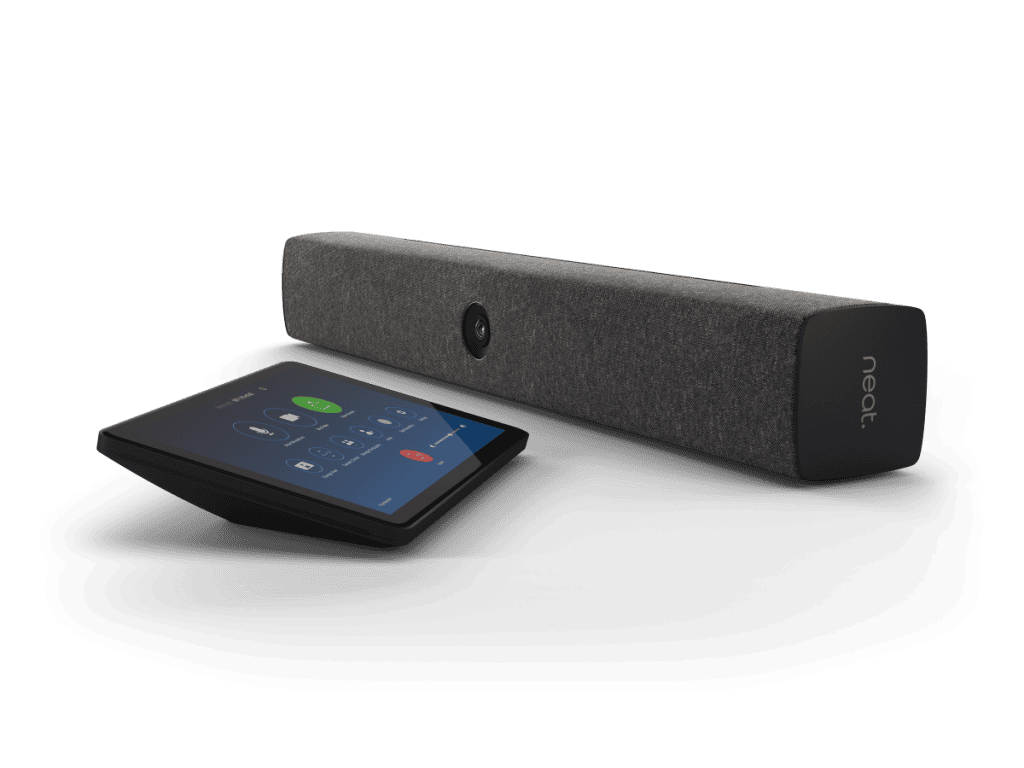
With the acceleration of digitalisation in workplace collaboration, all-in-one meeting solutions like Neat Bar have maximised the creativity and productivity of the workforce. The neat Bar and Pad bundle perfectly balances high-tech engineering and user-operating simplicity. Together, Neat Bar and Neat Pad can provide you with a complete video conferencing experience second to none.

The simple steps to setting up Neat Bar and Pad Bundle are as follows:

  1. Power up your Neat Pad. 
  2. Power up your Neat Bar.
  3. Choose your setup scenario.
  4. Choose your Mounting Configuration.
  5. Connect Neat Pad and Neat Bar to the Internet.
  6. Choose your Neat Bar.
  7. Choose the desired platform.


It’s very easy for anyone to install and set up the neat bar and pad bundle. Just plug in the cables, and the bar will auto-pair with the pad. Moreover, because the Neat Bar and Neat Pad have auto-flip, they instantly realign your view, regardless of how you mount or position them. The neat bar and pad bundle is perfect for bringing superior-quality audio and video to your meeting, huddle, or focus rooms for up to ten people. 

How to set up a Neat Bar and Pad Bundle? Step-by-step guide.

Neat Bar is a simple and elegant video conferencing solution. It is a highly capable meeting room device with a compact design. And its setup is not much of a hustle. All you have to do is follow these simple steps. 

STEP 1: Turn on your Neat Pad. So, if you have Power-Over-Ethernet (PoE) built into your network, use the Ethernet cable (supplied) to plug your Neat Pad directly into an Ethernet port to receive network and power. But if you want to connect to the Neat Bar. o Neat Pad using Wi-Fi, skip this step.

STEP 2: Charge your Neat Bar. Connect the Neat Bar to AC power and the TV screen using the HDMI output. But, if you use a single TV screen, make sure you connect to the Neat Bar’s HDMI 1 output.

If you want to connect the Neat Bar to a wired network, connect it to your network switch using an Ethernet cable. However, do not connect the Ethernet cable if you are using Wi-Fi. If a Neat device has a wired Ethernet connection, it will always use Ethernet. To force a Neat device to use Wi-Fi, there should be no wired/Ethernet connection cable physically connected.

STEP 3: Choose your setup case. So, if you are setting up a Neat Bar, the Neat Pad needs to be paired with the Bar. You will have four set-up options available to you. To do so, choose “Set up Neat Bar with a controller.”

But, if you are using the Neat Pad as a standalone device, choose the other two options for room availability (Zoom: Scheduler/ Microsoft: Team Panel) or meeting control (Zoom Room Controller/ Microsoft Teams Console) as desired.

STEP 4: Next, choose your mounting option. The Neat Bar supports three different mounting options:

  • Screen mounting
  • Wall mounting
  • Table mounting

You can pick an option according to your meeting room and preferences. The set-up Wizard will walk you through the appropriate steps to set up the Neat Bar accordingly. 

STEP 5: Now you have to connect both devices to the internet. So, if you’ve connected Neat Pad and Neat Bar using Ethernet cables to a wired network, you should be connected to the internet automatically. Otherwise, you will need to connect the Neat Pad to WiFi. (You can find the instructions on how to connect the Bar to Wi-Fi below.) 

STEP 6: Choose your Neat Bar if you have multiple Neat Bars in your office. All you have to do is select the correct serial number and hit continue.

STEP 7: Lastly, you will now be asked to choose your platform as shown below. Once you have selected your preference, hit continue to begin launching either Zoom or Microsoft Teams. (Find details below.)

That’s it! Now you’re done with the set-up and ready to make calls using your Neat Bar and Neat Pad. 

How do I pair a Neat Pad with Neat Bar?

Everything you need to connect Neat Bar to your TV or monitor is in the box, so it’s easy for anyone to install and set up. Just plug in the cables, and the Neat Bar will auto-pair with the Neat Pad. 

However, there are three Wi-Fi deployment options when Bar and Pad are paired together:

  1. Both Neat Bar and Neat Pad are connected over Wi-Fi.
  2. Neat Bar on Wi-fi and Neat Pad on a wired network. 
  3. Neat Bar on a wired network and Neat Pad on Wi-Fi.

How do I connect a Neat bar to WiFi?

The Neat Bar can be used on both wired and wireless networks. However, here is a step-by-step guide for you to connect to Wi-Fi. All you need is a stable internet connection:

  • Step 1: Connect both the Neat Bar and Neat Pad to power sources and connect to an external display using the HDMI 1 port (for a second monitor, use the HDMI 2 port). Do not connect the Ethernet cable if you want to connect Neat Bar to Wi-Fi. If you want to connect the Neat Pad over Wi-Fi, use the PoE injector to power it up, but do not connect it to a wired network.
  • Step 2: Follow the instructions on the Neat Pad, starting with the “preferred language selection.” Click on “Continue”. 
  • Step 3: Choose the setup: ‘Set up Neat Bar with controller’. Click ‘Continue’. 
  • Step 4: Next, follow the mounting guides for the appropriate configuration for your room and press ‘Start guide’ (optionally, you can choose ‘Skip’ if you are already aware of how to mount the devices.) 
  • Step 5: If you are connecting the Neat Pad to a Wi-Fi network.
  • Step 6: Choose ‘Connect using Wi-Fi’. You will see the ‘Neat Pad Wi-Fi’screen. For a successful pairing, Neat Bar and Neat Pad will need to be on the same “subnet”. Press ‘Got it. 
  • Step 7: Next, the Neat Pad will populate a list of all connected Wi-Fi networks.  
  • Step 8: Select your Wi-Fi network, enter the password, and click ‘Join’. Once connected, you will see a ‘tick’ next to the WI-Fi network’s name (SSID). Click ‘Continue’.
  • Step 9: Select the time zone and press “Continue.” 
  • Step 10: Next, you will see the list of neat bars. Choose the serial number shown on your Neat Bar’s TV screen and press ‘Continue’. 
  • Step 11: You will see the pairing process start, and after a short period, the pairing should be successful. You will get a ‘Paired with Neat Bar’ message on the Neat Pad and a corresponding ‘Paired with Neat Pad’ message on your TV screen. Click on “Continue.” 
  • Step 12: Choose between Zoom Rooms or Microsoft Teams as your platform and click “Continue.”
  • Step 13: You’re all set now to enjoy your high-end meetings!


How do you log in to Microsoft Teams with Neat Pad?

Once you have successfully paired the Neat Bar or Bar with a Neat Pad at the Neat level, the Bar and Pad will launch their respective Teams Rooms software. In order to operate as a single Teams Room device, the two devices will now need to pair at the Teams level.  Follow the instructions to do so:

  1. Once both devices have been successfully registered to a Microsoft Teams account via the device log-in page. The Pad will ask you to select a device to begin the Teams-level pairing process.
  2. And when the correct Neat Bar has been selected a code will appear on the Neat Bar to enter on the Pad and complete Microsoft Teams level pairing between the devices. 

Once you have launched the desired platforms, such as Microsoft Teams, you’re ready to run your meetings and enjoy a high-quality video experience.

Picture of Meeting Store

Meeting Store

Table of Contents

remote team monitoring tools
Remote Collaboration

Boost Your Team’s Productivity and Accountability with Top Remote Team Monitoring Tools

The shift towards remote work has revolutionized the way teams collaborate and operate. With the increasing prevalence of remote teams, there is a growing need for effective monitoring and accountability to ensure productivity, efficiency, and overall team performance. In this blog post, we will explore the concept of remote teams, highlight the importance of utilizing advanced monitoring tools, and discuss how they contribute to the success of remote work environments.Remote teams refer to groups of individuals working together towards a common goal while being geographically dispersed. This new paradigm offers flexibility, work-life balance, and access to a global talent pool. However, it also presents unique challenges, such as maintaining accountability and ensuring team cohesion without physical proximity.To overcome the challenges of managing remote teams effectively, organizations must leverage advanced monitoring tools. These tools serve as a crucial component of remote team management software, providing valuable insights into employee activities and facilitating accountability within the team.Remote team monitoring tools enable organizations to track and evaluate individual and team performance, ensuring that everyone is aligned with organizational goals. With real-time data and analytics, managers can identify areas of improvement and provide timely feedback and support to enhance accountability.By using employee monitoring solutions, organizations can identify potential bottlenecks and streamline workflows to optimize team productivity. These tools provide visibility into time spent on tasks, allowing managers to address time wastage and allocate resources more efficiently.Effective remote collaboration is a cornerstone of successful remote teams. Monitoring software fosters online team supervision and virtual team management by providing tools for seamless communication, file sharing, and project tracking. This ensures that team members stay connected, collaborate effectively, and achieve their goals collectively.Top 5 Employee Monitoring Software – Best Employee Monitoring Software Importance of Team Accountability in Remote WorkIn today’s fast-paced and ever-evolving work environment, remote teams have become increasingly prevalent. However, maintaining accountability within these teams poses unique challenges that require careful consideration. In this section, we will explore the challenges faced by remote teams in maintaining accountability, discuss the impact of accountability on team productivity and collaboration, and emphasize the need for reliable monitoring software to foster a culture of accountability in remote work environments.The Challenges of Remote Team Accountability and Progress TrackingRemote teams often encounter several challenges when it comes to maintaining accountability and tracking individual and team progress. Let’s examine some of these challenges: Communication Barriers: Remote collaboration relies heavily on effective communication channels. However, due to geographical and time zone differences, team members may face challenges in staying connected and communicating in real-time. This can lead to delays in information sharing and hinder accountability. Lack of Oversight: Unlike traditional office settings, remote teams lack direct supervision. Without physical presence, managers may find it difficult to monitor employees’ activities and ensure they are staying on track. This lack of oversight can result in reduced accountability and productivity. Distractions and Work-Life Balance: Remote work provides flexibility, but it also brings potential distractions that can impede accountability. Balancing work responsibilities with personal life demands can be challenging, leading to decreased focus and accountability. Limited Visibility: In a remote work environment, it can be challenging to gain visibility into individual and team progress. Without clear visibility, it becomes difficult to assess performance and ensure accountability. The Impact of Accountability on Team Productivity and CollaborationAccountability plays a vital role in enhancing team productivity, collaboration, and overall success. Here’s how accountability positively influences remote teams: Increased Productivity: When team members are accountable for their tasks and deliverables, productivity levels tend to rise. Knowing that their work is being monitored encourages individuals to stay focused, meet deadlines, and maintain high-quality output. Enhanced Collaboration: Accountability fosters a sense of shared responsibility within a remote team. Team members are more likely to collaborate, support one another, and work towards common goals. Effective collaboration leads to better problem-solving, innovation, and overall team success. Improved Time Management: Accountability promotes better time management practices among remote team members. When individuals are accountable for their time, they tend to prioritize tasks, minimize distractions, and make efficient use of their working hours. The Need for Reliable Monitoring Software in Remote Work EnvironmentsTo foster a culture of accountability in remote teams, reliable monitoring software is crucial. Such software enables employers and team leaders to track individual and team progress effectively. Here are some key benefits of utilizing remote team monitoring tools: Efficient Performance Tracking: Monitoring software provides real-time updates on individual and team performance, making it easier to identify areas for improvement. This data-driven approach allows managers to provide timely feedback and support team members in reaching their goals. Enhanced Employee Productivity: By using monitoring software, employers can gain insights into employee behavior, identify productivity bottlenecks, and implement strategies to improve efficiency. With data analytics and performance tracking, employers can provide targeted coaching and training to optimize productivity. Encourages Accountability: Remote team monitoring tools create a transparent and accountable work environment. When employees are aware that their activities are being monitored, they are more likely to adhere to company policies, meet deadlines, and take ownership of their work. Facilitates Communication and Collaboration: Many monitoring software solutions include features that facilitate team communication and collaboration. These tools enable virtual team members to share files, exchange ideas, and collaborate seamlessly, even from different locations.   Key Features to Look for in Remote Team Monitoring ToolsIn today’s fast-paced work environment, effective monitoring of remote teams has become crucial for businesses to ensure team accountability, enhance productivity, and foster seamless collaboration. Remote team monitoring tools play a vital role in providing organizations with the necessary insights and functionalities to manage their distributed workforce efficiently. To help you make an informed decision, this section presents a comprehensive list of essential features and functionalities that effective monitoring tools should possess. We will explore how each feature contributes to enhancing team accountability and productivity while addressing specific monitoring needs such as time tracking, activity monitoring, and performance evaluation. Real-Time Activity Monitoring One of the key features to look for in remote team monitoring tools is

Read More »
Interactive AV techniques
Training and Education

Unlock Interactive AV Techniques: Guided Training

Interactive AV techniques, at the intersection of cutting-edge AV technology and multimedia engagement, have emerged as a transformative force across various sectors. These user-friendly technologies facilitate real-time interaction and offer immersive audiovisual experiences, making them integral for educational technology, event solutions, conference technology, and even museum exhibits.Our blog focuses on guided training for interactive AV techniques, catering to the rising demand for seamless digital media integration and interactive content creation. With a commitment to providing value, we delve into the world of interactive learning, where presentation tools and interactive storytelling methods play pivotal roles.In an age of ever-evolving educational technology, interactive AV techniques have become central to interactive learning technologies, responsive AV systems, and interactive classroom AV. For businesses, including small enterprises, affordable interactive AV solutions offer an edge, while the event industry embraces interactive event technologies to captivate audiences.Museums, too, leverage interactive AV for interactive museum displays, enhancing audience engagement and storytelling methods. As AV technology integration advances, these immersive audiovisual experiences are no longer just a trend; they are the future of interactive media and educational technology.Interactive Immersive Classroom  Affordable Interactive AV Solutions for Small BusinessesIn today’s fast-paced digital landscape, small businesses are continually seeking innovative solutions to engage their audience effectively. Enter Interactive AV techniques, the transformative force reshaping business interactions. This cutting-edge technology not only enhances multimedia engagement but also offers user-friendly solutions for real-time interaction. Small businesses are embracing interactive audiovisual experiences, recognizing their potential to revolutionize operations, events, and education.Benefits of Affordable Interactive Technology for Small Businesses1. Enhanced Engagement:Interactive AV techniques empower businesses to create immersive audiovisual experiences, captivating their audience’s attention. Utilizing advanced AV technology, small businesses can seamlessly integrate digital media, fostering interactive content creation and real-time engagement. These responsive AV systems are tailored for audience engagement, whether in classrooms, conferences, or virtual events.2. Educational Advancements:In the realm of education, affordable interactive AV solutions are reshaping traditional learning platforms. Interactive learning technologies provide teachers and students with interactive classroom AV tools, enhancing the learning experience. Small businesses in the education sector benefit from interactive multimedia solutions, enabling dynamic content creation and interactive storytelling methods.Case Studies: Successful Implementation Stories1. Small Business Conferences:A local marketing agency implemented interactive AV for their annual conference, leveraging interactive conference solutions. Attendees experienced firsthand the power of interactive media production, engaging with presentations and speakers. This approach significantly enhanced audience participation and knowledge retention.2. Museum Exhibits Reimagined:A regional museum incorporated interactive AV for its exhibits, embracing interactive museum displays. By integrating interactive media storytelling techniques, they created an immersive learning environment. Visitors engaged with exhibits on a deeper level, enhancing their understanding of historical narratives.AV Equipment Innovations: A Comparative Analysis AV Technology Advantages Interactive Presentation Tools Facilitate dynamic presentations with interactive elements. Interactive Learning Platforms Enhance education through interactive modules and assessments. Interactive Conference Solutions Foster active participation and collaboration during events. Interactive AV in Business: Future TrendsThe future of interactive media is promising, with continuous advancements in AV technology. Small businesses are urged to stay updated with interactive AV technology trends, ensuring they remain competitive. Emerging trends like interactive AV for training sessions and interactive multimedia content creation are reshaping the business landscape.  Easy Interactive Multimedia Tools: User-Friendly OptionsWhen it comes to interactive multimedia tools, the key to success lies in user-friendliness. In this guide, we will review user-friendly interactive multimedia tools, compare ease-of-use among popular interactive AV devices, and provide tips on selecting the right tools to meet your specific needs.Reviewing User-Friendly Interactive Multimedia ToolsInteractive AV techniques are at the forefront of creating immersive audiovisual experiences. Whether you’re in the educational technology sector, event solutions, or museum exhibits, the demand for user-friendly technology is on the rise. Users expect real-time interaction and seamless digital media integration.One of the most important considerations in the world of interactive content is the ease of use. Interactive multimedia solutions that are cumbersome or complex can deter users and hinder audience engagement. To meet this challenge, advanced AV technology is continuously evolving to offer user-friendly interactive AV devices.Comparison of Ease-of-Use Among Popular Interactive AV DevicesTo ensure you select the right interactive multimedia tools, it’s essential to compare the ease-of-use among popular options. Cutting-edge AV experiences require responsive, user-friendly technology. This includes interactive presentation tools, interactive learning platforms, and interactive storytelling methods.In the realm of interactive media systems, the focus is on interactive content creation and real-time interactive AV. Whether you’re planning an educational event, conference, or museum exhibit, you need interactive user interfaces and user-friendly interactive AV.Let’s delve into a comparison of some key interactive AV options: Interactive AV Tools Ease of Use Features Offered Best Interactive Software High Real-time interaction, user-friendly interface Interactive Learning Platforms Moderate Varied features for educational technology Interactive Museum Displays High Immersive experiences for museum exhibits Interactive AV for Education High User-friendly technology for educational purposes Interactive Media Production Services High Professional content creation for events Tips on Selecting User-Friendly Interactive AV DevicesNow, let’s provide some practical tips for selecting the right user-friendly tools that cater to your specific needs. Affordable interactive AV solutions are available for small businesses, making them accessible to a wide range of users.When choosing the best interactive presentation software, consider the specific requirements of your event or project. Interactive AV for virtual events may require different features compared to interactive museum displays. Always check user reviews and interactive AV hardware reviews to gain insights into ease of use and user satisfaction.To stay ahead of AV technology trends, you must be aware of the latest interactive AV software comparison. This will help you make informed decisions when implementing interactive AV technology for your events, educational institutions, or businesses.  Best Interactive Presentation Software: Making an ImpactIn today’s fast-paced world, interactive AV techniques have revolutionized the way we engage with multimedia content. Whether it’s for educational purposes, business presentations, or museum exhibits, the demand for user-friendly technology that offers real-time interaction and immersive audiovisual experiences is on the rise. Interactive AV Techniques: Transforming EngagementInteractive AV techniques encompass a wide array of tools and strategies that facilitate audience

Read More »
Revolutionize meetings with audio visual technology
productivity

Break New Ground: Revolutionize Meetings with Audio Visual Technology

In the dynamic landscape of today’s business world, meetings play a pivotal role in driving collaboration, decision-making, and innovation. As modern enterprises strive for efficiency and engagement, the rapid advancements in audio visual (AV) technology have emerged as a game-changer. This blog explores how audio visual technology can revolutionize meetings, enhancing communication, fostering collaboration, and maximizing productivity.In the quest to revolutionize meetings, audio visual technology stands at the forefront of innovation. This technology transcends traditional meeting setups, offering interactive experiences that captivate participants. By integrating AV solutions into meeting spaces, businesses can harness the power of visual aids and dynamic presentations, effectively communicating ideas and strategies.Audio visual technology doesn’t just enhance the visual experience; it also has the potential to maximize meeting productivity. Through easy-to-use AV equipment, meetings become streamlined and efficient. Quick setup AV solutions, equipped with user-friendly interfaces, empower presenters to focus on content delivery rather than technical glitches. This synergy between technology and productivity sets the stage for efficient and impactful meetings.Innovative audio visual solutions redefine how meetings unfold. Imagine seamlessly integrating AV technology into presentations, transforming them into interactive experiences. This integration doesn’t just convey information; it engages participants, fostering discussions and ideation. The future of meetings lies in the realm of audio visual technology, where engagement and collaboration thrive.The integration of AV technology goes beyond enhancing presentations. It’s about creating an environment where engagement flourishes. Collaborative meetings with audio visual solutions allow teams to brainstorm, strategize, and problem-solve in real-time. Visual aids and presentation tools become catalysts for productive discussions, making every meeting a stepping stone towards achieving business goals.The Ideal Smart Meeting Room With New Video Conferencing Features  Enhance Communication and CollaborationAudio visual technology has revolutionized the way meetings are conducted, enhancing communication through visual and auditory cues while fostering seamless collaboration among team members. This modernization of business communication has paved the way for innovative solutions that maximize productivity and engagement, ultimately transforming meeting dynamics.Revolutionize Meetings with Audio Visual TechnologyAV technology has introduced a new era of interactive experiences in meetings, breaking the boundaries of traditional presentations. By integrating high-tech audio visual equipment, businesses can now revolutionize virtual meetings with AV solutions that elevate engagement and communication. These solutions provide real-time visual aids that not only enhance presentations but also foster collaborative discussions.Enhance Communication Through AV TechAudio visual solutions for meetings have the power to enhance communication in ways that were previously unimaginable. With the ability to display visual content alongside auditory cues, complex ideas can be conveyed effortlessly, transcending language barriers. These solutions also allow for the sharing of data, charts, and graphs, making information more comprehensible and memorable.Fostering Collaboration with AV SolutionsModernizing meetings with AV technology goes beyond communication enhancement; it fosters collaboration among team members. Interactive meetings with audio visual solutions enable participants to actively engage with content, driving more meaningful discussions. This AV integration encourages brainstorming and idea sharing, leading to innovative solutions and improved decision-making processes.  The Evolution of Meetings: Integrating AV TechnologyMeetings have come a long way from traditional boardrooms to modern, tech-integrated gatherings. The integration of Audio Visual (AV) technology has revolutionized the way we conduct meetings, enhancing communication, collaboration, and engagement. This section delves into the trend of AV integration, its impact on meeting dynamics, and how it’s shaping the future of business communication.Revolutionising Meetings with Audio Visual TechnologyThe advent of Audio Visual technology has transformed the landscape of meetings, allowing businesses to transcend geographical boundaries and connect in unprecedented ways. The ability to present ideas visually and interactively has elevated the efficacy of meetings, allowing participants to grasp concepts faster and engage more deeply.Maximizing Productivity with AV EquipmentMeeting efficiency is a key consideration for businesses aiming to optimize their operations. AV equipment plays a pivotal role in achieving this goal. Modern meetings demand more than just plain presentations; they require dynamic interactions and seamless sharing of information. Leveraging AV solutions, businesses can maximize productivity by offering intuitive, user-friendly tools that expedite idea sharing and decision-making.Enhancing Communication and CollaborationEffective communication lies at the heart of successful meetings. AV technology takes communication to the next level by enabling real-time interaction, video conferencing, and immersive presentations. Collaborative tools integrated with AV solutions empower teams to brainstorm, discuss, and innovate seamlessly, irrespective of their physical location.AV Integration: Shaping the Future of Business CommunicationThe future of business communication is firmly intertwined with AV integration. As technology continues to advance, so does the potential for more innovative solutions. Interactive experiences, driven by AV technology, are becoming the norm rather than the exception. This shift is reshaping the way businesses convey ideas, foster collaboration, and create impactful presentations.Meeting Room AV Solutions: A New ParadigmOne of the cornerstones of the AV revolution is the evolution of meeting room setups. Traditional boardrooms are now equipped with state-of-the-art AV equipment that facilitates engaging presentations, enhances participant engagement, and supports seamless virtual collaboration. These next-gen AV setups are no longer an extravagance; they are essential tools for modern businesses.Audio Visual Trends: Meeting Dynamics RedefinedThe integration of AV technology has brought about transformative trends in meeting dynamics. Interactive presentations, virtual engagement, and immersive content sharing have become indispensable. Businesses that embrace these trends are positioned to stay ahead in a rapidly evolving landscape. Data Impact Enhanced engagement 75% increase in participant engagement Improved retention 30% higher information retention Efficient decision-making 40% faster consensus building   Interactive Presentations: Best AV EquipmentIn the rapidly evolving landscape of modern business communication, the integration of audio visual technology has emerged as a game-changing solution. By seamlessly incorporating AV equipment into presentations, meetings are transformed from mundane affairs into captivating interactive experiences that maximize productivity and engagement. Interactive Presentations in Engaging ParticipantsInteractive presentations have revolutionized the way meetings are conducted. Leveraging cutting-edge AV technology enhances communication and collaboration, ultimately leading to more productive and engaging meetings. These presentations not only provide a platform for sharing information but also encourage active participation and idea exchange. By modernizing the traditional meeting format, businesses can keep pace with technology trends and deliver impactful presentations that resonate with

Read More »
remote work resource management
Remote Collaboration

Enhance Remote Work Resource Management with These Powerful Tools

In recent years, the global workforce has witnessed a significant shift towards remote work, where employees perform their tasks outside the traditional office environment. This paradigm shift has been fueled by advancements in technology, changing work culture, and the increasing demand for flexibility. However, the transition to remote work is not without its challenges. This blog post aims to provide an overview of the increasing trend of remote work, highlight the importance of effective remote work resource management, and discuss some of the associated challenges.Remote work has gained immense popularity due to its numerous advantages. It allows individuals to work from any location, providing flexibility and freedom. Companies embracing remote work can tap into a global talent pool, leading to increased diversity and innovation. Additionally, remote work eliminates the need for commuting, reducing stress and enhancing work-life balance.Effective remote collaboration is essential for teams operating in different locations. Communication and coordination can become more complex when colleagues are not physically present in the same workspace. However, with the right remote work tools and techniques, teams can overcome this challenge and foster seamless collaboration.Remote work requires efficient resource management to optimize productivity and ensure smooth operations. Without proper management tools and strategies, organizations may face difficulties in allocating resources effectively, tracking progress, and maintaining accountability.5 Best Resource Management Software & Tools  Remote Work Resource Management: Key ConceptsRemote work resource management refers to the effective allocation, coordination, and optimization of resources in a remote work environment. It encompasses the strategies, techniques, and tools employed to ensure the smooth functioning of remote teams and the efficient utilization of available resources. This approach aims to enhance productivity, collaboration, and overall performance while overcoming the challenges associated with geographically dispersed teams.Role in Optimising Productivity and EfficiencyRemote work resource management plays a crucial role in optimizing productivity and efficiency within remote teams. By implementing best practices and utilizing powerful management tools, organizations can streamline their operations and ensure that resources are utilized effectively. This enables teams to work together seamlessly, minimizing communication gaps and maximizing output.Efficient resource management eliminates bottlenecks, avoids duplication of efforts, and ensures that tasks are assigned appropriately to team members with the necessary skills and availability. By optimizing resource allocation, remote work resource management enables teams to accomplish more in less time, resulting in improved productivity and enhanced overall efficiency.Significance of Implementing Best Practices and StrategiesImplementing best practices and strategies in remote work resource management is essential for achieving optimal outcomes. These practices guide teams in effectively utilizing remote work tools and management tools, allowing them to overcome the unique challenges of working in a distributed environment.To optimize resources, it is important to establish clear guidelines and protocols for remote work. This includes defining workflows, setting goals, and establishing expectations for communication and collaboration. By adhering to such best practices, teams can ensure that everyone is aligned and working towards common objectives.Furthermore, utilizing remote work strategies, techniques, and software solutions enables organizations to overcome time zone differences, manage remote work productivity, and foster effective resource management. These strategies may include implementing project management platforms, employing task-tracking tools, and leveraging communication software to facilitate seamless collaboration and timely deliverables.Key Considerations and Techniques for Remote Work Resource Management Remote Work Organization: Establish a structured framework for remote work, including clear processes, communication channels, and task assignment methods. This promotes organization and accountability among team members. Remote Team Collaboration: Foster a culture of remote collaboration by utilizing tools that facilitate real-time communication, document sharing, and virtual meetings. Encourage team members to engage in regular communication to foster teamwork and avoid isolation. Efficient Resource Allocation: Employ effective resource management techniques to ensure that tasks are assigned to the most suitable team members based on their skills, availability, and workload. Regularly assess and adjust resource allocation to maintain productivity and balance workloads. Remote Work Platforms for Collaboration: Leverage collaborative platforms that provide features such as shared calendars, project management tools, and virtual workspaces. These platforms enable seamless collaboration and centralized information sharing. Remote Work Systems Optimization: Continuously evaluate and optimize remote work systems to identify areas for improvement. This includes analyzing workflow bottlenecks, exploring automation opportunities, and incorporating feedback from team members to enhance efficiency.   Essential Remote Work Management ToolsEffective remote work management is essential for optimizing productivity and collaboration in today’s dynamic work environment. With the rise of remote work, resource management has become a crucial aspect of ensuring success and efficiency. Fortunately, there are various remote work management tools available that can streamline processes, enhance communication, and maximize productivity. In this section, we will explore a range of these tools, their features, benefits, and how they contribute to remote work resource management.Project Management Software Project management software is a powerful tool for remote work resource management. It enables teams to plan, organize, and track projects in a centralized platform. These tools offer features such as task assignment, progress tracking, document sharing, and deadline management. Examples of popular project management software include Trello, Asana, and Monday.com. These platforms provide seamless collaboration, allowing remote teams to work together effectively.Communication and Collaboration Tools Remote collaboration is a key aspect of successful remote work management. Communication and collaboration tools facilitate real-time interactions, file sharing, and team collaboration. Platforms like Slack, Microsoft Teams, and Google Workspace offer instant messaging, video conferencing, and document collaboration features. These tools bridge the gap between remote team members and foster effective communication and collaboration.Time Tracking and Productivity Tools To optimize resources and ensure efficient remote work management, time tracking and productivity tools play a vital role. These tools help individuals and teams monitor their time, identify productivity bottlenecks, and improve efficiency. Time Doctor, RescueTime, and Toggl are popular examples of time-tracking tools that provide insights into work patterns, allowing for better resource allocation and improved productivity.File Storage and Sharing Platforms Efficient resource management requires seamless access to files and documents. File storage and sharing platforms enable remote teams to store, organize, and share files securely. Cloud-based solutions like Google Drive, Dropbox, and OneDrive offer ample storage space and

Read More »
MeetingStore.co.uk
Logo
Compare items
  • Total (0)
Compare
0
Shopping cart