Excellent
Next day delivery! Depending on Availability*
Here to help! Monday to Friday, 8:30AM-5:30PM*

How Are Augmented Reality Displays Revolutionizing Meeting Rooms?

Augmented reality displays for meetings

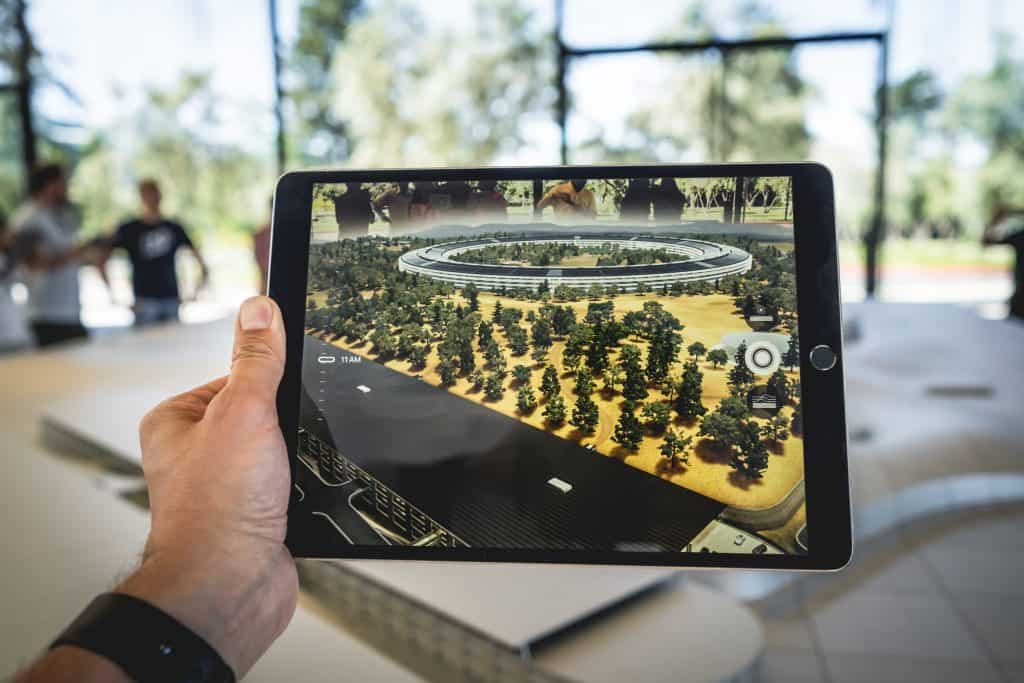
Augmented reality display for meetings transforms how we collaborate in the modern workspace. Augmented reality displays allow users to overlay digital images onto the physical world, creating an interactive, immersive experience that enhances visual communication. 

With AR displays in meeting rooms, companies can transform traditional conference rooms into futuristic spaces that facilitate remote work, telepresence, and collaboration. These displays provide 3D visualisation and holographic capabilities for better spatial computing and smarter office technology. 

These displays can also be used for remote meetings, making them an excellent option for businesses with a remote workforce. By using augmented reality displays, remote workers can have telepresence in the meeting room, allowing them to participate in the collaboration process actively. This technology creates an immersive, interactive experience that enhances visual communication, increases engagement, and enables real-time collaboration. 

The basics of augmented reality displays

Augmented reality (AR) is an interactive digital experience that overlays virtual elements in the real world. Unlike virtual reality (VR), which creates a fully immersive, simulated environment, AR enhances the user’s perception of the real world by adding digital elements. Augmented reality displays for meetings can transform traditional conference rooms into collaborative, interactive workspaces. 

AR technology uses cameras, sensors, and software to detect and analyse the real-world environment and then superimpose digital content on top of it. Some of the most popular augmented reality displays currently on the market include Microsoft HoloLens, Magic Leap, and Epson Moverio. These devices offer high-quality holographic displays, interactive features, and immersive experiences that can be used in small conference rooms or large meeting spaces.

Benefits of augmented reality displays for meetings

Augmented reality meeting displays offer many benefits, including improved collaboration, increased engagement, and enhanced visual communication. With the rapid development of spatial computing technology, augmented reality displays have become more affordable and accessible, making them an attractive option for businesses of all sizes.

Improved Collaboration

One of the biggest benefits of using augmented reality displays in meeting rooms is improved collaboration. These displays allow participants to share and manipulate virtual objects in real time, regardless of location. This makes it easier to work together on complex projects and make decisions more quickly. In addition, augmented reality displays can also help to break down language barriers, making it easier for participants who speak different languages to communicate effectively.

Increased Engagement

By providing an immersive and interactive experience, these displays can keep participants focused and interested throughout the meeting. This can lead to more productive meetings and better outcomes overall.

Enhanced Visual Communication

In addition to improving collaboration and engagement, augmented reality displays offer enhanced visual communication. These displays can create 3D visualisations of data, making complex information easier to understand. In addition, augmented reality displays can also be used to create holographic images, which are particularly useful for presentations and demonstrations.

Cost Saving

By utilising augmented reality displays, businesses can create a virtual workspace that allows team members to interact with each other as if they were in the same room. This technology allows for real-time communication and collaboration, significantly reducing the need for costly and time-consuming travel. In addition, augmented reality displays can provide 3D visualisations of data and products, allowing teams to work with complex information in a more intuitive and interactive way.

Collaborate Remotely

Augmented reality display has the ability to conduct remote meetings. With remote work becoming more prevalent, companies must have the tools to collaborate effectively from different locations. Augmented reality displays provide a unique and engaging way for teams to work together, regardless of their physical location. This technology can also reduce the cost of remote collaboration by eliminating the need for expensive video conferencing equipment.

Smart Office

Augmented reality displays create a smart office environment. These displays can control and manage the physical workspace, including lighting and temperature, providing a more efficient and comfortable work environment. Additionally, augmented reality displays can be used in education and healthcare, offering a more immersive and interactive experience for students and patients.

AR displays vs traditional meeting room technology

Augmented reality displays are digital screens that allow users to see virtual objects superimposed on the real world. They use cameras and sensors to track the user’s position and movements, allowing them to interact with the virtual objects in real time. AR displays are highly customisable; users can create 3D visualisations, interactive models, and even holographic displays.

On the other hand, traditional meeting room technology, such as video conferencing systems and projectors, has been around for decades. They allow remote participants to join a meeting, share their screens, and collaborate. While video conferencing systems provide a convenient way to conduct remote meetings, they lack the immersive experience that AR displays provide.

However, augmented reality displays for meetings offer many advantages over traditional technology. AR displays provide an immersive and interactive experience that enhances collaboration in meeting rooms. AR displays use holographic and digital technology to create a futuristic workspace that is visually stunning and engaging. 

Transforming conference rooms with AR displays

Augmented reality displays for meetings are quickly becoming the latest trend in transforming conference rooms into more interactive and immersive spaces. With the rise of spatial computing, this technology has the potential to revolutionise the way businesses approach collaboration and communication. Augmented Reality (AR) displays can transform conference rooms into more interactive and immersive spaces by enhancing collaboration, engagement, and communication among meeting participants. Here are some ways AR displays can achieve this:

  • Enhancing visual aids: AR displays can let participants see 3D models, graphs, and other visual aids projected in the room, creating a more engaging and interactive experience. This can improve communication and understanding of complex ideas.
  • Interactive Presentations: AR displays can enable speakers to make their presentations more interactive by incorporating animations, videos, and quizzes. This can keep the audience engaged and promote participation.
  • Remote Collaboration: AR displays can facilitate remote collaboration by allowing participants in different locations to join the conference room virtually. This can improve team communication and collaboration, especially in different geographic areas.
  • Virtual Tours: AR displays can provide virtual tours of products, facilities, or other locations, allowing participants to explore and interact with these locations more immersively. This can be particularly useful for product demonstrations, training sessions, or facility tours.
  • Interactive Whiteboards: AR displays can act as interactive whiteboards, allowing participants to annotate, draw, and collaborate on ideas in real time. This can promote engagement and collaboration among participants.
  • Real-time Data Analytics: AR displays can enable real-time data analytics, allowing participants to monitor and analyse data during a meeting. This can promote data-driven decision-making and improve communication among participants.

Challenges of implementing augmented reality displays for meetings

As technology advances, businesses seek innovative ways to improve collaboration and communication in the workspace. One solution is implementing augmented reality (AR) displays in meeting rooms. However, this implementation can come with its fair share of challenges.

  • Cost is one of the companies’ biggest challenges when implementing AR displays in meeting rooms. The cost of hardware and software can be significant, and it may require a considerable investment upfront. However, the long-term benefits of improved collaboration and communication may offset these costs.
  • Compatibility issues are another potential challenge when implementing AR displays in meeting rooms. Compatibility issues can arise due to differences in hardware and software configurations, making it difficult for users to work together effectively. Additionally, compatibility issues can make integrating existing systems with new AR displays challenging.
  • User training is also a critical challenge that companies may face when implementing AR displays in meeting rooms. Users may be unfamiliar with AR technology and require significant training to become proficient with the new system. This training can be time-consuming and costly, but ensuring that users are comfortable and confident with the new technology is essential.

Tips To Overcome Challenges

Despite these challenges, the benefits of AR displays in meeting rooms are significant. AR displays can provide a range of interactive and immersive experiences, from 3D visualisation to holographic displays. They can also enable real-time collaboration between remote teams, improving communication and efficiency.

Businesses can choose from various AR display options that vary in cost and capabilities. Some of the best-augmented reality displays for meetings include the Microsoft HoloLens 2 and the Magic Leap One. These displays offer high-quality graphics and advanced features, making them ideal for larger conference rooms.

More affordable augmented reality displays are available for smaller conference rooms, such as the Epson Moverio BT-300. This device offers a range of features, including video conferencing and 3D visualisation, at a lower cost. Thus, when implementing AR displays in meeting rooms, it is essential to consider the future of AR technology. AR displays will likely become more common in the workspace. By investing in AR displays now, businesses can position themselves for success in the future.

Future of augmented reality displays for meetings

The world has seen an increased interest in augmented reality displays for meetings. This technology has proven to be a game-changer, making meetings more interactive, collaborative, and immersive. It has also helped businesses and individuals work remotely, saving them time and money. With the rapid advancements in technology, augmented reality displays for meetings are poised to become even more ubiquitous, offering exciting opportunities for businesses and individuals alike.

Integration With Other Technologies

One of the most exciting potential future developments of augmented reality displays for meetings is increased integration with other technologies. As augmented reality continues to evolve, it will likely become more closely integrated with virtual reality, holographic displays, and 3D visualisation technologies. This integration will allow for even more immersive experiences in meeting rooms, with participants able to interact with virtual objects and environments in real time.

Enhanced Resolution & Image Quality

Another potential development for augmented reality displays for meetings is improved resolution and image quality. As technology advances, we can expect augmented reality displays to become even sharper and more realistic. This will make virtual objects, and environments feel even more lifelike and improve the overall experience for meeting participants.

Improved User Interfaces

Enhanced user interfaces are also a significant future development of augmented reality displays for meetings. As technology develops, we can expect interfaces to become more intuitive and user-friendly. This will make it easier for people to collaborate remotely and interact with virtual objects and environments in real time.

Conclusion

Augmented reality displays for meetings have revolutionised the way businesses conduct their meetings. AR technology allows teams to collaborate and communicate more effectively in the same room or globally. AR displays in meeting rooms enhance visual communication, making communicating and engaging with stakeholders easier. By implementing affordable augmented reality displays, businesses can save time and money by reducing travel costs and improving remote collaboration. Consider the benefits of using AR displays in your meeting rooms to stay ahead of the competition.

FAQs

Q. What is an augmented reality display?

An augmented reality display is a technology that allows users to overlay digital information in the real world.

Q. How do augmented reality displays work? 

Augmented reality displays work by using cameras or sensors to track the position and movement of the user and the objects in the real world and then projecting digital information onto a transparent display or the user’s field of view using a headset.

Q. What are the benefits of using augmented reality displays in meetings?

The benefits of using augmented reality displays in meetings include enhanced collaboration and communication, improved visualisation and understanding of complex data, and increased engagement and interactivity.

Q. Are augmented reality displays expensive?

The cost of augmented reality displays varies depending on the type and quality of the technology, but they can be expensive compared to traditional displays.

Q. Can augmented reality displays be used for remote meetings? 

Yes, augmented reality displays can be used for remote meetings through specialised software and hardware.

Q. How does augmented reality compare to holographic displays?

Augmented reality and holographic displays similarly overlay digital information in the real world. Still, holographic displays use different technology to create 3D images that can be viewed without a headset.

Q. What are some examples of augmented reality displays for meetings? 

Examples of augmented reality displays for meetings include virtual whiteboards, 3D models, and interactive presentations.

Q. How can businesses integrate augmented reality displays in their meeting rooms? 

Businesses can integrate augmented reality displays in their meeting rooms by investing in the necessary hardware and software and incorporating them into their collaboration and communication tools.

Q. What is the future of augmented reality in meetings?

The future of augmented reality in meetings is expected to grow as technology becomes more advanced and widely available.

Q. Can augmented reality displays be used for educational purposes?

Yes, augmented reality displays can be used for educational purposes such as virtual field trips, interactive learning experiences, and immersive simulations.

Picture of Meeting Store

Meeting Store

Table of Contents

AV transformation journey
Training and Education

Transformative AV Journey: Expert-Led Learning

In the realm of modern education, the concept of AV transformation journey stands as a pivotal force, reshaping classrooms and revolutionizing learning experiences. This transformative process, rooted in cutting-edge Audio Visual (AV) technology, is more than a mere upgrade; it’s an evolution. As educational technology intertwines seamlessly with interactive learning tools, multimedia integration, and experiential education, the role of expert-led learning becomes paramount in this journey.Educational technology has swiftly embraced AV solutions, paving the way for immersive teaching and collaborative learning. Traditional classrooms are no longer confined to static teaching methods. Instead, digital learning and interactive displays have ushered in an era of experiential learning experiences. Here, the AV transformation journey acts as a bridge, connecting educators and students to a world of innovative teaching tools and multimedia resources.Expert-led learning plays a pivotal role in guiding this AV transformation journey. Educators armed with knowledge about the future of AV technology are instrumental in implementing advanced visual solutions and interactive projection techniques. By understanding the nuances of AV integration solutions, educators can create interactive classroom experiences that resonate with the evolving needs of students. This process isn’t merely about incorporating technology; it’s about curating transformative learning experiences that enhance student engagement and optimize AV for effective teaching.For beginners, the AV journey might seem daunting. However, with the right guidance, transforming classrooms with AV becomes not only feasible but also enriching. The future-ready AV solutions available today cater to diverse educational settings, offering affordable classroom AV setups. Educators can benefit from guides that help them choose the right AV equipment and interactive displays suitable for their specific needs. From interactive projection solutions to budget-friendly classroom AV setups, the options are vast, allowing seamless integration of AV technology into education.How to use your interactive Epson projector in your classroom   AV Journey for BeginnersIn the ever-evolving landscape of education, the term “AV transformation journey” has emerged as a pivotal concept that underscores the integration of advanced audiovisual technology into the classroom. This journey encompasses a myriad of fundamental concepts and terminologies, offering innovative approaches to education while ensuring a seamless transition to the digital era.AV Transformation JourneyThe AV transformation journey signifies a paradigm shift in the education sector, characterized by the fusion of educational technology, interactive learning tools, and multimedia integration. At its core, this journey revolves around creating experiential education through AV solutions, thereby enhancing classroom technology and enabling digital learning. To navigate this path successfully, beginners must acquaint themselves with key terminologies, concepts, and cutting-edge audiovisual trends.Fundamental Concepts and Terminologies Immersive Teaching: Immersive technology refers to creating an environment that deeply engages students. It involves the use of interactive displays, interactive projection, and advanced visual solutions to create transformative learning experiences. Educational Innovation: This concept encompasses the adoption of innovative learning tools and experiential technology to enhance the learning process. Multimedia Resources: Multimedia resources include various content forms like videos, images, and interactive presentation tools that facilitate collaborative learning solutions. Technology-Enabled Education: The incorporation of AV integration solutions, adaptive AV systems, and next-gen multimedia to enable technology-driven teaching methods. Experiential Learning Experiences: Creating interactive and immersive classroom experiences that promote experiential education and improve student engagement. AV Innovation Trends: Staying updated with the latest AV technology trends is essential for maintaining an innovative learning environment.   Transforming Classrooms with AVEducational technology has come a long way in revolutionizing traditional classrooms. The integration of Audio-Visual (AV) technology has played a pivotal role in this transformation, shaping the way educators teach and students learn. In this section, we’ll explore the impact of AV technology on teaching methods, student engagement, and real-life examples of schools that have successfully embraced the AV transformation journey.AV Transformation Journey in EducationAV technology has evolved significantly, shaping the future of education. The AV transformation journey in classrooms has paved the way for immersive technology and experiential education. With cutting-edge AV solutions, traditional classrooms are no longer confined to static textbooks and chalkboards. Instead, digital transformation has ushered in an era of smart multimedia solutions, interactive displays, and immersive teaching.Impact on Teaching MethodsAV technology has redefined teaching methods, making learning more interactive and engaging. Educators can now leverage AV integration solutions to create transformative learning experiences. Interactive projection tools and multimedia resources empower teachers to deliver content in innovative ways. This shift from traditional teaching methods to experiential learning experiences has had a profound impact on students.Benefits of AV IntegrationThe benefits of AV technology in education are numerous. It enhances student engagement, making learning more enjoyable and effective. As a result, it fosters collaborative learning, allowing students to actively participate and work together. With AV innovation trends, educators can adapt their teaching methods to cater to diverse learning styles, ensuring a more inclusive and technology-enabled education.Choosing the Right AV EquipmentFor educators embarking on their AV journey for the first time, it’s crucial to choose the right AV equipment. Budget-friendly classroom AV setups are available, and AV setup guides for educators can help in this process. By optimizing AV for effective teaching, educators can ensure a smooth transition into the world of interactive multimedia learning tools.The Future of AV TechnologyAs we look to the future, the role of AV technology in education is set to expand. Emerging AV technologies will continue to shape the classroom of tomorrow. With interactive presentation software and AV solutions comparison, educators will have more choices than ever before. The future-ready AV solutions will empower educators to create immersive classroom experiences that cater to the needs of the digital generation.  Future-Ready AV SolutionsIn the fast-paced world of education, staying future-ready is crucial, and the adoption of cutting-edge AV solutions plays a pivotal role in this journey. As educational technology continues to evolve, so do the demands for immersive, interactive, and experiential education. Importance of Being Future-Ready with AV SolutionsThe AV transformation journey is a continuous process of adapting to the ever-changing educational landscape. Educational technology and interactive learning tools have revolutionized the way students engage with content, making multimedia integration a necessity for educators. AV solutions are the cornerstone of this

Read More »
Energy-efficient meeting room technology
Future Trends

The Advantages of Energy-Efficient Meeting Room Technology

Discover the advantages of energy-efficient meeting room technology and how it can help reduce energy costs while promoting sustainability. From lighting and HVAC systems to automation and audiovisual equipment, our comprehensive guide explores the latest trends in green conference room technology.

Read More »
best remote work tools
Remote Collaboration

Discover the Best Remote Work Tools for Unparalleled Productivity

Remote work has become increasingly popular in today’s workforce, transforming the way businesses operate and employees carry out their tasks. With advancements in technology and the need for flexibility, remote work has gained significant traction, allowing individuals to work from any location and collaborate seamlessly. To ensure optimal productivity and effective collaboration, it is essential to utilize the right tools specifically designed for remote work environments. This blog aims to explore the best remote work tools across various categories, focusing on enhancing productivity and collaboration for remote teams.In recent years, remote work has witnessed a remarkable surge in popularity. This shift in the work landscape has been fueled by various factors, including technological advancements, changing work preferences, and the need for improved work-life balance. Remote work allows individuals to break free from the traditional office setting, offering the flexibility to work from home, co-working spaces, or any location with an internet connection.Remote work brings its own set of challenges, such as maintaining productivity, effective collaboration, and seamless communication. To overcome these challenges and ensure success in a remote work environment, it is crucial to leverage the power of the right tools. The use of appropriate tools can enhance productivity, streamline communication, and foster collaboration among remote teams. By incorporating these tools into daily work routines, remote workers can achieve efficient workflows and maintain high levels of productivity.Remote collaboration is a vital aspect of successful remote work. The right tools enable team members to collaborate effectively, regardless of their physical locations. Whether it’s brainstorming ideas, sharing documents, or conducting virtual meetings, remote collaboration tools play a significant role in bridging the gap and ensuring seamless teamwork.My Top 4 Tools for Working Remote!  Best Remote Work Tools for Small TeamsIn today’s digital age, remote work has become increasingly prevalent, and small teams often face unique challenges in this setup. To ensure seamless collaboration and efficient communication, it is crucial for small teams to utilize the right remote work tools. In this section, we will discuss the specific needs of small teams in a remote work setup and present a curated list of remote work tools that cater to those requirements. These tools offer features and benefits that are suitable for small team collaboration and communication, enabling teams to thrive in a remote work environment.Project Management ToolsSmall teams require robust project management tools to streamline their workflow and enhance productivity. The following tools are highly recommended: Trello: Trello provides a visual and intuitive interface for organizing tasks, assigning responsibilities, and tracking progress. Its user-friendly design makes it ideal for small teams to manage projects effectively. Asana: Asana offers a comprehensive project management platform with features such as task assignment, deadline tracking, and team collaboration. It simplifies the coordination of small teams working remotely. Communication ToolsEffective communication is essential for small teams to maintain cohesion and stay connected. Consider the following communication tools: Slack: Slack is a popular instant messaging platform that enables real-time communication. It allows small teams to create dedicated channels for different projects, fostering seamless collaboration and remote communication. Microsoft Teams: Microsoft Teams combines chat, video meetings, and file sharing capabilities into one platform. It offers a centralized space for small teams to communicate and collaborate effectively. Collaboration ToolsRemote collaboration tools facilitate teamwork and enable small teams to collaborate efficiently on shared tasks. The following tools are highly recommended: Google Workspace: Formerly known as G Suite, Google Workspace provides a suite of productivity tools such as Google Docs, Sheets, and Slides. These tools allow small teams to collaborate in real-time, edit documents simultaneously, and ensure version control. Miro: Miro is a virtual whiteboard platform that enables remote teams to brainstorm, visualize ideas, and collaborate on projects. It offers a range of templates and tools to enhance small team collaboration. Time Management ToolsTo ensure optimal time utilization and productivity, small teams can benefit from time management tools. Consider the following options: RescueTime: RescueTime tracks the time spent on various tasks and provides insights into productivity. It helps small teams identify time-wasting activities and optimize their workflow. Toggl: Toggl is a time tracking tool that allows small teams to monitor their work hours accurately. It provides detailed reports and helps identify areas where time can be better allocated.   Affordable Remote Work ToolsIn the era of remote work, having the right tools at your disposal is crucial for staying productive and connected. However, cost concerns can often hinder the adoption of remote work tools. Fortunately, there are several cost-effective solutions available that deliver functionality and performance without compromising quality. In this section, we will explore a curated selection of affordable remote work tools that provide excellent value for money.Productivity Tools for Efficient Remote WorkWhen it comes to optimizing your remote work experience, productivity tools play a vital role. Here are some budget-friendly options worth considering: Toggl – Toggl offers a time tracking app that helps you monitor and manage your work hours effectively. It allows you to track your time across different projects, generate reports, and improve your productivity by identifying time-wasting activities. Notion – Notion is a versatile workspace tool that combines note-taking, task management, and collaboration features. It enables seamless organization, efficient collaboration, and easy access to information, making it a valuable asset for remote teams. Asana – Asana is a popular project management platform that empowers teams to streamline their workflows and stay on top of tasks. With intuitive task management, milestone tracking, and team communication features, Asana fosters efficient remote collaboration. Collaboration and Communication Tools for Remote TeamsEffective collaboration and communication are essential for remote teams to thrive. Here are some affordable tools that facilitate seamless teamwork: Slack – Slack is a leading communication platform that enables real-time messaging, file sharing, and integrations with various apps. It helps remote teams stay connected, exchange ideas, and collaborate effortlessly, fostering a sense of virtual togetherness. Google Workspace – Google Workspace offers a suite of cloud-based productivity tools, including Google Docs, Sheets, and Drive. These tools allow for real-time document collaboration, file storage,

Read More »
How to improve productivity with AV tools
productivity

The Winning Formula: How to Improve Productivity with AV Tools

In today’s fast-paced work environment, productivity is paramount for businesses of all sizes. Audio-Visual (AV) tools have emerged as indispensable assets in optimizing efficiency, collaboration, time management, and project execution. From small businesses to remote teams, AV technology offers powerful ways to enhance productivity and revolutionize work processes. In this blog, we will explore the various ways AV tools can significantly improve productivity across different work settings.Time management is crucial for maintaining productivity. AV tools, such as productivity software and AV productivity apps, offer features like task scheduling, reminders, and time tracking, helping individuals and teams stay organized and focused.Collaboration is the cornerstone of successful teamwork. AV tools facilitate virtual meetings and seamless communication, bridging the gap between remote team members. With AV tools for team collaboration, employees can exchange ideas, share files, and brainstorm in real-time, fostering a productive and cohesive work environment.Project execution requires careful planning and coordination. AV tools offer project management capabilities that enable teams to assign tasks, track progress, and set milestones. Through AV integration, project managers can facilitate smoother workflows and ensure projects are completed efficiently.VIP Conference Room in Prince Mohammad Bin Fahd University  AV Tools and Their Impact on ProductivityAV tools, short for audiovisual tools, encompass a wide range of equipment and technologies used to enhance the quality of communication through both audio and visual means. These tools can include projectors, displays, video conferencing systems, audio systems, interactive whiteboards, and various other hardware and software components. Audiovisual technology refers to the integration of these tools to create a seamless and engaging multimedia experience.The Role of AV Tools in Modern WorkplacesIn modern workplaces, AV tools play a crucial role in facilitating communication, collaboration, and productivity. Gone are the days when meetings were confined to physical boardrooms. With the advent of AV technology, teams can now conduct virtual meetings, enabling real-time interactions regardless of geographical barriers. This fosters efficient communication among team members, clients, and stakeholders, ultimately leading to better decision-making processes and project outcomes.Connection Between AV Tools and Productivity ImprovementAV tools have a profound impact on productivity improvement. By leveraging these tools effectively, individuals and organizations can streamline their workflows and optimize time management. Productivity is not just about working harder; it’s about working smarter. AV tools provide various productivity benefits, such as: Enhanced Collaboration: AV tools enable seamless collaboration between team members, even in remote work scenarios. The ability to share screens, hold virtual meetings, and collaborate on documents in real-time ensures efficient teamwork. Time Management: AV tools help boost efficiency by saving time on mundane tasks. For instance, rather than sending lengthy emails, employees can convey information more effectively through video messages or visual presentations. Improved Communication: Clear and concise communication is essential for productivity. AV tools facilitate better communication, reducing misunderstandings and ensuring everyone is on the same page. Project Management: AV tools aid in project management by allowing teams to present project updates, timelines, and milestones visually. This ensures that everyone involved in the project is well-informed, reducing the likelihood of delays or misunderstandings. Training and Onboarding: AV tools are instrumental in conducting training sessions and onboarding new employees. These tools can deliver engaging multimedia content, making the learning process more effective and time-efficient. Potential of AV Integration in Everyday WorkflowsMaximizing productivity with AV equipment involves integrating audiovisual tools seamlessly into everyday workflows. By incorporating AV tools strategically, organizations can achieve: Efficiency Gains: AV integration streamlines processes, reduces manual tasks, and simplifies complex workflows, leading to significant efficiency gains. Productivity Software Integration: Integrating AV tools with productivity software enhances the overall work experience. For instance, pairing video conferencing tools with task management software allows teams to collaborate efficiently within the same platform. Remote Work Facilitation: AV tools enable remote work by providing the necessary infrastructure for virtual collaboration. This flexibility in work arrangements increases productivity and promotes a healthy work-life balance. Productivity Hacks and Strategies: Utilizing AV tools, organizations can implement productivity hacks and strategies tailored to their specific needs. This could include setting up virtual whiteboards for brainstorming sessions or using productivity apps integrated with AV technology. AV Tools for Small Business and Workplace ProductivitySmall businesses can significantly benefit from AV tools to improve workplace productivity. For instance, incorporating AV technology for remote work allows small teams to collaborate effectively, even without a physical office space. Moreover, AV tools for team collaboration enable seamless communication and idea sharing, fostering a dynamic work environment.  AV Tools for Small Business ProductivitySmall businesses often encounter various challenges when it comes to enhancing their productivity. Limited resources, lack of efficient communication channels, and difficulty in managing remote teams are some of the common obstacles they face. However, with the right audiovisual (AV) tools and technology, these challenges can be overcome, paving the way for improved efficiency and productivity.Tailored AV Solutions for Small Business OperationsWhen it comes to AV tools for small businesses, a one-size-fits-all approach may not be suitable. Each business has unique needs and requirements. To address this, customized AV solutions offer the advantage of catering precisely to the business’s specific operational demands. Tailored AV systems ensure seamless integration with existing workflows, enabling small businesses to streamline their operations effectively.Leveraging AV Technology to Streamline Communication and CollaborationEfficient communication and collaboration play a crucial role in boosting productivity. AV technology provides various tools to facilitate seamless interactions among team members, regardless of their geographical locations. Video conferencing, virtual meetings, and real-time collaboration platforms enable teams to communicate effectively, reducing delays and increasing overall efficiency.  Increasing Productivity through Virtual MeetingsVirtual meetings have become an integral part of remote work, revolutionizing the way teams collaborate and communicate. With the advancement of audiovisual (AV) technology, conducting virtual meetings has never been easier or more efficient. In this section , we will explore how AV tools can significantly improve productivity during virtual meetings and help overcome common challenges that remote teams face.The Rise of Virtual Meetings and Their Impact on Remote WorkVirtual meetings have gained immense popularity due to their ability to bridge geographical gaps and foster seamless communication

Read More »
Customized AV education
Training and Education

Experience Customized AV Education: Expert Learning

Customized AV education is a transformative approach to learning in the digital age, providing tailor-made, multimedia-rich educational experiences that cater to individual needs and preferences. This innovative concept not only keeps pace with the fast-evolving digital landscape but also addresses the demand for personalized learning experiences. In this article, we delve into the importance of personalized learning and its growing relevance, while discussing the various aspects of customized AV education.In the digital age, AV education, or Audio Visual training, plays a crucial role in disseminating information effectively. With the rapid advancement of multimedia technology, traditional methods often fall short of engaging modern learners. Customized AV education fills this gap by offering a dynamic, interactive, and engaging learning environment.One of the key components of customized AV education is the emphasis on personalized learning experiences. In this approach, learners are at the centre of their educational journey. Personalization allows students to choose their learning path, pacing, and content, creating a highly engaging and effective learning environment. This tailored approach ensures that learners can study at their speed, addressing their unique needs and goals.Customized AV education introduces tailored curriculum options, allowing learners to select courses that align with their interests, career goals, and learning preferences. It integrates multimedia instruction, enabling students to engage with a variety of content formats, such as videos, audio, animations, and interactive simulations. This multimedia-rich approach enhances comprehension and retention, making learning more enjoyable and efficient.AV for Education: Classrooms, Lecture Halls, AV Control  Customized AV Education for BeginnersIn the fast-evolving landscape of AV education, beginners face unique challenges that demand personalized solutions. Traditional one-size-fits-all approaches often fall short of meeting the specific needs of newcomers. This is where customized AV education steps in, addressing the individual learning styles and preferences of beginners through tailored programs and specialized teaching methods.Benefits of Customized AV Education for NewcomersCustomized AV education offers a plethora of benefits for beginners, ensuring a seamless transition into the intricate world of audiovisual training. Personalized audiovisual learning experiences empower beginners to grasp complex concepts at their own pace, fostering a deeper understanding of multimedia instruction. Tailored AV training programs for professionals cater to diverse backgrounds and expertise levels, ensuring that each learner receives individualized multimedia courses designed to meet their unique needs.Comparative Analysis: Customized Learning SolutionsTo highlight the advantages of customized AV education, let’s delve into a comparative analysis of different learning paths available to beginners: Learning Path Advantages Customized AV Education 1. Personalized curriculum tailored to individual needs. 2. Specialized teaching methods for effective learning. 3. Hands-on audiovisual workshops for practical experience. Personalized Audiovisual Learning Platforms 1. Limited flexibility in course content. 2. Standardized instruction may not suit diverse learning styles. Tailored AV Training Providers 1. Varied quality of instruction. 2. Limited customization options for specific learning requirements. Choosing the Right Path: Key ConsiderationsWhen opting for customized AV education, beginners must consider several factors to make informed decisions: Course Flexibility: Ensure the program allows for tailored visual training and individualized multimedia instruction, accommodating various learning paces. Quality of Instruction: Seek providers with proven expertise in bespoke AV training, emphasizing specialized teaching methods and unique educational experiences. Cost Efficiency: While a personalized AV curriculum might seem pricier, the value gained through customized learning experiences justifies the investment.   Personalized Audiovisual Learning ExperiencesIn the realm of AV education, a transformative shift is underway, driven by the adoption of personalized learning experiences. Customized AV education, often referred to as tailored AV training, is revolutionizing the way students and professionals engage with audiovisual content. Let’s dive right into the fascinating world of personalized audiovisual learning.Customized AV Education for BeginnersFor beginners entering the world of AV education, the concept of personalized audiovisual learning experiences can be a game-changer. These individuals often seek tailored AV training programs designed to cater to their unique learning styles and preferences. Such programs not only enable them to grasp complex AV concepts quickly but also help in building a solid foundation.Personalized Audiovisual Learning ExperiencesPersonalized audiovisual learning experiences are at the heart of customized AV education. The approach involves adapting the content and teaching methods to match each student’s specific needs. This highly personalized approach ensures that students remain engaged and motivated throughout their AV education journey.Tailored AV Training Programs for ProfessionalsProfessionals, on the other hand, require a different level of customization. Tailored AV training programs for professionals are designed to fit around their busy schedules, allowing them to acquire new skills and knowledge without compromising their work commitments. This approach is essential for continuous professional development.Individualized Multimedia Courses for StudentsStudents, especially those pursuing multimedia-related degrees, benefit immensely from individualized multimedia courses. These courses cover a range of multimedia instruction, including bespoke visual education techniques and specialized AV instruction methods. Such courses are crucial for honing the skills necessary for success in the AV industry.Specialized Visual Instruction for StudentsFor students, specialized visual instruction is key to grasping the intricacies of the AV world. These instruction methods, rooted in custom audiovisual education, provide students with a solid foundation for future career opportunities.Bespoke AV Training for EducatorsEducators looking to create exceptional learning experiences can explore bespoke AV training. This involves utilizing unique AV teaching methods, such as multimedia learning paths and personalized visual education. Such training equips educators with the tools they need to inspire their students and create engaging lessons.Unique Multimedia Learning Experiences for ProfessionalsProfessionals seeking to expand their horizons should consider unique multimedia learning experiences. These experiences go beyond the traditional classroom setup and often incorporate customized audiovisual education. They allow professionals to gain expertise in their chosen field and stay ahead of the curve.  Tailored AV Training Programs for ProfessionalsIn the ever-evolving world of audiovisual technology, staying ahead requires more than just basic skills. Professionals in the AV industry demand specialized knowledge and expertise. This is where Customized AV education steps in, offering personalized learning experiences that cater to the unique needs and expectations of AV enthusiasts. Let’s delve into the advantages of these specialized AV training programs and explore how they can significantly boost your career development and

Read More »
MeetingStore.co.uk
Logo
Compare items
  • Total (0)
Compare
0
Shopping cart