Excellent
Next day delivery! Depending on Availability*
Here to help! Monday to Friday, 8:30AM-5:30PM*

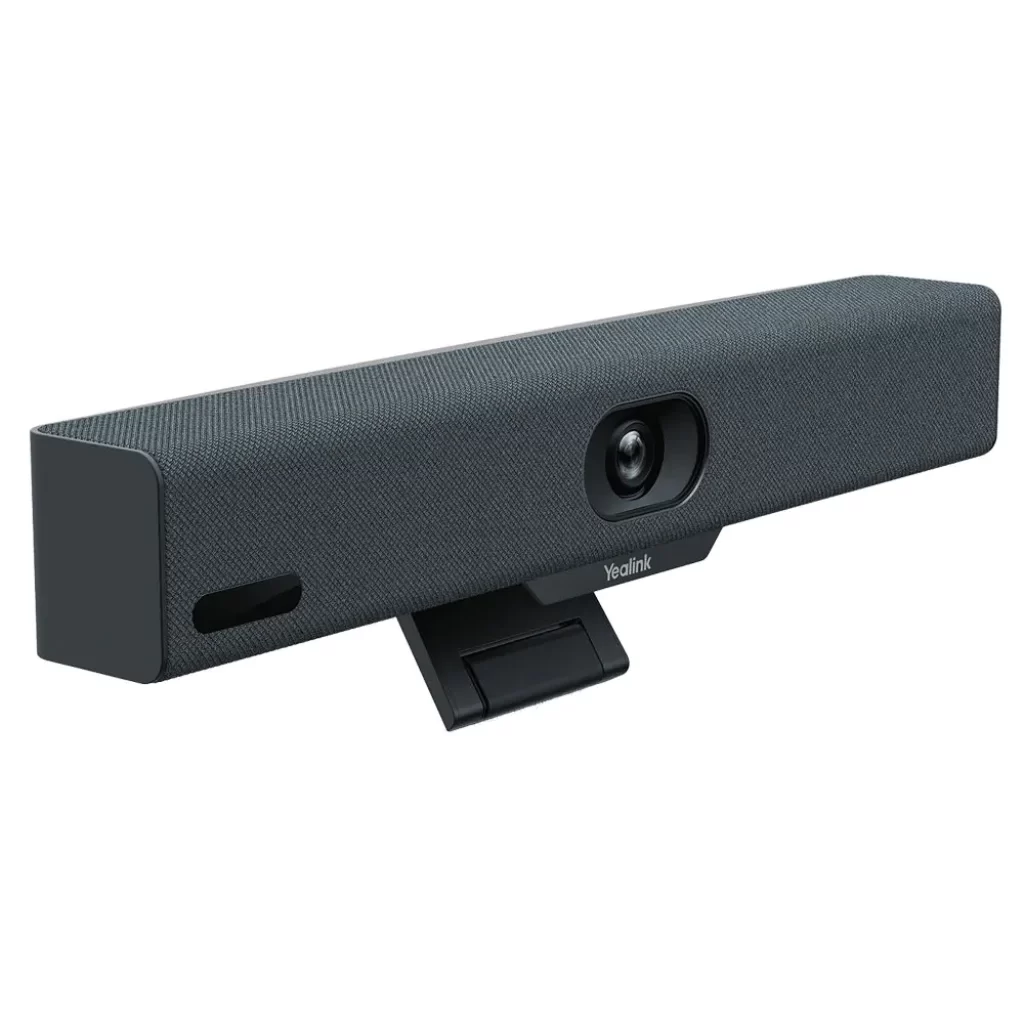
Yealink A10 For Huddle Spaces

Yealink A10

Huddle rooms are the future of the workplace, and over 75% of video meetings will occur in huddle rooms. Organisers of such meetings would often rely on USB peripherals for video conferencing, thus ignoring rapidly developing technology and solutions in the video conferencing arena. One such is Yealink A10, designed for huddle spaces. 

The Yealink A10 is a compact Meeting Bar for huddle rooms and home offices. It is certified for Microsoft Teams and compatible with all leading Unified Communication (UC) platforms, including Zoom. The Yealink Meeting Bar A10 is both affordable and ultra-convenient to use and set up.

Yealink is a global-leading provider of Unified Communication & Collaboration Solutions specialised in video conferencing, voice communications, and collaboration, dedicated to helping every person and organisation embrace the power of “Easy Collaboration, High Productivity”. With best-in-class quality, innovative technology, and user-friendly experiences, Yealink launched the Yealink A10 for huddle spaces to provide a simple, all-in-one audio and video conferencing solution for businesses and organisations that need an easy-to-use and cost-effective way to host Huddle Space meetings. It is a versatile and reliable choice for any small business or remote team.

Key Features of the Yealink A10

  • AI-enhanced voice: The built-in 8 MEMS microphone arrays and speaker in Meeting Bar A10 cover a huddle space nicely. As a result, you can enjoy a worry-free, full-duplex voice experience with superior performance. The device is also powered with AI noise cancellation, which blocks unnecessary background noise and makes the environment distraction-free. Thus, making everyone get heard. 
  • Speaker Tracking: Speaker Tracking frames a real-time close-up of the speaker. It brings a vivid face-to-face meeting experience.
  • Auto Framing: The feature recognises attendees’ numbers and positions, framing everyone in the most appropriate view. 
  • Clear view: The bar packs powerful AI-enhanced video features. Important moments in the huddle space are captured with a 4k camera and 120° field of view.
  • Smart Gallery: Smart gallery displays one panoramic view and two individual views of the current and last active speaker. This allows displaying the group more clearly to remote attendees. However, this feature is only available in Zoom-integrated devices only.

What Makes the Yealink A10 a Good Choice for Huddle Spaces

  • Simple to make room right

The Yealink Meeting Bar A10 caters to all your huddle space meeting and home office needs. It is compact enough to fit anywhere. It is specially designed for focus rooms, huddle rooms, and phone rooms. You can set up within minutes and kick o your huddle space meeting in seconds. Meeting Bar A10 optimises your huddle space design and minimises visible cabling with diverse mounting options. These include desks, walls, or monitors/TV.

Furthermore, compared with USB peripheral solutions, Meeting Bar A10 offers more: powerful video and audio, native meeting control and remote device management.

  • A clean desk

Meeting Bar A10 creates a wireless meeting experience with the WPP30 presentation pod. Not only content sharing but also can be wireless. Simply plug the WPP30 pod into the laptop’s USB-C port, and rich video and audio from A10 are shared immediately without installing software or drivers. Having a tidy workplace is always rewarding. Thus, reducing clutter and stress.

  • Mini size, hardcore

Though compact, the bar packs powerful AI-enhanced video and audio features. The AI-powered camera features real-time and precise Auto Framing and Speaker Tracking. Yealink’s deep learning intelligent audio analysis technology erases background noises. Thanks to its powerful video and audio technology, everyone gets an equal seat in the meeting.

  • Unified Communication

The Yealink Meeting Bar A10 is fully certified and compatible with leading video platforms such as Microsoft Teams and Zoom. It also adds flexibility as a standalone USB peripheral. No matter what platform a company starts with, later, when migrating to a native experience like Microsoft Teams or Zoom, it can complete the transition seamlessly.

  • Management over the air 

The Yealink Meeting Bar A10 can be monitored, controlled and upgraded remotely with a free YMCS (Yealink Management Cloud Service) account. It can all be done, whether it’s firmware updates, configuration updates, or troubleshooting.

Product Specifications

Items Yealink A10
Product Code A10-010
Price £1,196.91 Inc VAT
Camera
  • 8MP Camera
  • Resolution: 4k, 1080p and 720p 30fps
  • 120° field of view
  • 4x e-PTZ camera
  • Electric privacy sheer
  • Intelligent Features 

– Auto Framing 

– Speaker Tracking 

– Smart Gallery (Zoom Only)

Audio
  • Built-in 8 MEMS microphone array
  • Built-in 5W high fidelity speaker
  • Yealink Noise Proof Technology
  • Full-duplex
  • Echo cancellation
Network
  • Built-in dual-band Wi-Fi (2.4GHz/5GHz) 
  • Built-in Bluetooth
Operating System Android 11 
Connections
  • 1 x HDMI output (CEC supported)
  • 1 x USB 2.0 1 x USB-C
  • 1 x 10/100M/1000M Ethernet port
  • 1 x Yealink VCH port (RJ-45)
  • 1 x Power port
  • 1 x Security lock slot
  • 1 x Reset slot 


Picture of Meeting Store

Meeting Store

Table of Contents

Comprehensive AV guides
Training and Education

Comprehensive AV Guides: Your Roadmap to Proficiency

In today’s fast-paced digital landscape, audiovisual (AV) technology has become an integral part of our daily lives. Whether it’s for entertainment, communication, education, or business purposes, AV technology plays a pivotal role in enhancing our experiences. In this blog, we delve into the importance of AV technology in modern life, briefly touch upon the diverse topics covered in this comprehensive guide, and highlight the relevance of comprehensive AV guides for both beginners and enthusiasts.Audiovisual technology encompasses a wide range of AV equipment and techniques that enable us to transmit and receive audio and visual information effectively. From the most basic applications like watching TV or making video calls to advanced uses in professional settings, such as AV presentations and virtual conferences, AV technology has revolutionized the way we communicate and consume content.Comprehensive AV guides are more than just informational resources; they are your roadmap to audiovisual mastery. For beginners, these guides provide a structured AV learning journey, starting with the fundamentals and progressing to advanced AV techniques. They offer in-depth AV instruction, helping you develop the skills needed to become proficient in AV technology.Enthusiasts and professionals can benefit from these guides by expanding their AV knowledge base and staying updated with the latest industry trends. Whether you’re looking to enhance your AV skills, troubleshoot issues, or optimize your AV setup, comprehensive AV guides offer expert advice and best practices.3 methods of audio-visual translation | Need-to-know  AV Essentials for BeginnersWhen embarking on your comprehensive AV journey, it’s crucial to begin with the right equipment. Whether you’re a novice looking to delve into the world of audiovisual technology or seeking to enhance your existing AV proficiency, selecting the appropriate AV equipment is the foundational step to ensure a successful and rewarding experience. In this guide, we’ll explore the significance of starting with the right gear, recommend the best AV equipment for beginners, and highlight budget-friendly options that align with your AV learning roadmap.Why Starting with the Right Equipment MattersAudiovisual technology has become an integral part of our daily lives, from home entertainment systems to professional presentations. To master the art of AV and unlock the full potential of comprehensive AV guides and AV tutorials, you need to begin with the right tools. Here’s why it’s crucial: Seamless Learning: A solid foundation in AV equipment ensures that you can follow comprehensive audiovisual guides effortlessly. With the right gear, you won’t be hindered by compatibility issues or equipment limitations as you embark on your AV education. Enhanced Understanding: Having access to the best AV equipment for beginners helps you grasp advanced AV techniques more effectively. You’ll be able to experiment with various settings, thereby accelerating your AV knowledge base. Optimized Learning Journey: Selecting the right AV setup tips for home theaters, troubleshooting AV issues, and understanding AV terminology explained become more manageable with suitable equipment. Your AV learning pathways are streamlined, allowing you to focus on mastering AV technology.   Crafting Your Home Theater: AV Setup TipsIn the world of audiovisual technology, creating an immersive home theater experience is a dream for many. To achieve this dream, you need to start with a solid foundation. In this comprehensive AV guide, we’ll provide you with practical AV setup tips for home theaters that will enhance both audio and visual quality. Whether you’re a beginner or looking to master advanced AV techniques, this guide has you covered.Speaker PlacementOne of the key elements of optimizing your home theater is speaker placement. The right placement can make a significant difference in your audiovisual experience. Here are some AV best practices to keep in mind: AV Equipment Guides: Before you begin, refer to comprehensive AV resources and AV equipment guides to understand the specifications of your speakers and how they should be positioned. Audiovisual Proficiency: Achieving audiovisual proficiency requires precise speaker placement. Follow step-by-step AV guides to position your speakers at ear level for the best sound quality. Room Acoustics: The AV knowledge base tells us that room acoustics play a crucial role. AV expertise in room treatment can make your home theater sound exceptional. Consider AV learning materials that cover soundproofing, acoustic panels, and bass traps. Screen PositioningThe placement of your screen is equally vital for an optimal viewing experience. Here’s what you need to know: Advanced AV Techniques: Use advanced AV calibration techniques to ensure your screen is positioned at the right height and angle for a comfortable viewing angle. AV Learning Journey: Along your AV learning journey, you’ll discover that screen size and distance from the viewer impact the visual quality. Refer to in-depth AV instructions to get this right. Room AcousticsAV setup isn’t complete without addressing room acoustics: AV Mastery: Achieving audiovisual mastery involves understanding how sound travels in your space. AV self-study materials can help you learn about sound reflection, diffusion, and absorption. Comprehensive AV Handbook: For a comprehensive understanding of room acoustics, delve into comprehensive AV handbooks that provide insights into designing your home theater space for optimal sound quality. Transforming Your Home Theater ExperienceNow that you’ve optimized your AV setup, you’re on the path to transforming your home theater experience. With the help of these AV setup tips, you’ll notice a remarkable improvement in both audio and visual quality. Troubleshooting AV issues becomes easier when you have a solid foundation.Audio Visual TrainingAs you embark on your audiovisual proficiency journey, consider investing in audio visual training. It’s the key to mastering AV technology and presentation skills. Look for AV certification online to validate your expertise.  Troubleshooting AV IssuesAudiovisual technology has revolutionized the way we experience multimedia content. Whether you’re setting up a home theater, improving AV presentation skills, or just getting started, it’s crucial to understand common AV problems and how to resolve them. In this comprehensive guide, we delve into the issues beginners often face and offer step-by-step solutions. Let’s embark on your audiovisual proficiency journey.Common AV Problems and SolutionsAudio Dropouts: Issue: Sudden loss of sound during playback. Solution: Check all AV cables for loose connections. Ensure speakers and audio sources are powered on.


Read More »
AV skills sharpening
Training and Education

Sharpen Your AV Skills with Dedicated Training

In today’s fast-paced digital landscape, where multimedia content reigns supreme, mastering the art of AV skills sharpening has never been more critical. From video editing to visual communication, multimedia production to audiovisual technology, these skills are the building blocks of modern content creation. In this comprehensive guide, we will delve into the world of AV skills enhancement, exploring its significance, evolution, and the necessity of dedicated training. Let’s dive straight into the heart of this transformative journey.In an era dominated by multimedia content, having proficiency in AV skills is akin to possessing a superpower. These skills empower individuals and businesses to create captivating, engaging, and informative content that resonates with audiences worldwide. Whether it’s producing visually stunning video content or delivering compelling business presentations, AV skills are the cornerstone of success.The landscape of multimedia content creation is in a constant state of flux. New technologies, platforms, and trends emerge regularly, demanding that content creators stay ahead of the curve. To remain competitive, one must embrace multimedia skills that encompass video editing, visual communication, multimedia production, and audiovisual technology.AV skills improvement is a journey that requires dedication and structured learning. It’s not enough to dabble in video editing or experiment with multimedia content creation. To truly excel, one must undergo specialized training that hones their AV competency.When it comes to AV skills improvement, audio-visual training is your secret weapon. These training programs offer a structured approach to enhancing your multimedia skills. Whether you’re a content creator, educator, or business professional, AV training programs are tailored to sharpen presentation skills, enhance AV capabilities, and master video editing proficiency.In your pursuit of AV skills improvement, you’ll delve into multimedia skills development, discovering the intricacies of visual storytelling techniques and multimedia content creation. These skills will empower you to convey your message effectively and captivate your audience through various multimedia strategies.Audio-Visual Aids  Mastering Video Production FundamentalsIn the ever-evolving landscape of multimedia skills, honing your AV (audio-visual) skills is essential for staying ahead. Whether you’re a content creator, educator, or business professional, the ability to produce high-quality videos and multimedia content is paramount in today’s digital world.Camera Operation, Lighting, and Composition BasicsA strong foundation in camera operation, lighting, and composition is fundamental to video production excellence. When embarking on your AV skills improvement journey, start with these essential aspects: Camera Operation: Begin by familiarizing yourself with your camera’s settings, including aperture, shutter speed, ISO, and white balance. This will enable you to capture visually stunning footage with precision. Lighting Techniques: Mastering lighting is crucial for achieving professional-looking videos. Understand various lighting setups, such as three-point lighting, to enhance the visual appeal of your content. Composition Principles: Explore the rule of thirds, leading lines, and framing techniques to create aesthetically pleasing visuals that capture your audience’s attention. Audio Recording and Editing Techniques for High-Quality VideosAudio is half of the audiovisual equation, and it’s often overlooked. Here are some AV skills development strategies for audio: Quality Audio Recording: Invest in a high-quality microphone and understand proper microphone placement. Reducing background noise and capturing clear, crisp sound is essential for effective multimedia storytelling. Audio Editing Proficiency: Learn audio editing techniques to remove unwanted noise, enhance voice clarity, and add music or sound effects. Tools like Adobe Audition and Audacity can be your allies in this journey. AV Skills Sharpening through Multimedia ProductionMultimedia skills encompass not only video but also various aspects of content creation, including visual communication, multimedia technology, and more: Visual Communication Skills: Enhance your visual storytelling techniques to convey your message effectively. Incorporate graphics, animations, and infographics to engage your audience visually. Multimedia Strategies: Stay updated with the latest trends and best practices in multimedia. This includes interactive content, 360-degree videos, and virtual reality experiences. AV Certification and Online Courses: Consider enrolling in AV training programs and online courses to acquire formal AV competency. These resources offer structured learning paths and certification opportunities.   Advanced Video Editing Techniques for BeginnersVideo editing has become an essential skill in today’s multimedia-driven world. Whether you’re a content creator, educator, or business professional, sharpening your AV skills is crucial for effective visual communication and multimedia production. In this guide, we will demystify video editing for beginners, introduce popular video editing software, and provide step-by-step tutorials on essential editing tasks to enhance your AV skills and multimedia mastery.Popular Video Editing SoftwareBefore diving into advanced techniques, let’s familiarize ourselves with the popular video editing software options available. Learning the basics of these tools is the first step towards multimedia skills development: Adobe Premiere Pro: A professional-grade software favoured by filmmakers and video editors worldwide. It offers a wide range of features for both beginners and experts. Final Cut Pro X: Mac users often prefer this software, known for its user-friendly interface and advanced editing capabilities. DaVinci Resolve: A powerful, free-to-use video editing software that’s perfect for those just starting in video editing. iMovie: A user-friendly, entry-level video editing tool for Mac users, ideal for beginners. Step-by-Step Tutorials on Essential Editing TasksNow, let’s dive into the core of AV training with step-by-step tutorials on key video editing tasks:1. Cutting and Trimming ClipsLearning how to trim and cut clips efficiently is fundamental to video editing proficiency. This technique ensures your content flows seamlessly and holds the viewer’s attention.2. Adding TransitionsMaster the art of transitions to enhance the visual appeal of your videos. Discover how to use fades, wipes, and other effects to create a polished final product.3. Applying Filters and EffectsElevate your video quality by applying filters and effects that enhance colors, contrast, and overall aesthetics.4. Audio EnhancementsEffective multimedia storytelling methods require quality audio. Learn to remove background noise, add music, and ensure clear audiovisual excellence.5. Titles and TextEnhance your AV capabilities by adding titles and text overlays to your videos. Effective use of text can clarify your message and engage your audience.6. Exporting and SharingOnce your video masterpiece is ready, it’s time to export and share it with the world. Discover the best export settings for different platforms and how to maximize the impact

Read More »
In-depth AV knowledge
Training and Education

Dive into In-Depth AV Knowledge: Expert-Led Exploration

In today’s technology-driven world, having in-depth AV knowledge is indispensable. The audiovisual (AV) industry is constantly evolving, with innovations and trends shaping the way we experience audio and visual content. Whether you are a beginner looking to explore cutting-edge AV innovations or an expert seeking to optimize AV setups, this comprehensive guide will provide valuable insights into the world of AV technology.AV technology basics are the foundation of our modern digital experiences. From the immersive AV technology that transforms entertainment to the advanced audiovisual knowledge required for troubleshooting common AV issues, a deep dive into AV expertise is essential.AV technology encompasses audio and visual components, often used for entertainment, communication, and presentations. Audio components involve sound systems, speakers, and microphones, while visual components include displays, projectors, and cameras. Expertise in AV involves understanding the principles of sound propagation, acoustics, and video resolution.As we delve into the AV industry insights of 2023, it becomes evident that AV solutions are at the forefront of technology trends. To navigate this landscape effectively, you need expert AV knowledge that encompasses AV equipment, AV software analysis, AV system optimization, and audiovisual innovations.How to Use a ViewSonic Interactive Display  Cutting-edge AV Innovations for BeginnersCutting-edge AV innovations, in the realm of Audiovisual (AV) technology, represent the forefront of advancements and trends that have transformed the AV industry. These innovations encompass both hardware and software solutions, optimizing audio and visual experiences to their utmost potential. This comprehensive guide aims to introduce beginners to these innovations, enabling them to gain in-depth AV knowledge.Why are These Innovations Beneficial for Beginners in the AV World?For beginners, navigating the AV industry can be daunting. However, embracing cutting-edge AV innovations offers several benefits: Seamless Integration: Beginners can now effortlessly integrate various AV equipment and software, ensuring a harmonious audiovisual setup at home. This integration leads to immersive experiences that were once reserved for experts. Troubleshooting Made Easy: Cutting-edge AV innovations come with troubleshooting guides that simplify the resolution of common AV issues. These resources empower beginners to identify and address problems swiftly. Optimized AV Systems: AV system optimization techniques have become more accessible. Beginners can now fine-tune their AV setups for optimal performance, guaranteeing a smoother viewing and listening experience. Recent Innovations for BeginnersLet’s explore some recent innovations that beginners should be aware of: Immersive AV Technology: Immersive AV technology, such as virtual reality (VR) and augmented reality (AR), has revolutionized how we experience audiovisual content. Beginners can now delve into immersive worlds with ease. Comprehensive AV Guides: Expert-led analysis of AV solutions and a comprehensive guide to AV technology have become readily available. These guides offer beginners a deep dive into AV technology, simplifying complex concepts. Smart AV Equipment: The AV industry has seen the rise of smart AV equipment, which can be controlled using voice commands or smartphone apps. This simplifies the user experience for beginners. AI-Powered AV Software: AI-driven AV software analysis tools assist beginners in optimizing their setups. These tools provide personalized recommendations, ensuring a smoother user experience.   Optimising Audiovisual Setups at HomeIn today’s digital age, the importance of optimizing your home audiovisual (AV) setup cannot be overstated. Whether you’re a beginner looking to gain in-depth AV knowledge or an expert seeking advanced audiovisual insights, fine-tuning your AV system can significantly enhance your home entertainment experience. Basics of AV TechnologyBefore diving into advanced AV knowledge, let’s begin with the fundamentals. AV technology encompasses a wide range of audiovisual solutions, immersive experiences, AV equipment, and AV software. To optimize your home AV setup, start by familiarizing yourself with the basics. This deep dive into AV expertise begins with selecting the right hardware and software analysis.Selecting the Right AV EquipmentTo achieve a top-notch home entertainment experience, begin by choosing the right AV equipment. Cutting-edge AV innovations for beginners may include high-definition displays, surround sound systems, and versatile streaming devices. Consider your space, preferences, and budget when making these critical decisions. Refer to AV hardware reviews for insights into the latest trends and expert recommendations.AV Software SolutionsAV technology isn’t just about hardware; software plays a crucial role as well. AV software analysis in 2023 reveals that user-friendly interfaces, compatibility, and regular updates are essential. AV system optimization techniques involve configuring your software settings to match your hardware, ensuring seamless integration and performance.Mastering Audiovisual IntegrationAV integration is the key to a seamless home entertainment experience. Audiovisual integration tips ensure that all your devices work together harmoniously. Expert-led analysis of AV solutions can guide you in integrating new components into your existing setup efficiently.  Troubleshooting Common AV IssuesIn-depth AV knowledge is crucial for a seamless audiovisual experience. Whether you are an enthusiast or a professional in the AV industry, encountering common AV issues can be frustrating. This comprehensive guide will help you identify these issues, provide step-by-step troubleshooting solutions, and offer advice on when to seek professional help for more complex problems. Identifying Common AV IssuesBefore we dive into troubleshooting, let’s explore some common AV issues that plague users: Audiovisual Technology Basics: Understanding the fundamentals of audiovisual technology is essential. Issues often arise due to improper setup or configuration. AV Equipment Problems: Your AV setup may involve various components, such as projectors, speakers, and displays. Problems with these devices can disrupt your audiovisual experience. Software Analysis 2023: As technology evolves, AV software becomes more complex. Analyzing and troubleshooting software issues is a common challenge. AV Configuration Tips: Configuring your AV system correctly is crucial. Incorrect settings can lead to audiovisual glitches. Troubleshooting AV Issues: Identifying the root cause of AV problems is the first step towards resolving them. Troubleshooting SolutionsNow that we’ve identified the common AV issues, let’s explore step-by-step troubleshooting solutions: Check Connections: Ensure all AV equipment is properly connected. Loose cables are a common culprit for audiovisual problems. Software Updates: Keep your AV software up-to-date. Outdated software can lead to compatibility issues. AV System Optimization Techniques: Optimize your AV system settings for the best performance. Adjust audio and video settings as needed. AV Hardware Reviews: Before purchasing AV equipment, read reviews to ensure you choose

Read More »
Boost productivity with audio visual gear
productivity

Break the Mold: Boost Productivity with Audio Visual Gear

In today’s fast-paced business landscape, where time is of the essence, maximizing productivity is paramount. The modern era demands seamless work efficiency to stay competitive and meet the ever-increasing demands of industries across the board. As professionals strive to accomplish more in less time, the concept of using multimedia tools to optimize productivity has emerged as a game-changer.In the pursuit of enhancing work performance, professionals are turning to innovative solutions such as audio visual gear, a cornerstone of contemporary productivity tools. This transformative approach to work efficiency leverages multimedia devices and advanced presentation equipment to streamline workflows, thereby boosting work output and creating a more effective work environment.Visual communication stands as a beacon of productivity enhancement in the modern workplace. Utilizing audiovisual technology to convey information with precision not only captures attention but also expedites comprehension. With visual communication tools at the forefront, professionals can optimize their workflow, leveraging the prowess of audiovisual solutions to foster collaboration and ensure seamless information dissemination.The synergy between multimedia productivity tools and audiovisual equipment yields remarkable results. The benefits span from enhancing work efficiency with multimedia tools to boosting work output through visual communication devices. Effective integration of audiovisual aids advantages professionals by optimizing productivity, enabling them to achieve more in less time.The impact of audiovisual solutions on productivity cannot be overstated. By embracing advanced presentation gear benefits, professionals can seamlessly integrate multimedia solutions into their daily routines. These solutions offer multifaceted advantages, including improved efficiency and optimized workflow. The combination of audiovisual technology benefits and productivity optimization tools presents a robust framework for individuals and teams to excel.For those seeking actionable guidance on how to improve productivity with audiovisual gear, a plethora of strategies is available. The use of top audio visual equipment for boosting productivity forms the cornerstone of such strategies. Additionally, tips for optimizing work efficiency with visual aids empower professionals to harness the potential of audiovisual technology. The impact of audiovisual solutions on productivity is undeniable, and through strategic utilization, professionals can achieve unprecedented levels of efficiency.Optima Adaptable Meeting Room | Enhancing Acoustic Performance at Workspace Audio Visual’s Office  Unveiling the Best Affordable Audio Visual GearIn today’s fast-paced world, where work efficiency and effective communication are paramount, leveraging advanced audio visual (AV) equipment has become indispensable. The right tools not only enhance your work performance but also maximize productivity. This section dives into the realm of affordable audio visual gear that can elevate your work efficiency and revolutionize your workspace. Let’s explore how affordability does not compromise quality and functionality when it comes to audio visual technology.Maximizing Productivity with AV EquipmentIncorporating audio visual gear into your workflow can significantly boost work output and optimize your overall efficiency. By using multimedia tools, such as advanced presentation equipment and visual communication tools, you can create impactful presentations that captivate your audience and convey your message effectively. These tools enable you to streamline your presentations, saving you time and enhancing your work performance.Enhance Work Efficiency with Multimedia ToolsWhen it comes to enhancing work efficiency, audio visual equipment plays a pivotal role. Investing in the right multimedia devices allows you to create dynamic presentations that resonate with your audience. Effective audio visual equipment for productivity offers benefits beyond the surface, enabling you to convey complex information in a simplified manner. This not only saves time but also ensures that your message is comprehensible and memorable.Optimising Workflow through Audiovisual ToolsOne of the key advantages of audio visual gear is its ability to optimize workflow. With audiovisual solutions, you can seamlessly integrate various multimedia productivity tools into your work routine. This integration ensures that your tasks are accomplished more efficiently, leading to a boost in productivity. By utilizing audiovisual aids, you can effectively communicate your ideas, collaborate with your team, and achieve your goals with precision.Top Productivity-Boosting Gadgets Product Features Benefits AV Presentation System Seamless integration, intuitive controls Streamlined presentations, enhanced engagement Visual Communication Device HD display, interactive features Enhanced collaboration, impactful communication Multimedia Projector High-resolution projection, versatility Dynamic presentations, versatile usage Effective Audio Visual Equipment for ProductivityInvesting in advanced presentation gear brings forth numerous benefits that directly impact work efficiency. These multimedia solutions offer better productivity by facilitating engaging presentations, interactive discussions, and efficient information sharing. Visual aids provide clarity, making it easier to understand complex concepts and leading to more effective decision-making processes.Impact of Audiovisual Solutions on ProductivityThe impact of audiovisual solutions on productivity is undeniable. By incorporating audiovisual technology, you can revolutionize your workspace and create an environment that fosters creativity, collaboration, and efficiency. The benefits extend beyond just presentations; audiovisual technology enhances overall work effectiveness, promotes knowledge sharing, and ultimately contributes to achieving your goals.  Top Productivity-Boosting Gadgets: A New Way ForwardIn today’s fast-paced work environment, staying ahead requires innovative strategies. Leveraging cutting-edge gadgets is a new way forward to revolutionize productivity. These gadgets not only enhance work performance but also provide a significant boost to overall efficiency. Let’s delve into the realm of productivity-boosting gadgets and discover how they are changing the game.Advanced Presentation Gear for Work EfficiencyVisual communication is a cornerstone of effective collaboration. With audiovisual technology, individuals and businesses can optimize workflow and communication. This innovative approach leads to improved work output and higher work effectiveness.Impact of Audiovisual Solutions on Productivity: Real-world Success StoriesReal-world success stories highlight the profound impact of audiovisual technology benefits. Individuals and businesses that have embraced audio visual gear report significant productivity enhancements. Businesses that integrate audiovisual aids see a remarkable boost in work output and overall efficiency.Optimizing Workflow through Audiovisual Tools: Data-driven Insights Gadget Key Features Work Efficiency Impact Visual Communication Seamless video conferencing Enhanced remote collaboration Effective Presentation Interactive displays and annotation tools Captivating presentations Multimedia Tools Simultaneous content sharing Streamlined communication Advanced AV Equipment High-definition visuals and clear audio Engaging virtual meetings Productivity Tools Integration with productivity software Streamlined task management Enhance Work Efficiency with Multimedia Tools: Key Takeaways Leveraging audiovisual equipment benefits businesses and individuals alike by enhancing work efficiency. Integration of audiovisual technology optimizes workflow and communication, translating to increased work

Read More »
Holistic AV instruction
Training and Education

Attain Holistic AV Instruction: Guided Learning

Holistic AV instruction revolutionizes modern education by embracing diverse learning needs and integrating innovative teaching methods. In the realm of Audio-visual education, Holistic AV instruction stands out as a beacon of comprehensive learning. It caters to various learners’ needs, incorporating Guided learning, Interactive teaching techniques, and Effective pedagogy. Through the integration of Multimedia instruction, experiential learning, and tailored learning experiences, Holistic AV instruction transforms education into a personalized journey for every student.In classrooms, Interactive multimedia lessons for schools enhance engagement and facilitate immersive learning experiences. Comprehensive AV training programs empower educators with practical AV skills, enabling them to employ hands-on audiovisual training for students. The integration of Interactive visual aids and AV technology in classrooms enhances the learning process, making education dynamic and interactive.Moreover, Holistic AV instruction for beginners ensures a strong foundation, while Advanced multimedia education for professionals refines skills. The incorporation of Visual storytelling in education and audiovisual pedagogy adapts teaching methods to different learning styles. This approach emphasizes the importance of experiential learning with AV, promoting a multisensory learning experience.How To: Guided Learning Hour: for Lead Developers & Facilitators  Holistic AV Instruction for BeginnersIn the realm of audio-visual (AV) education, beginners’ unique needs and requirements call for a holistic approach that encompasses comprehensive instruction. This section explores the specific needs of beginners in AV instruction, discusses fundamental concepts and skills they should acquire, and sheds light on how holistic AV instruction caters to these requirements.Specific Needs of Beginners in AV InstructionBeginners in the world of AV instruction often grapple with fundamental concepts and skills. They seek clarity on how to navigate this multifaceted field effectively. Guided learning methods are essential in providing a structured and easily digestible path for beginners. They require simplified explanations and step-by-step guidance to build a strong foundation.Fundamental Concepts and Skills for BeginnersComprehensive AV training programs for beginners should cover the basics of AV technology integration, interactive teaching techniques, and experiential learning. This foundation ensures that learners can quickly grasp advanced multimedia concepts in the future. It’s important to emphasize the importance of hands-on audiovisual training, as this helps beginners acquire practical AV skills.Holistic AV Instruction – Meeting Beginner’s NeedsHolistic AV instruction is tailored to meet the specific needs of beginners. It incorporates interactive multimedia lessons, which are engaging and provide a multisensory learning experience. These lessons not only enhance comprehension but also cater to different learning styles, promoting effective pedagogy. Through personalization, beginners can explore content at their own pace and in a manner that suits their individual preferences.Innovative AV Techniques and MethodsThe integration of innovative AV techniques, such as immersive sound and video training courses, contributes to a more engaging and immersive learning experience. Interactive visual aids play a crucial role in making complex concepts easier to understand. Visual storytelling in education is another valuable approach that simplifies intricate AV concepts through narratives and relatable scenarios.Enhancing Education Through AV PedagogyInstructors must understand the significance of audiovisual pedagogy in schools and other learning environments. It provides a dynamic and interactive way to present information, ensuring students are actively engaged in the learning process. This fosters a holistic learning approach, ensuring that beginners quickly grasp AV concepts and skills.Practical Application of AV SkillsBeginners benefit from a hands-on approach to AV instruction, where they can apply what they’ve learned. Experiential AV learning not only reinforces understanding but also equips them with the confidence to handle AV technology effectively in real-world situations. This practical experience is vital for learners to succeed in their future careers.Effective AV Technology IntegrationEffective AV technology integration in classrooms is key to delivering engaging multimedia education. Educators must know the best practices for integrating audiovisual teaching methods seamlessly. This integration ensures that learners have access to the latest AV resources and tools, creating interactive learning environments that enhance education.  Interactive Multimedia Lessons for SchoolsIn the modern educational landscape, interactive multimedia lessons play a pivotal role in shaping the learning experiences of students. By integrating comprehensive AV training methods within classrooms, educators can create engaging and effective learning environments tailored to individual needs. This innovative approach, often referred to as Holistic AV instruction, leverages a variety of techniques, including guided learning methods, experiential learning, and interactive teaching techniques. Let’s delve into the benefits and successful examples of employing AV instruction in schools.Benefits of Holistic AV Instruction: Personalized Education: Holistic AV instruction allows for tailored learning experiences, catering to different learning styles and paces. Through immersive AV instruction, students can grasp complex concepts more effectively, ensuring a personalized educational journey. Enhanced Engagement: Interactive multimedia lessons capture students’ attention through innovative audiovisual pedagogy. By integrating interactive visual aids and engaging multimedia resources, educators can create a multisensory learning experience that promotes active participation and deepens understanding. Practical AV Skills: Comprehensive AV training programs equip learners with practical AV skills essential for the digital age. Hands-on audiovisual training enhances students’ abilities to navigate advanced multimedia technologies and integrate them into their academic pursuits. Effective Pedagogy: By embracing experiential learning with AV, educators can create interactive learning environments that encourage collaboration and critical thinking. This approach aligns with effective audiovisual teaching methods, ensuring that students not only receive information but also actively engage with it.   Comprehensive AV Training ProgramsAudio-visual education has evolved into a cornerstone of modern learning. Holistic AV instruction, offered through comprehensive AV training programs, empowers learners with a deep understanding of audio-visual technology and multimedia instruction. These programs incorporate guided learning methods, interactive teaching techniques, and experiential learning to provide a tailored, value-packed educational experience.Components of Comprehensive AV Training ProgramsComprehensive AV training programs consist of various modules and areas that cater to the diverse needs of learners. These modules are designed to provide a well-rounded understanding of AV technology integration, making it an essential part of modern education. Below are the key components: Interactive Multimedia Lessons: These programs begin with interactive multimedia lessons that engage learners with multisensory experiences. Through innovative AV techniques, learners gain practical AV skills and are introduced to the world of audio-visual education. Holistic Learning Approach: Holistic AV instruction for

Read More »
MeetingStore.co.uk
Logo
Compare items
  • Total (0)
Compare
0
Shopping cart