
Excellent
Next day delivery! Depending on Availability*
Here to help! Monday to Friday, 8:30AM-5:30PM*

Logitech Rally Bar vs Logitech Meetup

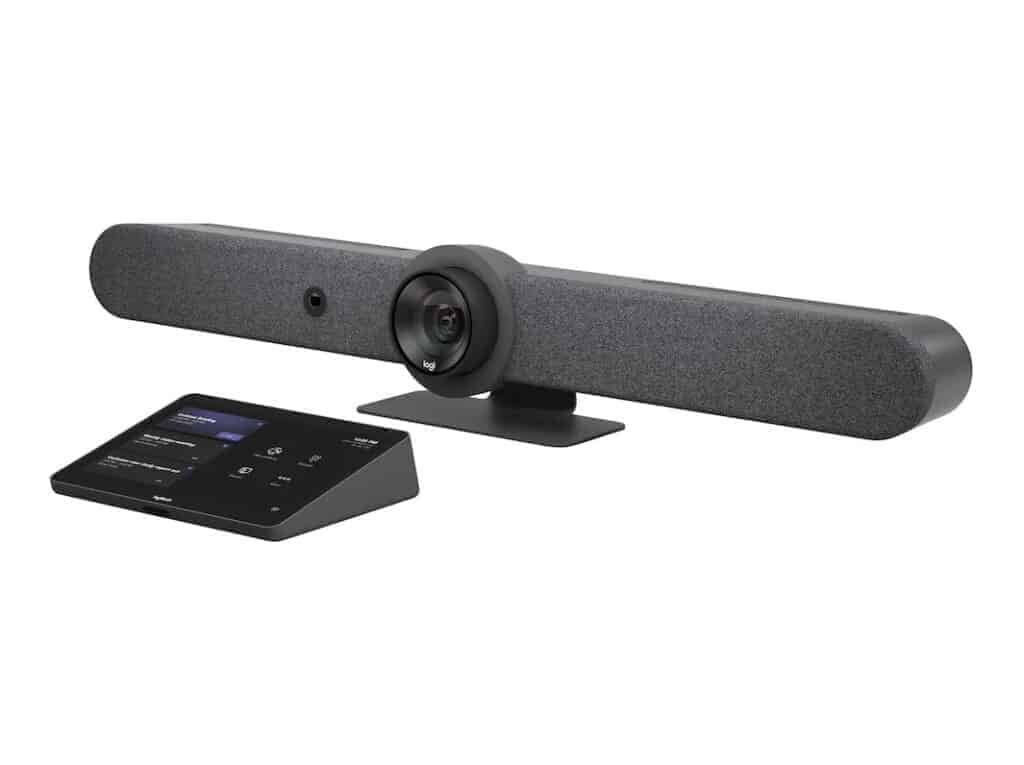
Rally Bar Logitech Tap Teams Appliance Mode Bundle - TAPRBGMSTAPP

All-in-one video solutions are becoming an aide for organisations looking for the best device with all the collaboration platforms they use and delivering high-quality audio and video conferencing. These plug-and-play units are compatible with multiple platforms and perfect for small to medium-sized huddle and conference rooms. 

The Logitech Rally Bar and the Logitech Meetup are both premier all-in-one video solutions. The Rally bar allows you to ditch the computer and use one-touch video conferencing. On the other hand, Meetup is the most compact video bar offering the most intelligent features. However, the Rally bar is intended for large meeting rooms, whereas Meetup is used for small to medium-sized meeting rooms. 

The sleek, all-in-one room system reduces setup stress with a flexible and streamlined installation. It provides an affordable and effective meeting solution and can be just as natural and productive as face-to-face collaboration. Let’s take a closer look at the difference between these two devices to help you make the better choice.


Logitech Rally Bar

About Logitech Rally Bar

The Logitech Rally Bar is an all-in-one video bar with an integrated AI camera for medium to large rooms. Its brilliant optics, automated PTZ, and high-performance audio set a new standard for video meetings. Logitech Rally Bar lets you do video meetings that can be just as natural as face-to-face collaboration. It is remarkably simple to manage, use, and deploy at scale, delivering professional-quality audio and video in a sleek. The Logitech Rally Bar is a system that includes cameras, microphones, and standalone speakers and is meant for larger meeting rooms.

Pros of Logitech Rally Bar

  • Compatible with most web-based video conferencing services.
  • Camera with super-high-resolution pan-tilt-zoom.
  • Beamforming microphone array.
  • Wide field of view.
  • Easy to set up.

Cons of Logitech Rally Bar

  • Two connection hubs seem duplicative.
  • Needs a separate computer.

Feature of Logitech Rally Bar

The Rally Bar brings all of the features of larger meeting room kits into a compact, streamlined design. This amazing product is easy to set up in seconds, with USB plug-and-play support. The incredibly rich features of the Rally Bar include: 

  • Appliance mode for PC-free access
  • USB plug-and-play design
  • All-in-one audio and video
  • RightSight for better framing
  • One-touch join for meetings
  • Logitech Sync for easy control
  • RightLight for improved lighting settings
  • RightSound for enhanced audio clarity
  • Integrations with leading meeting rooms
  • Remote control lens cap
  • Remote update management
  • 4K resolution at up to 30 FPS
  • Pan, tilt, and 4x digital zoom
  • Partner dashboard support
  • Add-on microphone options
  • AI noise suppression filter
  • Adaptive field of view up to 110 degrees
  • Room-filling speaker performance
  • Beamforming microphones

Product Description 

  • Camera:

-Resolution: 4K, 1440p, 1080p, 900p, 720p, and SD at 30fps

-Pan: Motorized ±25° 

-Tilt: Motorized ±15° Zoom: 15X HD zoom (5X optical, 3X digital available with upcoming software update) 

-Diagonal Field of View: 90° 

-Horizontal Field of View: 82.1° 

-Vertical Field of View: 52.2° 

-Total Room Coverage: 132.1° Horizontal x 82.2° Vertical

  • Built-in Components:

-6 beamforming microphones

-2 speakers, 

-PTZ camera

– AI Viewfinder

-retention system and cable management

-Logitech CollabOS platform

-table stand.

  • Power & Cables:

-Power Supply: Auto-sensing 

-Operating Voltage/Power: 100-240V, 19V, 4.74A 

-Power Supply Dimensions: 127mm x 51mm x 30mm 

-DC Cable: 1.5m / 4.9 ft 

-AC Cable: 1m / 3.28 ft 

-HDMI 1.4 Cable: 2m / 6.5 ft 

-USB A to USB C 3.0 Cable: 2.2m / 7.2 ft

  • Dimensions:

-Height: 164 mm / 6.46 in 

-Width: 910 mm / 2.99 ft 

-Depth: 130.5 mm / 5.14 in 

-Lens Depth: 28.8 mm / 1.13 in 

-Weight: 7.08 kg / 15.6 lbs

  • Interfaces:

-HDMI Out: 2 (up to 1080p) 

-HDMI In: 1 

-USB 3.0: 3x Type A, 1x Type C 

-Network: 10/100/1G Ethernet 

-WiFi: 802.11a/b/g/n/ac (MIMO) External Mic Input: Yes (proprietary input supports optional -Rally Mic Pod, Rally Mic Pod Hub, and Rally Mic Pod Extension Cable) 

-Remote Control: Bluetooth® Low Energy

  • Speakers:

-Drivers: 2x 70mm / 2.7 in 

-Output: 90dB SPL @1W, 99dB SPL @8.0W, both +/-2dB at ½ meter 

-Sensitivity: 90+/-3dB SPL at 1W, ½ meter 

-THD: 1kHz < 2% 

-Speaker Sampling Rate: 48 kHz

  • Microphones:

-Frequency Response: 90Hz – 16kHz 

-Sensitivity: >-36dBFS +/-1dB @ 1Pa 

-Microphone Data Rate Output: 48 kHz 

-Pickup Range: 4.5m / 15 ft 

-Beamforming Elements: Six omnidirectional digital MEMS microphones forming five adaptive acoustic broadside beams 

-Audio Processing: AEC (Acoustic Echo Cancellation), VAD (Voice Activity Detector) 

-Noise Suppression: AI filter 

-Add-on Mics: Supports up to 3 additional Rally Mic Pods for larger conference rooms

Compatibility with other platforms

The Logitech Rally Bar is compatible with Microsoft Teams Rooms on Windows(for medium-sized rooms), Microsoft Teams Rooms on Android (for medium-sized rooms), Zoom Rooms and Google Meet Rooms.

Logitech Meetup

About Logitech Meetup

Logitech Meetup, an all-in-one product with plug-and-play simplicity, is designed for small meetings and huddle rooms. Equipped to work with the latest applications for video conferencing. It is one of the front-runners in the all-in-one video conferencing appliance space. It comes with remote control and a Bluetooth option to function as a speakerphone for voice calls. Moreover, the Meetup is the only device in the pack with a pan/tilt camera, which zooms to an incredible view of 170 degrees. 

Pros of Logitech Meetup

  • The adjustable camera points straight to the talker.
  • Effective mic array to pick up voices well.
  • It is a convenient and compact package solution, including a mic, camera, and speaker. 

Cons of Logitech Meetup

  • Finding the proper software for additional features on the Logitech website. 
  • Video quality is not favourable for participants sitting a little far away.

Features of Logitech Meetup

The Logitech Meetup is an excellent solution for smaller meeting spaces and intimate meeting rooms. It also comes with access to some of Logitech’s most intelligent features. It is easy to install, has a 5X zoom range, and has a wide angle of view. Here is a detailed feature list for your complete understanding:

  • Three camera pre-set modes
  • Multiple mounting options
  • Excellent five times Zoom
  • 4K ultra-HD streaming and video control
  • All-in-one video and audio
  • Wireless Bluetooth technology
  • Certified for leading UCaaS tools
  • RightLight for improved lighting settings
  • RightSound for enhanced audio clarity
  • RightSight for better framing
  • 3-year warranty
  • Compatibility with other leading Logitech tools
  • Three microphones beam-forming array
  • Dial in the meeting option
  • Logitech Sync for better controls

Product Description

  • Camera:

-Custom Logitech lens with 5x HD zoom and motorised pan (+/- 25°) and tilt (+/- 15°)

-Field of View: Diagonal: 120°, Horizontal: 113°, Vertical: 80.7°

-Total Room Coverage (field of view + pan and tilt): 163° wide x 110° tall

-3 camera position presets

-RightSight auto-framing: Requires Windows 10 64-bit or macOS 10.14 or higher

  • Dimensions:

-15.8 x 4.1 x 3.4″ / 400.0 x 104.0 x 85.0 mm

-3.3 x 3.3 x 0.4″ / 83.0 x 83.0 x 10.0 mm (Remote)

  • Ports:

-USB 3.0 Type C

-USB 2.0 micro-B 5-Pin

-Power in

-USB 2.0 port (USB 3.0 Port and cable required for 4K video)

  •  Built-in Components:

-Built-in microphone

-Built-in speaker(s)

  • Microphones:

-Integrated microphone with three beamforming elements

-Pickup Range

*MeetUp: 4 m

*With optional Expansion Mic: 5 m

-Sensitivity: -27 dB

-Microphone frequency response: 90Hz-16KHz (without noise)

-AEC (Acoustic Echo Cancellation)

-VAD (Voice Activity Detector)

-Microphone date rate: 32KHz sampling rate

  • Speaker:

-Volume adjustable to 95 dB SPL at 1/2 meter peak

-Distortion: 200-300Hz < 3%, 3000 Hz -10KHz < 1%

-Speaker sensitivity 86.5+/-3dB SPL at 1/2 meter

  • Integration:

-Bluetooth wireless technology

-Integrated table/wall mount

-optional TV mount 

-RF remote control

-Kensington security slot

  • System Requirements:

-macOS 10.10 or higher

-Windows® 7, Windows 8.1, or Windows 10

Compatibility with other platforms

Logitech Meetup worked seamlessly with Microsoft Teams and was certified for Skype for Business, Zoom, and Google Hangouts Meet Hardware. Besides, it is compatible with other recordings,  video conferencing, and broadcasting applications that support TAA-compliant USB cameras. 


Logitech Rally Bar vs Logitech Meetup

The following table compares the specifications of the Logitech Rally Bar and Logitech Meetup. However, multiple configurations are available for both video bars, based on your needs and requirements. 

Items Logitech Rally Bar Logitech Meetup
Price £3,015.88  £664.94
Part Number 960-001312 960-001102
General
Power Source AC Adapter No
Host Connection USB Type-A USB 3.1 / USB 3.2 Gen 1 USB 2.0
Additional I/O 1 x USB Type-C USB 3.1 / USB 3.2 Gen 1 No
Low-Light Correction Yes No
Camera
Field of View Diagonal: 90°, Horizontal: 82.1°, Vertical: 52.2°  Diagonal: 120°, Horizontal: 113°, Vertical: 80.7°
Resolution and Frame Rate 4K, 1440p, 1080p, 900p, 720p, and SD at 30fps UHD 4K at up to 30 fps
Zoom 5x (Optical)

3x (Digital)

5x 
Tilt +/- 15° +/- 15°
Speaker Tracking Yes Yes
Pan +/- 25° +/- 25°
Speaker
Maximum Sound Pressure Level (SPL)    90dB SPL @1W, 99dB SPL @8.0W 95 dB
Built-In Speakers 2 1
Sensitivity 90+/-3dB SPL at 1W, ½ meter 86 dB
Microphone
Range 15ft 13.1 ft
Extension Microphone Yes(Optional) Yes(Optional)
Sensitivity >-36dBFS +/-1dB @ 1Pa -27 dB
Noise Cancellation  AI filter  Echo
Ports
Audio Input HDMI No
Audio Output HDMI No
Bluetooth Bluetooth® Low Energy Yes
Other Features
Wireless Screen Sharing No No
Touch Control Panel No (Optional)
Mount Options Wall, Table, Display Wall, Table, Display
Color Options Graphite, White Black
Supported Platforms
Zoom Yes Yes
Google Meet Yes Certified
Microsoft Teams Certified (USB Attached) Yes


Picture of Meeting Store

Meeting Store

Table of Contents

Powering productivity with audio visual gear
productivity

Harness the Power: Powering Productivity with Audio Visual Gear

In the dynamic landscape of modern business, the integration of technology has taken center stage, revolutionizing the way we work, communicate, and collaborate. One of the most remarkable advancements in this realm is the emergence of audiovisual (AV) gear, which has rapidly gained prominence due to its remarkable ability to enhance workplace productivity and efficiency.In a world that thrives on speed and agility, businesses are constantly seeking ways to optimize their operations and maintain a competitive edge. The concept of “Powering Productivity with Audio Visual Gear” goes beyond mere convenience; it signifies a paradigm shift in how organizations harness technology to enhance efficiency. This shift is embodied by the multifaceted advantages offered by AV technology, ranging from seamless communication to streamlined collaboration.The recent surge in remote work arrangements has redefined the traditional notion of the workplace. With an increasing number of employees working from diverse locations, the importance of AV gear becomes even more pronounced. Organizations are now utilizing advanced audiovisual solutions to bridge geographical gaps, enabling virtual teams to communicate effectively and collaborate seamlessly. Efficient teamwork forms the bedrock of any successful business. AV gear not only facilitates better communication but also fosters a sense of camaraderie among team members. The integration of multimedia tools empowers teams to exchange ideas, share information, and collectively brainstorm, thereby boosting productivity levels. Setting Up Video or Teleconferencing Equipment For Conference Rooms on Pro Acoustics Tech Talk Ep 75  Optimising Remote Work with AV GearIn today’s fast-paced business landscape, remote work has become the norm. However, with this shift comes a set of challenges. As teams are geographically dispersed, effective communication and collaboration become pivotal for workplace efficiency. This is where audio visual (AV) gear steps in as a game-changer. Maximizing productivity with AV equipment is not just a trend; it’s a necessity for modern businesses.Enhancing Virtual Interactions with AV GearBoosting Teamwork Through Audiovisual ToolsRemote work often means relying on digital communication platforms. These tools, while convenient, lack the depth of face-to-face interactions. AV gear, including high-quality webcams and microphones, bridges this gap. By integrating technology and enhancing visual communication, teams can foster a sense of connection, essential for effective collaboration.Impact of Clear Audio and Video on Remote MeetingsEfficient virtual meetings are critical for decision-making and project updates. AV technology ensures that every word is heard and every facial expression is captured. In fact, studies show that clear audio and video lead to higher engagement levels and reduced misunderstandings. The seamless audiovisual integration provided by AV equipment enables teams to focus on the discussion rather than deciphering poor-quality signals.Elevating Presentations and CollaborationEnhancing Presentations with Audiovisual GearEffective presentations are at the heart of business success. AV gear enables advanced presentations with crisp visuals and impeccable audio. Whether it’s a sales pitch or a quarterly report, multimedia devices integrated into AV solutions captivate audiences and convey messages with precision. The impact? Improved communication and better retention of information.Improving Virtual Collaboration Through AV TechnologyIn the realm of remote work, collaboration can be challenging. AV technology transforms this challenge into an opportunity. With tech-enabled productivity tools, teams can brainstorm, share ideas, and co-create as if they were in the same room. Visual technology enables a dynamic exchange of thoughts, resulting in faster decision-making and seamless project progression.Modernizing Workspaces with AV SolutionsThe modern workplace demands versatility. AV gear ensures that teams can transition effortlessly from solo tasks to collaborative endeavours. The integration of AV equipment isn’t just about upgrading technology; it’s about embracing business enhancement. It’s about investing in tools that streamline communication and maximize productivity. Benefit Description Enhanced Collaboration AV gear promotes real-time interactions, fostering teamwork and creative brainstorming. Improved Engagement High-quality audio and video keep participants engaged, reducing distractions. Seamless Communication AV solutions bridge geographical gaps, ensuring smooth and effective information exchange. Elevated Presentation Quality Multimedia integration enhances presentations, making them more impactful and engaging. Streamlined Decision-Making Clear communication leads to faster decision-making and efficient project progression.   Boosting Teamwork Through Audiovisual ToolsIn the modern business landscape, teamwork stands as a cornerstone for achieving organizational goals. The collaborative efforts of a cohesive team lead to heightened workplace efficiency and better outcomes. To harness the true potential of teamwork, organizations are turning to advanced multimedia solutions and audiovisual (AV) technology. These tools not only enhance collaboration but also power productivity, ushering in a new era of work optimization.Enhancing Collaboration with AV ToolsMaximizing productivity with AV equipment has become a focal point for forward-thinking companies. The integration of audiovisual gear into the workplace environment fosters effective collaboration and efficient communication. Through seamless visual communication, teams can share ideas, insights, and strategies with clarity, leading to quicker decision-making and improved problem-solving.Modernizing Workspaces with Multimedia IntegrationThe evolution of work practices has given rise to remote work scenarios. To optimize remote work and maintain effective collaboration, AV gear proves indispensable. Teams can use video conferencing platforms to bridge geographical gaps, enhance presentations with audiovisual gear, and streamline communication using AV solutions. This tech-enabled productivity ensures that remote teams remain seamlessly connected and aligned with organizational objectives.Strategies for Enhanced Team DynamicsTo boost teamwork, it’s imperative to implement audiovisual advancements effectively. The integration of collaborative whiteboards into brainstorming sessions promotes active participation, while AV-equipped conference rooms enable dynamic and efficient presentations. By utilizing AV technology, businesses can enhance collaboration, break down communication barriers, and foster a cohesive work environment.Choosing the Right AV Equipment for Your NeedsSelecting appropriate audiovisual gear requires a keen understanding of your organization’s needs and goals. Consider factors such as the size of your team, the nature of collaboration, and the frequency of virtual meetings. This strategic approach ensures that the chosen AV equipment aligns perfectly with your vision for enhancing workplace efficiency.  Increasing Productivity with Multimedia IntegrationIn the modern business landscape, where workplace efficiency and effective communication are paramount, integrating technology has become a cornerstone of success. Maximizing productivity with AV equipment has emerged as a key strategy for businesses seeking to optimize their operations and enhance collaboration. In this section, we’ll explore how audio visual gear, in the form of projectors, interactive

Read More »
remote collaboration strategies
Remote Collaboration

Master with these Proven Remote Collaboration Strategies for Success

In today’s digital age, remote collaboration has become increasingly prevalent and essential for businesses and teams worldwide. The ability to collaborate effectively while physically separated offers numerous advantages, such as flexibility, improved productivity, and access to diverse talent pools. However, remote collaboration also presents unique challenges that need to be addressed for optimal outcomes. This article explores the importance of remote collaboration, outlines its challenges and benefits, and provides strategies to enhance collaboration in a remote work environment.Remote collaboration plays a pivotal role in facilitating efficient teamwork and fostering innovation across various industries. With advancements in technology and increasing globalization, businesses can harness the power of remote work to tap into talent from around the globe, regardless of geographic limitations. Effective remote collaboration allows teams to work together seamlessly, breaking down barriers and overcoming the constraints of traditional office-based environments. Communication and Coordination: Without face-to-face interactions, remote teams may face difficulties in clear and timely communication, leading to misunderstandings or delays in project delivery. Building Trust and Engagement: Remote work can make it challenging to build trust and maintain high levels of team engagement. The absence of in-person interactions can sometimes hinder relationship-building and shared understanding. Managing Time Zones and Cultural Differences: Remote collaboration often involves working across different time zones and cultures, which can pose coordination challenges and impact team dynamics. Maintaining Productivity and Accountability: Ensuring consistent productivity and accountability among remote team members requires effective management and clear expectations. Virtual Tools & Strategies For Successful Remote Collaboration  Remote Collaboration for Small TeamsIn today’s evolving work landscape, remote collaboration has become an integral part of small team dynamics. With the rise of remote work, it is essential for small teams to navigate the unique challenges that arise when working together from different locations. This section explores the specific obstacles faced by small teams in remote collaboration and provides practical strategies to enhance communication, foster camaraderie, and optimize productivity. Additionally, we will highlight remote collaboration tools and software tailored to the needs of small teams.Challenges in Remote Collaboration for Small TeamsSmall teams engaging in remote collaboration often encounter several distinctive challenges that can impede productivity and hinder team dynamics. Understanding and addressing these challenges is vital to creating a successful remote work environment. Limited Communication Channels: Remote collaboration can hinder spontaneous interactions and informal communication, leading to misinterpretations and delays in decision-making. Lack of Camaraderie: Building a sense of unity and camaraderie among team members is more challenging in a remote setting, potentially impacting motivation, team spirit, and overall productivity. Coordination and Synchronization: Coordinating tasks, managing deadlines, and ensuring everyone is on the same page can be more complex when team members are not physically present. Reduced Feedback and Recognition: Remote collaboration can sometimes result in reduced feedback loops, making it crucial to establish effective mechanisms for recognizing and rewarding team members’ efforts. Strategies for Effective Remote CollaborationTo overcome the challenges posed by remote collaboration, small teams can implement the following strategies tailored to their specific needs:Maintaining Clear Communication ChannelsClear and efficient communication lies at the heart of successful remote collaboration. The following strategies can help foster effective communication within small teams: Establishing Regular Check-ins: Schedule regular team meetings and one-on-one sessions to align on goals, provide updates, and address any concerns or challenges. Utilizing Collaboration Tools: Leverage remote communication platforms such as Slack, Microsoft Teams, or Zoom to facilitate real-time messaging, video conferencing, and file sharing. Encouraging Active Participation: Encourage team members to actively engage in discussions, ask questions, and provide input to maintain an inclusive and collaborative environment. Fostering a Sense of CamaraderiePromoting a positive team culture and building camaraderie is crucial for remote teams. Consider the following strategies to enhance team cohesion: Virtual Team Building Activities: Organize virtual team-building exercises, such as online games, virtual happy hours, or team challenges, to foster connection and strengthen relationships. Celebrating Milestones: Recognize and celebrate individual and team achievements to boost morale and promote a sense of accomplishment within the remote team. Encouraging Informal Interactions: Create dedicated channels or forums for non-work-related discussions to foster social interactions and build personal connections among team members. Leveraging Remote Collaboration Tools and SoftwareVarious tools and software solutions can empower small teams to streamline remote collaboration processes and enhance productivity. Consider the following options: Project Management Tools: Utilize platforms like Asana, Trello, or Monday.com to organize tasks, track progress, and ensure seamless collaboration on projects. Virtual Whiteboarding and Brainstorming Tools: Platforms like Miro or MURAL enable teams to collaborate visually, ideate, and brainstorm ideas in real-time, replicating the experience of an in-person whiteboarding session. Document Collaboration: Tools like Google Docs or Microsoft Office 365 enable simultaneous editing, commenting, and version control, facilitating efficient collaboration on shared documents.   Remote Collaboration for FreelancersIn today’s digital age, remote work has become increasingly prevalent, offering freelancers the freedom to work from anywhere in the world. However, this newfound flexibility can sometimes lead to feelings of isolation and hinder effective collaboration. To combat these challenges, freelancers must adopt remote collaboration strategies that foster communication, productivity, and teamwork. In this section, we will explore how freelancers can overcome isolation and enhance their collaboration skills in a remote working environment.Building Professional Networks and Leveraging Collaboration Platforms Join Remote Work Communities: Connect with like-minded professionals through remote work communities and forums. These platforms provide valuable networking opportunities, allowing freelancers to exchange ideas, seek advice, and collaborate on projects. Utilize Social Media: Leverage social media platforms such as LinkedIn, Twitter, and Facebook groups to build a strong professional network. Engage in discussions, share insights, and establish connections with potential collaborators. Virtual Collaboration Tools: Utilize remote collaboration platforms like Trello, Asana, or Slack to streamline project management and facilitate seamless communication among team members. These tools enhance productivity and enable real-time collaboration, regardless of geographical boundaries. Importance of Clear Communication and Setting ExpectationsEffective communication lies at the core of successful remote collaboration. Freelancers must establish clear communication channels and set expectations with clients and team members. Here are a few tips to ensure smooth remote

Read More »
AV gear for optimal meeting productivity
productivity

Unlock Your Edge: AV Gear for Optimal Meeting Productivity

In today’s dynamic work landscape, where remote collaboration and virtual meetings have become the norm, the role of AV gear cannot be overstated. As businesses adapt to new remote work solutions, the importance of high-quality audio-visual equipment in enhancing communication and collaboration has taken center stage. This article dives into the significance of AV gear for optimal meeting productivity, highlighting its role in seamless virtual meetings and effective remote team communication.In the realm of remote work solutions, AV gear stands as a linchpin for successful virtual meetings. AV gear for remote meetings brings together audio-visual solutions, conference hardware, and communication tools to create an immersive meeting environment. This modern conference setup empowers teams to interact as if they were in the same room, overcoming the barriers of physical distance.Quality audio and visuals are pivotal for maintaining engagement and fostering effective communication in virtual meetings. Audio enhancement tools and advanced AV technology ensure that every participant’s voice is crystal clear, eliminating misunderstandings due to poor sound quality. High-quality video conferencing supported by meeting efficiency devices enables participants to pick up on visual cues, gestures, and expressions, thus promoting a more interactive and engaging discussion.Remote collaboration gear is instrumental in promoting efficient video conferencing setup. When teams are equipped with remote presentation equipment and teleconferencing equipment, they can deliver their ideas seamlessly, even when miles apart. This leads to successful remote meetings, where every participant’s perspective is valued, and ideas flow effortlessly. The setup of a virtual meeting room with AV gear for optimal meeting productivity fosters a professional atmosphere that boosts productivity and collaboration.Choosing the right AV equipment for remote work is pivotal for meeting success. Top-rated audio enhancement tools and reliable video call accessories ensure that the audio-visual experience is not compromised, regardless of the physical location of the participants. Modern conference tools and remote communication solutions provide the necessary technology for virtual presentations that captivate and inform.How to master hybrid meetings [Setup and best practices]  Affordable AV Gear for Remote MeetingsIn the modern landscape of remote work and virtual collaboration, efficient communication tools are paramount for ensuring meeting productivity. To help you navigate the world of AV gear for optimal meeting productivity, we’ve curated a guide highlighting budget-friendly options that don’t compromise on audio-visual quality. These cost-effective solutions offer high-quality experiences and seamless remote collaboration, all while adhering to the principles of effective communication.AV Gear for Remote Meetings: Elevating EfficiencyWhen it comes to remote collaboration, having the right audio-visual equipment can make all the difference. Effective virtual communication tools not only bridge the geographical gap but also enhance engagement and understanding during meetings. By leveraging advanced AV technology, you can create a virtual meeting setup that replicates the effectiveness of in-person interactions.Optimal Meeting Tech: Affordable AV Equipment Options Conference Hardware Essentials: Setting up a successful virtual conference room starts with the right conference hardware. Consider options like high-quality video conferencing cameras that provide clear visuals, contributing to productive remote team communication. Audio Enhancement Tools: Clear audio is crucial for virtual meetings. Affordable audio enhancement tools, such as microphones with noise-cancelling capabilities, can significantly enhance the quality of discussions, minimizing disruptions. Remote Presentation Equipment: For efficient remote presentations, invest in devices like laser pointers and wireless presenters. These tools not only streamline your presentation but also add a touch of professionalism to your virtual meetings. High-Quality Remote Meeting Tech: Balancing Quality and BudgetAchieving quality audio-visual solutions for remote work doesn’t mean breaking the bank. By strategically choosing equipment that aligns with your budget and needs, you can maximize the value of your AV gear for remote meetings. Equipment Benefits Cost Range HD Webcam High-quality video for virtual meetings £50 – £100 USB Microphone Crystal-clear audio input £30 – £70 Wireless Presenter Effortless control during presentations £20 – £40 Noise-Canceling Headphones Improved focus during calls £50 – £100   Best AV Equipment for Virtual PresentationsIn the realm of remote collaboration and virtual meetings, the right audio-visual (AV) equipment can make all the difference. As businesses adapt to the demands of remote work, having optimal AV gear for remote meetings has become crucial. Enhancing Virtual Communication with Advanced AV TechnologyAV Gear for Remote Meetings and Seamless CollaborationWhen it comes to effective virtual communication, having the right AV gear for remote meetings is paramount. Modern conference tools encompass a wide range of audio-visual solutions that cater to various aspects of remote work. These tools go beyond traditional conference hardware and delve into technology for virtual presentations, ensuring seamless interaction between remote teams.Optimal AV Equipment for Seamless CollaborationConference gear for successful remote meetings plays a pivotal role in maintaining meeting efficiency. Efficient video conferencing setups, equipped with high-quality remote meeting tech, can significantly enhance virtual meeting setups. Quality audio-visual solutions for remote work contribute to effective remote team communication, fostering a sense of collaboration despite the physical distance.Elevating Virtual Presentations with Quality EquipmentBest AV Equipment for Virtual PresentationsThe importance of quality AV equipment in virtual meetings cannot be overstated. A reliable video conferencing setup, complete with top remote presentation devices, contributes to digital meeting success. AV gear for optimal meeting productivity encompasses a variety of technology, including audio enhancement tools and remote presentation equipment, all aimed at enhancing virtual presentations with technology.Effective Virtual Meeting Room SetupAn effective virtual meeting room setup involves more than just teleconferencing equipment. It extends to efficient video conferencing setups that incorporate advanced AV solutions for productivity. These setups not only provide reliable video call accessories but also facilitate efficient remote communication.  Enhancing Audio: Top-Rated Audio Enhancement ToolsIn today’s world of remote collaboration, effective communication is paramount for the success of virtual meetings. The key to achieving this lies in the quality of audio-visual equipment used. AV gear for optimal meeting productivity plays a pivotal role in ensuring seamless virtual meetings that enhance communication and collaboration among remote teams.Audio Enhancement Tools: Elevating Virtual CommunicationAV Gear for Remote Meetings: Modern remote work solutions heavily rely on audio-visual equipment to bridge the gap between geographically dispersed teams. By investing in productivity-enhancing AV equipment, such as

Read More »
Skill-centric AV workshops
Training and Education

Skill-Centric AV Workshops: Tailored Training for You

In today’s rapidly evolving digital landscape, possessing Audiovisual (AV) skills is no longer a mere advantage but a necessity. The ability to harness the power of visual technology is crucial for individuals and businesses alike. This article delves into the importance of AV skills, the relevance of skill-centric AV workshops.AV industry expertise is the cornerstone of success in the multimedia landscape. Professionals equipped with multimedia production skills can create visually compelling content that captures audiences’ attention. From video editing to graphic design, these skills empower individuals to excel in the digital age.Visual technology training is the bridge between creativity and innovation. In today’s digital world, staying ahead requires mastering the latest visual technology trends. Skill-centric AV workshops provide hands-on learning experiences, enabling participants to develop their AV skills effectively.Skill-centric AV workshops are designed to empower individuals with practical knowledge. They cover a broad spectrum of topics, including multimedia production courses, digital media technology, and interactive media training. These workshops cater to both beginners and professionals, offering comprehensive AV training programs tailored to individual needs.Obtaining professional certification in AV skills is a significant milestone. It not only validates your expertise but also opens doors to a multitude of audiovisual job opportunities. Visual storytelling is a key aspect of AV training, allowing participants to convey messages effectively through multimedia content creation.School Hall Audio Visual Systems  Skill-Centric AV Workshops for BeginnersIf you’re a beginner looking to dive into the dynamic realm of audiovisual (AV) technology, you’re in the right place. Skill-centric AV workshops are your gateway to gaining AV industry expertise, mastering multimedia production skills, and harnessing the power of visual technology training. In this comprehensive guide, we’ll explore how beginners can benefit immensely from these workshops, highlighting fundamental concepts, hands-on training, and the personalized guidance that sets you on the path to success.AV Skills Development Through Hands-On LearningSkill-centric AV workshops place emphasis on hands-on learning from day one. This approach ensures that beginners not only understand theoretical concepts but also gain practical experience with audiovisual equipment. You’ll have the opportunity to work with state-of-the-art tools and learn the ins and outs of multimedia production. This hands-on AV training is a crucial component of your journey to becoming a professional in the field.Personalised Guidance for NovicesOne of the key advantages of skill-centric AV workshops is the personalized guidance you receive. Instructors with extensive AV industry expertise are there to mentor you every step of the way. They tailor their instruction to your skill level, ensuring that you progress at a pace that suits you. Whether you’re a novice or have some prior experience, these workshops cater to your needs, making sure you don’t feel overwhelmed.Unlocking Creative AV SolutionsAs you delve deeper into these workshops, you’ll unlock the secrets of creative AV solutions. You’ll learn to harness audiovisual technology to craft compelling visual stories and multimedia content. Visual storytelling training is an integral part of these workshops, equipping you with the skills to engage your audience through captivating narratives.Professional Certification for Career AdvancementSkill-centric AV workshops also provide the opportunity to earn professional certification, a valuable credential in the industry. This certification validates your skills and knowledge, opening up numerous audiovisual career prospects. Employers value certified professionals who can contribute to their creative multimedia projects.Comprehensive AV Workshop AgendaThe AV workshop agenda is thoughtfully structured to cover a wide range of topics. You’ll delve into advanced multimedia production techniques, explore cutting-edge audiovisual skills, and gain mastery over visual equipment. These workshops are like comprehensive AV training programs, ensuring you leave with a well-rounded skill set.Interactive Media Training and Digital Media SkillsIn the era of interactive media and digital content, these workshops keep you updated with the latest advancements. You’ll gain insights into visual communication strategies and learn how to utilize multimedia production tools effectively. The curriculum is designed to equip you with the skills needed to thrive in the ever-evolving digital media technology landscape.  Comprehensive AV Training ProgramsAre you ready to embark on a journey into the world of audiovisual excellence? Comprehensive AV training programs are designed for advanced learners like you, offering an in-depth exploration of the AV industry. In this comprehensive guide, we’ll delve into the wide range of topics covered in these programs, including visual technology and multimedia production.Skill-Centric AV Workshops: Unveiling the EssenceAt the heart of comprehensive AV training programs are skill-centric AV workshops. These workshops are meticulously crafted to equip you with the expertise needed to excel in the AV industry. Let’s delve deeper into what makes these workshops an invaluable resource for advancing your career.Audiovisual Training at Its FinestAudio-visual training is the cornerstone of these workshops, where you’ll learn to master the art of using audiovisual equipment effectively. Hands-on learning is prioritized, allowing you to gain practical experience in handling professional audiovisual equipment, a crucial aspect of the AV industry.Multimedia Production SkillsMultimedia production is a multifaceted discipline, and our programs ensure you become proficient in it. You’ll learn to create multimedia content that tells compelling stories, thanks to the immersive training provided.Visual Technology TrainingVisual technology is ever-evolving, and staying updated is key. Our comprehensive AV training programs keep you abreast of the latest advancements in digital media technology. This training empowers you to harness the full potential of visual equipment mastery.Creative AV SolutionsIn the modern AV landscape, creativity reigns supreme. Our workshops foster creative AV solutions by teaching you innovative techniques for visual content creation. Whether it’s for personal projects or professional endeavours, these skills are indispensable.Professional Certification: Your Badge of ExcellenceTo truly establish yourself in the AV industry, professional certification is essential. Our programs provide the knowledge and hands-on AV training needed to pass certification exams with confidence. This is your ticket to unlocking a world of audiovisual job opportunities.The Holistic Approach: Multimedia Production Courses OnlineComprehensive AV training programs adopt a holistic approach by offering multimedia production courses online. This approach caters to the diverse needs of learners like you, allowing you to personalize your AV learning journey.Interactive Media TrainingInteractive media is a powerful tool in today’s digital landscape. Our

Read More »
virtual team collaboration software
Remote Collaboration

Drive Exceptional Results with the Best Virtual Team Collaboration Software

Drive Exceptional Results with the Best Virtual Team Collaboration Software. Enhance your team’s productivity and streamline communication with our powerful virtual team collaboration software. Experience seamless collaboration, efficient project management, and effective remote teamwork. Find the perfect solution for your business and achieve outstanding outcomes.

Read More »
MeetingStore.co.uk
Logo
Compare items
  • Total (0)
Compare
0
Shopping cart