Excellent
Next day delivery! Depending on Availability*
Here to help! Monday to Friday, 8:30AM-5:30PM*

Microsoft Mesh: Is The Metaverse Taking Over?

Technology is forever growing. And with the world being turned on its head for the last couple of years, technology has had even more chance to expand. New ideas popping up to help get us accustomed to this new lifestyle we’ve been pushed into. With an idea coming to life, a new world being created – the Metaverse.
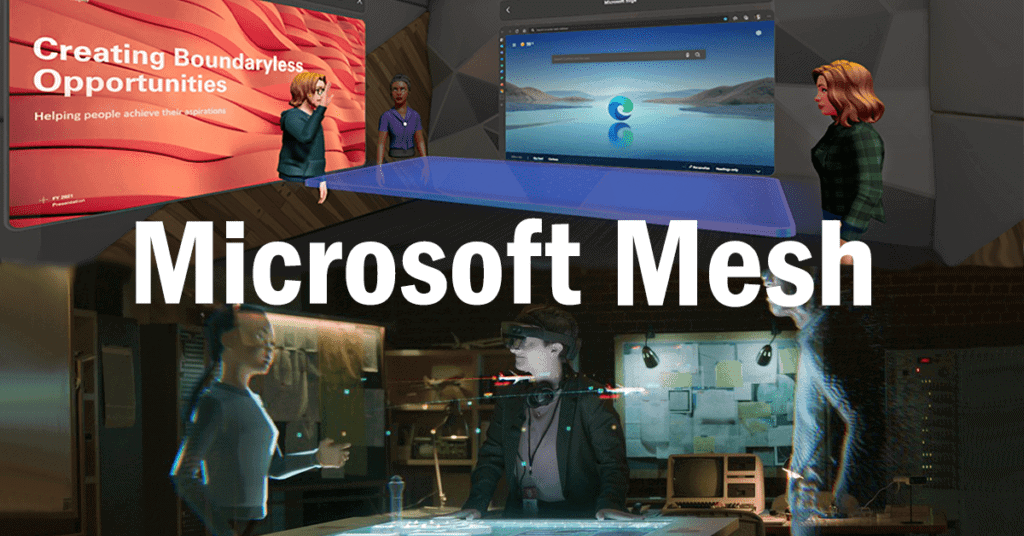
Holograms and virtual realities were an exciting, futuristic ideas that seemed to be a reality in years like 2064. But virtual reality is much closer than you think with Metaverse being introduced last year. Now Microsoft has jumped on the bandwagon with Microsoft Mesh. A place where you can hold business meetings from the comfort of your home but actually be fully immersed in the world you have created. You can bring your projects to life with having a design being in front of you, in the form of a hologram.

With the future of technology already upon us, what is Microsoft Mesh and what can it do for you?

What is Microsoft Mesh?

Microsoft Mesh is a new application created by Microsoft, bringing holograms and virtual reality into to your home. Mesh can connect friends, family and colleagues no matter where they are in the world. This can be through their holoportation or their virtual reality world where you can walk around as your avatar. There are so many possibilities with Mesh – a whole new world for businesses to hold meetings.

Within this virtual world you can create yourself into an avatar and join a meeting from you home office. Although you wont just be slumped over a desk using your keypads to move your avatar around. You will be fully immersed into the world, being able to move around and present your work during a meeting, using the VR headsets. You can stand at the head of the meeting table and draw up your plan on the whiteboard. The VR headset tracking you hand movements to present exactly what you are doing. 

Holoportation

The new era of working remotely is here to stay. Whether you’re 10 miles or 100 miles away from your workplace, holoportation can bring everyone in your business together. The holoportation feature is similar to the hologram feature. In that it can project a realistic, holographic image of your colleague into your home office. Letting you work on a project together or just hold a meeting. The headset will take a photo like capture of yourself and project it to the person you are meeting with – as a hologram. Letting you and your meeting participant interact as you normally would if you were both there in human form.

Yes over a normal Teams call you would still be able to interact with each other, but Mesh brings those interactions back to a normal human level, the way that we have missed so much. Brining back eye contact, hand movements and facial expressions and actually feeling like you are in the same room as your colleague. Bringing work from home situations to a whole new level.

If you don’t want to show your face, just like people don’t want to turn their camera on during a Teams call, then you don’t have to. Easily project your customised avatar to your colleague instead. Again, the headset tracking your hand movements to bring those non-verbal gestures back into the meeting. 

Immersive Spaces

If your are wanting to completely separate your work life from your home life, then Mesh’s immersive spaces can achieve this for you. Separating your work from home life used to be such a simple task for some people but with home offices becoming peoples main place of work, that separation is becoming smaller and smaller. So instead of having a sperate office space for work, you can have a whole separate world for work.

The immersive space uses 3D animation to create a meeting room for you and your colleagues. This almost having the resemblance to a high resolution game. All you have to do is join your Teams meeting and pop on the VR headset. Transporting you into the virtual world where your team is waiting for you around the virtual meeting room table.

But don’t just believe that you are limited to only sitting around the table, that’s not what Microsoft wanted. Microsoft has thought about the normal task and activities that would happen during a meeting. And transferred them as easy as possible in to the immersive space. Allowing your avatar to get up from the table and start presenting in front of your team. Creating and presenting on the whiteboard at hand. With the VR headset and accessories this is all possible, the VR equipment following your head and hand movements to create a perfect representation of you to your colleagues, in your avatar form.

How To Use Mesh?

To be able to use the futuristic capabilities of Microsoft Mesh – you will have to use a VR headset. These headsets act as glasses that instead will show you either your hologram or the virtual reality office space. Making you feel as though you are actually in the Mesh Metaverse. These headsets have trackers that follow you eye and head movements, so wherever you turn your head the headset will show the right display of the room. Mesh supports the most popular VR headsets – Oculus and Hololens. These sleek designed headsets can transport you into a virtual world and changing you into your avatar. Bring you international colleagues into your home through holoportation or create interactive holograms in your home office.

Mesh is essentially an application for you to video conference with colleagues. But Microsoft is extending the video conferencing limits to make Teams meetings more exciting and engaging. Users can use Mesh alongside the Teams application to hold their meetings in the Mesh world, with each colleague turning into their avatar. Tis brings back the meeting experience to those working from home, immersing them back into office life. Even if you are working from abroad, this is a chance for you to actually meet your colleagues and all of you be able to sit around the same able and discuss the way you would if you were really there. Not just holographically or in avatar form.

Quest VR Headset 

If the idea of a whole new world at your fingertips sounds exciting, especially if you are working from home and confided in a small box room, then the Quest VR headsets are your best bet to use Mesh to its full extent. The Quest headset will strap around your head and fully cover both of your eyes. Showing you a full view of the virtual reality office. Because the Oculus Quest will fully cover your eyes, a worry may be over tripping up or falling over any furniture. And no one wants to be moving their home office furniture about a couple of minutes before a meeting. With the Oculus this worry is eliminated out.

When using the headset you will have to draw out the area you will be using the Oculus. So if you were using the Oculus to join a meeting, you would scan the area of your desk you want the Oculus to pickup. Once you have scanned out the area you would like to use, the Oculus will register the area and guardian will be activated. This means that if you reach past the area you have drawn and cross the guardian. A pass through alert will notify you. stopping any tripping or falling over, meaning you can take those few minutes before a meeting to prepare your setup instead of moving furniture.

Specs

With the Oculus Quest 2 headset you will get 1832 x 1920 pixels per eye, offering high resolution whichever way you turn your head. Letting you all see each other in crystal clear resolution, making the experience feel even more real. And you would expect nothing less from the speed and motion. 

[vc_images_carousel images=”31067,31068″ img_size=”full”]

The Quest 2 uses fibre optic cables to give the cleanest and smoothest motion, with premium fibre-optic strands it not only increases the speed and enhances the flexibility. The cables also reduce the weight of the headset, making it a more comfortable fit. With the Quest 2 weighing 224g, its important that the headset isn’t too heavy and uncomfortable for the user. If the headset is too heavy it can make the user uncomfortable and distracted. 

HoloLens Headset

Unlike the Quest VR Headset, the Hololens is for the holoportaition and holographic side of Mesh. This headset will still strap around your head but instead of fully covering your eyes, the Hololens will have a glasses like shape to fit over your nose and a plastic shield in front of your eyes. Whoever or whatever is being projected into your room will be seen through the plastic lens of the Hololens. Not only does the Hololens let you project your work in front of you but you can also hold meetings with the device. With the Teams call be projected in front of you instead – a perfect way to call your boss for guidance and  continue with your task at hand. 

Specs

The Hololens offers 2K resolution with a 5 channel microphone array and built in speakers with spatial sound. Spatial sound will deliver sound to you from the correct places the are coming from. So, if you are sat at the meeting table and your colleague next to you starts talking, the sound of their voice will come from that direction. Making the Microsoft Mesh world feel so real.

[vc_images_carousel images=”31062,31063,31064″ img_size=”full”]

Making sure that you body movements are properly represented on your holoportation, the device has multiple sensors. Including 4 head tracking cameras and 2 IR cameras tracking you eyes. Furthermore, there is hand tracking for when you are using a whiteboard in the Mesh world. Not only that but it brings a sense of human nature to the avatar as the avatar will follow hand movements while you are talking. Along with cameras tracking your body movements, the device comes with the ability to give commands with your voice. Letting you control the Hololens with you voice.

An important factor of this type of device is the battery life, especially it is being used on the go. The full battery on the Hololens will give you 2 – 3 hours of use, which may not seem a lot. But if your main use of the Hololens is to hold a holographic meeting with a colleague, then the 2 hour battery life is fine as most meetings run for an hour. Charging is done through a USB-PD cable for fast charging. 

The lens comes in one size, with an adjustor on the head straps for you to be able to tighten or loosen the headset if needed. 

Price

VR headsets are never cheap. If the holographic, mixed reality side of Mesh has caught your eye and believe that it would be a great addition to your business, then you will need to purchase the Hololens 2. And this may be pricey for most. The Hololens 2 will cost you £3,349.00, from Microsoft’s website. This version of the Hololens would be perfect for education, offices and even healthcare providers. However if you are working on site and need something more sturdy, then the Hololens also comes in a industrial edition. This headset will be suitable for hazardous location environments.

But if the fully immersive, animated world complete with your own customisable avatar and designed meeting rooms is definitely what you want. Then the Oculus Quest 2 starts from £299. This will included the VR headset and two Quest Touch Controllers – giving you the full experience of the Metaverse world. 


Who Can Benefit From Using Mesh?

Microsoft Mesh can practically work in any setting. If you are in a situation where Teams is your main source of communication. Then Mesh can work wonders for you. It can be the solution to bringing peoples motivation and productivity back up. Whether you are using Mesh for its holoportation feature or for its immersive spaces, Mesh can work for business, universities or training centres.

Business

The Hololens can fit into any situation. If you work in an office, chances are hybrid working is still present. Although this may be a pricey solution for you, Mesh can be a great way to bring all your employees back together again. All of you being able to sit around the meeting room together and share your ideas – bringing back that normality.  

What if you work for an architecture company – creating structures and drawings is a big part of your job. Having to plan your design precisely and accurately. Now imagine being able to bring your drawing to life as a 3D holographic structure. No matter where you are, you could be working from home or on the site where your building may go. This way you can share your plan with your boss and other colleagues on the project. All of you being able to see the design come to life and interact with it. Therefore letting you identify any problems with the structure you may have missed. Or letting your boss and other colleagues suggest any ideas to add on to the structure. Bringing an easier workflow into your business, with you bosses being able to help with any problems with a first hand view of the design, just by popping the VR headsets on.

Taking the use of Mesh into a different direction. Mesh can be an amazing way for people to get in touch with medical experts. If you have the money to own an Hololens, you could meet with your doctor from you living room. With Mesh, the possibilities are endless and the future is looking more technology based.  

Training And Education

In a training situation the Hololens can massively improve students understanding on what they are training. Viewing a diagram on a projector or watching a video may not cut it with students anymore. Especially when this kind of technology is now at hand. If you are a medical student training to be doctor, you will be constantly looking at diagrams of the body. It can difficult and put a strain on your eyes having to look at the smaller details in a diagram. With the Hololens, students can simply put the headset on and see the diagram of a body organ come to life. Letting them get up close and see the little details that may not have been noticeable in a drawn diagram.  

The immersive side of Mesh can be a great addition for office workers and students. Letting the teacher have everyone in the same room and teach the way they know how to. Bringing back natural teacher and student interactions and conversations – instead of the teacher having to talking to a bunch of blank screens. Essentially, a tool like this can help bring students productivity levels back up, as online lessons have obviously not been great for them. 

Picture of Natalie Horn

Natalie Horn

Table of Contents

Presentation success with audio visual tools
productivity

Win Big: Presentation Success with Audio Visual Tools

Effective communication lies at the heart of professional and academic success. Whether you’re presenting research findings, pitching a business idea, or teaching a class, your ability to convey information clearly and engage your audience can make or break your presentation. Presentation success goes beyond the mere delivery of content; it involves captivating your audience’s attention, conveying complex ideas with ease, and leaving a lasting impact. This blog post dives into the crucial role of audio visual tools in achieving presentation success, offering actionable tips to harness their potential.Visual aids have revolutionized the art of public speaking and multimedia presentations. Incorporating captivating visuals into your presentation can transform it into an engaging visual storytelling experience. These tools provide a dynamic platform for conveying information, making it easier for your audience to comprehend and remember key points. Notably, the use of presentation software and multimedia tools allows you to create interactive and visually appealing slides that enhance your message’s clarity and impact.When it comes to successful public speaking and effective presentations, audio visual tools play a pivotal role in boosting engagement and understanding. By integrating multimedia solutions, you can turn ordinary talks into impactful experiences that resonate with your audience. Whether you’re a beginner looking for engaging presentation ideas or a seasoned speaker aiming to improve your speaking skills with visuals, audio visual tools offer a range of opportunities to elevate your presentation game.Microsoft Teams Room Video Conferencing Installation  Engaging Presentation Ideas for BeginnersNovice presenters often encounter several challenges when striving to create captivating presentations. Navigating through the intricacies of presentation success, while integrating audio visual tools seamlessly, can be intimidating for those new to the art of public speaking.Embracing Visual Aids for Effective CommunicationVisual aids are pivotal to presentation success with audio visual tools. These aids encompass multimedia presentations, impactful visuals, and captivating slides that empower beginners to communicate their ideas effectively. Incorporating visual aids helps bridge gaps in public speaking skills and maximizes productivity with AV equipment.Unlocking the Power of Visual StorytellingThe fusion of presentation techniques and visual storytelling forms the crux of impactful presentations. By leveraging multimedia tools and presentation software, beginners can craft narratives that resonate with their audience. This approach fosters engaging slides that effortlessly capture attention, fostering an atmosphere of successful public speaking.Crafting Interactive Slides for Enhanced EngagementThe journey towards presentation effectiveness involves creating interactive slides. Incorporating multimedia tools not only enhances visual communication but also encourages audience participation. Beginners can employ beginner-friendly audio visual solutions to curate presentations that encourage dialogues, thereby elevating the overall engagement level.Amplifying Confidence Through VisualsFor those aiming to enhance their presentation skills, utilizing audio visual aids can be transformative. Multimedia presentations complement public speaking tools by providing a visual crutch that aids in conveying information. Novices can explore easy audio visual tools, steadily increasing their confidence and delivering impactful presentations.Standing Out with Impactful Visual AidsIncorporating captivating visuals isn’t just about decoration; it’s about mastering presentation design. By employing visual aids strategically, beginners can forge an emotional connection with their audience. This blend of presentation techniques and visual communication ensures that even complex information is comprehensible and memorable.Simplifying Multimedia Solutions for SpeakersTo succeed in the realm of presentations, novices can benefit from embracing multimedia tools. These tools encompass presentation software, audio visual aids, and presentation equipment. Such resources provide a practical foundation for crafting engaging slides and seamless presentations that resonate with the audience.Incorporating Technology for Engaging TalksThe seamless integration of presentation technology and audio visual resources underpins successful talks. Multimedia presentations, when infused with multimedia tools, create an environment where beginners can effortlessly communicate their message. This synthesis transforms ordinary presentations into compelling experiences.  Improving Speaking Skills with VisualsIn the realm of presentation success, incorporating audio visual tools has emerged as a pivotal strategy for enhancing public speaking skills. Visual aids not only captivate the audience’s attention but also facilitate the effective conveyance of complex information. Leveraging multimedia tools and presentation software in tandem with verbal communication offers a potent approach to maximize engagement and convey ideas with precision.Enhancing Communication through Visual AidsVisual aids serve as potent companions to spoken content, allowing speakers to amplify the impact of their message. “Research indicates that incorporating engaging visuals into presentations can enhance information retention by up to 65%, thereby significantly boosting presentation effectiveness. “ Multimedia presentations harness the power of visual storytelling, aiding speakers in crafting narratives that resonate with their audience on a deeper level. Such captivating visuals not only emphasize key points but also aid in conveying emotions and establishing connections.Synchronizing Verbal and Visual ElementsMastering the art of synchronizing verbal communication with visual elements is a cornerstone of successful public speaking. A proven technique is to employ visual aids as cues, guiding the flow of the presentation and ensuring seamless transitions. Incorporating impactful visuals at strategic moments can help emphasize key concepts, elucidate intricate details, and simplify complex data.Presentation Strategies for Maximum ImpactEngaging presentation ideas for beginners often involve utilizing audio visual tools for confident and impactful speeches. One such technique is creating interactive slides that encourage audience participation, thereby fostering a dynamic and immersive experience. Incorporating multimedia solutions, such as videos, infographics, and animations, can invigorate presentations, making them more engaging and memorable.Boosting Presentation Success with AV EquipmentMaximizing productivity with AV equipment is integral to successful public speaking. By seamlessly integrating visual aids, speakers can bolster their presentation skills and leave a lasting impression. Beginner-friendly audio visual tools offer simple yet effective ways to enhance communication and resonate with audiences. Employing easy-to-use multimedia tools ensures that the focus remains on the content, allowing speakers to convey their message confidently and persuasively.  Audio Visual Tools for Confident PresentationsIf you’re new to the world of public speaking, incorporating audio visual tools into your presentations can significantly enhance your communication skills. Visual aids play a pivotal role in successful presentations, as they provide a dynamic way to convey information, captivate your audience, and boost your confidence as a speaker. Here, we’ll explore a range of audio visual tools suitable for different presentation scenarios and

Read More »
remote collaboration tools for students
Remote Collaboration

Essential Remote Collaboration Tools for Students: Enhancing Learning and Collaboration

In today’s rapidly evolving world, remote learning has emerged as a crucial component of education. Enabled by advancements in technology, remote learning provides students with the flexibility to access educational resources and engage in academic pursuits from any location. This article explores the concept of remote learning, highlights the significance of collaboration in student learning, and presents a wide range of remote collaboration tools that enhance student collaboration.Remote learning, also known as distance learning or e-learning, refers to the delivery of education through digital platforms, eliminating the need for physical classroom attendance. This approach has gained momentum due to its numerous benefits, such as flexible scheduling, personalized learning experiences, and expanded access to educational resources.Collaboration plays a pivotal role in fostering effective student learning. When students work together in groups, they actively engage in discussions, share ideas, and contribute their unique perspectives. This collaborative environment enhances critical thinking, problem-solving skills, and promotes creativity. Furthermore, collaboration prepares students for real-world scenarios, where teamwork and cooperation are highly valued.Remote collaboration tools empower students to interact and collaborate seamlessly, despite physical distances. These tools provide a virtual space for students to connect, communicate, and work together on various educational projects.What is an ONLINE COLLABORATION TOOL?  Best Remote Collaboration Tools for StudentsEffective remote collaboration tools are essential for students engaged in remote learning. These tools enable students to work together, share ideas, and collaborate on projects seamlessly, regardless of their physical location. In this section, we will explore the top-rated remote collaboration tools for students, highlighting their features and suitability for remote learning. Google Workspace for Education Google Workspace for Education offers a comprehensive suite of tools that facilitate remote collaboration among students. With its cloud-based platform, students can access and collaborate on documents, spreadsheets, and presentations in real-time. The suite includes Google Docs, Google Sheets, Google Slides, and Google Drive, allowing students to edit and share files effortlessly. Furthermore, Google Classroom provides a centralized hub for assignments, discussions, and teacher-student communication. Microsoft 365 Education Microsoft 365 Education is another popular suite of tools for remote collaboration among students. With applications like Microsoft Word, Excel, PowerPoint, and OneDrive, students can collaborate on documents, create presentations, and store files securely in the cloud. Microsoft Teams, an integral part of Microsoft 365, offers features such as video conferencing, chat, and file sharing, facilitating seamless collaboration and communication. Slack Slack is a versatile communication and collaboration platform that is widely used in educational settings. It allows students to create channels for different subjects or projects, enabling focused discussions and file sharing. With features like direct messaging and integrations with other tools, Slack promotes efficient teamwork and facilitates quick information exchange. Trello Trello is a flexible project management tool that can be utilized by students for collaborative work. It uses boards, lists, and cards to organize tasks and track progress. Students can create boards for group projects, assign tasks, set due dates, and leave comments, fostering effective teamwork and accountability. Zoom Zoom has become an essential tool for remote communication and collaboration. Its video conferencing features enable students to participate in virtual classrooms, engage in group discussions, and conduct presentations. Zoom also offers screen sharing capabilities, breakout rooms for small group work, and chat functionality, enhancing the overall remote learning experience. Padlet Padlet is an interactive online whiteboard that facilitates collaborative brainstorming, note-taking, and content sharing. Students can create virtual bulletin boards and add text, images, videos, and other multimedia elements. Padlet encourages creativity, collaboration, and engagement within virtual classrooms or study groups. Miro Miro is a collaborative online platform that replicates a physical whiteboard environment. It allows students to collaborate on projects, create mind maps, and visualize ideas using sticky notes, drawings, and diagrams. Miro fosters creativity, critical thinking, and active participation in remote learning settings.  Affordable and Free Remote Collaboration PlatformsIn today’s remote learning environment, collaboration among students is crucial for effective education. However, budget constraints can pose challenges when it comes to accessing remote collaboration tools. Fortunately, there are numerous affordable and free options available that cater to the needs of budget-conscious students and educational institutions. This section highlights a selection of cost-effective remote collaboration platforms, including free options, to facilitate seamless student collaboration and enhance the virtual learning experience.Remote Collaboration Tools for Students: Addressing the Financial AspectWhen considering remote collaboration tools for students, affordability is a key factor. Educational institutions and students alike need solutions that are not only effective but also fit within their limited budgets. Fortunately, there are a variety of affordable and free options available that can meet these needs.Affordable and Free Remote Collaboration Platforms Virtual Collaboration Platforms: Online Collaboration Tools: These tools enable real-time collaboration, allowing students to work together on projects and assignments regardless of their physical location. Digital Collaboration Tools: With features like document sharing, video conferencing, and interactive whiteboards, digital collaboration tools facilitate seamless communication and teamwork among students. Educational Collaboration Software: Remote Education Tools: These platforms are specifically designed to support remote learning environments, providing students with a virtual classroom experience and enabling interactive learning. Student Collaboration Tools: Designed to foster collaboration and group work, these tools allow students to collaborate on projects, share resources, and communicate effectively. Distance Learning Collaboration Tools: Online Group Work Tools: These platforms offer features tailored to group projects, such as task management, file sharing, and progress tracking, ensuring efficient teamwork in a virtual setting. Virtual Classroom Collaboration Tools: Designed for online classrooms, these tools enable teachers and students to engage in real-time discussions, share content, and collaborate effectively. Cloud Collaboration Tools: Collaborative Learning Software: These cloud-based tools facilitate collaborative learning by enabling students to access and work on shared documents, participate in discussions, and provide feedback. Real-Time Collaboration Apps: These apps provide instant messaging, document editing, and video conferencing features, allowing students to collaborate synchronously regardless of their physical location. Remote Study Group Tools: Student Project Collaboration Tools: These platforms are ideal for student group projects, providing features like task assignment, document collaboration, and progress monitoring. Online Teamwork Tools: These tools

Read More »
Voice-activated meeting technology
Future Trends

The Future of Voice-Activated Meeting Technology

Discover the future of voice-activated meeting technology and revolutionize the way you collaborate. With our AI-powered meeting solutions, you can enhance productivity and streamline communication. Learn about the latest voice recognition software and virtual assistants that make meetings more efficient and accessible. Join us and experience the power of voice-activated conferencing.

Read More »
In-depth AV exploration
Training and Education

In-Depth AV Exploration: Expert-Guided Learning

In-depth AV exploration in the modern digital age is crucial for staying at the forefront of Audiovisual technology. This comprehensive guide delves into various aspects of audiovisual technology, offering insights that go beyond the surface. Our aim is to provide value and immediate understanding to AV enthusiasts and beginners alike, ensuring Expert-guided AV learning.Troubleshooting AV issues and Interactive multimedia systems are part of our journey, offering Cutting-edge audiovisual innovations, 3D AV experiences, and High-definition AV equipment insights.As we navigate the landscape of AV technology, we’ll keep you informed about the latest AV industry trends and what the future holds. Our goal is to enhance your AV learning through expert-guided techniques and Advanced AV understanding.AV How to Guide – Standard Classroom  In-Depth AV Exploration TechniquesWhen delving into the realm of audiovisual technology, enthusiasts and experts alike seek comprehensive understanding through in-depth AV exploration techniques. This journey not only enriches multimedia experiences but also enhances the integration of advanced audiovisual solutions. In this guide, we will dissect the nuances of in-depth AV exploration, offering expert-guided learning that caters to AV enthusiasts’ insights.In-depth AV exploration refers to the profound analysis and understanding of audiovisual technology, encompassing AV setup, troubleshooting AV issues, and exploring interactive multimedia systems. It involves expert-guided AV learning that provides valuable audiovisual technology insights.Comprehensive AV Guides and TutorialsFor beginners and seasoned enthusiasts, comprehensive AV guides and tutorials are essential. These guides serve as immersive AV experiences for beginners, offering step-by-step instructions on troubleshooting common AV issues, interactive multimedia system setup, and enhancing AV setup for better performance. By embracing expert-guided audiovisual learning, individuals gain a deep dive into AV integration techniques, understand high-definition audiovisual systems, and explore 3D audiovisual experiences.Cutting-Edge Audiovisual SolutionsThe future of audiovisual technology lies in cutting-edge solutions. Through in-depth AV exploration, individuals gain insights into the latest audiovisual innovations, including visual and auditory technology insights, high-definition AV equipment reviews, and interactive multimedia setup guides. By staying updated on AV industry trends, enthusiasts can enhance AV performance with cutting-edge audiovisual gadgets.Hands-On Techniques and ToolsIn the world of in-depth AV exploration, hands-on techniques and tools are invaluable. Explorers use advanced AV technology insights to troubleshoot audiovisual problems, set up AV systems effectively, and integrate AV equipment for beginners. Through immersive audiovisual experiences, individuals can step into the future of AV technology, exploring 3D audiovisual trends and understanding the nuances of interactive multimedia experiences.  Advanced AV Technology InsightsIn the fast-paced world of audiovisual technology, staying up to date with the latest advancements is paramount. It’s an era where immersive experiences, high-definition displays, and advanced sound systems have redefined the way we perceive and interact with visual and auditory technologies. This section offers a comprehensive guide for those seeking advanced AV insights and expert-guided AV learning.Exploring Advanced Audiovisual SolutionsThe world of AV technology is evolving at an unprecedented rate, with cutting-edge innovations enhancing multimedia experiences. From interactive multimedia systems to 3D audiovisual technologies, it’s essential to keep pace with the latest developments. In-depth AV exploration provides a deep dive into AV technology insights, ensuring you stay at the forefront of the industry.Applications Across IndustriesAV integration has become pivotal in various industries, from education to entertainment and beyond. Immersive AV learning is no longer confined to the classroom; it’s revolutionizing how we learn and engage with content. As the future of audiovisual technology unfolds, businesses are increasingly relying on advanced audiovisual solutions to engage their audience and provide a memorable experience.Troubleshooting AV IssuesWhile advanced AV technology promises a lot, it’s equally important to know how to troubleshoot common AV issues. The immersive audiovisual experience can quickly turn sour if you don’t understand AV setup techniques or AV integration methods. This is where in-depth AV exploration comes to the rescue, offering expert-guided AV learning to help you tackle any AV troubleshooting tips.Visual and Auditory Technologies UnveiledHigh-definition AV equipment, interactive multimedia setups, and cutting-edge audiovisual solutions are becoming more accessible. As the industry trends toward the future of audiovisual technology, understanding the fundamentals is crucial. You can enhance your AV setup for better performance with step-by-step AV equipment installation and AV integration techniques.The Journey Towards Enhanced AV LearningIn your quest for enhanced AV learning, it’s crucial to explore the depths of audiovisual technology. Whether you’re a newbie or an experienced enthusiast, comprehensive AV guides and tutorials can be your best companions. They provide insights into AV innovations and advancements that will leave you astounded.Future Trends in Audiovisual TechnologyCurious about the future of AV technology? Well, 3D audiovisual trends and visual and auditory technology insights are just the beginning. In-depth AV exploration techniques and expert-guided audiovisual learning are your gateway to understanding the industry’s evolution. As the AV industry updates, you’ll be prepared for what’s to come.  Expert-Guided Audiovisual LearningIn today’s rapidly evolving landscape of Audiovisual (AV) technology, mastering its intricacies requires more than just a basic understanding. Expert-guided learning has become paramount for individuals and professionals seeking to navigate the complexities of this field effectively. In this comprehensive guide, we delve deep into the significance of expert-led tutorials, guides, and learning resources, emphasizing the importance of In-depth AV exploration and Audiovisual training.Importance of Expert Guidance in AV TechnologyThe intricacies of AV technology, encompassing Multimedia experiences, AV integration, and Visual and auditory technologies, demand expert insight. Expert-guided AV learning not only provides a structured path for enthusiasts but also equips professionals with the necessary skills for troubleshooting AV issues and setting up interactive multimedia systems. Through Immersive AV learning, individuals gain a profound understanding of cutting-edge audiovisual innovations, 3D AV experiences, and high-definition AV equipment. Success Stories: Expert-Guided Learning in ActionTo highlight the efficacy of expert guidance, we present compelling case studies showcasing successful learning experiences. These stories exemplify how expert-led training elevates knowledge and skills, enabling individuals to stay abreast of AV industry trends. The future of audiovisual technology is explored through AV industry trends, emphasizing the role of expert-guided learning in shaping the next generation of AV enthusiasts.Comprehensive AV Guides and TutorialsFor beginners entering the realm of AV technology, expert-guided tutorials offer a step-by-step approach to

Read More »
AV insights immersion
Training and Education

Dive Deep into AV Insights: Expert-Led Learning

In the fast-paced realm of modern education, the integration of Audiovisual (AV) technology has heralded a groundbreaking era, redefining conventional teaching methods. AV Insights Immersion, an innovative approach, revolutionizes classrooms, offering a sensory-rich, interactive, and deeply engaging educational experience. This blog delves into the significance of AV Insights Immersion, shedding light on its transformative impact and the myriad benefits it offers to both educators and learners.In today’s educational landscape, the seamless integration of audiovisual technology is imperative. AV Insights Immersion not only enhances traditional learning environments but also fosters experiential learning through cutting-edge AV solutions. By incorporating sensory technology, educational resources are transformed into immersive, interactive experiences, creating an environment conducive to deep learning.AV Insights Immersion goes beyond standard classroom setups. It embraces advanced AV solutions, incorporating virtual reality, interactive education, and multimedia teaching tools. These methods not only enhance student engagement but also provide educators with invaluable insights into effective AV learning strategies. Incorporating AV in teaching isn’t merely a trend; it’s a pedagogical necessity.Immersive experiences in the digital age – what’s new about them? | Lina Johansson | TEDxNorrköping  Effective AV Learning StrategiesIn today’s fast-paced world, education has evolved significantly, driven by the integration of audiovisual (AV) technology. This section explores the importance of effective AV learning strategies and offers insights into optimizing AV learning experiences. We delve into the immersive world of educational multimedia, sensory technology, and interactive platforms to provide valuable insights and enhance the learning journey.Importance of Effective Audiovisual (AV) Learning StrategiesAudiovisual technology has revolutionized the way we learn, offering immersive experiences that engage multiple senses. This integration of sensory technology has transformed traditional education into experiential learning. Let’s delve into the significance of these strategies: Sensory-Rich Experiences: AV learning provides sensory-rich experiences that stimulate visual and auditory senses, enhancing retention and comprehension. Immersive Technology: Immersive technology, including virtual reality, brings abstract concepts to life, making complex subjects more understandable and relatable. Interactive Education: AV solutions facilitate interactive education, allowing students to actively engage with the content, and fostering critical thinking and problem-solving skills. Multimedia Teaching Tools: Educational multimedia offers a diverse range of resources, such as videos, animations, and interactive simulations, catering to various learning styles. Digital Classrooms: AV integration in digital classrooms transforms the learning environment into an engaging and collaborative space, improving student engagement and participation. Cutting-Edge AV: Staying updated with AV technology trends ensures that educators provide the best immersive educational content and keep students motivated. Optimizing AV Learning ExperiencesTo harness the full potential of AV insights immersion, educators should consider the following strategies: Incorporating AV in Teaching: Teachers can enhance their lessons by incorporating audiovisual content, making learning more dynamic and engaging. Enhancing Education through Immersive Experiences: Virtual reality insights can be leveraged to create immersive educational experiences that transport students to different environments or historical eras. Interactive Learning with Audiovisuals: Utilize interactive multimedia resources to encourage active participation and deeper understanding. Student Engagement with Immersive Education: Engage students by integrating experiential learning, allowing them to explore concepts hands-on through AV technology. Impactful Multimedia Learning: Utilize cutting-edge educational AV to create multimedia content that captivates learners and conveys complex ideas effectively. Innovative AV Teaching Methods: Stay ahead in tech-enhanced education by exploring innovative AV teaching methods that align with the latest trends in sensory technology.    Interactive Multimedia EducationInteractive multimedia education revolutionizes learning by integrating audiovisual technology and immersive experiences into educational resources. In today’s digital classrooms, the synergy of multimedia elements elevates traditional teaching methods, creating sensory-rich experiences that engage students in profound ways.Enhancing Learning Through Multimedia ElementsIncorporating sensory technology and interactive education, multimedia learning transforms classrooms into hubs of experiential learning. Through cutting-edge AV solutions, students delve into immersive educational content, gaining deep learning AV insights that empower their educational journey. By utilizing immersive technology and expert-led learning, educators create impactful multimedia learning environments where students engage with interactive audiovisuals, enhancing their education through experiential learning.AV Insights Immersion in EducationOne of the key advancements in education is the effective integration of AV technology. By incorporating AV in teaching, educators facilitate student engagement with immersive education. This approach includes interactive multimedia resources and sensory-rich experiences, fostering innovative AV teaching methods. Through AV integration, classrooms become dynamic spaces where students actively participate in interactive learning with audiovisuals, amplifying their educational experience.The Power of Sensory Technology in EducationSensory technology plays a pivotal role in interactive multimedia education, enabling educators to provide immersive audiovisual experiences. Sensory-enhanced learning not only captivates students but also enhances their understanding of complex concepts. By incorporating AV insights immersion, educators leverage advanced multimedia education tools, creating educational virtual reality experiences that captivate students’ senses and deepen their knowledge.Benefits of Interactive Multimedia EducationThe benefits of interactive multimedia education are manifold. Students experience immersive audiovisual environments, promoting experiential learning with AV. Educational benefits of immersive technology include enhanced student engagement, improved retention, and increased knowledge acquisition. Through innovative AV teaching methods, educators tailor their approach to individual learning styles, ensuring that every student receives a personalized, impactful multimedia learning experience.AV Integration and Future TrendsLooking ahead, AV technology trends continue to shape the future of education. Interactive AV platforms and virtual reality in education are becoming standard, providing educators with cutting-edge educational AV tools. By embracing these trends, educational institutions enhance their multimedia classroom solutions, offering students interactive multimedia resources that inspire curiosity and foster a lifelong love for learning.  Sensory Technology in EducationIn today’s rapidly evolving educational landscape, sensory technology has emerged as a game-changer. Its role in educational settings is pivotal, transforming traditional classrooms into immersive, interactive, and experiential learning environments. This section explores the impact of sensory technology on immersive learning, emphasizing the integration of audiovisual technology, multimedia resources, and immersive experiences.Audiovisual Technology: The Backbone of Sensory LearningAudiovisual technology, often referred to as AV solutions, plays a central role in creating sensory-rich experiences within the educational context. By harnessing the power of sound technology and visual experiences, educators can engage students in ways that were previously unimaginable. Incorporating expert-led learning through cutting-edge AV solutions ensures that students receive immersive

Read More »
MeetingStore.co.uk
Logo
Compare items
  • Total (0)
Compare
0
Shopping cart